One Punch Man: The Strongest Top Up on BitTopup
One Punch Man: The Strongest brings the explosive turn-based strategy of the hit anime series to your mobile device. Building a top-tier roster featuring powerful SSR and LSSR heroes—such as Awakened Tatsumaki, Boros, and Garou—requires a steady supply of in-game resources. Purchasing Coupons and Funds allows you to summon limited characters, obtain rare keepsake vouchers, and secure daily growth packages to dominate the Hero and Monster leaderboards.
BitTopup provides a direct, ID-based recharge service for One Punch Man: The Strongest players across Southeast Asia and global regions. By inputting only your Player ID and Zone ID, you can top up your account balance without ever sharing your login credentials. Review the catalog above to view live product pricing and select the exact package you need.
How to Recharge One Punch Man: The Strongest on BitTopup
To top up your account quickly, follow these simple steps:
- Select Your Package: Choose the denomination of Coupons, Funds, or special resource packs you want from the product selection menu.
- Enter Your Account Information: Input your numerical Player ID and select your correct Server Zone ID in the required fields.
- Confirm and Proceed: Double-check your entered credentials to ensure the recharge reaches the correct character profile.
- Complete Payment: Pick your preferred payment method and finalize your transaction.
- Receive Your Items: Log in to One Punch Man: The Strongest. Your purchased Coupons or Funds will credit directly to your account balance or arrive in your in-game mailbox.
Where to Find Your One Punch Man: The Strongest Player ID and Zone ID
Locating your Player ID and Zone ID takes only a few seconds within the game client. Make sure you copy the exact digits to prevent delivery delays.
- Launch One Punch Man: The Strongest and log into your game server.
- In the main lobby screen, tap on your character avatar (profile picture) located in the upper-left corner.
- The Personal Info window will open. Your numerical Player ID is displayed clearly below your character's nickname.
- To verify your Zone ID, look at the top-left section of the screen or check the server title displayed on the login gate screen (for example, Server 24 or SEA-S50).
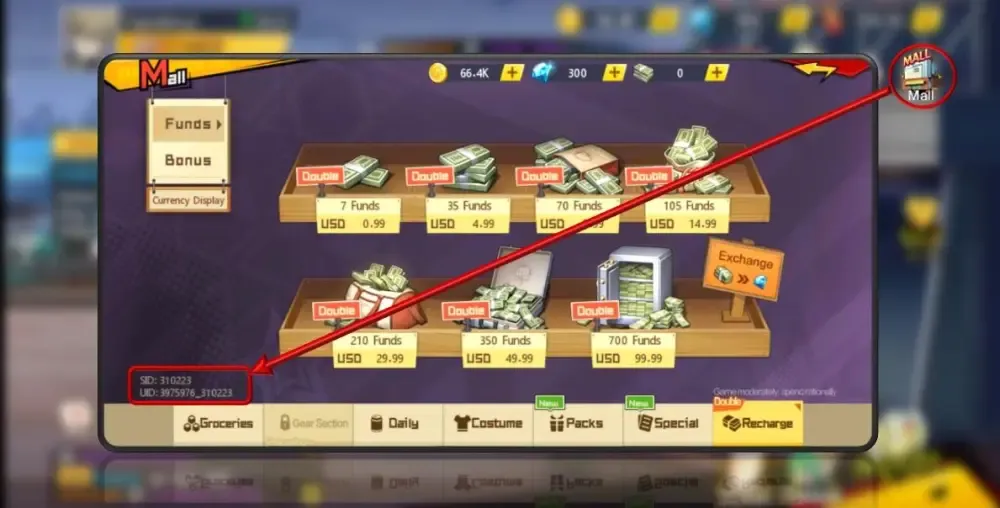
- You can also tap the in-game Mall / Recharge icon; your active server zone and player identification numbers appear directly on the balance display screen.
Understanding In-Game Currencies: Coupons, Funds, and Gems Explained
One Punch Man: The Strongest features three distinct primary currencies. Knowing how they convert and where to spend them ensures you get the highest value from every top-up.
- Coupons: Coupons are the direct web and external recharge currency. In the in-game store, Coupons convert directly to Funds at a 1:1 ratio. Coupons can also be used directly to purchase exclusive time-limited supply bundles, rebate packs, and monthly privileges.
- Funds: Funds are the primary premium currency used within the in-game Mall. Players use Funds to purchase Black Summon Tickets (Limited Recruitment Vouchers), Hero Awakening materials, talent badges, and premium equipment chests.
- Gems: Gems are the universal progression currency. You can convert Funds into Gems to purchase stamina refreshes, daily challenge resets, Arena tickets, and standard recruitment vouchers. Gems can also be earned in-game through daily quests and story progression.
| Currency Type | Direct Source | Primary In-Game Purpose |
|---|---|---|
| Coupons | BitTopup direct recharge | 1:1 Conversion to Funds, Special Pack Purchases |
| Funds | Converted from Coupons / Recharge | Limited Recruitment (Black Tickets), Keepsake Boxes, Perk Cards |
| Gems | Exchanged from Funds / Daily Quests | Vitality / Stamina Refills, Normal Summon Vouchers, Arena Resets |
Supported Server Zones and Regions for OPM: The Strongest Top-Up
One Punch Man: The Strongest separates players across multiple regional servers and numbered zones to ensure stable matchmaking and low latency. BitTopup supports accounts across the entire SEA (Southeast Asia) network as well as broader Global server clusters.
When filling out your order, verify your exact server number. Accounts on different server zones (such as Zone 01 vs. Zone 85) maintain completely independent databases. Crediting an incorrect Zone ID can deliver your Funds to a different character or cause the delivery to fail. Always confirm your active server name on the title loading screen before ordering.
Security and Safety: Direct Player ID Top-Up Without Account Passwords
Account safety is essential. Traditional account sharing methods—where third parties ask for your Google, Apple, or social media login details—put your personal data, linked credit cards, and game progress at serious risk.
BitTopup uses a direct ID-based fulfillment process. You only provide your public Player ID and Zone ID. We never ask for your password, security questions, or verification codes. This eliminates the risk of account compromise, unauthorized access, or account bans related to unauthorized third-party logins. You keep full control of your account at all times.
How to Redeem One Punch Man: The Strongest Gift Codes in 2026
In addition to topping up, you can redeem active 2026 promotional gift codes issued during official events, anniversary celebrations, and tournament broadcasts:
- Open One Punch Man: The Strongest on your device.
- Tap your player avatar in the top-left corner of the main lobby.
- In the Personal Info window, select the Gift Code button on the right.
- Type or paste your active 2026 redemption code into the text field.
- Tap Confirm. Your free items, which may include Gems, Exp Soda, and Gold, will be delivered straight to your in-game mailbox.
Ensure that you claim mailbox attachments promptly, as uncollected reward messages expire after a set duration.
Troubleshooting Delivery Status and In-Game Mailbox Claims
If your recharge does not appear on your account immediately after completion, follow these troubleshooting checks:
- Restart the Game Client: Force-close the application and reopen it. This forces the client to reconnect with the game server and sync your updated balance.
- Check Your In-Game Mailbox: Certain promotional packages, bonus Funds, or first-recharge perks are delivered as mail attachments rather than direct wallet balance adjustments.
- Verify Your Order Information: Check your BitTopup order history to make sure that the Player ID and Zone ID entered match your active character.
- Contact Support: If you have restarted your app and confirmed your ID details but the items have not credited, contact BitTopup 24/7 customer support with your transaction order number for fast verification and resolution.
Frequently Asked Questions
How do I find my Player ID and Zone ID in One Punch Man: The Strongest?
Tap your player avatar in the top-left corner of the main screen. Your numerical Player ID is located directly below your character name. Your Zone ID is the server number you select upon logging into the game, also visible in the Personal Info interface.
What is the difference between Coupons and Funds in One Punch Man: The Strongest?
Coupons are the direct recharge currency obtained via web top-ups, converting to Funds at a 1:1 ratio. Coupons can also be used directly for exclusive cash-equivalent packs. Funds are spent inside the in-game Mall for limited recruitment tickets, keepsake crates, and high-tier upgrade materials.
Do I need to provide my game account password to recharge on BitTopup?
No. BitTopup only requires your public Player ID and Zone ID to process your top-up. You never need to share passwords, verification codes, or third-party login credentials.
How are purchased Coupons and Funds delivered to my account?
Most top-ups credit automatically to your in-game account balance within moments after payment confirmation. Some event bundles or bonus items may arrive directly in your in-game mailbox.
Is there a One Punch Man: The Strongest gift code available in 2026?
Yes, the game regularly distributes limited-time gift codes during 2026 seasonal updates, live streams, and community milestones. You can redeem these via the Gift Code button inside your character profile window.
What should I do if my One Punch Man: The Strongest recharge has not arrived?
First, restart the game client to refresh your server data, and check your in-game mailbox. If the balance remains unchanged, verify the Player ID submitted in your BitTopup receipt and contact our 24/7 customer support team for assistance.