Need your account data fast? Learn where to find UID in One Punch Man: The Strongest on mobile, copy your Server ID, and claim gift rewards instantly.
The Two-Tap Path to Your UID and Server ID
Home screen visual clutter makes locating account details tedious. Rotating banners, event badges, shop shortcuts, and floating notices obscure basic data. You do not need to scroll through settings menus to pull account info for a support ticket, friend request, or external store top-up.
Two taps from the main city screen bring it up:
- Locate your character avatar portrait in the upper-left corner of the screen.
- Tap directly on the circular portrait frame to launch the main profile interface window.
Look directly beneath your nickname on the profile card to find your numerical character UID. Right next to or beneath that sequence, the game lists your active Server ID (such as Server 1, or regional marks like 一区 in localized Asian builds).
[Home Screen Top-Left]
       │
       ▼
[Tap Player Avatar]
       │
       ▼
┌─────────────────────────────────────────┐
│           PLAYER PROFILE CARD           │
│ Nickname: SaitamaHero                   │
│ UID: 108492048291                      │
│ Server: 01-City A                       │
│ [Copy Button]                           │
│                                         │
│ [Gift Code]  [Account Icon]             │
└─────────────────────────────────────────┘
Most client versions include a small clipboard icon beside the number. Tapping it copies the player UID directly to your device clipboard so you do not have to copy a ten-digit string by hand. If your build does not have the copy button, grab a screenshot of the profile card before exiting.
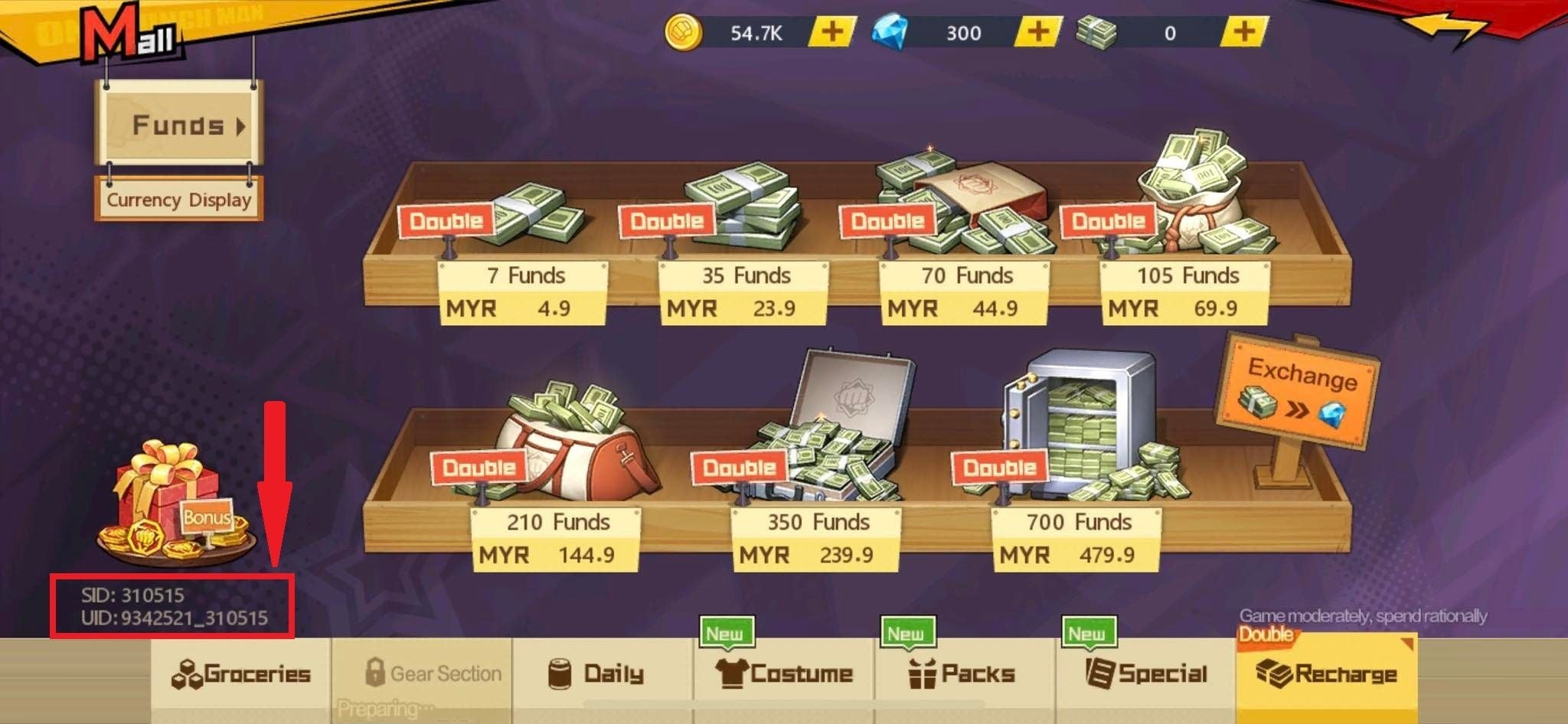
Avatar Selection Trap vs. Account Details Menu
Tapping the small wrench, pencil, or miniature frame icon on your profile portrait is a common trap. That opens the cosmetic avatar drawer rather than your account overview.
The cosmetic drawer lets you swap character portraits (such as Genos, Terrible Tornado, or Mumen Rider) and equip seasonal frames. That screen shows zero account metadata—no server district, join date, or numerical ID. If you see rows of hero portraits with lock icons, you tapped the customizer instead of the profile body.
Aim for the center of the avatar circle or tap your player name directly. That loads the primary status sheet with your battle power, club affiliation, server number, and UID. Tapping too low along the left rail opens event shortcuts or login trackers instead, so stay centered on the top-left portrait frame.
Locating Your Exact Numerical Server District
A UID without a Server ID is incomplete. One Punch Man: The Strongest runs on isolated regional server clusters. A player on Server 1 cannot share resources, join clubs, or trade stamina with anyone on Server 45. Customer support routing and top-up deliveries both require your exact server district alongside your character ID.
You can verify your server district in two places:
- The Start Screen: Before you tap past the intro screen to enter the city, the client displays your active server box at the bottom center. It shows the server number and server title.
- The In-Game Profile Sheet: Inside your opened profile card, the game prints your server right beside your UID.
Localized SEA versions frequently list servers numerically or through district symbols (for example, 一区 for Server 1). If you play across multiple regional servers on a single login, your account generates a completely distinct UID for each individual server profile. Progress does not carry over between servers. If you switch from Server 1 to Server 12 to join a friend's club, your team starts at level 1 with an entirely new numerical UID.
Never assume your UID carries across servers. Always check the profile card on the specific server where you want purchases or rewards delivered.
Gift Code Entry and Regional Server Restrictions
Redeeming promotional codes for tickets, stamina, and gems is the primary reason players track down their UID.
Inside your player profile card, locate the Gift Code button directly to the left of the account icon. Tapping it opens the text entry field. SEA and Global servers maintain distinct code databases: entering a Global code into a SEA client returns an invalid error, even if that code is currently active on Global.
Here is how regional code categories and profile requirements break down across active regional distributions:
| Server Region | Verified Active Code Examples | Profile Requirement for Redemption | Redemption Box UI Location |
|---|
| Global Servers | TFTOPM, OPM777, OPMTS | Character UID + Server ID | Inside Profile card, left of Account Icon |
| Southeast Asian (SEA) | OCTOPM, OPM4EVER, OPMBRAVE | Numerical Server District + UID | Inside Profile card, left of Account Icon |
| Private / Third-Party Clones | Variable custom pack strings | Custom web portal form | External web dashboard (Not in-game) |
Always verify your client's region before hunting for redemption codes, as Global and SEA distributions do not share valid promotional keys.
Some community sources list OPM777 as the only active code, while others include TFTOPM and OPMTS. Developers frequently rotate validity dates without in-game patch notices. If a code fails inside the box, verify your server region before retyping your UID.
Securing Currency and Top-Up Deliveries with Account Data
Purchasing Funds, Gems, or packs outside the app store requires your exact UID and Server ID to route orders to your mailbox. Off by one digit, and your order stalls or credits another player.
Free-to-play grinding yields a steady baseline. Dailies, milestones, and chapter clears provide roughly 2,000 to 3,000 Gems, and maintaining Diamond rank in the Arena adds 200 Gems each day. That income dries up fast once limited recruitment banners arrive.
Recruiting top-tier units demands Black Tickets. Each limited-time banner caps Gem purchases at 36 Black Tickets priced at 220 Gems each, totaling 7,920 Gems per event window. Across two monthly banner rotations, buying out the maximum allowance of 72 tickets eats up 15,840 Gems.
When your free Gem stash runs out during a must-have banner, checking out One Punch Man The Strongest top up options gives you a direct path to top off your balance. External stores only need your server number and your character UID to deliver your currency directly to your game inbox.
Always double-check your UID on your profile card before confirming checkout. Taking a screenshot beforehand eliminates transcription errors. If you need vouchers before an event timer expires, you can order Funds for One Punch Man The Strongest SEA with your server and UID.
Finding Other Players' IDs in the Social Interface
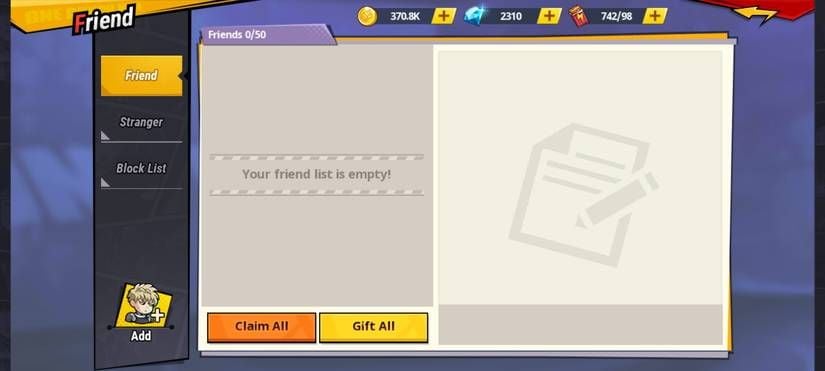
Looking up another player's ID does not require matching with them in combat. The in-game Friend menu acts as a directory for copying IDs during club recruitment or coordinating daily stamina routines.
The Friend interface sits right beside your Mail and Community icons on the main screen. Tapping it opens a split view with strict list caps that manage your social network:
- Friend List: Holds a maximum of 50 active players.
- Stranger List: Tracks up to 50 recently encountered players.
- Block List: Capped at 100 players.
Here is how social capacity and progression systems map across the game:
| Interface System | Capacity / Threshold Limit | Primary Account Function | Requirement to Unlock |
|---|
| Friend List | 50 Players Maximum | Mutual daily Stamina gifting | Unlocked during early tutorial |
| Stranger Directory | 50 Players Maximum | Inspecting and sending team invites | Unlocked during early tutorial |
| Block List | 100 Players Maximum | Suppressing unwanted messages | Available by default |
| Club Affiliation | Variable roster size | Club bosses and shared progression | Account Level 20 |
| Home Training Facility | 30 Upgrade Stat Slots | Stat manuals and coin stat rolls | Account Level 40 |
| Active Combat Lineup | 6 Units (3 Front, 3 Back) | Core PvE and PvP team deployment | Progressive level milestones |
Account limits prevent hoarding infinite friend connections, making active stamina exchange management essential for daily quest completion.
Daily stamina trades through your friend list directly feed your account level. Regular campaign clears grant only 6 EXP each, making daily quest completions the primary engine for account progression. Filling your stranger and friend lists ensures a continuous incoming flow of bonus energy.
OPM: The Strongest vs. OPM World Interface Differences
Players searching for UID guides frequently confuse One Punch Man: The Strongest with One Punch Man World, despite their separate engines and menus.
In One Punch Man World, account data sits inside an in-game smartphone dashboard behind a settings wheel. That smartphone interface does not exist in The Strongest. Do not look for a phone icon or dig into the bottom-right settings gear—that gear only adjusts audio levels, graphics toggles, and push notifications. In The Strongest, your UID lives exclusively on the top-left avatar profile sheet.
Account Progression Milestones Tied to Your Profile Level
Your profile card tracks account level alongside your static UID. That level governs feature unlocks across every game mode.
Reaching account level 20 unlocks Clubs and collective boss fights. You can use Quick Join the moment level 20 registers on your profile card. Pushing to account level 40 unlocks the Home training facility, letting you spend stat manuals and coins across 30 stat slots to raise overall Battle Points.
Combat squads expand as your account grows, maxing out at 6 character slots divided evenly into 3 front-row and 3 back-row positions. Upgrading those units requires heavy resource spending through the character limit-break system. Below are the exact resource figures required to clear early limit-break hurdles:
| Limit Break Tier | Required Class Badges | Required Coin Cost | Required Hero Shards | Activation Nodes |
|---|
| 1-Star Limit Break | 6 Badges | 10,000 Coins | None | 3 Activation Nodes |
| 2-Star Limit Break | 12 Badges | 20,000 Coins | None | 3 Nodes (Unlocks Passive) |
| 3-Star SSR Break | 40 Badges | 30,000 Coins | 25 Character Shards | 5 Activation Nodes |
Character progression demands steep coin and badge investments early on, requiring careful resource allocation across your six active combat slots.
Because regular campaign stages return a meager 6 EXP per clear, finishing your daily quest list at the bottom of the home screen is the only reliable way to earn account EXP and level up your profile card. If you plan to build out an SSR character, keep these coin thresholds in mind before spending your stash on casual shop items. To keep your team stocked with resources, you can purchase discount vouchers on bittopup to pick up essential growth packs for your server profile.
Frequently Asked Questions
Where can I find my UID in One Punch Man: The Strongest?
Tap your player avatar portrait located in the upper-left corner of the main home screen. Your character UID is displayed directly beneath your player nickname on the profile card that pops up.
Where do I find my Server ID in One Punch Man: The Strongest?
Your Server ID appears on the start screen before you tap to enter the city, as well as on your profile card right beside your UID. Localized versions show the numerical district, such as Server 1 or 一区.
Where is the Gift Code button located in the game?
Open your player profile card by tapping your avatar, then look directly to the left of the account icon. Tapping that button opens the text box where you can paste active redemption codes.
Why is my redemption code failing after entering my UID and server?
Codes fail if they are expired, already claimed on your account, or intended for a different regional server. Global server codes do not work on Southeast Asian clients, and SEA codes return errors on Global builds.
Can I check another player's UID from the friend list?
Yes, you can open the Friend menu next to the Mail icon and tap on any player in your Friend or Stranger list. Viewing their player card reveals their level, combat power, and basic identification info.
Does One Punch Man: The Strongest have the same profile UI as One Punch Man World?
No, they are separate games with entirely different interfaces. One Punch Man World hides player info inside an in-game phone menu, whereas The Strongest puts everything inside the top-left avatar card.
Do I keep my UID if I switch to a different server?
No, your UID is tied strictly to the specific server where your character was created. Starting on a new server district generates a brand-new profile at level 1 with its own unique numerical ID.
Final Verdict on Account Verification
Finding your player data in One Punch Man: The Strongest does not require digging through nested system settings. Skip the gear icon entirely. Just tap your avatar portrait in the upper-left corner of the main city screen to bring up your profile card.
From that single card, you can grab your numerical UID, verify your active server district, and tap the Gift Code button right next to the account icon. Verify your server region before entering gift codes or initiating currency orders, and always make sure you are tapping the center of your portrait rather than the cosmetic frame selector.