



About RentacarGift Cash Voucher (MY) Recharge & Supported Rental Providers
The RentacarGift Cash Voucher (MY) gives travelers across Malaysia and international destinations complete flexibility when booking car rentals. Powered by the global TripGift travel platform, RentacarGift lets you access inventory from over 500 car rental suppliers across 160 countries through a single, easy-to-use digital portal.
Whether you need an economy hatchback for city driving in Kuala Lumpur, an SUV for a family holiday in Sabah, or a premium sedan for overseas business travel, RentacarGift digital codes can be applied directly to your online rental reservation.
| Feature | Details |
|---|---|
| Product Type | Digital Gift Card / e-Voucher Code |
| Region / Currency | Malaysia (MYR denomination base) |
| Applicable Platform | RentacarGift & TripGift Online Booking Engine |
| Stacking Limit | Maximum 2 voucher codes per booking transaction |
| Partner Agencies | Hertz, Enterprise, Avis, Alamo, Budget, Sixt, Europcar, National, Dollar, Thrifty |
| Delivery Method | Instant digital code delivery directly to your BitTopup account screen |
| Account Security | Password-free purchase (Code & PIN provided directly) |
Eligible Car Rental Agencies
When booking through the RentacarGift system, your digital voucher funds apply to leading car rental companies worldwide, including:- Enterprise Rent-A-Car- Hertz- Avis- Budget- Alamo- Sixt- Europcar- National Car Rental- Dollar & Thrifty
All reservations must be completed online through the official RentacarGift booking portal before picking up the vehicle at your chosen airport or city branch.
How to Recharge RentacarGift Cash Voucher via BitTopup
Buying your digital voucher on BitTopup takes only a few quick steps without requiring sensitive personal booking logins:
- Select Denomination: Choose your desired RentacarGift Cash Voucher (MY) value from the available options. Denominations and real-time prices appear on the live checkout page.
- Provide Contact Details: Enter your valid email address to receive your order confirmation and digital voucher details.
- Select Payment Gateway: Pick your preferred local or international payment method at checkout.
- Complete Checkout: Review your order summary and authorize the transaction.
- Receive Your Code: Your voucher code and PIN will appear immediately on your BitTopup order confirmation screen.
Retrieving Your Voucher UID and Security PIN
Once your purchase is complete, your voucher credentials can be accessed instantly from your account order history.
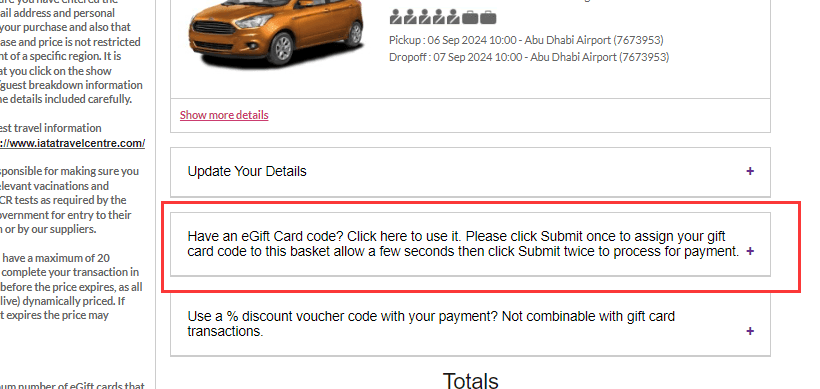
To view your voucher details:1. Open your BitTopup profile and go to Order History.2. Locate your recent RentacarGift Cash Voucher transaction.3. Click on the order details to reveal your unique digital Voucher Code (UID) and Security PIN.4. Copy both strings carefully before heading to the reservation portal.
Step-by-Step Code Redemption Guide on RentacarGift Portal
Follow these steps to redeem your digital voucher against any supported car rental reservation:
- Visit the Booking Portal: Open the official RentacarGift website (or TripGift car rental search engine).
- Search for Vehicles: Enter your pick-up destination, drop-off location, rental dates, and driver age requirements.
- Select Your Car: Browse the list of available rental agencies (such as Hertz, Enterprise, or Alamo), choose your preferred vehicle class, and select your optional add-ons (child seats, extra insurance, GPS).
- Proceed to Checkout: Input the primary driver details as they appear on their government-issued identity card or passport and driver license.
- Apply the Digital Code: In the payment section, look for the e-Voucher / Gift Card field. Enter your Voucher Code and Security PIN, then click Apply.
- Pay Remaining Balance (if any): If your booking total exceeds the voucher value, pay the difference with a credit or debit card.
- Receive Confirmation: Your confirmed rental voucher and supplier confirmation reference will be sent to your email address. Present this confirmation and the required physical payment card for the security deposit upon vehicle collection at the counter.
Multi-Voucher Stacking and Split-Payment Policy (Max 2 Codes)
Understanding payment rules helps you plan your car rental budget smoothly:
- Maximum 2 Codes Per Transaction: The RentacarGift booking engine permits a maximum of two (2) digital gift voucher codes per single reservation. If you hold three or more vouchers, you must use the remaining codes on a separate booking.
- Split-Payment Flexibility: If your rental total exceeds your combined voucher balance, the platform lets you pay the remaining balance using standard major credit cards or debit cards.
- Unused Balance Retention: If your voucher balance exceeds the total booking cost, the remaining funds remain attached to your voucher code under the terms and validity period of the issuer.
- Security Deposit Requirements: Digital vouchers cover the prepaid rental base rate, taxes, and selected prepaid add-ons. Physical rental counters still require the lead driver to present a valid credit card in their name for the on-site security deposit.
Voucher Expiry Terms and Regional Validity Rules
- Malaysia (MY) Regional Usage: RentacarGift Cash Voucher (MY) codes are issued for the Malaysian market and are processed in MYR base currency or automatically converted at the live exchange rate on the booking platform for international rentals.
- Validity Window: Digital vouchers are generally valid for 12 to 36 months from the date of issue. Review the specific expiration date printed on your BitTopup digital voucher receipt.
- Advance Booking Requirement: Most car rental bookings through the platform must be confirmed at least 2 to 4 days prior to the scheduled pick-up date to allow supplier confirmation.
- Non-Exchangeable: Vouchers cannot be refunded, exchanged for physical cash, or transferred to other third-party booking portals outside the authorized TripGift/RentacarGift platform.
Common First-Time Redemption Pitfalls and How to Fix Them
- Attempting Counter Redemption: Physical rental desks (like airport Hertz or Enterprise counters) cannot scan RentacarGift codes directly. You must book online through the RentacarGift website before arriving at the pickup location.
- Typing Whitespace Errors: When copying your code or PIN from BitTopup, ensure no accidental leading or trailing spaces are pasted into the voucher box.
- Exceeding Stacking Limits: Entering three or more voucher codes causes an error at checkout. Combine at most two codes and settle any remaining balance via card.
- Driver Name Mismatches: Ensure the name entered during the online booking matches the driver license and passport of the person collecting the vehicle.
Why Choose BitTopup for Your Travel Digital Codes
- Instant Delivery: Your digital voucher codes and PINs appear immediately on your order screen upon payment confirmation.
- Secure, Password-Free Process: You never need to share sensitive account passwords or personal profiles to purchase digital codes.
- Flexible Payment Methods: Choose from a broad range of local and global payment gateways at live checkout.
- Dedicated Customer Support: Our multilingual support team is available 24/7 to assist with any code delivery or order inquiries.
Frequently Asked Questions
How do I redeem my RentacarGift Cash Voucher code?
Visit the official RentacarGift or TripGift website, select your rental location and dates, choose your preferred vehicle from brands like Hertz or Alamo, and enter your Voucher Code and PIN in the payment section before confirming your booking.
Can I use multiple RentacarGift vouchers in a single booking?
Yes, you can combine a maximum of two (2) RentacarGift voucher codes in a single checkout transaction on the booking portal.
Which car rental agencies accept RentacarGift vouchers?
RentacarGift vouchers work across more than 500 car rental providers accessible through its online booking portal, including major brands such as Hertz, Enterprise, Avis, Alamo, Budget, Sixt, Europcar, National, Dollar, and Thrifty.
Can I use a gift card at Enterprise or Hertz via RentacarGift?
Yes. When you book an Enterprise or Hertz vehicle directly through the RentacarGift portal, your voucher code pays for the online booking cost. However, you cannot take the raw RentacarGift code directly to a physical Enterprise or Hertz desk without booking online first.
What happens if my booking total exceeds the voucher amount?
The RentacarGift checkout portal supports split payments. The voucher covers up to its full value, and you can pay the remaining balance using a major credit or debit card.
What is the validity period of the RentacarGift Cash Voucher (MY)?
RentacarGift (MY) vouchers typically carry a validity period ranging from 12 to 36 months from the date of generation. Check your BitTopup order details for exact expiration terms.
Are RentacarGift vouchers refundable or exchangeable after purchase?
No. Once a digital code has been generated and delivered to your BitTopup order screen, all sales are final and cannot be refunded or exchanged for cash.