



Super Sus Golden Star Top Up: What Are Golden Stars and In-Game Uses
Golden Stars (also known as Goldstars) serve as the primary premium currency in Super Sus - Who Is The Impostor. While Cookies and Gold can be earned through regular gameplay, completing tasks, and daily participation, Golden Stars provide direct access to exclusive premium content, advanced progression systems, and rare vanity items.
Core Uses for Golden Stars in Super Sus
- Character Roles and Ability Unlocks: Instantly acquire newly released Spacecrew, Impostor, and Neutral roles (such as Sheriff, Joker, Phantom, or Arsonist) to expand your tactical options in multiplayer matches.
- Super Pass Upgrades: Upgrade the standard seasonal pass to the Elite or Advanced Super Pass track to claim limited-edition character outfits, execution effects, and exclusive profile frames.
- Cosmetic Outfits and Weapon Skins: Purchase legendary costumes, customized spacesuits, animated headwear, back accessories, and themed holiday outfits directly from the in-game mall.
- Lucky Wheel and Mystery Chests: Obtain tokens to participate in exclusive gacha events, seasonal prize pools, and limited-time mystery crates containing mythic-tier skins.
- VIP and Privilege Cards: Activate VIP subscriptions, Weekly Cards, and Monthly Cards to receive daily resource disbursements and premium chat badges.
- Interactive Emotes and Match Customization: Acquire custom lobby animations, sound effects, expressive stickers, and unique victory poses to stand out in meeting discussions.
How to Recharge Super Sus Golden Stars on BitTopup
Recharging Golden Stars on BitTopup requires only your in-game Player ID (Space ID). You never need to share your account credentials, login passwords, or social media links.
- Select Your Package: Browse the available Golden Star denominations on this page and choose the amount that fits your in-game needs.
- Enter Your Player ID: Input your numeric Super Sus Player ID into the designated field. Ensure you double-check the digits for accuracy.
- Review Current Pricing: Check the live checkout screen for real-time pricing and select your preferred payment method from the available options.
- Complete Checkout: Finalize your payment through our secure processing system.
- Receive Your Stars: The Golden Stars are transferred directly to your Super Sus account via the game server. Open your game app to verify your updated balance.
How to Find Your Super Sus Player ID
To ensure your Golden Stars arrive without delay, you must provide the correct Super Sus Player ID associated with your account. Follow these simple steps inside the game client:
- Launch the Super Sus application on your mobile device or emulator.
- Tap your Avatar Profile icon located in the upper-left corner of the main lobby.
- On your personal info card, locate the numerical Space ID / Player ID printed directly below your in-game username.
- Tap the Copy icon next to the number to copy the ID directly to your clipboard, avoiding typing errors.
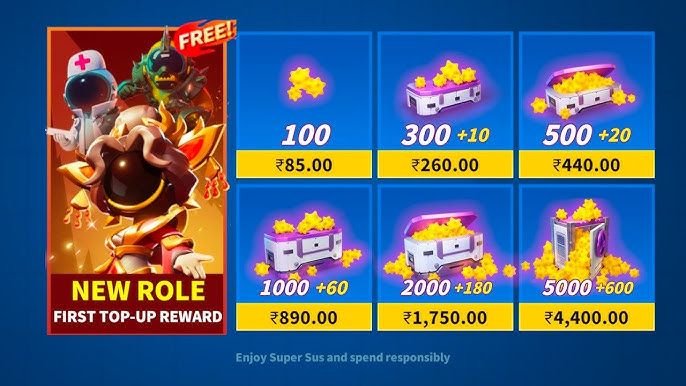
Super Pass, Weekly/Monthly Card, and VIP Card Overview
Golden Stars allow you to activate various high-value progression tracks and subscription privileges in Super Sus. Review the options below to plan your top-up:
| Item / Pass Type | Requirement | In-Game Benefits & Key Features |
|---|---|---|
| Elite Super Pass | Direct Golden Stars | Unlocks the premium seasonal reward track, exclusive role skins, extra Cookies, and unique elimination effects. |
| Advanced Super Pass | Direct Golden Stars | Includes all Elite Super Pass rewards plus an instant 20-level boost and exclusive avatar customization assets. |
| VIP Subscription | Golden Star Recharge | Grants special VIP lobby status, distinct chat bubbles, daily bonus rewards, and priority matchmaking privileges. |
| Weekly Card | Direct Golden Stars / Recharge | Immediate initial Golden Star drop followed by 7 days of daily login resource rewards. |
| Monthly Card | Direct Golden Stars / Recharge | Grants a large upfront currency sum plus 30 days of consistent daily resource bundles and role shards. |
| Role & Skin Gacha | Direct Golden Stars | Provides spin attempts for limited-time character skins, animated pets, and mythic-tier wardrobe sets. |
Why Direct Player ID Top-Up Is Safe for Your Account
Account safety is essential when purchasing in-game currency. BitTopup uses a direct Player ID delivery system that protects your personal data:
- No Password Required: We never ask for your password, verification codes, Apple ID, Google Play login, or social media credentials. Your account stays entirely under your control.
- Direct Game Server Delivery: Orders are fulfilled directly to your in-game UID through standard digital delivery protocols, maintaining complete account integrity.
- Global Server Compatibility: The direct Player ID recharge system functions across global regions, ensuring your currency credits to your account regardless of your geographical location.
- Encrypted Transactions: Every order processed on BitTopup utilizes modern data encryption standards to keep your transaction information confidential.
Order Delivery Time and Troubleshooting In-Game Balance
Most Golden Star top-ups credit to your Super Sus account within moments after payment confirmation. If you do not see your updated balance right away, follow these troubleshooting steps:
- Restart the Game Client: Completely force-close the Super Sus app and relaunch it. This forces the client to sync with the central server and refresh your wallet balance.
- Check the In-Game Mailbox: Certain event bonuses, promotional packs, or pass activation tokens are delivered through the in-game mail system rather than added directly to your header wallet.
- Verify Your Player ID: Check your BitTopup order history to verify that the Player ID submitted during checkout matches your current in-game profile.
- Clear Application Cache: On mobile devices, clearing the temporary app cache from your device settings can resolve local visual display bugs.
- Contact BitTopup Support: If your balance has not updated after restarting, contact the BitTopup 24/7 customer support team with your Order ID for immediate assistance.
Frequently Asked Questions
How to get Golden Stars in Super Sus?
You can acquire Golden Stars by purchasing them through secure digital top-up services like BitTopup using your in-game Player ID. Golden Stars are the primary premium currency used to unlock exclusive cosmetics, characters, and seasonal passes.
Where can I find my Super Sus Player ID for recharge?
Open Super Sus and tap your profile avatar in the top-left corner of the main lobby. Your numerical Player ID (Space ID) is displayed directly below your username. Tap the copy icon next to it to copy the exact number.
Do I need to provide my Super Sus account password to recharge?
No. Recharges on BitTopup require only your public Player ID. You should never share your account password, email login, or two-factor authentication codes with any top-up service.
What can I purchase with Super Sus Golden Stars?
Golden Stars can be spent on Super Pass upgrades, premium character roles, legendary costumes, weapon skins, limited-time gacha events, mystery chests, VIP cards, and personalized profile cosmetics.
Can I purchase Super Pass or VIP Cards through Golden Star recharge?
Yes. Once Golden Stars are added to your balance, you can navigate to the in-game Super Pass or Privilege menu to unlock the Elite Pass, Advanced Pass, or VIP subscription directly.
What should I do if my Super Sus Golden Stars do not appear immediately?
First, close and reopen the Super Sus app to force a server refresh. If the currency still does not reflect, check your in-game mailbox, verify the Player ID entered in your BitTopup order summary, and reach out to BitTopup customer support with your Order ID.