Configure the best Black Clover M graphics settings to lock stable 60 FPS, eliminate combat stutter, drop chip thermals, and prevent brutal battery drain.
Black Clover M: Rise of the Wizard King looks gorgeous, but visual fidelity carries a steep hardware tax. Garena International II built this turn-based mobile RPG on Unreal Engine 4. The engine renders crisp 3D character models and flashy team attacks, but unoptimized settings heat up mobile chipsets within twenty minutes.
Cranking graphical sliders to Ultra during guild boss fights turns combat into a slideshow. You do not need to sacrifice visual clarity to achieve fluid motion. You just need to know which settings actively choke mobile GPUs and which ones preserve visual fidelity at near-zero compute cost.

Unreal Engine 4 and the Combat Lag Problem
Unreal Engine 4 handles static lighting and asset scaling well, but mobile hardware buckles under heavy particle workloads. Dual ultimates flood the display with alpha effects, dynamic lighting spikes, and geometry recalculations. When these trigger simultaneously, 1% and 0.1% frametime lows collapse.
Average framerates hide this bottleneck. A benchmark can register 58 average FPS while actual gameplay stutters continuously. Micro-stutter happens when individual frames take 50 to 100 milliseconds to render instead of the 16.6 milliseconds required for 60 FPS. Background shader compilation and dynamic shadow rendering cause the vast majority of these frametime spikes.
Android 7.0 launches the game client, but meeting minimum install requirements does not guarantee stable combat performance. A manual graphics tune stabilizes frametimes before hardware heat mitigation kicks in.
Best Black Clover M Graphics Settings (Slider by Slider)
Systematic manual tuning beats automated graphics presets. Built-in profiles over-allocate GPU cycles to invisible post-processing while starving your actual target framerate.
Apply this configuration to lock down stable frame delivery:
| Setting Option | Recommended Target | Performance & Thermal Impact |
|---|
| Frame Rate Target | 60 FPS (or locked 45 FPS) | Higher battery draw, but eliminates skill animation hitching |
| Shadow Quality | Low / Off | Massive GPU relief; clears stutter during four-mage cutscenes |
| Visual Effects Quality | Low | Prevents combat lag spikes from stacked magic particle bursts |
| Anti-Aliasing | Off | Reclaims rendering overhead without softening character lines |
| Texture Quality | Medium / High | Negligible impact on modern SoCs; preserves crisp hero models |
| Display Resolution | 1080p (FHD) | Saves 14.1% battery power and drops running temperatures |
Targeting Low for shadows and visual effects yields the single biggest recovery in combat frametimes without destroying model fidelity.
Drop shadow quality to Low or Off first. Dynamic shadow mapping forces mobile GPUs to calculate complex geometry twice per frame. Disabling it provides the largest immediate frametime recovery, especially when multiple mages crowd the combat field.
Keep Effects Quality on Low. While reducing spell effects in a magic-focused anime game seems counterintuitive, High effects swamp the screen with transparent particle layers that choke the GPU during boss ultimate sequences. Texture Quality, by contrast, occupies VRAM rather than active compute cycles. Keep textures on Medium or High so Asta, Yami, and Noelle look sharp.
Before spending hours tuning raid rosters, keep your summon currency ready. You can secure pulls through a Black Clover M Summon Pack - TH to build out your team without progression halts.

Resolution vs Frame Rate: The Battery and Thermal Tradeoff
Many flagship phones run 1440p (QHD+) displays by default. Forcing an intensive 3D mobile title to render at full 1440p generates intense heat, pushing internal junction temperatures toward defensive limits.
Mobile processors trigger defensive thermal throttling when internal junction temperatures reach 90 to 100 degrees Celsius. At that ceiling, the SoC slashes CPU and GPU clock speeds by half to prevent motherboard damage. That sudden clock drop explains why combat runs smoothly for ten minutes before plummeting into an unplayable crawl.
Lowering your rendering resolution to 1080p cuts battery consumption by roughly 14.1% during heavy 3D loads. If your device supports 720p scaling, you can reduce total power draw by up to 27%. Native 1080p rendering delivers an average of 64.6 minutes (an 11.7% to 21.6% increase) of extra screen-on time compared to power-hungry 1440p panels under identical workloads.
| Native Display Mode | Relative GPU Rendering Load | Average Battery Life Delta | Thermal Throttling Risk |
|---|
| 1440p (QHD+) | 100% (Baseline load) | Baseline drain (Fastest discharge) | Severe (triggers within 15-20 min) |
| 1080p (FHD) | ~56% of QHD+ pixels | +14.1% battery extension | Moderate (manageable without cooler) |
| 720p (HD) | ~25% of QHD+ pixels | +27.0% battery extension | Very Low (sustained clock speeds) |
Scaling your rendering down to 1080p produces the best compromise between visual sharpness and extended gaming sessions.
Consistent frame pacing matters far more than an erratic high refresh rate. A locked 45 or 60 FPS delivers a cleaner visual flow than an unstable 90 FPS profile that dives to 30 FPS under load. Cap the game at 60 FPS, or drop to a locked 45 FPS if your chassis warms up. Your eyes adapt to steady frame pacing immediately.
Step-by-Step Black Clover M Lag Fix for Android
System-level background tasks often drag down performance even when in-game options are optimized. Clear operating system bottlenecks using this sequence:
- Disable Battery Saver Mode: Power-saving toggles throttle CPU clock frequencies by 15% to 30%, causing immediate combat animation stutter.
- Free Up Internal Storage: Keep at least 20% free storage space. When capacity drops below 20%, Android's virtual memory swap routines slow down, creating hitching during dynamic asset loads.
- Clear the Application Cache: Open Android Settings, locate Black Clover M under Apps, and clear its cache. Outdated patch remnants frequently trigger unexplained combat frame hitching.
- Enable Deep Sleep for Background Apps: Put non-essential apps into deep sleep. This restricts background CPU wake-locks and preserves thermal margin for your game.
- Switch to 5GHz Wi-Fi and Optimize DNS: Turn-based combat requires clean server validation. Switching from 2.4GHz to 5GHz Wi-Fi and changing network DNS to Cloudflare (1.1.1.1) or Google (8.8.8.8) cuts 30 to 60ms of ping jitter, preventing visual skill rubber-banding.
BlueStacks and PC Emulation Setup for High-FPS Grinding
Emulating Black Clover M on PC expands display size, but virtualization adds processing overhead. Default emulator profiles often stutter because the virtual machine lacks dedicated resource access.
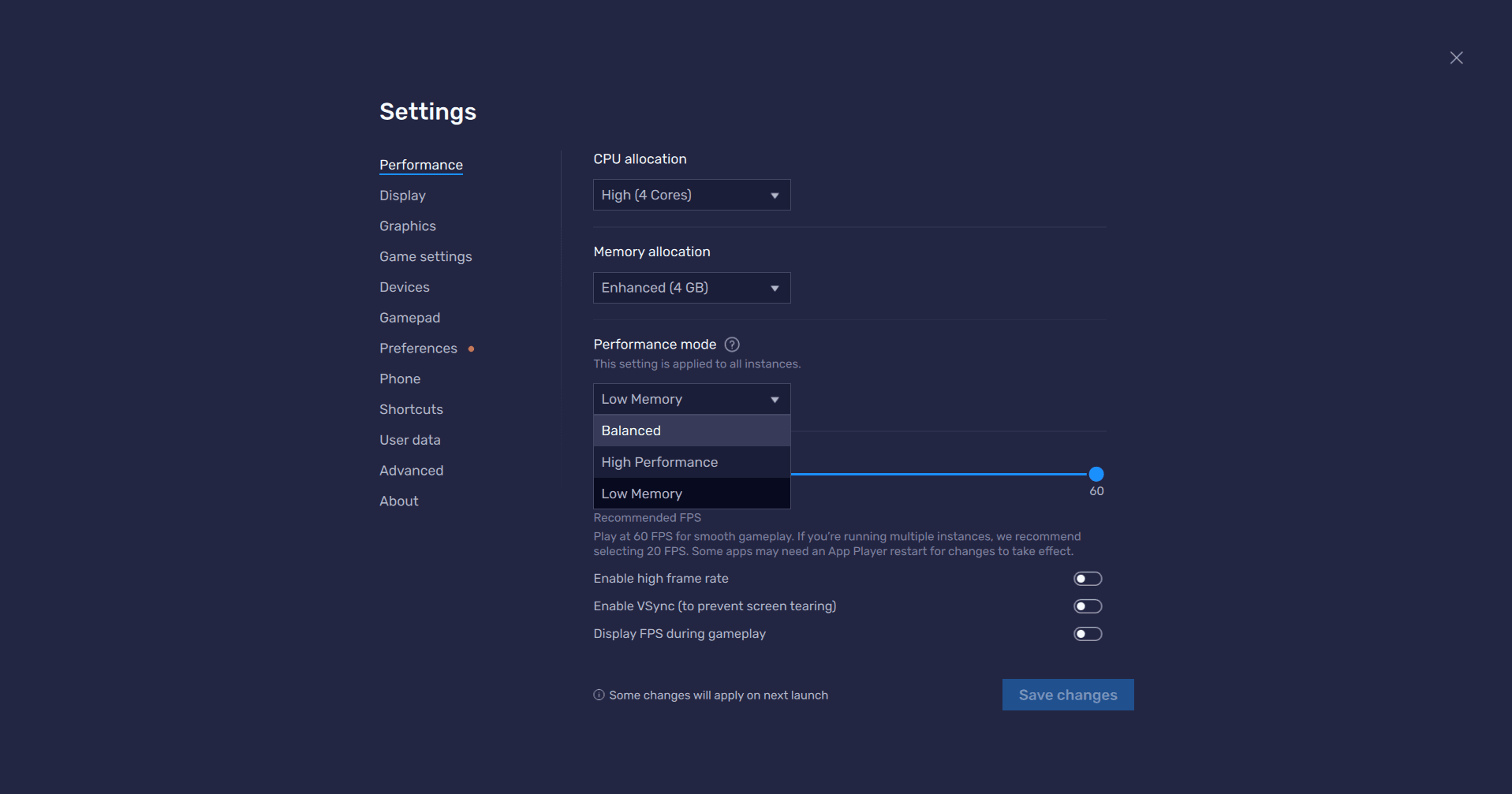
To lock 60 FPS on BlueStacks, allocate at least 4 CPU cores and 4 GB of RAM under the Performance tab, then select the "High Performance" profile. Set emulator display resolution to 1920x1080 at 240 DPI, and confirm the frame rate slider is set to 60 FPS or higher.
Emulator documentation frequently recommends maxing out all in-game graphical sliders for PC play, assuming desktop GPUs overpower the UE4 workload. In practice, UE4 mobile ports still suffer micro-stutter from dynamic shadow passes regardless of desktop GPU headroom.
Keep in-game shadow quality on Low inside the emulator client. Let your graphics card render at 1080p, preserve High textures for clean character outlines, and turn off in-game anti-aliasing. PC monitor pixel density renders mobile anti-aliasing redundant while avoiding frametime variance.
If you run automated daily farming loops on PC, make sure your summons are stocked. Grabbing a Black Clover M Summon Pack - TH lets you capitalize on rate-up banners while daily routines farm materials unattended.
Mobile vs PC Emulation: Performance Comparison
Platform choice changes your primary hardware bottleneck. Mobile devices battle heat dissipation and battery limits, while emulators fight virtualization overhead and shader translation.
| Platform Variable | Native Android Device | PC Emulator (BlueStacks) |
|---|
| Minimum System Baseline | Android 7.0 OS, 3 GB RAM | 4 CPU Cores, 4 GB RAM allocated |
| Primary Frame Rate Bottleneck | Thermal throttling after 15-30 min | Virtualization pipeline & shader compilation |
| Framerate Stability in Combat | High risk of drop (down to 30 FPS) | Highly stable 60 FPS when cores are allocated |
| Battery & Power Consideration | 14.1% savings by dropping to 1080p | Unlimited wall power (No thermal throttling) |
| Best Shadow Setting | Low / Off | Low (bypasses UE4 draw-call limits) |
| Ping & Input Latency | Variable (needs 5GHz Wi-Fi + clean DNS) | Stable (direct Ethernet cable routing) |
Mobile setups demand strict thermal management, whereas emulator setups require direct resource allocation to beat virtual machine overhead.
Mobile hardware is constrained by heat over time. After 15 to 30 minutes of continuous 3D loads, thermal throttling begins lowering framerates. On PC, allocating 4 cores and 4 GB of RAM allows multi-hour dungeon farming without performance degradation.
Hardware Heat Traps: Surviving Beyond 30 Minutes
Phones rely on internal graphite sheets and vapor chambers to radiate heat outward through the chassis. When heat cannot escape quickly enough, internal junction temperatures hit the 90 to 100°C threshold.
Remove protective phone cases before starting long play sessions. Thick plastic and silicone insulate the rear glass, trapping heat against the battery and processor.
Avoid charging your phone while running Black Clover M. Fast charging adds substantial thermal resistance on top of the rendering load. If your device supports bypass charging—routing wall current directly to the processor without charging the battery—turn it on. Otherwise, cap your charge state at 80% to limit cumulative heat.
For serious mobile sessions, attach an active semiconductor cooling fan. External clip-on coolers run between $15 and $35 in 2026 and pull heat straight from the rear casing, keeping SoC temperatures below the throttling trigger.
Keep your account stocked while your hardware stays cool. You can pick up a Black Clover M Summon Pack - TH to pull top-tier defenders and supports for upcoming seasonal boss raids.
Frequently Asked Questions
What are the best graphics settings for smooth 60 FPS in Black Clover M?
Set your frame rate target to 60 FPS, shadows to Low or Off, and visual effects to Low. Keep textures at Medium or High so character models stay clear without overloading your GPU during combat animations.
Why does Black Clover M start lagging after 15 to 20 minutes of gameplay?
Your mobile device is thermal throttling due to rising internal junction temperatures. Once your processor approaches its safety ceiling, clock speeds drop sharply to protect the hardware. Take off your phone case, lower your screen brightness, and avoid charging while playing.
How can I get stable 60 FPS on BlueStacks when playing Black Clover M?
Open BlueStacks settings and allocate at least 4 CPU cores and 4 GB of RAM under the High Performance profile. Manually slide the emulator frame rate limit to at least 60 FPS and drop in-game shadow settings to Low.
Does lowering the resolution improve Black Clover M battery life?
Yes, dropping rendering resolution down from 1440p to 1080p saves roughly 14.1% battery power during 3D gaming. Dropping to 720p can save up to 27% on supported devices by significantly cutting active GPU load.
Should I keep Battery Saver mode turned on while playing Black Clover M?
No, you must disable Battery Saver mode before launching the game. Power-saving profiles throttle mobile CPU clock speeds by 15% to 30%, which causes severe frametime stutter during combat.
What should I do if Black Clover M still stutters on a powerful phone?
Clear the game's cache in your application settings and verify that your internal storage has over 20% free space remaining. Storage starvation and corrupted post-patch cache files are primary culprits behind micro-stutter on flagship devices.
Crisp Characters Without the Melted Battery
Running mobile games on maximum presets offers diminishing returns when the phone overheats within half an hour. You do not need dynamic shadow maps or layered spell blooms to enjoy Black Clover M. Dropping shadows to Low, dialing down spell effects, and keeping character textures on High preserves visual clarity while protecting your frame pacing.
Pair these settings with 1080p display scaling, maintain 20% free storage, and remove heavy cases during raid sessions. The result is a rock-solid 60 frames per second without thermal throttling.