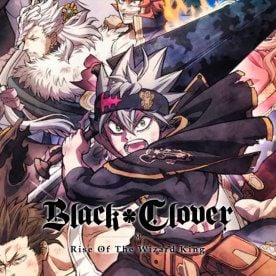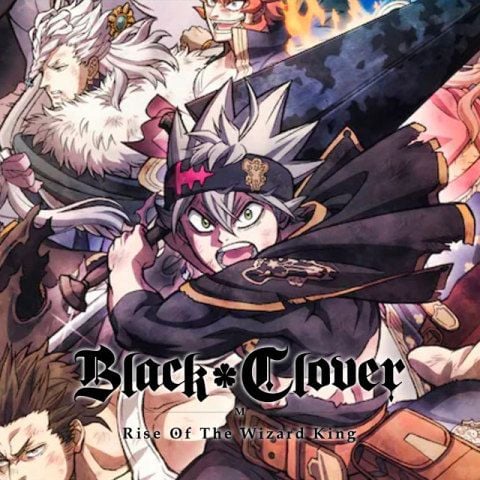


Black Clover M Summon Pack TH Top Up: Overview and In-Game Benefits
Building a top-tier magic knight squad in Black Clover M requires steady access to high-value summons. The Black Clover M Summon Pack TH provides players on the Thailand server with the resources needed to pull limited-rate rate-up mages, seasonal characters, and signature skill pages. Instead of grinding for weeks to hit banner pity, picking up a summon pack delivers summon tickets and Black Crystals straight to your game account.
Summon packs provide targeted value for your summons. By stocking up on summon tickets and crystals, you can budget for upcoming banner releases, secure meta-defining defenders and attackers, and max out duplicate character enhancements. Top-up purchases are applied directly via your unique account identifier, allowing you to focus on arena rankings and raid challenges.
Differences Between Premium Black Crystals, Standard Crystals, and Summon Packs
Black Clover M features several in-game currencies and bundle types. Understanding how summon packs differ from direct crystal recharges ensures you select the right item for your progression goals.
| Item Type | Primary Use Case | Delivery Method | Key Contents |
|---|---|---|---|
| Summon Pack (TH) | Pulling on standard and rate-up character banners | Direct in-game mailbox / inventory | Summon Tickets, Black Crystals, bonus progression items |
| Black Crystals | Multi-purpose use: stamina refreshes, store purchases, summons | Direct crystal balance credit | Base Black Crystals + bonus crystal tiers |
| Monthly / Battle Passes | Daily sustained login rewards and milestone milestones | Activated status on game profile | Daily crystal distributions, stamina, exclusive cosmetics |
Summon Packs offer the highest concentration of direct summon resources per recharge, giving you immediate pulling power for active banners.
Thailand (TH) Server Compatibility and Region Requirements
Black Clover M operates distinct server regions across Southeast Asia and global territories. This specific product is strictly locked to the Thailand (TH) server managed under the regional publisher ecosystem.
- TH Server Specificity: Orders processed for the TH Summon Pack can only be fulfilled on accounts registered to the Thailand server.
- Cross-Region Incompatibility: If your account is registered on the Asia (AS), Global (GL), or US servers, this package will not credit your account. Verify your account region inside the game client before checking out to avoid delivery delays.
- Account Binding: Regional accounts linked via Google, Apple ID, Facebook, or Garena retain their specific server assignments regardless of physical location. Always confirm your server tag on your profile screen.
How to Locate Your Black Clover M Player ID and Server
To ensure your summon pack is credited correctly, you need to provide your exact Player ID (Account UID) from your game client. Follow these steps to find it:
- Launch Black Clover M on your mobile device or emulator.
- Tap your player avatar or profile icon located in the top-left corner of the main lobby screen.
- Open the Account tab in the player info pop-up window.
- Locate your Account ID (AID / UID) displayed near your nickname and current server tag (confirming TH).
- Tap the Copy icon next to your ID to copy it to your clipboard.
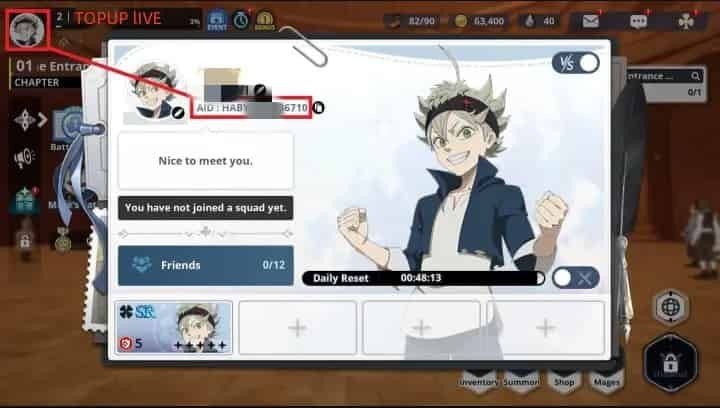
Double-check that the copied numbers match your profile exactly. You do not need to share your login credentials, password, or verification codes.
How to Recharge Black Clover M Summon Pack TH on BitTopup
Recharging your Black Clover M account through BitTopup takes only a few quick steps:
- Select the Pack: Choose the Black Clover M Summon Pack - TH denomination from the product catalog.
- Enter Player Information: Paste your copied Black Clover M Player ID into the designated account field. Confirm that your active server is the Thailand (TH) server.
- View Live Pricing: Review the checkout summary. Live package pricing and payment channels are displayed clearly on the checkout interface.
- Complete Payment: Select your preferred checkout method and confirm the transaction.
- Receive Items: Once the order is verified, the summon pack resources will be credited directly to your in-game mailbox or inventory. Restart your game client to see your updated balances.
Safe and Passwordless Recharges on BitTopup
Account safety is critical when purchasing mobile game currencies. BitTopup uses a direct-to-UID fulfillment process that protects your personal gaming data:
- Zero Password Requirements: You will never be asked for your account password, email access, or two-factor authentication codes. Your Player ID is the only detail needed for crediting.
- Encrypted Checkout: Every transaction is processed through encrypted payment gateways to protect your personal and financial details.
- Account Integrity: Recharges comply with standard publisher distribution protocols, keeping your account secure from third-party login flags or suspension risks.
- 24/7 Order Tracking: Our customer support team is available around the clock to assist you with order status checks or entry verification.
Troubleshooting and Support for Black Clover M Deliveries
If your summon pack does not appear immediately after completing your order, follow these troubleshooting checks:
- Restart the Client: Fully close Black Clover M from your device background apps and relaunch it to refresh your server connection.
- Check In-Game Mail: Certain pack contents are sent directly to your in-game mailbox rather than auto-added to your inventory. Tap the mail icon in the lobby to claim your items.
- Verify Server Selection: Ensure the Player ID you submitted belongs to an active account on the Thailand (TH) server. Submitting an Asia (AS) or Global (GL) ID for a TH pack prevents successful system routing.
- Contact Support: If your items have not arrived after a short period, reach out to BitTopup customer support with your BitTopup Order ID and in-game Player ID for fast resolution.
Frequently Asked Questions
Can I buy the Black Clover M Summon Pack TH if I play on the Global or AS server?
No. This product is strictly configured for the Thailand (TH) server. If your account is registered to the Global or Asia (AS) servers, purchasing this pack will result in a fulfillment error. Please select the specific catalog item matching your server region.
How do I find my Black Clover M Player ID to complete the recharge?
Tap your player avatar in the top-left corner of the game screen, open the Account tab, and locate your Account ID / UID. Use the copy button next to the ID to ensure error-free entry during checkout.
Do I need to share my game account password to recharge Summon Packs?
No. BitTopup operates on a passwordless top-up system. You only need to provide your Player ID. Never share your password, login tokens, or verification codes with anyone.
What items are included in the Black Clover M Summon Pack?
The summon pack contains summon resources such as Summon Tickets and Black Crystals designed for drawing characters and skill pages on active summon banners. Exact item breakdowns are listed in the pack description at checkout.
How long does it take for the Summon Pack to reflect in my game account?
Most orders are processed promptly after payment verification. Once completed, the items will appear in your in-game mailbox or balance. Restarting your game app helps refresh your resource display.
What should I do if my Black Clover M TH top-up does not arrive immediately?
First, restart your game client and check your in-game mailbox. If the items are still missing, verify that your submitted Player ID was correct for the TH server, then contact BitTopup customer support with your order number for immediate assistance.