

BLEACH: Soul Resonance Top Up: Spiritual Jade and Packs Online
BLEACH: Soul Resonance brings the iconic 3D action combat of Tite Kubo's universe to mobile and PC platforms. To recruit top-tier characters such as Ichigo Kurosaki, Rukia Kuchiki, and the Gotei 13 Captains, you need Spiritual Jade. Spiritual Jade serves as the core premium currency required for character banner pulls, weapon summons, stamina refills, and limited-time event participation.
BitTopup provides a direct, secure route to acquire Spiritual Jade and premium game passes. Using our direct User ID (UID) recharge system, your items transfer straight to your in-game profile without requiring your account login credentials or password. Pick your pack on the checkout selection above to replenish your balance immediately.
How to Recharge BLEACH: Soul Resonance Spiritual Jade Online
Recharging your account on BitTopup takes only a few minutes. Follow these simple steps to ensure your purchase processes without delay:
- Select Your Item: Browse the product listing above and choose the Spiritual Jade denomination or bundle pack you wish to purchase.
- Enter Your User ID: Input your BLEACH: Soul Resonance User ID (UID) into the input field. Double-check that your digits match your in-game profile.
- Proceed to Checkout: Click the purchase button to move to the payment screen.
- Select Payment Method: Pick your preferred regional or international payment option from the live checkout menu.
- Complete Payment: Confirm the transaction. Once the payment clears, the Spiritual Jade or bundle delivers straight to your game account balance.
How to Find Your BLEACH: Soul Resonance User ID (UID)
Locating your BLEACH: Soul Resonance User ID is straightforward and accessible directly from your main game screen.
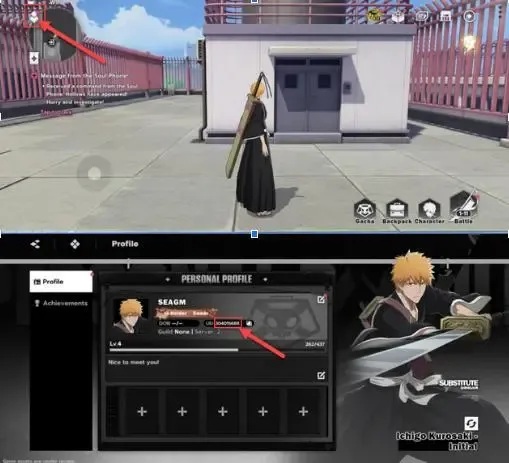
- Launch BLEACH: Soul Resonance on your device and log in to your server.
- Tap your Player Avatar / Profile Icon located in the top-left corner of the main lobby screen.
- Open the Personal Info or Player Profile tab.
- Locate your UID, which is a numerical sequence displayed beneath your character name and server designation.
- Tap the Copy icon next to your UID to save it to your clipboard, then paste it directly into the User ID field on BitTopup.
Tip: Always use the copy-paste function rather than typing numbers manually to prevent mistyping errors.
Available BLEACH: Soul Resonance Top-Up Packs, Spiritual Jade, and Bundles
BitTopup supports the full spectrum of in-game items and premium packs available in BLEACH: Soul Resonance. Depending on your current progression needs, you can choose from standalone Spiritual Jade bundles to recurring monthly benefits.
| Pack Type | Primary Contents | Best Used For |
|---|---|---|
| Small Jade Tier | Base Spiritual Jade | Quick stamina refreshes and daily resource resets |
| Medium Jade Tier | Spiritual Jade + First-Purchase Bonus | Summoning on rate-up character or weapon banners |
| Large Jade Tier | High-quantity Spiritual Jade bundles | Securing guaranteed banner pity for limited Soul Reapers |
| Monthly Card / Pass | Daily Spiritual Jade login claims + VIP perks | Long-term currency accumulation and daily resource boosts |
| Battle Pass / Growth Fund | Milestone rewards, materials, and tickets | Account leveling and character upgrade acceleration |
Note: Current pricing, regional currency conversions, and available first-time purchase bonus flags update dynamically on the BitTopup product catalog above.
Account Safety: Why UID-Only Recharges Protect Your Game Account
Account security is critical when purchasing game top-ups online. Traditional third-party services often ask players to hand over their login credentials, email passwords, or verification codes. This introduces major risks, including unauthorized account access, data theft, or game publisher account bans due to suspicious IP logins.
BitTopup eliminates these risks entirely through direct UID-based fulfillment:
- Zero Passwords Required: You never share your account login, password, linked social media accounts, or 2FA codes.
- Official Delivery Protocol: Transactions credit via public player ID routing, exactly like gifting mechanisms.
- No Third-Party Logins: No one logs into your game profile from unfamiliar foreign devices or unauthorized IP addresses.
- Permanent Purchase Records: Every transaction generates a clear, verifiable receipt tied to your order number on BitTopup.
Supported Payment Methods for BLEACH: Soul Resonance Recharges
BitTopup ensures players across all regions can conveniently purchase Spiritual Jade with flexible payment solutions. During checkout, you can select from various global and local payment options:
- Credit and Debit Cards: Visa, Mastercard, American Express, and other major card networks.
- E-Wallets: Popular digital wallets tailored for domestic and international gamers.
- Online Banking & Instant Transfers: Direct bank transfer rails depending on your country of residence.
- Local Payment Channels: Regional payment gateways configured to offer low transaction fees without hidden conversion charges.
Select your region during checkout to view the exact payment methods and localized currencies supported for your area.
Troubleshooting Common BLEACH: Soul Resonance Delivery and Top-Up Issues
While orders on BitTopup process automatically, network synchronization issues or input errors can occasionally occur. Here is how to handle the most common scenarios:
1. Delivery Delay After Payment
If your Spiritual Jade does not appear immediately after completing payment:* Restart your BLEACH: Soul Resonance game client completely to force a server data refresh.* Check your in-game mailbox; certain bundle purchases or milestone rewards arrive as attached mail items rather than direct balance additions.* Verify that your payment status shows as "Successful" or "Completed" in your BitTopup account order history.
2. Incorrect User ID Submitted
If you submitted an incorrect UID:* Check the order status on your BitTopup dashboard. If the order has not yet been processed, reach out to BitTopup customer support immediately with your Order ID and correct UID.* If the order has already been successfully delivered to an existing, valid UID on the game server, digital fulfillment cannot be reversed. Always verify your UID before confirming your order.
3. Contacting Customer Support
If your order shows completed on BitTopup but currency has not arrived after restarting the game, contact BitTopup 24/7 customer support. Prepare the following details for immediate investigation:* BitTopup Order ID* BLEACH: Soul Resonance User ID (UID) and Server Name* Screenshot of your in-game profile showing your UID* Proof of payment confirmation
Frequently Asked Questions About BLEACH: Soul Resonance Top Up
What information do I need to provide to top up BLEACH: Soul Resonance?
You only need to provide your in-game User ID (UID). You do not need to provide your password, login email, social media links, or verification codes.
Where can I find my BLEACH: Soul Resonance User ID in the game?
Tap your character avatar in the top-left corner of the main lobby screen. Your UID is listed in your profile menu under your character name. Tap the copy icon next to it to copy the numbers accurately.
Is it safe to recharge BLEACH: Soul Resonance without sharing my account password?
Yes. BitTopup uses direct UID delivery, meaning credits are applied using your public account identifier alone. Because you never share passwords or authentication credentials, your account remains completely secure from unauthorized access.
Which in-game items and currencies can I purchase through BitTopup?
You can purchase all available Spiritual Jade denominations, Monthly Cards, Battle Passes, and promotional bundle packs listed in our top-up catalog above.
How long does it take for Spiritual Jade to arrive after completing the recharge?
Orders typically process directly to your game profile within minutes after payment confirmation. During peak server activity or maintenance, delivery may take slightly longer. Restart your game client to refresh your balance.
What should I do if my Spiritual Jade is not credited to my account?
First, restart the game client and check your in-game mailbox. If the items are still missing, check your BitTopup order history to verify payment status, then contact BitTopup customer support with your Order ID and in-game UID for prompt assistance.