



TalkTalk-華語版 Coins Top Up: Overview and In-App Uses
TalkTalk-華語版 is a popular interactive voice entertainment, live group chat, and karaoke application dedicated to Chinese-speaking communities worldwide. It is completely distinct from telecommunication network airtime services or mobile SIM top-ups. In TalkTalk-華語版, users connect in real-time audio rooms to converse, participate in party games, sing karaoke (K-Song), and build vibrant social circles.
TalkTalk Coins represent the central digital currency within the application. With a balance of TalkTalk-華語版 Coins, you can send animated virtual gifts to your favorite room hosts, enter community prize draws, display exclusive entrance effects, and activate Noble status badges. Recharging your balance ensures uninterrupted participation in community events, gifting battles, and group voice activities.
Why Recharge TalkTalk-華語版 Coins on BitTopup
BitTopup offers a direct top-up solution designed specifically for TalkTalk-華語版 users. When you purchase on BitTopup, you benefit from:
- UID-Only Processing: You only need to provide your numeric User ID. No sensitive passwords, verification codes, or personal account credentials are ever requested.
- Fast Order Fulfillment: Digital processing ensures your Coins are credited directly to your TalkTalk-華語版 profile shortly after payment confirmation.
- Flexible Global and Regional Payments: Complete your order using credit cards, debit cards, e-wallets, and regional payment solutions supported on the live checkout page.
- Real-Time Price Clarity: Live product listings clearly display exact coin quantities and localized checkout rates with no hidden processing fees.
How to Find Your TalkTalk-華語版 User ID
To ensure your Coins arrive safely in the correct account, you must enter your exact TalkTalk-華語版 User ID (UID). Finding your UID takes only a few seconds:
- Open the TalkTalk-華語版 app on your mobile device and log in to your account.
- Tap the Profile icon ("My" / "我") located in the bottom-right corner of the home screen.
- Look beneath your profile avatar and display name. Your unique numeric User ID is displayed clearly.
- Tap the copy icon next to your ID number to copy it to your clipboard.
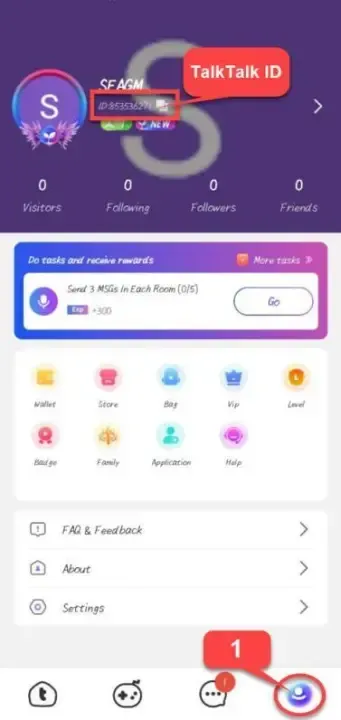
Always verify your UID before finalizing your order on BitTopup to prevent sending Coins to an incorrect user profile.
Step-by-Step Guide to Complete Your TalkTalk-華語版 Coins Recharge
Purchasing TalkTalk-華語版 Coins on BitTopup is straightforward. Follow these steps:
- Select Coin Denomination: Browse the available TalkTalk-華語版 Coin packages on the BitTopup product page and pick the amount you want.
- Enter Your Account Information: Input your TalkTalk-華語版 User ID in the designated recipient field.
- Proceed to Checkout: Click "Buy Now" and review your order summary on the checkout screen.
- Select Payment Method: Choose your preferred payment option from the available regional and international payment methods.
- Complete Payment: Follow the on-screen instructions to finalize your transaction securely.
- Check Account Balance: Once the transaction is marked complete, open TalkTalk-華語版 to verify your updated Coin balance.
In-App Features and Perks of TalkTalk-華語版 Coins
TalkTalk-華語版 Coins unlock a wide variety of social, interactive, and customization features across the platform:
- Animated Virtual Gifts: Send standard, luxury, and full-screen animated gifts to room hosts, broadcasters, and co-hosts during live audio streams.
- Noble and VIP Subscriptions: Activate monthly Noble privileges (such as Knight, Viscount, Earl, Duke, or King) to display exclusive nameplates, special avatar frames, and high-tier chat bubbles.
- Custom Entrance Effects: Announce your arrival in any voice chat room with personalized entrance animations, luxury vehicles, and custom audio banners.
- Karaoke and Song Requesting: Tip singers in K-Song rooms, queue priority song requests, and boost your favorite performers on room leaderboards.
- Interactive Party Games: Use your Coins to participate in interactive social minigames, lucky prize wheels, and seasonal app-wide festivals.
| Feature Category | In-App Uses & Benefits |
|---|---|
| Virtual Gifting | Send 2D and 3D animated gifts to support room hosts and rank on contributor boards |
| Noble Privileges | Unlock prestigious badges, avatar borders, and entrance car animations |
| Voice Room Perks | Gain priority speaking spots, song queues, and special sound effects |
| Profile Customization | Purchase themed chat bubbles, profile background skins, and dynamic titles |
Safe Checkout and Account Security Guarantee
Account safety is essential when purchasing virtual credits online. BitTopup processes TalkTalk-華語版 top-ups strictly through external system integration using only your public User ID.
- Zero Password Exposure: BitTopup never asks for your account login password, SMS verification codes, or linked social media logins (WeChat, Apple ID, Google, Facebook).
- Secure Encryption: All transactions are processed using industry-standard SSL encryption protocols to protect your personal and financial details.
- Official In-App Delivery: Coins are credited straight to your registered profile balance, eliminating the risk of unauthorized third-party balance transfers or account flags.
Troubleshooting and Order Status Verification
In most instances, Coin top-ups arrive within a short period after checkout. If you do not see your Coins immediately, follow these troubleshooting steps:
- Refresh the App: Fully close the TalkTalk-華語版 app from your device's background app switcher, reopen it, and check your "My Wallet" balance.
- Verify Order Status on BitTopup: Visit your BitTopup Order History page to ensure your payment has cleared and the status shows "Completed".
- Verify the Submitted UID: Check your BitTopup order receipt to confirm that the User ID entered matched your active TalkTalk-華語版 account.
- Contact Support: If the order is marked completed on BitTopup but your balance remains unchanged after 15 minutes, reach out to BitTopup customer support with your Order Number and a screenshot of your in-app profile.
Frequently Asked Questions
How do I find my TalkTalk-華語版 User ID?
Open the TalkTalk-華語版 application, navigate to the "My" (我) profile tab in the bottom navigation bar, and view the numeric ID displayed under your profile name. Tap the copy icon beside the number to copy your exact UID.
What are TalkTalk-華語版 Coins used for in the app?
TalkTalk Coins are the virtual currency used inside TalkTalk-華語版 for sending animated gifts to audio broadcasters, joining K-song activities, unlocking Noble titles and avatar decorations, and entering community events.
Do I need to provide my TalkTalk account password to recharge?
No. BitTopup requires only your public TalkTalk User ID. You should never share your account password, login SMS codes, or private credentials with anyone.
How long does it take for TalkTalk-華語版 Coins to arrive after payment?
Coin top-ups are processed quickly after your payment confirms. You can view real-time delivery status on your BitTopup order management page.
What payment options are available to buy TalkTalk-華語版 Coins on BitTopup?
BitTopup supports various payment methods, including major credit and debit cards, secure online payment gateways, and popular regional payment options. Check the live checkout page to see the exact options available in your country.
What should I do if my TalkTalk-華語版 Coins do not reflect on my account balance?
First, close and restart the TalkTalk-華語版 application to refresh your wallet balance. Next, verify in your BitTopup order history that your UID was entered accurately and the order status is completed. If you still do not see your Coins, contact BitTopup 24/7 customer support with your order ID for prompt assistance.