


The Legend of Neverland Cabala Crystal Top Up (SEA)
Cabala Crystals serve as the premium currency in The Legend of Neverland (SEA). Whether you need to summon top-tier 6-star Flower Fairies, acquire rare mounts, expand your inventory, or purchase essential character development materials, having an adequate balance of Cabala Crystals keeps your combat power (CP) competitive across all PvE and PvP content.
BitTopup provides a direct Character ID top-up method for Southeast Asian players. You do not need to share passwords or login credentials. Enter your Character ID, select the crystal bundle you need, and receive your balance straight to your in-game mailbox or balance screen.
Cabala Crystal Uses: Flower Fairy Summons, Growth Items, and Mounts
Cabala Crystals are vital for unlocking high-tier gameplay systems and accelerating your progression across Cabala. Here is how players strategically spend their crystals:
1. Flower Fairy Summons (Gacha Banners)
Flower Fairies are your primary combat partners, providing active skills, passive attribute boosts, and elemental resonance. Premium banners require Cabala Crystals or Summon Seeds purchased with crystals. Spending crystals on limited-time rate-up banners ensures you pull powerful Flower Fairies such as Twin Lotus, Lycoris, Anthurium, and Chestnut.
2. Miru and Mount Advancement
Upgrading your Miru sprite and unlocking exclusive mounts grants permanent stat increases across all four active classes (Gladiator, Ranger, Scholar, and Craftsman). Crystal-exclusive growth packs provide the rare promotion materials required when your mounts and sprites hit progression level caps.
3. Equipment Enhancement and Forging
High-level dungeon gear requires refining stones, enhancement scrolls, and protective charms to prevent gear degradation at higher upgrade tiers. Purchasing daily and weekly value packs with Cabala Crystals secures steady equipment progression without relying purely on drop RNG.
4. Stamina and Daily Event Resets
Completing daily activities, Ruins exploration, and World Boss raids is essential for farming EXP and skill books. Cabala Crystals allow you to buy extra attempt tickets and stamina recharges, ensuring you maximize your daily CP gains.
| Item / System | Primary Currency | Gameplay Benefit |
|---|---|---|
| Premium Fairy Summons | Cabala Crystals / Seeds | Unlocks 6-Star Fairies & Elemental Links |
| Mount & Miru Upgrades | Cabala Crystals | Flat CP boost & mobility speed |
| Daily Dungeon Resets | Cabala Crystals | Extra gear, gold, and upgrade material drops |
| Exclusive Costumes | Cabala Crystals | Aesthetic customization & passive stat buffs |
| Bag & Storage Expansion | Cabala Crystals | Increases carrying capacity for crafting |
How to Find Your The Legend of Neverland Character ID
To ensure your Cabala Crystals arrive without delay, you must provide your exact Character ID. Follow these steps inside the game client:
- Launch The Legend of Neverland on your mobile device or PC emulator.
- Log into your character on the appropriate SEA server.
- Tap your Avatar icon located in the top-left corner of the main screen.
- Open the Personal Info / Character Profile tab.
- Locate the numerical Character ID displayed near your character name and server number.
- Tap the copy icon next to your ID to copy it directly to your clipboard.
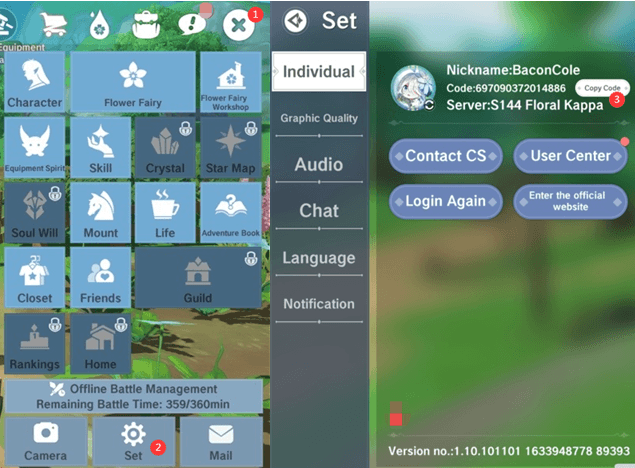
Note: Do not confuse your Character ID with your account username or linked social media ID. BitTopup uses your direct in-game Character ID to route the crystals to your specific character.
How to Recharge Cabala Crystals for The Legend of Neverland (SEA)
Recharging through BitTopup is direct and straightforward:
- Select the Cabala Crystal denomination you want to purchase from the product catalog above.
- Enter your Character ID in the designated input field.
- Verify your character details and confirm the order amount.
- Choose your preferred payment method from the checkout options available.
- Complete the payment process.
- Return to The Legend of Neverland client. Your Cabala Crystals will be credited directly to your account or delivered via your in-game mail.
Safe Character ID Recharge vs Risky Account Sharing
Protecting your gaming account is critical. Third-party services that ask for your Google, Apple, Facebook, or Line login information put your personal data and in-game assets at severe risk.
- Zero Password Requirement: BitTopup operates strictly via direct Character ID transfer. We will never ask for your password, secondary PIN, or two-factor verification codes.
- Protection Against Bans: Unauthorized login sharing violates publisher terms of service and can lead to permanent account penalties or black market chargeback bans. Character ID top-ups avoid this risk entirely.
- Scam Protection: Avoid suspicious third-party crystal generator tools or hacked APKs that promise free crystals. These programs are designed to steal account tokens and compromise your device security.
Supported SEA Regions and Account Verification
This recharge service is configured specifically for The Legend of Neverland (SEA) published server pool. It covers players located in and playing on servers dedicated to:
- Thailand (TH)
- Indonesia (ID)
- Philippines (PH)
- Malaysia (MY)
- Singapore (SG)
- Vietnam (VN)
Before placing your order, ensure your game client was downloaded from a Southeast Asian app store or official SEA portal. If you play on the Global, Taiwan/Hong Kong/Macau, or European releases, top-ups processed under the SEA SKU will not link to your character.
Troubleshooting Delivery Status and Common Top-Up Errors
If you experience any delay after completing checkout, follow these troubleshooting checks:
- Restart the Client: Close The Legend of Neverland completely and relaunch it. Server synchronization often updates your crystal counter after a fresh login.
- Check In-Game Mail: Certain special promotions, bonus bundles, and first-recharge gifts arrive inside your mailbox rather than going straight into your numerical balance.
- Verify Your Character ID: Check your receipt to make sure there was no typo in the Character ID submitted during checkout.
- Contact 24/7 Support: If your balance does not update, reach out to BitTopup customer support with your Order Number and Character ID for swift resolution.
Frequently Asked Questions
How do I find my Character ID in The Legend of Neverland?
Tap your character avatar in the upper-left corner of the screen. Your Character ID is listed directly in your profile summary next to your character name.
Do I need to share my password to recharge Cabala Crystals on BitTopup?
No. You only need to provide your in-game Character ID. BitTopup will never request your login email, social account passwords, or verification codes.
What are Cabala Crystals used for in The Legend of Neverland?
Cabala Crystals are used to summon 6-star Flower Fairies, purchase Miru growth items, unlock mount upgrades, expand inventory space, and buy stamina or daily dungeon entry resets.
How long does it take for Cabala Crystals to reflect in my game account?
Orders are processed automatically upon successful payment. In most cases, your crystals will appear in your account balance or in-game mailbox shortly after checkout.
Can I recharge Cabala Crystals for a friend using their Character ID?
Yes. As long as you know your friend's correct Character ID and confirm they play on the SEA server, you can enter their ID at checkout to send crystals directly to their account.
What should I do if my Cabala Crystals have not arrived after checkout?
First, restart your game client and check your in-game mailbox. If the crystals still have not appeared, contact BitTopup customer support with your order number and Character ID for immediate assistance.