




Age of Apes Top Up: What Are Ape Coins and How to Use Them
Ape Coins are the primary premium currency in Age of Apes. Unlike standard resources like Food, Iron, and Batteries that your troops gather on the map, Coins give you direct access to the most valuable upgrades, speedups, and exclusive packs across your outpost.
When you buy Age of Apes coins, they are credited to your account balance. In-game, Coins act as universal tokens that can be exchanged for any package in the store at a 1:1 value ratio with standard in-app purchases. This gives you complete flexibility over direct pack purchases.
| Item / Feature | How Coins Are Used | Strategic Benefit |
|---|---|---|
| VIP Points | Direct purchase in the VIP menu | Unlocks permanent building, research, and march speed boosts |
| Recruitment Discs | Exchange for Vinyl Discs and CDs | Summons elite Fighters to lead your monkey troops |
| Speedups | Purchase universal and building speedups | Cuts days off high-tier City Hall and research upgrades |
| Daily Special Packs | Buy targeted growth bundles | Provides guaranteed Fighter shards and resource chests |
| Event Passes | Unlock premium event milestone tiers | Grants exclusive march skins, avatar frames, and massive rewards |
Using Coins gives you the freedom to hold currency on your account and spend it instantly when limited-time flash events, rocket-building competitions, or cross-server battles launch.
How to Find Your Age of Apes Player ID and Nick Name
To complete an Age of Apes direct top up on BitTopup, you only need your in-game Player ID (UID) and Nick Name. No login details or passwords are ever required.
Follow these steps to find your account credentials:
- Launch Age of Apes on your mobile device.
- Tap your Avatar icon in the top-left corner of the main screen.
- Your Nick Name is visible at the top of the Profile window.
- Look for your Player ID (a series of numbers) displayed next to or below your avatar details.
- Tap the small Copy icon next to your Player ID to copy it directly to your clipboard.
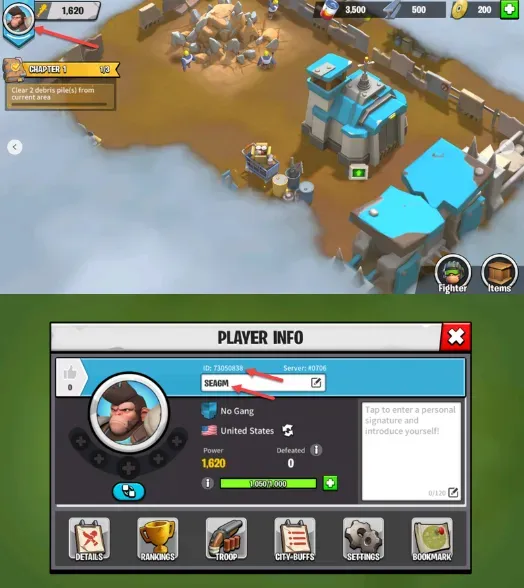
Double-check that both your Player ID and Nick Name match what is shown in your profile before completing your order. Providing both fields allows the delivery system to cross-verify your account and prevent crediting errors.
How to Recharge Age of Apes on BitTopup Step-by-Step
Recharging your Age of Apes account on BitTopup is straightforward and takes only a minute:
- Select Your Package: Choose the amount of Age of Apes Coins or the bundle denomination you want to purchase.
- Enter Your Account Information: Paste your Player ID into the
useridfield and enter your Nick Name into theusernamefield. - Review Your Selection: Verify that your Player ID numbers are accurate.
- Proceed to Checkout: Check the live prices displayed on the checkout interface and select your preferred payment option from the available global and local payment methods.
- Receive Your Coins: Confirm your payment. Once processed, the Coins are delivered directly to your Age of Apes account in-game.
Best Strategies to Spend Coins and Get Power Quickly in 2026
Spending your Coins efficiently determines how fast your troop power grows and how well your alliance competes in the rocket race. Here are the top strategies to maximize your account progression:
Prioritize VIP Level Progression
Investing Coins into VIP points early pays long-term dividends. Reaching higher VIP levels unlocks permanent construction speed boosts, research speed increases, extra daily free chests, and exclusive legendary Fighter shards. The permanent production buffs you gain from VIP status outperform one-time resource purchases.
Focus on City Hall and Tech Upgrades
Your City Hall level dictates your maximum troop tier, march capacity, and building access. Use Coin-purchased speedups during alliance building events to push your City Hall straight to Tier 4 (T4) and Tier 5 (T5) troop unlock levels. Always pair speedup usage with active alliance help and territory buffs to reduce Coin expenditure.
Target High-Impact Fighter Recruitment
Fighters lead your troops in PvP combat, resource defense, and mutant ape raids. Instead of spending Coins on random standard pulls, save your Coins for special recruitment events where specific top-tier Fighters are featured. Focus on leveling their primary active skills first to gain maximum combat advantages on the battlefield.
Save Coins for Server Events and Rocket Launches
Every major server milestone and seasonal event features point leaderboards with massive reward tracks. Coordinate your Coin spending with events like Rocket Launch Stages, Cross-Server KvK skirmishes, and Top Commander challenges. Spending Coins during these events yields double value by unlocking milestone rewards while you upgrade your base.
Account Safety: 100% Safe UID Recharge Without Password Sharing
Account security is critical when purchasing game currencies. BitTopup uses a direct UID top-up method that protects your account data at all times:
- Zero Password Requirements: You never share your game password, Google account, Apple ID, or social logins.
- No Account Access: No third party logs into your game account. Your active session remains entirely uninterrupted.
- Direct Crediting: Coins are sent directly through the game's official UID delivery API, ensuring full compliance with account safety standards.
- Data Privacy: Your payment details and personal information are encrypted using industry-standard security protocols during checkout.
Because direct top-ups only require public identifiers (Player ID and Nick Name), your account remains fully in your control with zero risk of unauthorized access.
Troubleshooting Age of Apes Coin Delivery and Common Order Issues
If you experience any delay or issue with your Age of Apes top up, use the following troubleshooting checklist:
- Restart the Game: Close the Age of Apes application completely and relaunch it. This forces the game client to refresh its balance from the game servers.
- Check the In-Game Mailbox: In some instances, event packs or purchased Coin items are delivered as claimable attachments in your system mail.
- Verify Transaction Status on BitTopup: Log in to your BitTopup account and check your order history to confirm that your payment has finished processing.
- Incorrect UID Entered: If you accidentally entered the wrong Player ID, contact BitTopup 24/7 customer support immediately with your order number, the correct Player ID, and your Nick Name.
- Contact Support: If your balance has not updated after a short period, reach out to the BitTopup 24/7 live support team with your order ID for immediate assistance.
Frequently Asked Questions About Age of Apes Top Up
How to find my Player ID and Nick Name in Age of Apes?
Open Age of Apes and tap your Avatar in the top-left corner of the screen. Your Nick Name is displayed at the top of your Profile, and your Player ID is the number string located directly on the profile window. Tap the copy icon next to the ID to copy it.
What can I purchase with Age of Apes Coins?
Age of Apes Coins can be spent in the in-game shop to buy special bundles, daily packs, VIP points, recruitment discs, speedups, and resource chests. Coins can substitute for direct purchases across almost all in-game store packages.
Do I need to share my game login password to recharge?
No. BitTopup only requires your public Player ID and Nick Name. You never need to provide your game password, linked email, or verification codes.
How to get power quickly in Age of Apes?
To gain power quickly, push your City Hall level to unlock higher troop tiers, invest Coins into VIP levels for permanent research and build speed buffs, upgrade military technologies in your Research Lab, and recruit high-tier Fighters during recruitment events.
Is Age of Apes free to play?
Yes, Age of Apes is free to download and play on iOS and Android. In-game currencies like Ape Coins are optional purchases designed to accelerate base progression, troop training, and Fighter upgrades.
What should I do if my Age of Apes coins have not arrived?
First, restart your game app to refresh server data and check your in-game mailbox. If the coins do not appear, check your order status on BitTopup and contact the 24/7 customer support team with your order number for fast resolution.