




Age of Empires Mobile Top Up: Instant Player ID Recharge
Dominating the battlefield in Age of Empires Mobile requires rapid kingdom expansion, advanced military technologies, and elite legendary commanders. Upgrading your town center, recruiting troops, and sustaining heavy siege warfare demands steady supplies of premium currency.
BitTopup provides a direct, secure way to purchase your Age of Empires Mobile currency without sharing private credentials or account passwords. With direct top-ups credited via your unique Player ID, your resources and packs are delivered straight to your in-game mailbox so you can focus on leading your alliance to victory.
What are Apex Coins and Empire Coins in Age of Empires Mobile?
Understanding the currency system in Age of Empires Mobile ensures you maximize the value of every purchase:
- Empire Coins: The primary premium currency used directly in the in-game shop. You spend Empire Coins to hire legendary heroes, buy speed-ups, acquire massive resource bundles, unlock VIP levels, and participate in limited-time recruit events.
- Apex Coins: The official direct top-up exchange currency. When you buy Apex Coins, they credit directly to your account balance, allowing you to convert them directly into Empire Coins or purchase special in-game privilege cards and daily gift packs.
| Currency Type | Primary Purpose | How It Is Used |
|---|---|---|
| Apex Coins | Top-Up Balance / Direct Pack Conversion | Credited to account for 1:1 pack redemption and coin conversion |
| Empire Coins | In-Game Shop Premium Currency | Used for Hero summons, VIP upgrades, speed-ups, and building queues |
| Food / Wood / Stone / Gold | Standard Base Resources | Farmed or purchased with Empire Coins for troop training and upgrades |
Step-by-Step Guide: How to Find Your Age of Empires Mobile Player ID
To ensure your recharge arrives accurately and immediately, you only need to provide your in-game Player ID. Follow these steps to find it:
- Launch Age of Empires Mobile on your mobile device.
- Tap your Avatar/Profile Icon in the top-left corner of the main city screen.
- Locate your profile summary. Your Player ID (a series of numbers) is displayed right next to your profile avatar and username.
- Tap the Copy button next to your Player ID to copy the numerical string directly to your clipboard.
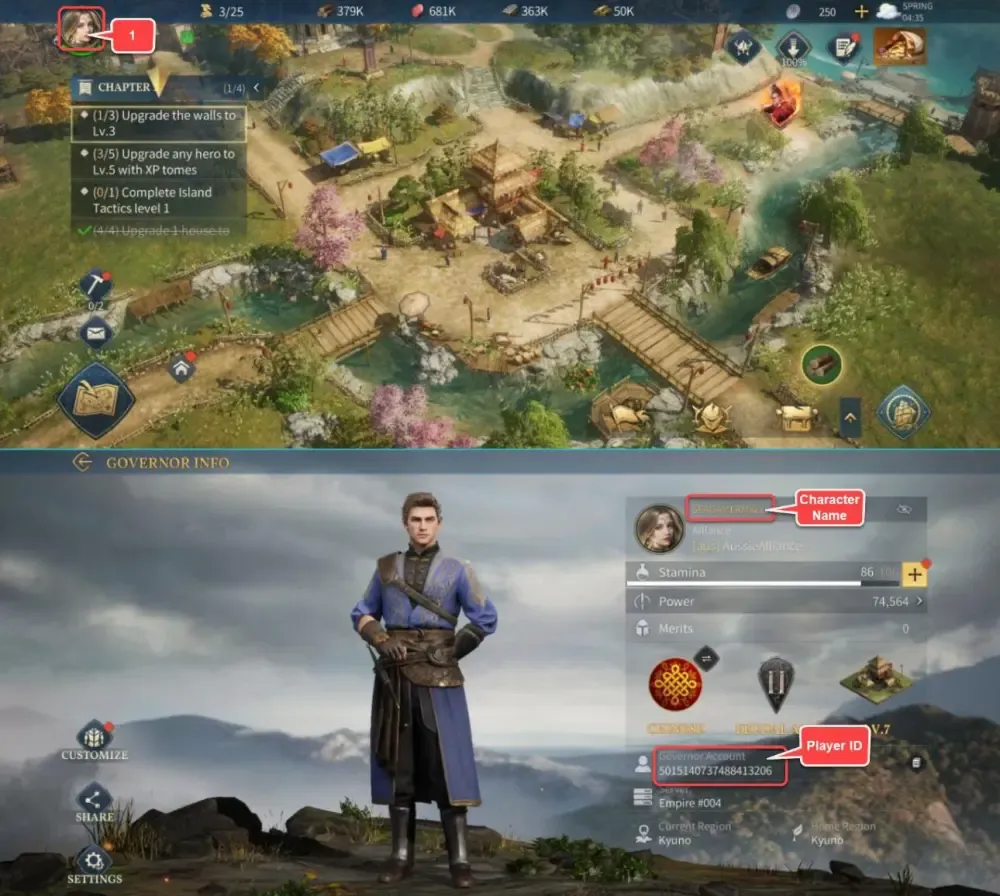
Your Player ID is permanently tied to your character profile. Even if your kingdom undergoes a server merge, an Era transition, or a kingdom relocation, your Player ID remains the same.
How to Recharge Age of Empires Mobile Coins on BitTopup
To get your currency delivered quickly, follow this simple process:
- Select your desired denomination of Empire Coins or Apex Coins from the product catalog.
- Enter your Player ID accurately in the required field.
- Check the checkout screen to verify your current order total and select your preferred payment method.
- Complete the payment transaction.
- Open Age of Empires Mobile and check your in-game balance or mail system to confirm the arrival of your coins.
What Can You Buy with Empire Coins (Heroes, Speeds, Resources & Event Packs)?
Empire Coins provide the tactical flexibility needed to stay ahead of rival alliances:
- Legendary Commander Recruitment: Acquire legendary figures like King Arthur, Joan of Arc, and Alexander the Great through premium recruitment pools to lead your specialized cavalry, archer, or infantry legions.
- Building & Research Speed-ups: Cut down multi-day upgrade timers on your Town Center, Academy, and Military Barracks instantly.
- Resource Bundles: Instantly replenish Food, Wood, Stone, and Gold when preparing for major alliance wars or repairing defenses after heavy attacks.
- VIP Privileges: Advance your VIP level to unlock permanent construction speed buffs, extra gathering queues, and daily legendary hero statues.
- Seasonal Event Rewards: Participate in rotating 2026 server events, kingdom tournaments, and exclusive seasonal lucky wheels.
Is It Safe to Recharge AOE Mobile with Only a Player ID?
Yes. Direct top-ups via Player ID offer the highest standard of account security:
- No Password Required: BitTopup never asks for your email login, Apple ID, Google Play credentials, or passwords.
- Zero Risk of Account Hijacking: Because you never share login credentials, your account remains fully protected against unauthorized access.
- Official System Routing: Direct top-ups utilize standard game server delivery pipelines, ensuring the transaction is clean and fully compliant with game guidelines.
Common Top-Up Mistakes and How to Avoid Delivery Delays
To avoid any interruption in delivery, keep these tips in mind:
- Do Not Confuse Username with Player ID: Your in-game display name is customizable and can change. Always use the numerical Player ID copied directly from your profile.
- Avoid Spaces or Special Characters: Paste the numeric ID directly without accidental trailing spaces.
- Verify Server Maintenance Windows: If Age of Empires Mobile is undergoing scheduled server updates or major patch maintenance, deliveries may credit immediately after the servers reopen.
Age of Empires Mobile Top Up Troubleshooting & Order Support
If your coins do not appear within a few minutes of purchase, follow these troubleshooting steps:
- Restart the Game Client: Force-close Age of Empires Mobile and reopen it to refresh your connection with the game server.
- Check the In-Game Mailbox: Some event bundles or coin deliveries arrive as claimable mail attachments rather than direct balance adjustments.
- Verify Your Order History: Check your BitTopup order status to confirm that the transaction was completed successfully.
- Contact 24/7 Support: If your balance has not updated, reach out to BitTopup customer support with your Order Number and Player ID for rapid resolution.
Frequently Asked Questions
What is the difference between Apex Coins and Empire Coins in Age of Empires Mobile?
Apex Coins are the direct recharge currency that credits to your account upon checkout, allowing you to acquire in-game packs or convert them directly into Empire Coins. Empire Coins are the primary currency used inside the in-game shop for recruitments, speed-ups, and building upgrades.
How do I find my Age of Empires Mobile Player ID?
Tap your character avatar in the upper-left corner of the main screen. Your numeric Player ID is shown directly beside your profile name. Tap the copy icon next to it to copy the numbers accurately.
Do I need to share my game account password to top up on BitTopup?
No. You never need to share passwords, verification codes, or third-party login credentials. BitTopup only requires your public Player ID to send coins directly to your account.
How to use Apex Coins in Age of Empires Mobile?
Once Apex Coins are credited to your account, open the in-game store. When purchasing packs, daily promotions, or coin bundles, select Apex Coins as your payment method at checkout inside the game.
How quickly will my Empire Coins arrive after completing payment?
Orders are processed through an automated delivery system right after payment confirmation. In most cases, items reflect in your account within a few moments.
What should I do if my Player ID was entered incorrectly?
If you realize you provided the wrong Player ID, contact BitTopup customer support immediately with your order details. If the order has not yet been dispatched to the game server, support staff can correct the ID for you.
Can I recharge Age of Empires Mobile for a friend using their Player ID?
Yes. You can top up an account for a friend or alliance member simply by entering their numeric Player ID at checkout. The coins will be delivered directly to their in-game account.