



Golden Spatula SEA Top Up: Direct In-Game Recharge
Golden Spatula is the official mobile strategy auto-battler set in the League of Legends universe, built specifically for tactical competition across Southeast Asia. In Golden Spatula, players build synergies, recruit champions, equip items, and adapt their boards across fast-paced rounds to outlast seven opponents.
Upgrading your tactical journey requires in-game currency to unlock exclusive Little Legends, mythic arena skins, custom boom strike effects, and seasonal battle passes. A direct Golden Spatula SEA top up on BitTopup allows you to credit RP and tokens straight to your player profile using only your User ID. All transactions process through secure gateways, ensuring your account receives its currency immediately without sharing login credentials.
How to Recharge Golden Spatula (SEA) on BitTopup Using User ID
Recharging your Golden Spatula account takes less than a minute. Follow these simple steps to complete your purchase:
- Select Your Currency Package: Browse the available Golden Spatula RP denominations and select the bundle you wish to purchase. Current live pricing is shown directly in the catalog selection box.
- Enter Your User ID: Type or paste your Golden Spatula numeric User ID into the designated input field.
- Confirm Your Server: Verify that your game client is registered within the Southeast Asia (SEA) server region.
- Proceed to Checkout: Choose your preferred payment method and finalize the order.
- Receive Your In-Game Currency: Open or restart your Golden Spatula game client. Your RP balance will update automatically upon transaction confirmation.
Step-by-Step Guide: Where to Find Your Golden Spatula User ID
To ensure your top up arrives without delay, make sure you copy your exact User ID from inside the game client.
- Launch the Golden Spatula application on your mobile device and log in to your account.
- Tap your Avatar Profile icon located in the upper-left corner of the main lobby screen.
- Open the Basic Info or profile overview tab.
- Locate your numeric User ID (UID) displayed beneath your player nickname.
- Tap the Copy button next to your User ID to copy the full string to your clipboard.
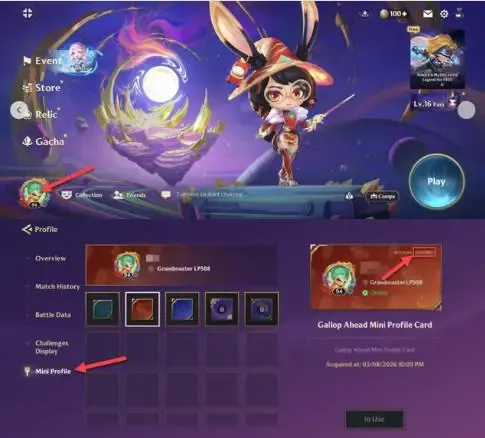
Always double-check that you paste the exact digits into BitTopup before checking out. You do not need to provide your account password or linked email address.
Supported Southeast Asian Countries and Server Compatibility
Golden Spatula (SEA) is tailored for players across Southeast Asian territories. Before purchasing, confirm that your game client connects to one of the supported regional servers listed below:
| Country / Territory | Regional Server Support | Platform Availability | Login Methods Supported |
|---|---|---|---|
| Singapore | Dedicated SEA Server | iOS / Android | Riot Account, Google, Apple ID, Facebook |
| Malaysia | Dedicated SEA Server | iOS / Android | Riot Account, Google, Apple ID, Facebook |
| Thailand | Dedicated SEA Server | iOS / Android | Riot Account, Google, Apple ID, Facebook |
| Philippines | Dedicated SEA Server | iOS / Android | Riot Account, Google, Apple ID, Facebook |
| Indonesia | Dedicated SEA Server | iOS / Android | Riot Account, Google, Apple ID, Facebook |
| Other SEA Territories | Regional Routing | iOS / Android | Riot Account, Google, Apple ID, Facebook |
Note: Golden Spatula accounts registered on Chinese mainland servers or standard global TFT Mobile clients operate on separate server architectures and cannot receive top ups through the SEA catalog.
Account Safety: Why You Never Need to Share Your Password
Account integrity is the top priority for any player. BitTopup uses direct player identification protocols to deliver your items:
- Zero Login Requirement: You never have to share your password, Riot account credentials, social logins, or one-time verification codes (2FA).
- No Account Handover: Your account remains completely in your hands during and after the transaction.
- Safe Direct Credit: Currency is routed directly to the database record linked to your public User ID.
- Complete Data Privacy: Your personal information is encrypted according to modern web security standards.
Because third-party account access is never required, your account remains 100% compliant with standard terms of service, preventing security locks or unauthorized modifications.
Available Golden Spatula Currency Bundles and In-Game Rewards
Purchasing RP and Spatula tokens unlocks access to the full cosmetic and competitive catalog in Golden Spatula:
- Seasonal Battle Pass: Complete daily and weekly quests to earn exclusive Little Legends, emote wheels, star shards, and board themes.
- Exclusive Mythic Little Legends: Unlock high-tier tacticians featuring unique celebration animations and lobby interactions.
- Interactive Board Arenas: Equip custom arenas with reactive environmental elements that change according to your win streaks and health totals.
- Finisher & Boom Effects: Personalize the attack animations that blast opponent tacticians when you win a round.
- Gacha & Treasure Chests: Roll on time-limited event banners for rare collectors items and prestige tactician skins.
Live item prices, bundle sizes, and currency packages are maintained directly on the BitTopup product page so you always see current market rates.
Delivery Speed, Order Verification, and Customer Support
Orders submitted on BitTopup process through direct automated fulfillment queues. Here is what to expect after completing your transaction:
- Instant Dispatch: Most orders credit to your Golden Spatula account within seconds of payment completion.
- In-Game Verification: If your balance does not refresh immediately, restart the Golden Spatula app to force a client-server sync.
- Order Tracking: You can view the real-time status of your recharge directly inside your BitTopup account dashboard.
- 24/7 Dedicated Support: If an unexpected delay occurs or if you have questions regarding your order status, our customer support team is available around the clock to assist you. Keep your order number and transaction receipt ready for swift resolution.
Frequently Asked Questions About Golden Spatula SEA Top Up
In which countries is Golden Spatula SEA available?
Golden Spatula SEA is officially accessible to players across Southeast Asian markets, including Singapore, Malaysia, Thailand, the Philippines, Indonesia, and surrounding regional territories on both iOS and Android platforms.
How do I find my Golden Spatula User ID for top up?
Open the Golden Spatula app, tap your profile avatar in the upper-left corner of the lobby screen, and view your profile summary. Your numeric User ID is displayed under your player name. Tap the copy icon beside it to copy the number.
Do I need to provide my game account password to recharge?
No. Recharging through BitTopup only requires your numeric User ID. You never need to provide your password, security codes, or social media logins.
What is the difference between Golden Spatula and TFT Mobile?
Golden Spatula is a standalone, mobile-first auto-battler developed specifically with customized user interfaces, unique seasonal game modes, exclusive tacticians, and regional events optimized for mobile performance, whereas standard TFT Mobile is a direct cross-platform port of the PC Teamfight Tactics client.
How long does it take for Golden Spatula RP to arrive after purchase?
Recharges typically arrive within seconds after payment authorization. If you are already logged in when the top up completes, restart your game app to see your updated RP balance.
What should I do if I entered the wrong User ID during recharge?
Because top ups are processed instantly to the ID provided, always double-check your UID before finalizing payment. If an incorrect ID was entered, contact BitTopup customer support immediately with your order details so our team can check if the transaction is still pending in the queue.