



Racing Master LATAM Top Up: Direct In-Game Recharge with User ID
Racing Master delivers authentic physics, officially licensed supercars, and competitive real-time multiplayer tracks across global circuits. To build your dream garage, secure rare vehicle blueprints, and install high-performance tuning components, you need a steady supply of in-game gems.
BitTopup provides a direct, secure method to complete your Racing Master LATAM recharge. By using your in-game User ID, gems are sent straight to your Latin America game profile without requiring your account login credentials or passwords.
How to Recharge Racing Master (LATAM) Gems on BitTopup
- Select the gem package you want to purchase from the product catalog above.
- Enter your Racing Master User ID in the designated field.
- Verify that your game account is registered on the Latin America (LATAM) server.
- Click Buy Now and select your preferred payment option.
- Complete the checkout process. Once confirmed, reopen your Racing Master game client to see your updated gem balance.
Step-by-Step: How to Find Your Racing Master User ID in Game
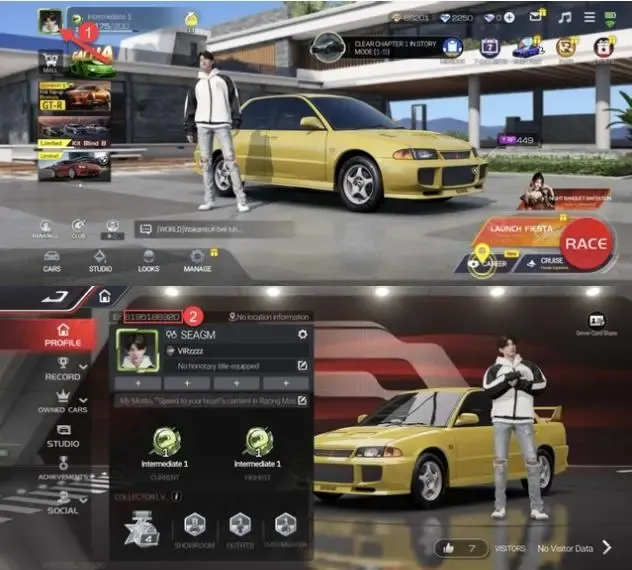
Locating your Racing Master User ID is quick and does not require browsing through complicated settings menus. Follow these steps on your mobile device:
- Open the Racing Master app and log in to your account.
- On the main garage or lobby screen, tap your Avatar / Profile Icon located in the top-left corner.
- Stay on the main Personal Info tab.
- Locate your User ID (UID), which is an alphanumeric string displayed below your racer name.
- Tap the Copy icon next to your UID to copy it directly to your clipboard.
- Paste this ID into the User ID field on BitTopup to avoid typing mistakes.
Racing Master LATAM Gems Packages and In-Game Value
In-game gems serve as the primary premium currency in Racing Master. They allow drivers to participate in vehicle gacha pools, purchase limited-time bundles, upgrade mechanical components, and acquire exclusive styling kits. Live pricing for each package is displayed directly on the BitTopup storefront selection grid.
| Gem Package Tier | Primary In-Game Purpose | Recommended For |
|---|---|---|
| Starter Pack (Small) | Daily stamina refills, basic part crates, routine repairs | Casual daily racers looking for quick maintenance |
| Performance Pack (Medium) | Specialized ECU tuning, performance tire sets, custom paint | Drivers focusing on competitive ranked ladder tuning |
| Gacha Draw Pack (Large) | 10x Lucky Draws for Tier-1 Supercars (Ferrari, Lamborghini, Porsche) | Collectors targeting exclusive vehicle banner drops |
| Master Collector Pack (XL) | Complete legendary car mastery, VIP event passes, widebody kits | Hardcore track competitors aiming for top leaderboard times |
What You Can Unlock with Gems in Racing Master
Having sufficient gems directly impacts your vehicle performance, track competitiveness, and garage presentation. Here is what you can acquire using your recharged gems:
- Supercar Lucky Draws: Pull for legendary licensed vehicles from manufacturers like Ferrari, Lamborghini, Aston Martin, BMW, and Porsche. Gems let you purchase lucky draw tickets during rate-up banners.
- ECU & Engine Tuning Kits: Upgrade your engine output, turbo boost efficiency, suspension damping, and brake responsiveness to shave seconds off your lap times.
- Aesthetic Customization: Unlock exclusive racing liveries, carbon fiber body kits, custom wheel rims, tire smoke effects, and neon underglow.
- Seasonal Battle Pass & Event Access: Unlock premium tiers of the seasonal track pass for exclusive driver outfits, vehicle blueprints, and bonus gold.
Server Compatibility and LATAM Regional Restriction Guidelines
This specific recharge page is configured exclusively for the Latin America (LATAM) server of Racing Master.
- Regional Verification: Your account must have been created within the Latin America region. Recharging an account registered on Asian, European, or North American regional servers through this page will result in delivery failures or delayed crediting.
- Client Matching: Make sure your mobile app client corresponds to the LATAM distribution before submitting your order.
- No Cross-Server Transfers: Game publishers do not support transferring gems between different regional servers once the currency is credited to a UID.
Why Direct User ID Recharge Is Safer Than Account Sharing
Keeping your gaming account safe is critical. BitTopup uses direct UID crediting, which offers major security advantages over third-party account logins:
- Zero Password Requirements: You never share your Google, Apple ID, Facebook, or NetEase login passwords with anyone.
- No Account Lockouts: Since no external IP or unfamiliar device logs into your profile, your account will not trigger automated security flags or anti-cheat bans.
- Instant Direct Crediting: Purchases are processed directly through the official server communication channels straight to your account UID.
- Data Privacy: Your personal credentials remain completely private on your personal device.
Delivery Troubleshooting and Customer Support for BitTopup Orders
If you have completed your purchase but your gems do not appear immediately in your account, follow these standard troubleshooting steps:
- Restart Your Game App: Completely close the Racing Master application from your device task manager and relaunch it. This forces a fresh synchronization with the server.
- Check Your In-Game Mailbox: Some promotional items or bonus currency packs are sent directly to your in-game mail system rather than added to the top gem counter instantly.
- Verify Your Submitted UID: Check your BitTopup order receipt to confirm that the User ID you entered matches your in-game profile exactly.
- Contact 24/7 Support: If your order status shows completed but your balance has not updated after restarting, reach out to the BitTopup customer service team with your Order ID and UID. Our support staff is available around the clock to assist you.
Frequently Asked Questions
How do I find my User ID in Racing Master (LATAM)?
Open the game, tap your player avatar in the top-left corner of the lobby screen, and locate the numeric UID shown beneath your racer name on the Personal Info tab. Tap the copy icon next to it to copy your ID.
Do I need to provide my game account password to recharge Racing Master?
No. BitTopup only requires your in-game User ID. You never need to share your account password, email login, or two-factor authentication codes.
Can I recharge an account registered outside the Latin America region?
No. This product is strictly locked to accounts created on the Latin America (LATAM) server. Submitting a UID from other regional servers may lead to failed processing or lost credits.
How long does it take for Racing Master gems to appear in my account?
Delivery processes immediately after payment verification. In most cases, gems appear within minutes. Restarting your game app will refresh your currency balance.
What can I purchase with gems in Racing Master?
You can spend gems on vehicle gacha draws for licensed supercars, engine and performance tuning upgrades, cosmetic visual kits, seasonal battle passes, and stamina refills.
What should I do if I entered the wrong User ID during checkout?
If your order has not yet been processed by the system, contact BitTopup customer support immediately with your order details and the corrected User ID. If the gems have already been delivered to the entered ID, the transaction cannot be reversed.