

Ragnarok M Classic Top Up – Direct UID Recharge
Powering up your character in Rune Midgarts requires steady resources, equipment upgrades, and vital items. A direct Ragnarok M Classic top up on BitTopup allows you to acquire the currency and packages you need to progress through challenging dungeons, dominate Guild Wars, and secure high-tier MVP loot.
BitTopup provides a direct-to-account recharge process that requires only your User ID. You never have to share account passwords or sensitive login credentials. Select your desired package, enter your UID, and receive your items directly in your in-game profile with full account safety.
Overview of Ragnarok M Classic Currency and In-Game Economy
The economy of Ragnarok M Classic centers around core resources that dictate character progression, combat efficiency, and market trading:
- Zeny: The primary currency for purchasing crafting materials, trading on the Exchange, buying daily consumables, and paying for gear refinement or card slotting.
- Premium Memberships & Passes: Monthly passes and special service tickets that grant bonus daily stamina, extra storage space, stat boosts, and increased drop rates.
- Special Event Packs & Bundles: Timed packages containing refinement materials, headwear vouchers, and rare gacha currencies to give your build a decisive edge in PvE and PvP.
Maintaining a solid reserve of Zeny and premium items ensures you can immediately purchase rare cards from the Exchange, craft critical gear sets, and reset your skill or stat builds whenever your team composition demands it.
How to Recharge Ragnarok M Classic on BitTopup
Recharging your Ragnarok M Classic balance takes only a few quick steps:
- Select Your Item: Choose the Ragnarok M Classic package, Zeny tier, or service bundle you wish to purchase from the catalog list.
- Enter Your User ID: Type your exact numerical User ID into the required input field.
- Review Your Details: Confirm that your UID matches your active character to prevent misdirected orders.
- Proceed to Checkout: Select your preferred payment method on the secure checkout screen.
- Receive Your Items: Once the order completes, open Ragnarok M Classic to see your updated balance or check your in-game mailbox.
Note: Exact pricing, package variants, and regional availability are displayed live on the checkout interface.
How to Locate Your In-Game User ID Accurately
Your User ID (UID) is the unique identifier tied to your character data. Providing the correct UID ensures your purchase arrives directly in your inventory without delay.
Step-by-Step UID Retrieval:
- Open Ragnarok M Classic on your device and log into your account.
- Select and enter the game world with your active character.
- Tap your Character Avatar in the top-left corner of the main screen.
- Open your character profile page.
- Locate your User ID (UID), which appears as a series of numbers near your character name and level.
- Tap the copy icon next to the number or carefully write it down.
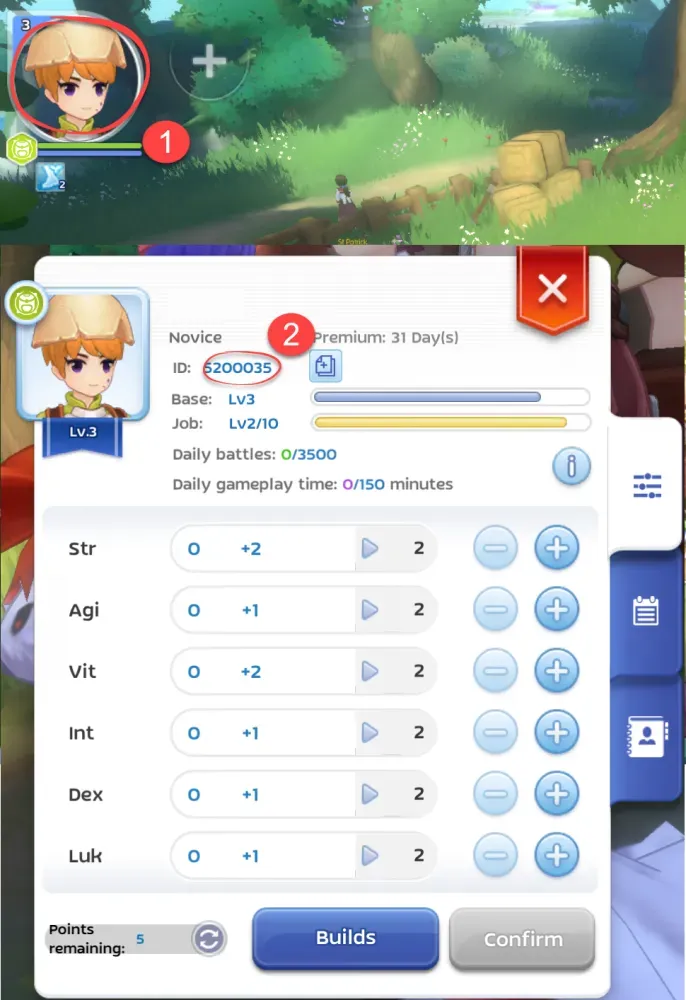
Double-check that you do not include extra spaces or omit any digits when pasting your UID into the order field on BitTopup.
Safe and Passwordless Account Top-Up on BitTopup
Account safety is essential when purchasing in-game resources online. BitTopup uses a direct UID-only delivery protocol designed to keep your personal data secure:
- No Account Passwords Required: You never need to provide your Google, Apple, Facebook, or third-party login details. The transaction is handled entirely through public server identifiers.
- No Account Sharing: Your login session is never accessed by external operators, eliminating the risk of unauthorized account alterations or suspensions.
- Secure Payment Processing: All payment paths utilize standard encryption protocols to protect your billing information.
- Order Tracking Support: Every transaction generates a distinct order receipt, allowing you to monitor fulfillment status in real time.
Supported Regional Server Options & Currency Delivery Verification
Ragnarok M Classic serves players across regional environments, notably South East Asia (SEA) and global clusters. Selecting the correct server package ensures accurate delivery.
| Recharge Parameter | Platform Specification | Player Verification Method |
|---|---|---|
| Identifier Required | Numerical User ID (UID) | Top-left character profile screen |
| Crediting Channel | Direct server transmission | Automatic wallet update or in-game mail |
| Account Security | 100% passwordless UID entry | No third-party login access required |
| Regional Coverage | South East Asia & Global clusters | Matched via live catalog selection |
Where to Find Your Delivery In-Game:
- Direct Balance Updates: Standard Zeny and currency denominations typically credit straight to your main wallet balance upon login or client refresh.
- In-Game Mailbox: Certain promotional bundles, VIP passes, or ticket items arrive via the in-game system mail. Open your mail tab from the main menu and claim the attached rewards.
Troubleshooting Common UID and Delivery Issues
If you experience any issues after completing your order, follow these troubleshooting steps:
- Recharge Has Not Appeared: * Wait a few moments for the game server to synchronize. * Completely close the Ragnarok M Classic application and relaunch it. * Switch maps or relog into your character to force a balance update. * Check your in-game mailbox for claimed package tokens.
- Entered an Incorrect User ID: * Check your order confirmation receipt immediately to see what UID was submitted. * Contact BitTopup 24/7 customer support right away with your Order ID. * If the order has not yet processed to the server, support can help correct the destination ID.
- Server Maintenance Windows: * If the official game servers are down for maintenance or patch updates, deliveries will process automatically as soon as the servers reopen.
Frequently Asked Questions
How do I recharge Ragnarok M Classic on BitTopup?
Select your required package, enter your in-game User ID (UID), review your order details, and complete your purchase using the available payment options on the checkout screen. Your items will be sent directly to your character.
Where can I find my Ragnarok M Classic User ID?
Log into your character, tap the character avatar in the top-left corner of the screen, and view your profile. Your numerical User ID is displayed next to your character name with a quick-copy button.
Do I need to share my game account password to top up?
No. BitTopup requires only your public User ID to credit your account. You should never share your password, social login credentials, or verification codes with anyone.
How long does it take for the recharge to arrive in my account?
Orders are processed through direct server transmission immediately after payment confirmation. In most cases, items appear in your wallet or in-game mailbox shortly after completing checkout.
What should I do if I provided an incorrect User ID?
Contact BitTopup customer support immediately through the live chat or support portal. Provide your order number and the correct User ID so our team can assist before the transaction is finalized on the server.
Can I recharge Ragnarok M Classic for different servers?
Yes, as long as you select the package corresponding to your server region (such as South East Asia) and provide the correct User ID associated with your character on that server.