

Overview of Roblox Japan Top Up and JPY Digital Codes
Roblox Japan digital gift cards provide a fast, secure method to add Japanese Yen (JPY) balance directly to your Roblox account. When you complete a Roblox Japan top up, you receive an authentic 10-to-16-digit alphanumeric digital PIN code. Redeeming this code credits your account balance in JPY, allowing you to buy Robux, purchase exclusive in-game items, acquire developer products, or subscribe to monthly Roblox Premium memberships.
Digital gift cards issued for the Japan region operate independently of credit cards, making them the preferred payment option for players seeking privacy, spending control, and access to region-exclusive promotional virtual items.
Step-by-Step Guide: How to Recharge Roblox with a Japan Digital Card
Redeeming your digital code takes less than two minutes. Roblox gift cards must be redeemed through an internet browser rather than inside the Roblox mobile application or console clients.
Redeeming on Desktop or Mobile Browser
- Log In: Open your preferred browser (Chrome, Safari, Edge, or Firefox) and go to the official redemption page at
roblox.com/redeem. Log into the Roblox account where you want the funds applied. - Enter Code: Copy the digital PIN code received from BitTopup and paste it into the Code input field.
- Click Redeem: Press the white Redeem button. A success message will appear confirming the JPY amount added to your balance.
- Convert to Robux or Premium: - Click Convert to Robux to immediately turn your entire newly credited balance into Robux. - Alternatively, keep the credit as account balance and use it during checkout when purchasing specific Robux packages or recurring Roblox Premium tiers.
How to Check Your Roblox Account Details and Region
Before you purchase or redeem a Japan code, verify that your account settings match the required currency region. While digital codes apply to your account profile directly via the browser redemption tool, confirming your account username and settings prevents regional activation conflicts.
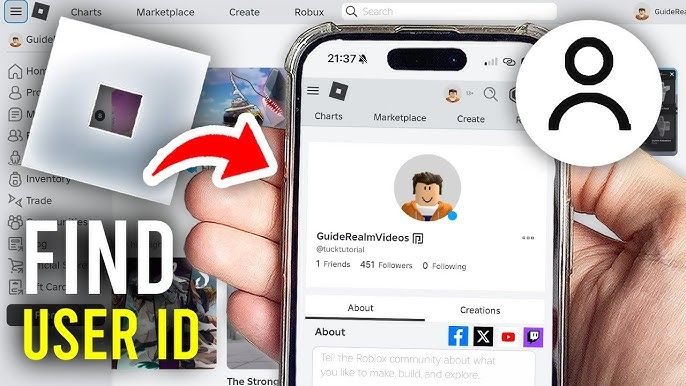
Finding Your Username and Checking Account Region
- Log into your account on
roblox.com. - Look at the upper right corner of your screen to confirm your display name and
@username. - Click the Gear icon (Settings) in the top-right corner and select Settings > Account Info.
- Under Personal, verify that your account location is set to Japan (JP) and that your primary balance display lists JPY (¥).
If you need your numeric User ID (UID) for profile verification, navigate to your profile page. The string of numbers located in the browser URL bar between users/ and /profile is your Roblox UID.
Roblox Japan JPY Denominations and Robux Conversion Rates in 2026
Roblox Japan gift cards come in fixed Japanese Yen denominations. Once added to your Roblox account balance, this JPY credit can be converted directly into Robux at official platform rates.
| Card Denomination (JPY) | Typical Robux Yield | Recommended Use Case |
|---|---|---|
| 1,000 JPY | ~800 Robux | Avatar accessories, game passes, small microtransactions |
| 1,500 JPY | ~1,200 Robux | Mid-tier cosmetics, limited items, monthly tier renewals |
| 2,000 JPY | ~1,700 Robux | Premium bundles, multiple game passes |
| 3,000 JPY | ~2,600 Robux | High-tier game items, developer assets, VIP passes |
| 5,000 JPY | ~4,500 Robux | Rare limiteds, extensive avatar wardrobe updates |
| 10,000 JPY | ~10,000 Robux | Bulk asset creation, group payouts, major experiences |
Note: Exact Robux yields and live product pricing fluctuate based on standard platform adjustments. Current purchase prices are displayed directly on the live BitTopup checkout page.
Japan Account Currency and Region Compatibility Rules
Roblox maintains strict regional currency alignment policies for gift card redemptions:
- Currency Matching: Roblox gift cards denominated in JPY are intended for accounts registered with Japan set as their primary country and JPY as their base currency.
- Cross-Region Limitations: If your account currency is set to USD, EUR, GBP, or another non-JPY denomination, the platform may block direct redemption with a currency mismatch error. Ensure your account profile reflects Japan before attempting activation.
- No Auto-Conversion on Mismatched Accounts: Unlike some multi-currency platforms, Roblox enforces strict region matching to prevent unauthorized cross-border arbitrage. Always ensure you purchase the card matching your account's regional settings.
Japan-Exclusive Bonus Virtual Avatar Items and Redemption Perks
Redeeming an authentic Roblox Japan digital gift card frequently qualifies your account for exclusive virtual avatar items. Each month, Roblox releases region-specific avatar accessories, such as custom hats, back accessories, shoulder pets, and themed gear that can only be obtained by redeeming codes tied to specific retail distributions in Japan.
- Automatic Grant: Bonus items are automatically added to your avatar inventory immediately upon successful code redemption at
roblox.com/redeem. - Collector Value: These virtual items are often limited to that specific calendar month and cannot be purchased directly through the standard Avatar Shop.
Fixing Common Roblox Gift Card Redemption and Activation Errors
If you run into an issue while applying your code, consult these solutions for common platform errors:
1. "Invalid PIN" or "Code Not Found"
- Typo Verification: Check for easily confused characters. For example, ensure you have not swapped the number
0with the letterO, or the number1with capitalIor lowercasel. - Strip Whitespace: Ensure no accidental spaces were copied at the beginning or end of your PIN code.
2. "An Unexpected Error Occurred" / Currency Mismatch
- Region Mismatch: Your account base currency might not match JPY. Go to your Account Settings to check your regional settings.
- Browser Extension Conflicts: Ad-blockers and script blockers can interrupt the verification token on the redemption page. Disable extensions or switch to an incognito/private browser window.
3. "Code Has Already Been Redeemed"
- Check your account balance at the top right of the screen or review your Billing / Transaction History tab under Account Settings. Often, the code went through successfully even if the browser timed out during submission.
Why Buy Roblox Japan Codes on BitTopup: Instant Delivery and Safe Checkout
BitTopup provides a streamlined, secure environment for digital gamers purchasing regional game cards:
- Safe, Password-Free Transactions: You never share your account password, security tokens, or private credentials. You receive an authentic digital code to redeem yourself.
- Instant Digital Delivery: Your digital key is generated on-screen immediately after payment processing and backed up to your confirmation email.
- Global and Local Payment Options: Complete your order using trusted international cards and local payment methods with full transaction encryption.
- Dedicated Customer Support: If you have questions regarding your order status or need redemption guidance, responsive customer support is available to assist.
Frequently Asked Questions About Roblox Japan Top Up
Where can I buy a Roblox Japan gift card online?
You can buy genuine Roblox Japan digital gift cards online through BitTopup. Select your desired JPY denomination, complete the checkout process, and receive your digital redemption code instantly on screen.
Can I redeem a Roblox Japan (JPY) code on an account outside Japan?
Roblox gift card codes are region-locked to the currency assigned to your account. To redeem a JPY card, your Roblox account country and currency settings must be set to Japan. Accounts registered in other currencies may encounter a currency mismatch error.
How much Robux do I get from a 1,000 JPY or 3,000 JPY Roblox card?
A 1,000 JPY card converts to approximately 800 Robux, while a 3,000 JPY card yields approximately 2,600 Robux when converted via the Roblox website. You can also apply this balance toward a Roblox Premium subscription.
Do Roblox Japan digital gift card codes expire?
No, Roblox digital gift card codes do not have an expiration date. Once purchased, you can hold the code or redeem it whenever you choose. Once redeemed, the credited JPY balance remains in your Roblox account until spent.
How do I redeem my Roblox Japan gift card code?
Visit roblox.com/redeem on any web browser, log into your Roblox account, enter the digital PIN in the designated box, and click Redeem. The funds will be instantly credited as JPY balance, which you can convert into Robux or use for Premium.
Does redeeming a Roblox Japan card give exclusive virtual items?
Yes, redeeming a valid Japan-region Roblox code often rewards your account with an exclusive virtual avatar accessory tied to that calendar month's promotion. The item appears in your inventory automatically upon redemption.