



Pure Sniper Top Up: Fast and Direct Gold Recharge
Pure Sniper delivers intense sniper action across varied tactical environments, demanding high precision, specialized weapons, and constant equipment upgrades. To dominate multiplayer PvP battles, complete high-stakes hostage rescue operations, and rank up in competitive shooting leagues, having an ample supply of in-game currency is essential.
Gold serves as the premier resource in Pure Sniper. It allows you to obtain top-tier sniper rifles, acquire advanced scopes, bypass upgrade delivery timers, and replenish vital tactical supplies. BitTopup provides an automated, direct channel to secure your Pure Sniper Gold for Thailand (TH) server accounts using only your Player ID.
How to Recharge Pure Sniper (TH) via Player ID
To top up your Pure Sniper account on BitTopup, follow these direct steps:
- Select Your Package: Browse the available Pure Sniper Gold options on this page and choose the pack that fits your tactical needs.
- Provide Your Account Information: Enter your Pure Sniper Player ID in the designated account field.
- Review Your Order: Double-check your Player ID to ensure accurate delivery to your specific profile.
- Complete Payment: Choose your preferred secure payment method and proceed through the encrypted checkout.
- Receive Your In-Game Currency: Once the order status shows completed, launch Pure Sniper on your device to see your updated Gold balance immediately.
How to Locate Your Pure Sniper Player ID In-Game
Your Player ID is a unique sequence assigned to your Pure Sniper profile. Providing the correct ID guarantees that your purchased Gold arrives instantly in your account without delays.
Follow these steps to find your ID:
- Launch the Pure Sniper application on your mobile device.
- In the main lobby screen, locate and tap the Settings gear icon or your Profile Avatar in the top section of the screen.
- The account overview panel will display your username along with your Player ID.
- Tap the copy icon next to your Player ID, or write it down carefully without adding spaces or extra characters.
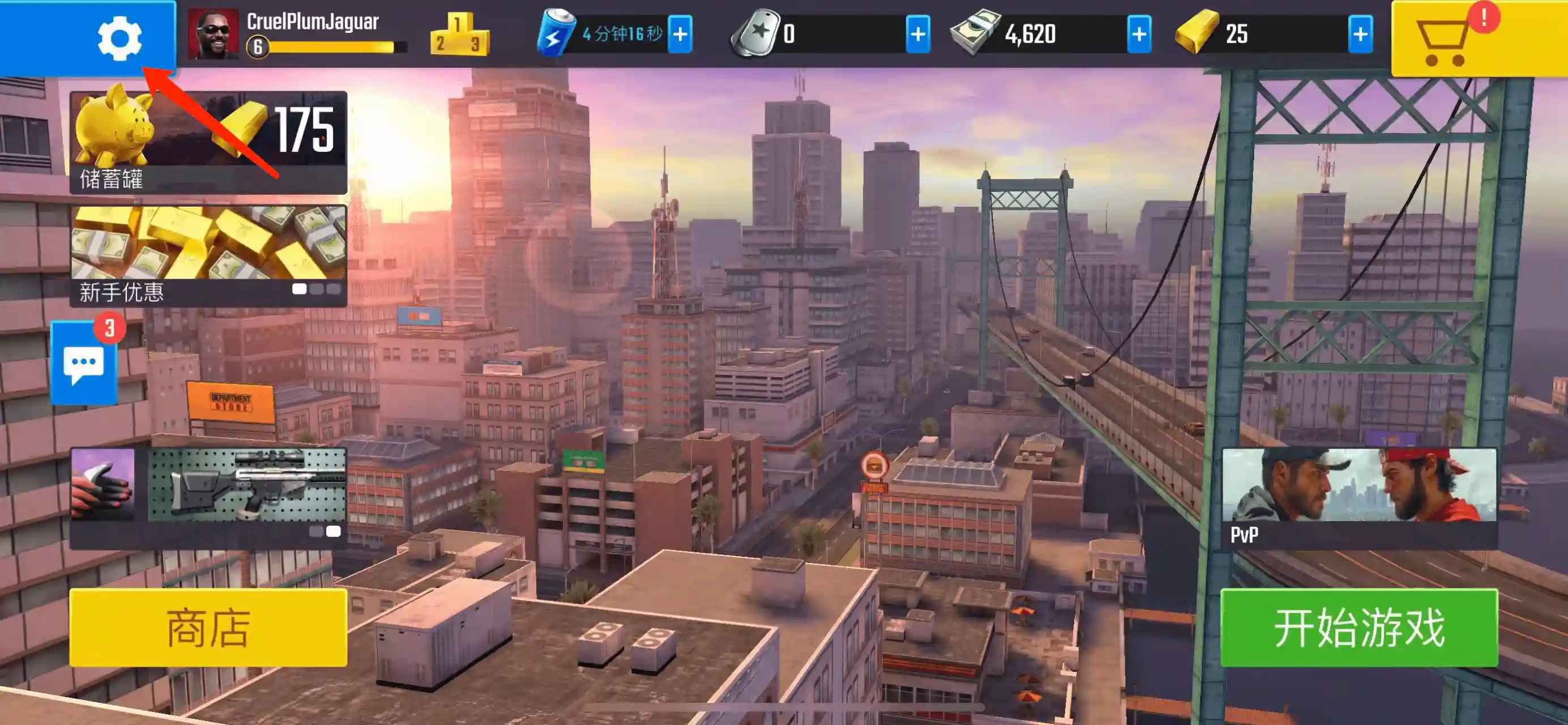
Make sure to paste the exact string into the BitTopup checkout field before submitting your order.
Pure Sniper In-Game Currencies: Gold and Cash Uses
Managing your armory in Pure Sniper requires understanding how each in-game currency works. Upgrades scale in cost as your weapons reach higher tiers, making budget planning crucial for progression.
| Currency | Primary Acquisition Methods | Main Uses in Pure Sniper |
|---|---|---|
| Gold | Direct Top-Up, Special Achievements, High-Tier Events | Buying premium sniper rifles, skipping upgrade timers, purchasing special ammunition, unlocking exclusive crates |
| Cash | Completing Campaign Missions, Bounty Contracts, Daily Tasks | Standard weapon tier upgrades, basic scope modifications, barrel enhancements, regular gear maintenance |
| Energy | Auto-replenished over time, Gold refills | Entering campaign missions, starting PvP arena matches, participating in event operations |
Why Gold Is Crucial for Weapon Progression
Standard missions reward Cash, but transitioning to elite weapon classes requires substantial Gold reserves. Gold allows snipers to skip multi-hour upgrade timers, instantly equipping upgraded suppressors, high-magnification scopes, and armor-piercing barrels before jumping into competitive PvP arenas.
Thailand (TH) Account Verification and Region Compatibility
This specific product catalog is configured for Pure Sniper accounts registered in the Thailand (TH) region. Regional parameters determine how in-game servers authenticate and deliver purchased currency items.
Region Compatibility Guidelines:
- Account Origin: Verify that your Pure Sniper game profile was created or is currently set to the Thailand server environment.
- Cross-Region Purchases: If your account is bound to a different country or regional server, purchasing from the TH store catalog may lead to delivery failures or processing delays.
- App Version: Ensure your Pure Sniper mobile game client is updated to the latest official release available in the regional app store.
Prices for all packages reflect real-time amounts visible on the live checkout interface.
Safe and Password-Free Top-Up Security for Pure Sniper
Account safety is a top priority when purchasing digital game currencies online. BitTopup operates on a direct-to-ID fulfillment architecture designed to keep your personal data protected at all times.
- Zero Account Sharing: You never have to share your game password, Google Play login, Apple ID credentials, or linked social media access.
- Direct Server Fulfillment: Orders are processed directly to your account using only the public Player ID you provide.
- Encrypted Transactions: Checkout channels use industry-standard encryption protocols to safeguard your payment details.
- Account Integrity: Because the process does not involve third-party account takeovers or unapproved modifications, your Pure Sniper account remains fully compliant with standard fair-play terms.
Automated Direct Checkout vs. Peer-to-Peer Marketplaces
Using an automated platform like BitTopup offers clear advantages over peer-to-peer trading sites:
- Immediate Processing: Automated order dispatch sends your Gold directly upon payment confirmation, eliminating the need to wait for a seller to wake up or respond in chat.
- No Chat Negotiations: You do not have to coordinate with unverified individual sellers or deal with unexpected order cancellations.
- Transparent Tracking: You receive instant order status updates and clear transaction histories for every purchase.
- Dedicated Assistance: If any technical question arises, a professional support system is available around the clock.
What to Do If Your Pure Sniper Gold Recharge Is Delayed
Orders on BitTopup process automatically, but occasionally network synchronization or server maintenance can cause a short delay in your in-game display. Follow these troubleshooting steps if your Gold has not appeared:
- Restart the Game: Close Pure Sniper completely from your device app switcher and launch it again. This forces the client to fetch updated profile data from the game servers.
- Check Your Connection: Ensure your Wi-Fi or mobile data connection is stable.
- Verify Order Status: Log in to your BitTopup account and check the Order History page to ensure your payment status is marked as Completed.
- Confirm Player ID Accuracy: Check your order confirmation email to ensure the Player ID you entered matches your in-game profile without typos.
- Contact Support: If the balance has not updated after several minutes, reach out to BitTopup 24/7 customer support with your Order Number and Player ID for rapid verification.
Frequently Asked Questions
How do I find my Pure Sniper Player ID for a top up?
Open Pure Sniper on your mobile device, tap on your Profile icon or the Settings gear in the lobby screen, and locate the numeric or alphanumeric Player ID string displayed in your account summary. Copy or write down this exact ID for checkout.
Can I recharge a Pure Sniper account registered outside Thailand?
This product page is specifically tailored for accounts associated with the Thailand (TH) region. If your account is registered in another country or region, please choose the appropriate regional catalog on BitTopup to avoid delivery issues.
Do I need to share my Pure Sniper login password to recharge?
No. BitTopup requires only your Pure Sniper Player ID to process your Gold top-up. Never share your password, email login, or two-factor authentication codes with anyone.
What can I purchase with Pure Sniper Gold and Cash?
Gold is used to buy premium sniper rifles, bypass weapon upgrade wait times, acquire special ammunition crates, and unlock exclusive tournament events. Cash is used primarily for standard weapon tier stat improvements and routine gear maintenance.
Is Pure Sniper free to play?
Yes, Pure Sniper is free to download and play on iOS and Android devices. In-game items and premium currencies such as Gold can be purchased to speed up weapon progression and unlock premium tactical equipment.
What should I do if my Pure Sniper recharge does not show up in my account?
First, restart the Pure Sniper app to refresh your connection with the server. If the Gold balance is still not updated, verify your order status on BitTopup and contact customer service with your Order ID and Player ID for immediate assistance.