

Merge Kingdoms Top Up: Direct Account Delivery
Merge Kingdoms combines puzzle-merging mechanics with kingdom-building strategy, requiring a steady flow of resources to expand territory, upgrade buildings, and train units. As your kingdom grows, clearing fogged land and speeding up construction cycles demands valuable in-game assets.
A Merge Kingdoms top up on BitTopup provides a direct, secure way to reload your gems, event chests, and premium passes. Because BitTopup processes recharges via your unique Player ID, you receive your items directly in-game without ever sharing your login credentials, password, or linking social accounts. Check our live checkout screen for real-time pricing and available bundle selections.
How to Recharge Merge Kingdoms Online
To complete a Merge Kingdoms recharge on BitTopup, follow this simple checkout procedure:
- Select Your Package: Browse the product catalog on BitTopup and choose your desired gem quantity, value bundle, or VIP pass.
- Enter Your Player ID: Input your Merge Kingdoms Player ID into the designated account field. Double-check the characters to avoid delivery delays.
- Review the Live Checkout Price: Select your local currency and preferred payment method to view the exact final total.
- Complete Payment: Finalize your transaction through our encrypted payment gateway.
- Receive Items In-Game: Open Merge Kingdoms on your mobile device. Your purchased gems or bundles will credit automatically to your balance or appear inside your in-game mailbox.
How to Find Your Merge Kingdoms Account ID
Your Player ID is the unique account identifier tied directly to your game profile. Providing the correct ID ensures your recharge reaches your specific kingdom.
- Launch the Merge Kingdoms app on your device.
- Tap your Avatar or the Settings gear icon located in the upper corner of the main screen.
- In the profile or account settings window, locate the string labeled Player ID or UID.
- Tap the Copy icon next to the ID string to copy it directly to your clipboard, or carefully write down the full sequence.
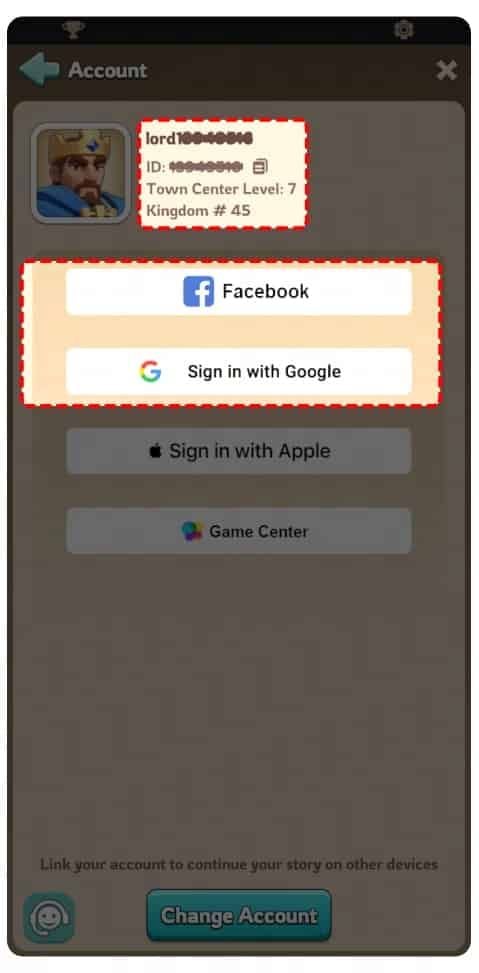
Paste this ID into the account input box on BitTopup before proceeding to payment. Never share your password; your Player ID is the only information required to complete a top-up.
Merge Kingdoms In-Game Currency and VIP Pass Guide
Understanding the role of each currency and package helps you optimize your spending for faster kingdom expansion:
- Gems: The core premium currency of Merge Kingdoms. Gems allow you to purchase missing merge items in the shop, unlock locked reward bubbles, skip merge cooldowns, and instantly clear high-tier land plots.
- VIP / Monthly Passes: Premium subscriptions that yield a steady supply of daily gems over a 30-day period. Passes often include passive quality-of-life benefits such as increased worker speed, extra merge energy capacity, and bonus daily reward chests.
- Special Event Bundles: Timed packs introduced alongside seasonal kingdom events. These packages contain event-exclusive merge chains, legendary commander tokens, and high-tier energy refills at fixed bundle rates.
Best In-Game Purchase Strategies: Chests vs Gems in 2026
Spending your budget strategically determines how quickly your kingdom unlocks advanced merge lines and military units.
| Purchase Type | Primary Contents | Best Strategic Use | Value Rating (2026) |
|---|---|---|---|
| VIP / Monthly Pass | Daily Gems + Passive Buffs | Long-term growth, daily energy efficiency | Highest ROI |
| Direct Gem Packs | Raw Premium Gems | Rushing land expansion, purchasing missing chain pieces | High (Flexible) |
| Rare / Epic Chests | High-Tier Merge Fragments | Bypassing low-level merge steps for rapid unit upgrades | High (Mid-to-Late Game) |
| Event / Starter Bundles | Mixed Tokens, Energy & Items | Overcoming early-game bottlenecks and event milestones | High (Limited Availability) |
Prioritizing Your In-Game Spending
- Early Game: Focus on VIP passes and raw gems. Unlocking extra worker slots and expanding your base land grid provides compounding returns on every merge action.
- Mid Game: Target rare and epic chests during targeted merge events. Opening chests while an event multiplier is active maximizes the value of each drop.
- Late Game: Reserve gems for high-level bubble pops (items created by merging that require gems to unlock) to secure tier-8 and tier-9 structures without grinding lower-tier chains from scratch.
Safe Payment Options for Merge Kingdoms Top Up
Account security is essential when buying game currencies online. BitTopup protects your transaction through strict protocols:
- Direct UID Delivery: BitTopup does not require your Apple ID, Google Play credentials, or social media passwords. Transactions are processed externally via your Player ID, eliminating the risk of account compromise.
- Encrypted Checkout: All payments are handled across industry-standard encrypted channels, safeguarding your personal billing details.
- Transparent Live Pricing: The checkout page displays exact live prices with zero hidden handling fees, ensuring full clarity before you authorize payment.
- 24/7 Order Support: Our customer support team is available around the clock to assist with order tracking, confirmation, and account verification.
Troubleshooting Common Recharge and Delivery Issues
If your Merge Kingdoms recharge does not reflect immediately after payment, follow these diagnostic steps:
- Restart the Game App: Force-close the Merge Kingdoms application and relaunch it. This prompts the client to synchronize with the live server and update your currency balances.
- Check the In-Game Mailbox: Some bundle contents, chest rewards, and promotional items are delivered as mail attachments rather than credited directly to the top-bar wallet.
- Confirm the Submitted Player ID: Review your BitTopup order receipt in your account dashboard. Verify that the Player ID matches your in-game profile exactly.
- Check Payment Authorization: Ensure your payment provider completed the transaction and that the funds were deducted without a pending hold.
- Contact Support: If your order remains uncredited after completing these checks, submit your BitTopup Order Number and in-game Player ID to our customer service team for prompt investigation.
Frequently Asked Questions
Is Merge Kingdoms free to play?
Yes, Merge Kingdoms is free to download and play. Players can experience the core merging mechanics, unit production, and territory expansion without paying. In-game purchases, such as gems and chests, are optional tools to speed up progression, expand land faster, and acquire premium items.
How do I recharge Merge Kingdoms using my Player ID?
To recharge using your Player ID, select your desired package on BitTopup, paste your unique Player ID into the account field, select your preferred payment method, and complete the order. The items will credit directly to your game account without requiring a password.
Do I need to provide my game login password to top up Merge Kingdoms?
No. BitTopup only requires your Merge Kingdoms Player ID to process your recharge. You should never share your password, email login, or account verification codes with anyone.
Which chests or bundles offer the best value in Merge Kingdoms?
For sustained progression, VIP and monthly passes offer the highest return on investment by providing daily gems and passive kingdom buffs. For immediate progression, limited-time event bundles offer better value than standard gem packs due to the inclusion of high-tier merge items and energy refills.
How long does it take for Merge Kingdoms top-up items to appear in-game?
Most orders process promptly upon payment verification. Once the transaction completes, items typically reflect in your balance or in-game mailbox after restarting the application.
What should I do if my Merge Kingdoms recharge does not arrive?
First, restart your game to refresh your account data and check your in-game mail. If the balance remains unchanged, check your BitTopup order history to verify the Player ID you entered, then contact BitTopup customer support with your order details for assistance.