


YY Live Y Coin Top Up: Instant Direct Recharge
YY Live (YY直播) is one of China's premier live-streaming entertainment networks, hosting thousands of daily broadcasts spanning music performances, talk shows, gaming streams, dance routines, and interactive community events. To actively support your favorite creators, participate in live activities, and unlock platform privileges, you need YY Live Y Coins (Y币).
Y Coins serve as the primary official virtual currency across the YY Live platform. BitTopup provides a direct, secure YY Live Y Coin top up service that credits your account using only your YY ID (yyno). You never need to share sensitive account passwords or scan untrusted QR codes. Enter your YY ID, select the desired coin package, and receive your balance directly to your account.
What Are YY Live Y Coins and What Can You Use Them For
YY Live Y Coins provide access to interactive features, premium digital content, and creator support options across the YY ecosystem. Once credited, Y Coins convert directly within the app to purchase virtual gifts, badges, and subscription passes.
Core Uses of Y Coins on YY Live
- Sending Virtual Gifts: Send special gifts ranging from simple digital flowers to animated gifts like Airships, Sports Cars, and Super Rockets to boost your favorite broadcaster's channel ranking.
- Channel Noble Titles & Badges: Unlock exclusive status badges (such as Knight, Viscount, or Duke) that display custom entrance effects and highlighted chat bubbles when entering live rooms.
- Guardian Privileges: Become an official Guardian (守护) for a specific streamer, granting special chat privileges, dedicated fan badges, and priority interaction during broadcasts.
- Interactive Live Games: Participate in community mini-games, voting polls, talent competitions, and streamer PK battles.
- Premium Access: Access VIP audio/video channels, private broadcast sessions, and special event streams.
| Feature / Detail | YY Live Y Coin Specification |
|---|---|
| Currency Name | YY Live Y Coin (YY直播 Y币) |
| Supported Region | China (Mainland YY Accounts) |
| Account Identifier | YY ID (yyno / YY号) |
| Credential Required | YY ID Only (No Password Needed) |
| Supported Platforms | YY Live App (iOS / Android), YY Web, YY PC Client |
| Incompatible Platforms | Huya Live, Douyu, or non-YY platforms |
| Fulfillment Type | Automated Direct Account Recharge |
How to Find Your YY ID (yyno) in the YY App
To ensure your recharge is credited properly, you must provide your correct YY ID (numeric account number). The YY ID is unique to your profile and is different from your display nickname.
Steps to Locate Your YY ID:
- Open the YY Live app on your mobile phone (or log into the official YY PC client/website).
- Tap the My (个人中心 / 我) tab located in the bottom-right corner of the home screen.
- Locate your profile banner at the top of the screen.
- Directly beneath your profile avatar and nickname, find the line labeled YY号 (or YY ID).
- Copy or record this sequence of numbers carefully.
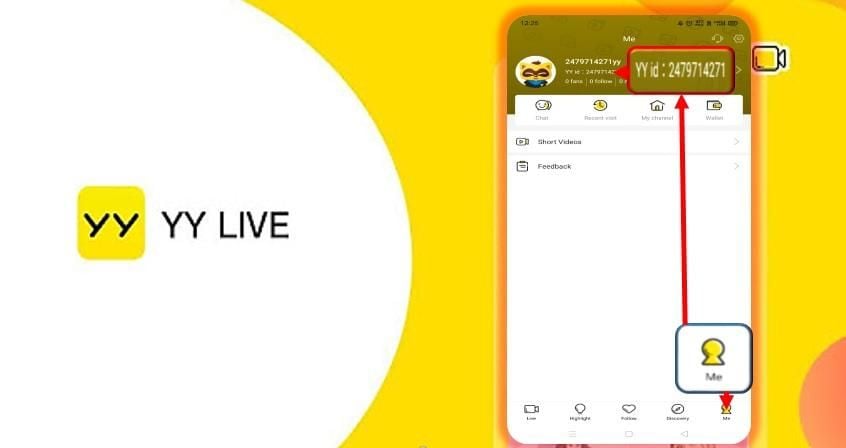
Important Check: Do not submit your custom nickname or bound phone number. Only provide the official numeric YY ID displayed in your profile settings.
Step-by-Step Guide: How to Recharge YY Live Y Coins with YY ID
Recharging Y Coins on BitTopup is straightforward and takes only a few quick steps:
- Select Package: Choose the quantity of YY Live Y Coins you want to add to your account from the live catalog above.
- Input Account Details: Enter your valid YY ID into the account input field. Double-check the digits to prevent sending funds to the wrong user.
- Proceed to Checkout: Click the purchase button to view your order summary.
- Complete Payment: Choose your preferred secure payment method from the available checkout options.
- Instant Delivery: After payment confirmation, the system automatically processes your order and credits the Y Coins directly to your YY Live account.
Check current unit rates and available bundle options directly on the live product selector above.
Supported Platforms and Limitations (YY Ecosystem vs Huya)
Before ordering, verify which streaming platform you intend to use.
- Where Y Coins Work: Y Coins recharged through this service are strictly valid across the YY Live ecosystem, including the YY Mobile App (iOS/Android), the YY PC client, and YY.com web broadcasts.
- Platform Boundaries (Huya Live): Although Huya Live originally developed under the broader YY umbrella, Huya operates as an independent streaming platform with its own distinct currency (Huya Gold Beans / Silver Beans). YY Live Y Coins cannot be transferred or used on Huya Live.
- Ensure that the channel and streamer you want to support broadcast on the official YY Live platform before completing your purchase.
Safe & Fast YY Live Recharge: No Password Needed
Account safety is essential when purchasing digital streaming currency online. BitTopup uses direct API-driven recharge protocols designed to protect your account integrity.
Why Direct Recharge is Secure
- Zero Password Sharing: You only provide your public YY ID. We never ask for your account password, security verification codes, or SMS OTPs.
- No Account Handover: Avoid risky third-party logins or manual agent handling that could violate platform terms or expose personal data.
- Encrypted Checkout: All checkout transactions are secured with industry-standard encryption protocols.
- 24/7 Support: If you have questions about your order, customer service specialists on BitTopup are available around the clock to assist you.
YY Live Y Coin Recharge Troubleshooting and Balance Checking
How to Check Your Updated Balance in YY
- Open the YY Live App.
- Tap the My (个人中心 / 我) tab.
- Tap on My Wallet (我的钱包) or My Y Coins (我的Y币).
- Your updated balance will be visible on the main wallet dashboard.
Troubleshooting Common Issues
- Balance Not Updating Immediately: Pull down on the wallet screen to refresh your account data. If the balance has not refreshed, close the YY app completely and restart it.
- Entered the Wrong YY ID: Because digital recharges process automatically upon payment confirmation, orders sent to an existing incorrect YY ID cannot be reversed. Always verify your numeric YY ID before finalizing payment.
- Order Status Inquiries: If your order shows completed on BitTopup but your in-app balance does not reflect the added coins after a refresh, copy your Order Number and contact the 24/7 BitTopup support team immediately with your YY ID for rapid verification.
Frequently Asked Questions
What is YY Live Y Coin used for?
YY Live Y Coins (Y币) are the primary virtual currency used on the YY Live streaming platform. They allow users to purchase animated virtual gifts for streamers, subscribe to channel guardian programs, unlock VIP noble titles, and participate in interactive live room activities.
Where can I find my YY ID to recharge Y Coins?
Open the YY Live app, go to the "My" (个人中心 / 我) profile tab in the bottom right corner, and find the numeric sequence labeled "YY号" directly underneath your avatar and nickname. That number is your YY ID.
Do I need to provide my YY account password to recharge?
No. Recharging YY Live Y Coins on BitTopup requires only your public numeric YY ID. You should never share your account password or SMS verification codes.
Can YY Live Y Coins be used on Huya Live?
No. YY Live and Huya Live operate on separate account systems and currencies. Y Coins purchased here can only be used on the YY Live platform (App, Web, and PC client) and cannot be transferred to Huya.
How long does it take for YY Live Y Coins to arrive after payment?
Orders are processed through an automated direct-recharge system immediately after payment confirmation. In most cases, your Y Coin balance updates in your YY Live account shortly after the transaction is approved.
What should I do if my YY Live Y Coins do not show up in my account?
First, refresh the "My Wallet" section inside the YY Live app or restart the application. If the balance still does not appear, check your BitTopup order history to confirm the YY ID submitted was correct, and contact BitTopup customer support with your order number for fast assistance.