


Apple Gift Card NO Top Up: Overview and Digital Balance Essentials
An Apple Gift Card (NO) adds direct credit in Norwegian Krone (NOK) to your personal Apple Account balance. Designed specifically for the Norwegian Apple ecosystem, this digital card functions across all primary Apple platforms, including iOS, iPadOS, macOS, tvOS, and watchOS.
Once added to your Apple Account, your balance gives you direct access to a broad catalog of digital media, software, and subscription services without attaching a local debit or credit card to your account.
Eligible Purchases with Apple Gift Card Norway
- App Store Games and In-App Purchases: Buy premium mobile games, top up in-game currencies (such as gems, coins, and pass tiers), and purchase expansion packs.
- Apple Digital Subscriptions: Pay for recurring services including iCloud+ cloud storage, Apple Music, Apple TV+, Apple Arcade, and Apple Fitness+.
- App Store Software: Purchase productivity applications, creative utilities, video editing software, and utilities for Mac and iOS.
- Apple Books and Media: Buy or rent movies, TV seasons, audiobooks, and digital ebooks on the Apple TV app and Apple Books.
Region Lock Guidelines: Ensuring Norway Storefront Compatibility
Apple enforces strict regional boundaries on all gift cards and account balances. An Apple Gift Card issued for Norway (NO) can only be redeemed on an Apple ID that is registered to the Norway region and configured with NOK currency.
Storefront and Currency Compatibility Matrix
| Attribute | Requirement / Specification |
|---|---|
| Card Currency | Norwegian Krone (NOK) |
| Supported Region | Norway (NO) |
| Apple ID Region Requirement | Must match Norway |
| Cross-Region Usability | Not supported (Cannot be redeemed on US, UK, EU, or other regional IDs) |
| Hardware Compatibility | iPhone, iPad, Mac, Apple Watch, Apple TV, Windows PC (via official apps) |
Checking Your Apple ID Region
Before purchasing or attempting redemption, verify your current country setting:1. Open the Settings app on your iPhone or iPad.2. Tap your Name / Apple ID banner at the top of the screen.3. Select Media & Purchases, then tap View Account.4. Tap Country/Region to confirm your account is set to Norway.
Verifying Your Account Identifier Before Code Entry
Unlike direct top-up services that credit a numeric game UID automatically over an API, Apple gift cards are delivered as private alphanumeric digital voucher codes. You do not need to submit your Apple ID password or grant account access to BitTopup.
To ensure your balance applies to the correct profile, make sure you are signed into the exact Apple ID profile you intend to fund.
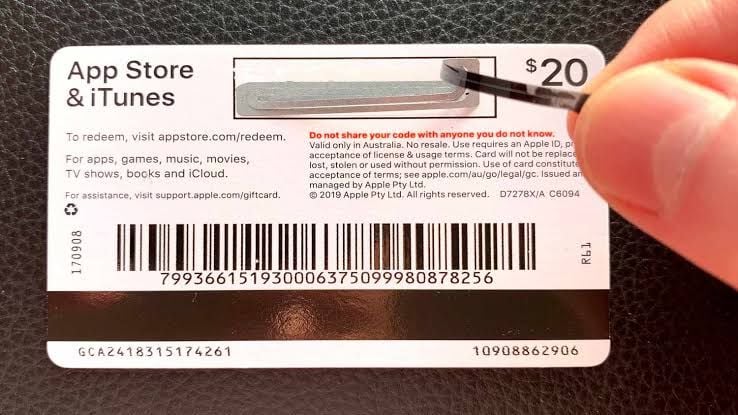
Make sure your active account matches your intended recipient email before entering your 16-digit code.
Step-by-Step Guide: How to Redeem Apple Gift Card on iPhone, iPad, and Mac
Redeeming your code takes only moments across any compatible device. Follow the specific instructions below based on your operating system.
On iPhone or iPad
- Open the App Store app.
- Tap your user photo or sign-in icon in the top right corner.
- Tap Redeem Gift Card or Code.
- Choose Enter Code Manually (you can also use your camera to scan the code).
- Paste or type your 16-digit code received from BitTopup and tap Redeem.
- Your updated balance in NOK will display instantly.
On Mac (macOS)
- Open the App Store.
- Click your name or profile photo in the bottom-left sidebar.
- Click Redeem Gift Card in the top-right corner of the window.
- Enter your Apple ID password if prompted.
- Input the alphanumeric code and click Redeem.
On Windows PC
- Open the Apple Music or Apple TV app (or iTunes for Windows).
- Click your account name at the bottom of the sidebar or top menu bar.
- Select Redeem.
- Type your digital code and confirm redemption.
Troubleshooting Common Apple Gift Card Redemption Errors
If you experience an issue during code redemption, review these common error codes and their solutions:
- "Code is Not Valid": Ensure that you did not confuse similar characters. For example, check numbers and letters carefully: the letter
Ois often confused with the number0,Bwith8,Swith5, andZwith2. Apple codes do not use hyphens during manual entry. - "Card Must Be Redeemed in a Different Storefront": This indicates your Apple ID country does not match Norway. You must switch your Apple ID region to Norway or create a dedicated Norwegian profile to use NOK gift cards.
- "Card Has Already Been Redeemed": Refresh your App Store application or log out and back into your Apple ID. If the balance updated, the code was processed. Check your purchase history under Account Settings to review recent credit additions.
- "Card is Inactive": Contact BitTopup customer support with your order number for verification assistance.
Why Buy Apple Gift Card (NO) on BitTopup: Secure Digital Delivery
- Fast Digital Code Delivery: Receive your digital voucher code directly in your order center and email inbox after your transaction is verified.
- No Password Sharing: BitTopup values account safety. You never need to supply your Apple ID login credentials, security questions, or passwords.
- Transparent Pricing: Check all available denominations, currency rates, and live checkout options directly on the product purchase interface.
- 24/7 Customer Support: Our dedicated help desk is ready around the clock to assist you with order verification, delivery questions, and redemption guidance.
Managing Your Apple Account Balance and In-App Subscriptions in 2026
When you maintain a positive Apple Account balance in Norwegian Krone, Apple automatically applies that credit first for all upcoming recurring charges. This includes ongoing iCloud+ storage upgrades, active Apple Music family or individual plans, and third-party in-app subscriptions managed through the App Store.
If an active subscription charge exceeds your remaining gift card balance, Apple charges the difference to your secondary payment method on file. To avoid service interruptions, keep track of your renewal dates and maintain an adequate balance on your account.
Frequently Asked Questions
Can an Apple gift card be topped up or reloaded?
No, individual physical or digital Apple Gift Card vouchers cannot be reloaded directly onto the same code. Once you redeem a card, its total value transfers permanently to your Apple Account balance. To add more funds later, buy an additional Apple Gift Card (NO) and redeem the new code onto your account.
Why is my Apple Gift Card showing an invalid code or region error?
A region error occurs when the country setting of your Apple ID differs from the country of the gift card. Norwegian gift cards require an Apple ID set to Norway. An invalid code error is typically caused by a typo during entry or attempting to input an already-used voucher string.
What can I buy with an Apple Gift Card (NO) balance?
You can spend your NOK balance on App Store games, in-app purchases, game subscriptions, productivity apps, Apple Music, Apple TV+, Apple Arcade, iCloud+ storage, and books on Apple Books.
How do I check my Apple Account balance after redeeming?
On an iPhone or iPad, open the App Store and tap your profile icon at the top right. Your remaining credit balance appears directly under your name and email address. On a Mac, your balance displays under your profile name in the App Store sidebar.
Can I use a Norway Apple Gift Card on an account registered in another country?
No. Apple does not allow cross-border gift card redemption. A Norway (NOK) card cannot be used on Swedish, Danish, UK, US, or other international accounts.
Are Apple Gift Cards refundable after purchase?
Because digital codes are revealed immediately upon order completion, digital gift card codes are non-refundable once delivered. Please ensure that you have selected the correct region (Norway) before completing your checkout on BitTopup.