

Elona Mobile Diamonds Top Up: Overview and In-Game Utility
Diamonds serve as the primary premium currency in Elona Mobile, the roguelike open-world RPG where survival, character progression, and dungeon exploration demand preparation. Securing a reliable supply of Diamonds allows you to bypass grind walls, obtain top-tier companions, recruit rare allies, and protect your character against dangerous dungeon affixes and the deadly Ether Wind.
In Elona Mobile, Diamonds are used across multiple core game systems. From pulling rare allies through gacha banners to acquiring essential consumables in specialized shops, managing your diamond balance effectively directly impacts how deep you can venture into the Void and high-level Nefia dungeons.
Primary Uses of Diamonds in Elona Mobile
- Ally and Companion Recruitment: Pull from specialized gacha banners to recruit orange and red quality allies with unique combat traits and passive bonuses.
- Mystic Diamond Shop Purchases: Buy rare enhancement materials, Potions of Potential, Evolution Eggs, and skill books to strengthen your build.
- Wishing Well Wishes: Cast wishes at Wishing Wells to target specific red artifacts, high-level spellbooks, and rare crafting ingredients.
- Storage and Bag Expansions: Expand your backpack and home storage capacity so you never have to leave valuable dungeon loot behind due to encumbrance.
- Death Revivals and Dungeon Stamina: Revive your character inside deep Nefia floors without dropping hard-earned equipment or losing gold.
- Mutation Cleansing: Purchase cures to remove debilitating physical and magical mutations acquired during Ether Wind storms.
Best Uses for Diamonds: Gacha, Wishing Well, and Mystic Shop
Spending your Diamonds strategically ensures optimal account progression. Below is a breakdown of the highest-value diamond investments in Elona Mobile.
1. Golden Gacha Eggs and Companion Banners
Companions play a vital combat role in Elona Mobile. Red-tier allies provide massive party buffs, crowd control, and frontline defense. Using Diamonds on featured gacha banners guarantees high-tier ally summons and grants duplicate tokens needed for character gene splicing, unlocking essential racial perks and passive stat multipliers.
2. The Mystic Diamond Shop
The Mystic Shop stocks daily and weekly rotating items that are difficult or impossible to farm reliably through regular dungeon runs. Priority purchases include:
- Potions of Potential: Keep your primary attributes (Strength, Constitution, Dexterity, Magic, Perception, Will, Learning, Charisma) growing at maximum efficiency.
- Superior Enchantment Scrolls: Safely upgrade high-tier weapons and armor without risking item breakage.
- Gene Splicing Materials: Essential for transferring critical feats and passive skills between allies.
3. Wishing Well Wishes
Throwing Diamonds into Wishing Wells allows you to wish for rare items. In high-level play, players use the Wishing Well to target specific red equipment pieces, rare mounts, and specific skill manuals that drastically alter combat efficiency.
Diamond Spending Priority Guide
| Feature | Priority Level | Key Benefit |
|---|---|---|
| Companion Gacha | High | Unlocks top-tier red allies and gene splicing options |
| Potions of Potential | High | Prevents attribute progression caps |
| Backpack & Storage Expansion | High | Increases weight capacity and item storage |
| Wishing Well | Medium | Targets specific gear sets and rare spellbooks |
| Dungeon Revives | Low | Emergency use only on deep Void/Nefia floors |
How to Recharge Elona Mobile Diamonds Online
Recharging your Elona Mobile Diamonds on BitTopup is quick, secure, and completed entirely through your game User ID (UID). You never need to share account passwords or login credentials.
How to Find Your Elona Mobile UID
- Launch Elona Mobile on your mobile device.
- Tap your Character Avatar in the top-left corner of the main screen.
- Open your profile page to view your Account UID and your Server Name.
- Copy or record the exact numeric UID.
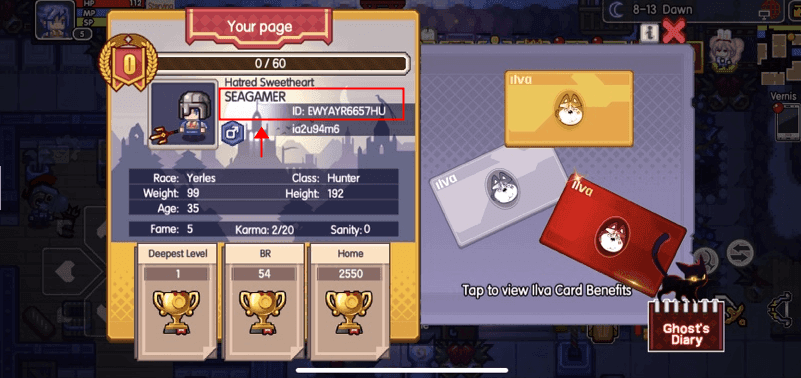
Step-by-Step Top-Up Guide on BitTopup
- Select the quantity of Elona Mobile Diamonds you want to purchase from the product catalog.
- Enter your Account UID and select your Server in the provided input fields.
- Click Buy Now to proceed to the secure checkout page.
- Select your preferred payment method from the available options shown at checkout.
- Complete your transaction. Your Diamonds will be credited directly to your in-game account.
Safe Top-Up Guarantees: Secure Transactions with No Account Passwords
Account safety is essential when purchasing in-game currencies. BitTopup operates on direct UID fulfillment protocols, ensuring complete protection for your game account.
- Zero Password Requirement: We only require your public Character UID and server. We will never ask for your login password, Google Play credentials, Apple ID, or third-party login tokens.
- Official Delivery Channels: All diamond packages are processed through verified payment routes, protecting your account from chargeback penalties, suspensions, or balance rollbacks.
- Encrypted Checkout: Every transaction uses industry-standard SSL encryption to protect your personal and payment details.
- Order Tracking: Track your top-up progress in real time directly from your BitTopup order history page.
Supported Payment Methods and Delivery Process for Elona Mobile
BitTopup provides a straightforward checkout experience with multiple payment channels available depending on your region. Live prices and local currency options are displayed directly on the checkout screen.
Delivery Process
Once your payment is confirmed, the system immediately routes your order to the Elona Mobile top-up processing network. In most cases, your Diamonds appear in your in-game account balance or mailbox within moments of transaction completion. If you experience any delay due to in-game server maintenance, our 24/7 customer support team is available to assist you.
Frequently Asked Questions About Elona Mobile Diamonds
What are Diamonds used for in Elona Mobile?
Diamonds are the premium currency in Elona Mobile. They are used to summon rare companions via gacha eggs, purchase high-grade items in the Mystic Diamond Shop (such as Potions of Potential and skill books), cast wishes at Wishing Wells, expand inventory space, cure mutations, and revive characters in deep dungeon runs.
How do I recharge Diamonds for Elona Mobile on BitTopup?
Select the diamond denomination you wish to buy, enter your Elona Mobile Account UID and Server, choose your payment method at checkout, and complete the payment. Your Diamonds will be delivered directly to your account.
Do I need to provide my Elona Mobile game password to top up?
No. Recharges on BitTopup only require your numeric User ID (UID) and server. You should never share your account password or social login credentials with anyone.
How long does it take for Elona Mobile Diamonds to be delivered?
Orders are processed automatically upon payment verification. In standard conditions, Diamonds reflect in your in-game balance shortly after checkout. Check your in-game diamond counter and mailbox after completing the purchase.
What is the most efficient way to spend Diamonds in Elona Mobile?
The most efficient way to spend Diamonds is on high-tier companion recruitment, permanent inventory/storage expansions, and essential progression consumables like Potions of Potential from the Mystic Shop. Avoid spending Diamonds on basic dungeon revives or common crafting speed-ups.
What should I do if my Elona Mobile Diamonds do not arrive immediately?
First, restart the Elona Mobile application and check both your diamond counter and in-game mailbox. If the balance has not updated, visit your BitTopup order history to verify that your order status is completed and check that the submitted UID and server were correct. If you need further help, contact the BitTopup 24/7 customer support team with your order number for immediate assistance.