




GoPlayPlay Top Up and Digital Game Card Reloads
GoPlayPlay is a premier gaming portal in Southeast Asia, powering fan-favorite titles such as Mahjong 3P (麻将3P), web-based RPGs, and mobile community games. A GoPlayPlay card serves as the universal prepaid credit used across the publisher's entire gaming network.
Acquiring game points directly through digital game cards gives you full control over your spending without linking personal banking accounts directly to mobile app stores. BitTopup provides direct access to digital GoPlayPlay reloads, delivering redeemable serial numbers and PINs directly to your user dashboard immediately after purchase.
Supported GoPlayPlay Games and Services List
GoPlayPlay point cards convert directly into in-game currency or VIP points across multiple titles hosted on the GoPlayPlay platform. Below is a breakdown of supported titles and card applications:
| Game / Service | In-Game Currency / Item | Usage & Features |
|---|---|---|
| Mahjong 3P (麻将3P) | Gold, Diamonds, VIP Tokens | Quick match entry, custom tables, premium avatar frames, sound packs |
| GoPlayPlay Web Portal Games | Platform Points / Game Coins | Direct balance transfer to connected browser RPGs and strategy titles |
| Mobile Strategy & Card Titles | Premium Ingots / Crystals | In-game gacha pulls, monthly passes, event milestone packs |
| Platform Account Wallet | GoPlayPlay Universal Credits | Store credit for upcoming title releases and platform microtransactions |
Note: Denominations and current live pricing appear directly on the BitTopup product selection screen. Please check your specific game client to confirm the exact exchange rate of GoPlayPlay platform points to in-game currency.
How to Find Your GoPlayPlay UID and Game Account Details
Before redeeming your card code, you must confirm your exact user ID or game account ID to avoid crediting the wrong character.
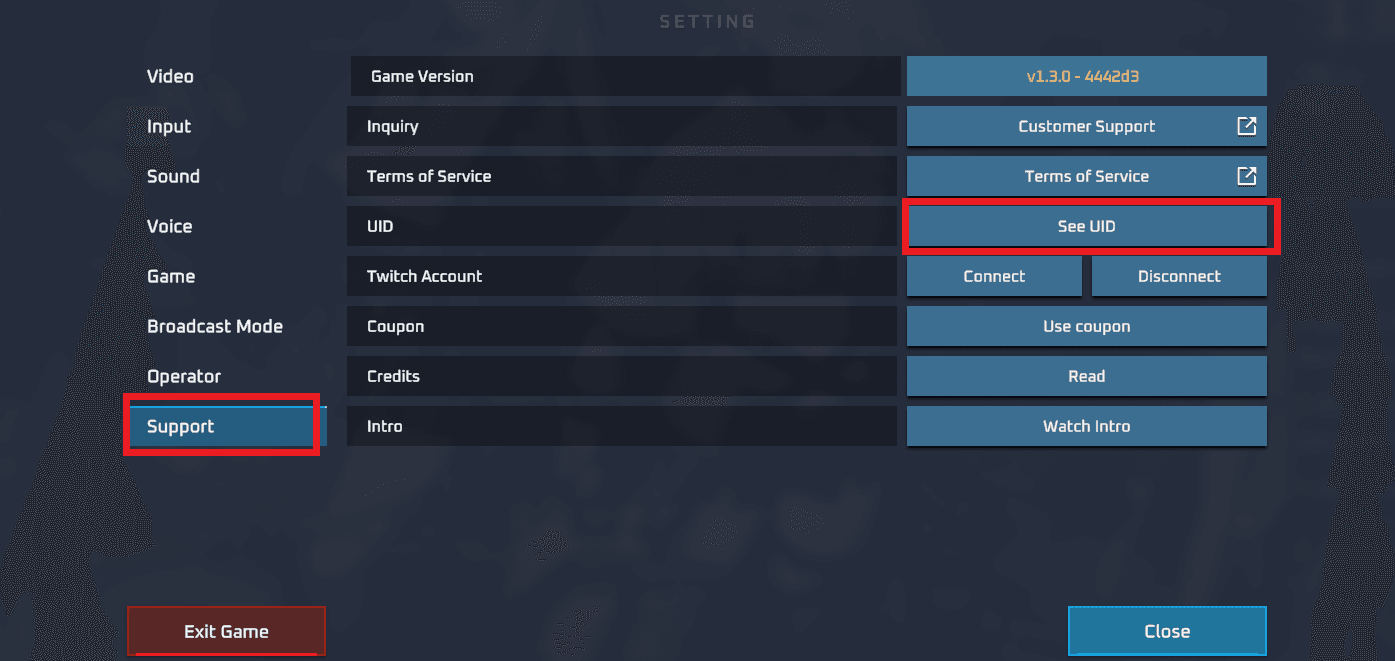
- Launch your specific game (e.g., Mahjong 3P) or log in to the official GoPlayPlay platform portal.
- Tap your user avatar located in the top-left corner of the main screen.
- Locate your User ID (UID) or Account ID displayed under your nickname.
- Tap the copy icon next to the number sequence or write it down carefully for redemption.
How to Recharge GoPlayPlay Card on BitTopup
Ordering your game card through BitTopup takes only a few quick steps:
- Select your desired GoPlayPlay denomination on the BitTopup product page.
- Verify the order quantity and currency balance needed for your game.
- Click Buy Now to proceed to the checkout screen.
- Select your preferred payment method from the available local and global payment gateways.
- Complete the payment process securely.
- Retrieve your digital serial number and PIN code instantly from your BitTopup order history screen.
Step-by-Step Guide to Redeem GoPlayPlay Cards on Official Game Portals
Once you receive your digital code from BitTopup, redeem it on the official GoPlayPlay website or directly inside the game client:
Method 1: Redeeming via the Official GoPlayPlay Web Portal
- Go to the official GoPlayPlay top-up / payment center in your web browser.
- Log in using your registered GoPlayPlay credentials, Facebook account, or Apple ID.
- Select Prepaid Card Reload or GoPlayPlay Card as your deposit option.
- Enter the Card Serial Number and Card PIN / Password obtained from your BitTopup order.
- Select the target game, server, and character UID you wish to fund.
- Click Confirm Reload. Your account will update immediately with the corresponding points.
Method 2: In-Game Direct Redemption (e.g., Mahjong 3P)
- Open the Mahjong 3P app on your device.
- Tap the Store or + (Add Diamonds/Gold) icon on the main menu.
- Choose External Reload / Game Card.
- Type or paste your digital serial number and PIN.
- Confirm the transaction to receive your items instantly.
Digital Delivery and Order Verification Process
BitTopup uses an automated delivery system to ensure you receive your game codes without delays.
- Dashboard Retrieval: As soon as your payment clears, your code is generated in your personal BitTopup account under My Orders.
- Order Verification: Each code contains two distinct fields: the Card Serial (identifying number) and the Card PIN / Key (the secret security string required for redemption).
- Transaction History: All previous purchases remain accessible in your profile for record-keeping, allowing you to track your gaming budget easily.
Secure Payment Options and Account Protection
Account safety is a core priority when buying digital game codes online. BitTopup protects your credentials by design:
- Zero Password Sharing: You never need to share your game password, Facebook login, or sensitive credentials. You receive an independent digital card code to redeem yourself.
- Encrypted Transactions: Every checkout is processed through end-to-end SSL encryption standards to protect your billing information.
- Multiple Payment Channels: Choose from a wide selection of localized payment methods, e-wallets, online banking options, and international cards displayed at live checkout.
GoPlayPlay Card Troubleshooting and Customer Support Solutions
If you experience an issue when redeeming your code, consult these standard resolution steps:
- Invalid Card Number / PIN Error: Ensure you did not mix up the Serial Number and the PIN. Double-check for common typos, such as confusing the number
0with the letterO, or1with uppercaseI. - Code Already Used: Refresh your game balance first to verify if the points applied. If the balance remains unchanged, verify that you did not submit the code on an alternate account or server by mistake.
- Game Region Lock: GoPlayPlay cards are designated for platform accounts in Malaysia and Southeast Asian service regions. Confirm that your game account is set to the matching regional service.
- Customer Support Assistance: If an error persists, reach out to BitTopup 24/7 customer support with your Order ID, a screenshot of the error message, and your game account UID for prompt resolution.
Frequently Asked Questions
How do I recharge my GoPlayPlay game or account?
Select the required card value on BitTopup, complete the purchase, and retrieve your serial number and PIN from your order dashboard. Then, visit the official GoPlayPlay reload portal or open the in-game top-up center, input your code details, select your character UID, and confirm the redemption.
What games can I use GoPlayPlay cards for?
You can use GoPlayPlay cards for any game managed under the GoPlayPlay network, including Mahjong 3P (麻将3P), associated web-based strategy titles, and mobile RPGs published on their platform.
Do I need to provide my GoPlayPlay password to recharge on BitTopup?
No. BitTopup never asks for your GoPlayPlay account password or private login details. You receive a standard digital prepaid code that you redeem directly into your own account.
How fast is the digital delivery for GoPlayPlay recharges?
Codes are delivered automatically to your BitTopup user account dashboard immediately after your payment is confirmed by the payment gateway.
What should I do if my GoPlayPlay code shows as invalid or already used?
First, verify that the serial number and PIN were entered into the correct input boxes without accidental spaces. If the issue continues, take a screenshot showing the error along with your redemption page, and contact BitTopup customer support through live chat or the support ticketing system for verification.
Are there regional restrictions on GoPlayPlay cards?
Yes. GoPlayPlay prepaid cards are intended for regional accounts registered under the Southeast Asia (primarily Malaysia) service umbrella. Please confirm that your game profile matches the regional server before completing your purchase.