



快手 Kwai CN Coin Recharge: Overview and In-App Utility
快手 (Kuaishou), known internationally as Kwai in select markets, is one of China's most popular short-video and livestreaming platforms. Within the Mainland Chinese version of the app, the primary virtual currency is 快币 (Kwai Coins). Users purchase 快币 to interact with content creators, support streamers during live broadcasts, and unlock premium interactive features.
When you recharge 快手 Kwai (CN) Coins, your balance is credited directly to your Chinese 快手 account wallet. These coins can be used immediately across various platform features:
- Livestream Virtual Gifts: Send animated virtual items—ranging from roses and claps to luxury sports cars and fireworks—to support your favorite creators during live broadcasts.
- Streamer PK Battles: Use coins to send gifts during live interactive battles (PKs) to help your chosen creator win competitive rounds against other hosts.
- Fan Club Memberships: Join exclusive streamer fan clubs to access special badges, custom emotes, and subscriber-only chat rooms.
- Creator Tipping: Support independent video creators directly on their short-form video posts to encourage ongoing production.
BitTopup provides a direct recharge system that credits your official account using only your unique 快手 User ID (快手号), ensuring your funds arrive quickly without compromising account security.
Important: Chinese Mainland Version vs. Kwai International Version
Before placing an order, confirm which regional version of the app you are currently using. Virtual currencies on the Chinese Mainland version and the international versions are completely separate and non-transferable.
| Feature | 快手 (Chinese Mainland Version) | Kwai / SnackVideo (International Versions) |
|---|---|---|
| Target App | 快手 (Mainland China App Store / Chinese APK) | Kwai / SnackVideo (Global Google Play / App Store) |
| In-App Currency | 快币 (Kwai Coins / Kuaishou Coins) | Diamonds / In-App Cash Points |
| Account Identifier | 快手号 (Numeric or Custom UID) | International User ID / Social Login Handle |
| Service Compatibility | Fully Compatible with this BitTopup service | Not Compatible (Recharge will fail or misallocate) |
| Account Region | Registered under China mainland service nodes | Global regional service nodes |
Warning: This recharge service applies only to accounts created and operating on the official Mainland Chinese version of 快手. If your app interface is in Spanish, Portuguese, Indonesian, or points to SnackVideo/Kwai International servers, do not submit your ID on this page.
How to Find Your 快手 Kwai (CN) User ID
To ensure your recharge reaches your account without delay, retrieve your exact User ID directly from your profile settings in the app.
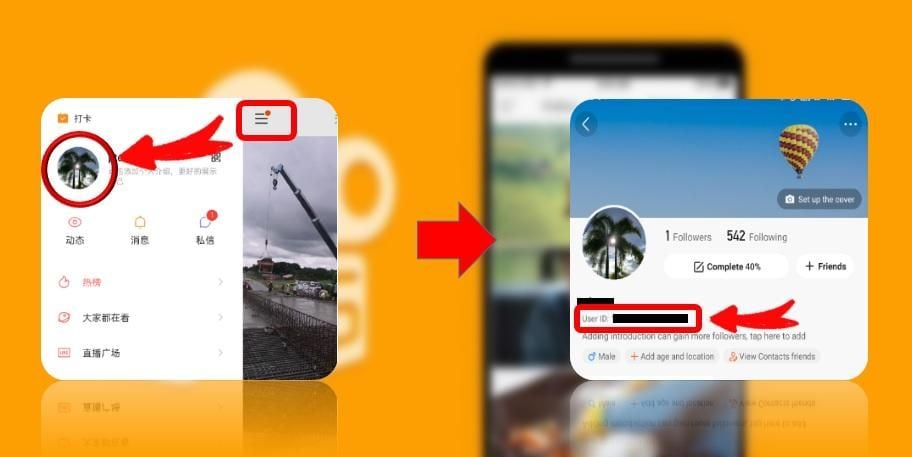
Follow these steps to find your User ID:
- Launch the 快手 app on your mobile device.
- Tap the profile menu icon (我 / Me) located at the bottom-right or top-left corner of the home screen.
- View the top header card showing your avatar and profile details.
- Look directly below your display nickname to locate your 快手号 (Kwai ID / User ID).
- Tap the ID or the copy icon next to it to copy the string directly to your clipboard.
Important: Do not enter your display nickname (which can be changed at any time) or your registered mobile phone number. Only the official 快手号 ensures accurate delivery.
Step-by-Step Guide to Recharge 快手 Kwai (CN) Coins on BitTopup
Recharging your account balance on BitTopup is straightforward and requires no account sharing.
- Select Coin Denomination: Review the available 快币 packages listed on this page and choose the amount you wish to credit.
- Provide Your User ID: Enter your copied 快手号 accurately into the
User IDinput field. - Verify Account Details: Re-check your entered User ID to make sure there are no typos or missing digits.
- Proceed to Checkout: Click the buy button to proceed to the secure BitTopup payment interface.
- Complete Payment: Select your preferred local or international payment method and finalize the transaction.
- Receive Coins: Once payment confirmation is complete, the 快币 are deposited directly to your account. Open your 快手 app and check your balance under Settings > 我的钱包 (My Wallet).
Kwai Coin Value, Packages, and Supported Payment Methods
The standard baseline conversion within the Chinese 快手 platform operates at a rate where 1 RMB (CNY) equals 10 快币 (Kwai Coins). Live catalog denominations, regional pricing, and available promotional packages are updated dynamically in the product selector at the top of this page.
BitTopup supports a wide selection of payment options, including major international credit/debit cards, digital wallets, and region-specific payment methods. All transaction totals are displayed transparently at checkout before you submit payment, ensuring clear pricing with no hidden surcharge fees.
Why Choose UID Direct Recharge (No Password Required)
Maintaining the security of your social media and streaming accounts is critical. BitTopup uses direct API UID routing to fulfill your order, providing several security advantages:
- Zero Password Sharing: You never need to hand over your login credentials, email passwords, or SMS verification codes.
- No Account Suspension Risk: Third-party logins from unfamiliar IP addresses often trigger platform security verifications or temporary account locks. Direct UID crediting bypasses login risks completely.
- Cross-Platform Compatibility: Whether you use 快手 on iOS, Android, or HarmonyOS, direct UID top-ups credit your account wallet regardless of operating system.
- Accessible Customer Support: If you ever need help verifying transaction status, BitTopup customer support is available to check your order using your order reference number.
Frequently Asked Questions and Order Troubleshooting
How do I find my 快手 Kwai (CN) User ID?
Open the Chinese 快手 app, tap 我 (Me) in the navigation menu, and look directly below your profile picture and nickname. Your User ID is listed as 快手号. Tap it to copy the ID directly.
Can I recharge an international Kwai or SnackVideo account with this service?
No. This product is strictly compatible with the Mainland China version of 快手. International accounts operating on Kwai (Latin America, MENA, etc.) or SnackVideo use different backend systems and cannot accept Mainland 快币 recharges.
Do I need to provide my 快手 account password to recharge coins?
No. BitTopup requires only your public User ID (快手号). You should never share your account password or SMS verification codes with any recharge service.
How long does it take for Kwai (CN) Coins to appear in my account?
Most direct top-up orders are processed automatically and arrive within minutes after payment confirmation. During platform peak hours, minor network congestion on Chinese servers may cause slight delays.
Can I get a refund if I entered an incorrect User ID?
Digital coin recharges are fulfilled automatically based on the identifier submitted. If an incorrect but valid User ID was provided, the platform credits that external account immediately, making transactions non-refundable. Always double-check your 快手号 before completing checkout.
What should I do if my 快手 Coin recharge has not arrived after 30 minutes?
First, force-close and restart your 快手 app, then check your balance under 我 > 设置/更多 > 我的钱包. If the coins still do not reflect, verify your payment status on BitTopup and contact BitTopup customer support with your Order Number and submitted User ID for prompt verification.