


New State Mobile NC Top Up: What It Is and In-Game Uses
New State Mobile NC (New State Credits) is the premium currency used to purchase exclusive in-game items, cosmetics, and seasonal content in New State Mobile. While standard matches grant BP (Battle Points) and Chicken Medals through missions, NC gives you direct access to high-tier store items, time-limited promotional events, and weapon customization systems.
What You Can Buy with New State Mobile NC
- Survivor Pass (Premium & Premium Plus): Purchasing the seasonal Survivor Pass with NC unlocks exclusive character outfits, weapon skins, vehicle paint jobs, and bonus currency rewards across 50+ reward tiers.
- Weapon Upgrade Lab Skins: Upgradeable weapon skins require NC or upgrade materials purchased with NC to unlock custom kill messages, hit effects, loot box appearances, and visual modifications.
- Lucky Spin and Crate Openings: Gain access to themed crates, legendary apparel, mythic suits, and futuristic vehicle skins for vehicles like the Volta, Nova, and Lightning.
- Name Change Cards and Account Services: Modify your in-game nickname or purchase specific utility items directly from the store.
- Lucky Vouchers & Event Packs: Exchange NC for promotional tokens during seasonal 2026 battle royale events to unlock limited-edition rewards.
| Item / Pass Type | Primary In-Game Purpose | Currency Used |
|---|---|---|
| Survivor Pass Premium | Unlocks seasonal tier rewards and exclusive outfits | NC |
| Survivor Pass Premium+ | Unlocks base pass plus instant tier skips and bonus items | NC |
| Custom Weapon Crates | Grants upgradeable weapon skins and cosmetic attachments | NC |
| Store Bundles & Sets | Direct-purchase mythic outfits and character sets | NC |
| Name Change Card | Changes in-game account nickname | NC |
Key Differences Between New State Mobile NC and PUBG Mobile UC
Many players confuse New State Mobile NC with PUBG Mobile UC (Unknown Cash). While both games belong to the broader battle royale universe created by KRAFTON, they operate on separate servers, use distinct engines, and run completely different account systems.
- Separate Currencies: New State Mobile uses NC (New State Credits). PUBG Mobile uses UC (Unknown Cash). You cannot transfer UC to New State Mobile, nor can you spend NC in PUBG Mobile.
- Distinct Game Clients: New State Mobile is set in a near-future setting (Troi and Erangel 2051) with unique weapon attachment kits, drone stores, and recruit mechanics. PUBG Mobile runs on its own classic client and seasonal update tracks.
- Account Systems: Your New State Mobile Player ID (Account ID) is completely independent of any numeric ID used in PUBG Mobile. When placing an order on BitTopup, ensure you submit your New State Mobile Account ID to avoid delivery errors.
Step-by-Step Guide: How to Find Your New State Mobile Player ID
To top up your NC balance on BitTopup, you only need your unique in-game Player ID (Account ID). You do not need to provide your login credentials or email address.
- Launch New State Mobile on your mobile device.
- In the main lobby screen, tap the three horizontal dots or the gear icon in the top-right corner to open the menu.
- Tap Settings from the drop-down list.
- Select the Basic tab on the right-hand side menu.
- Locate the Account ID field. You will see a long alphanumeric string.
- Tap the Copy icon next to your Account ID to copy it to your clipboard.
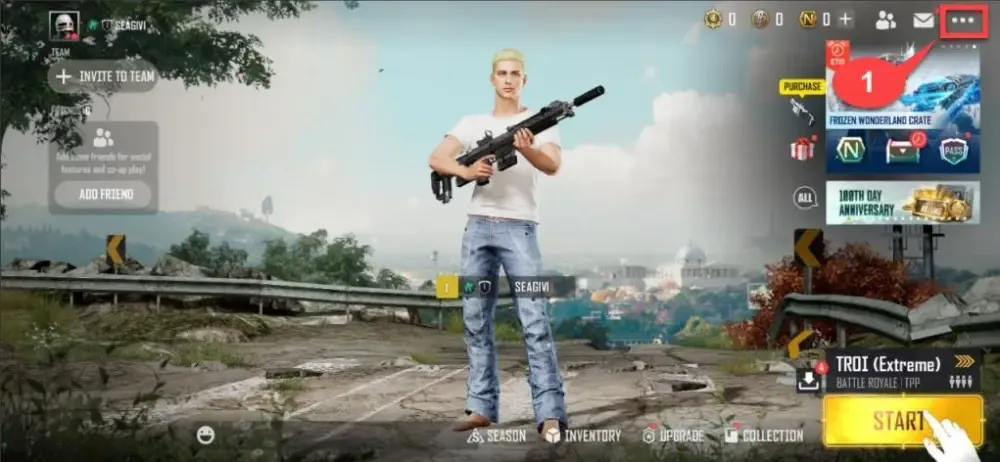
Make sure to paste this exact ID into the BitTopup order field without adding spaces or changing characters.
How to Recharge New State Mobile NC on BitTopup
To complete an order on BitTopup, follow this simple process:
- Select Your NC Package: Browse the available NC denominations on the product page and choose the amount you wish to purchase.
- Enter Your Player ID: Paste your copied New State Mobile Account ID into the Player ID input field.
- Review Your Order: Check the entered Player ID carefully to confirm it matches your account.
- Select Payment and Complete Checkout: Choose your preferred payment method and finalize the transaction. Current prices and processing terms are shown on the live checkout screen.
- Check Your In-Game Balance: Once the order status updates to completed, launch New State Mobile to verify that your NC balance has updated.
Account Security: Safe UID-Only Recharge Without Passwords
Account safety is essential when purchasing digital gaming currencies. BitTopup uses a direct ID-based fulfillment process designed to keep your personal data protected at all times.
- Zero Password Requirements: You will never be asked for your Apple ID, Google Play credentials, Facebook login, or game password. The entire top-up is processed using only your public Account ID.
- No Account Sharing: Sharing login details violates terms of service on many platforms and exposes your account to unauthorized access. UID-only recharges remove this risk entirely.
- Secure Payment Processing: All checkout interactions on BitTopup are encrypted to protect your payment details throughout the transaction.
Troubleshooting Delivery: What to Check if Your NC Balance Is Delayed
In most cases, NC orders are processed promptly after payment verification. If your NC balance does not reflect in your account right away, perform the following verification steps:
- Restart the Game App: Completely close New State Mobile from your device app switcher and relaunch it to refresh your profile balance from the server.
- Check Your In-Game Mailbox: Some promotional NC packs or bonus credits arrive as claimable mail attachments in your in-game mailbox rather than direct wallet balance additions.
- Verify Your Submitted Player ID: Check your BitTopup order history and verify that the Player ID submitted matches your actual Account ID in the game's Basic settings tab.
- Review Order Status on BitTopup: Log in to your BitTopup account and check the order tracking page. Ensure payment was confirmed and the order status reads completed.
- Contact Support: If your order status is completed but your balance remains unchanged after restarting, contact BitTopup customer support with your Order ID and an in-game screenshot of your Basic Settings tab showing your Account ID.
Frequently Asked Questions
How do I recharge New State Mobile NC with my Player ID?
Select the desired NC package on BitTopup, input your in-game Player ID into the designated field, select your payment method, and complete checkout. The NC will be credited directly to your New State Mobile account upon payment completion.
Where can I find my New State Mobile Account ID or Player ID?
Open New State Mobile, tap the menu icon (three dots or gear) in the upper-right corner of the lobby, select Settings, and open the Basic tab. Your Account ID is displayed near the top, along with a quick-copy button.
What is the difference between PUBG Mobile UC and New State Mobile NC?
NC is exclusive to New State Mobile, while UC is exclusive to PUBG Mobile. They operate on separate servers, separate games, and separate economies. NC cannot be transferred to PUBG Mobile or converted into UC.
Do I need to share my game password to recharge NC on BitTopup?
No. BitTopup only requires your public Player ID. You should never share your account passwords, social media logins, or two-factor authentication codes with anyone.
What in-game items can I buy with NC in New State Mobile?
You can use NC to buy the Survivor Pass Premium/Premium+, upgradeable weapon skins in the Upgrade Lab, vehicle cosmetics, custom crates, character bundles, and name change cards.
Can New State Mobile NC be transferred to another player account?
No. Once NC is credited to an account, it is permanently bound to that specific Player ID and cannot be transferred, traded, or gifted to another player's balance. However, you can buy NC for a friend by entering their Player ID during checkout on BitTopup.
What should I do if my recharged NC has not arrived in my account?
Restart your game client to refresh account data, and check your in-game mailbox for claimable mail items. If your balance still does not update, check your BitTopup order status and contact customer support with your Order ID for assistance.