



DDTank Origin Chicken Coin Top Up: Usage and Benefits
Chicken Coins serve as the premium currency in DDTank Origin. Acquiring Chicken Coins allows you to access high-tier upgrade items, customize your character, and progress efficiently through competitive PvP battles and challenging PvE dungeon raids.
Primary Uses for Chicken Coins in DDTank Origin
- Weapon Enhancement and Refining: Purchase vital upgrading materials such as Enhancement Stones, Lucky Charms, and Synthesis Stones. Higher weapon levels directly boost your base damage, critical strike chance, and shot precision.
- Fashion Outfits and Cosmetics: Stand out in the lobby and battle arena by purchasing exclusive outfits, glowing wings, decorative hats, expressive glasses, and weapon skins. Outfits also supply passive attribute bonuses including extra Agility, Armor, and Luck.
- Pet Summoning and Growth: Unlock pet eggs, pet training snacks, and evolution materials. Upgraded pets provide active skills during turn-based artillery rounds to shield your character or heal damage.
- Gacha Lucky Wheels and Shard Chests: Participate in limited-time prize draws to collect legendary weapon fragments (such as specialized WOW cannon, Brick, or First Aid kit variants) and rare title badges.
- Guild Progression and Social Systems: Contribute directly to your guild fund to unlock guild shop perks, purchase wedding rings for marriage ceremonies, and use server-wide broadcast megaphones.
DDTank Origin Chicken Coin Denominations and Packages
BitTopup offers multiple Chicken Coin pack tiers to match your specific in-game goals. Whether you need a quick top-up for an emergency dungeon attempt or a larger package for seasonal gacha events, select the amount that fits your current needs.
| Package Tier | Top-Up Method | Primary In-Game Purpose |
|---|---|---|
| Small Coin Tier | Role ID Direct Top-Up | Daily consumables, horn broadcasts, energy restores |
| Medium Coin Tier | Role ID Direct Top-Up | Weapon refining charms, synthesis stones, pet food |
| Large Coin Tier | Role ID Direct Top-Up | Premium fashion sets, wings, mount upgrades |
| Epic / Event Tier | Role ID Direct Top-Up | High-tier gacha pulls, legendary weapon shards, VIP rank |
Note: Live pricing, available localized currencies, and promotional package rates are displayed directly on the checkout selection menu on BitTopup.
How to Locate Your DDTank Origin Role ID
To ensure your Chicken Coins arrive directly at your character profile, you only need to provide your unique in-game Role ID. Follow these steps to find and copy your credentials inside the game application:
- Launch DDTank Origin on your mobile device and log in to your chosen server.
- Tap your character avatar in the upper-left corner of the main lobby screen.
- The Personal Info / Profile window will appear on screen.
- Locate your Role ID displayed under your character nickname and server name.
- Tap the small copy icon next to your Role ID numbers to copy the exact string to your clipboard.
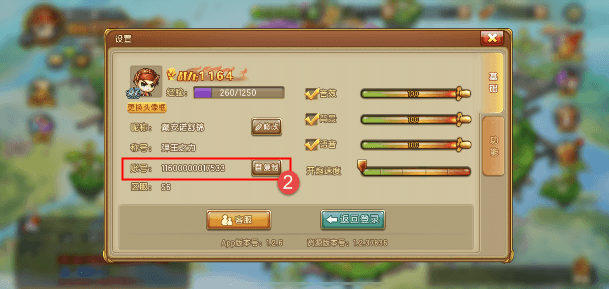
Double-check that you select the correct server region before submitting your order to prevent delivery delays.
How to Recharge DDTank Origin Chicken Coins on BitTopup
Recharging on BitTopup takes only a few straightforward steps:
- Select the desired DDTank Origin Chicken Coin package quantity from the options above.
- Paste your Role ID into the designated player input field.
- Verify that the entered Role ID matches your in-game profile details.
- Choose your preferred payment option at checkout.
- Complete your transaction. Once verified, the Chicken Coins are credited directly to your DDTank Origin balance.
Safe and Password-Free Top-Up Guarantees
Keeping your account protected is essential when topping up gaming currencies. BitTopup utilizes direct system top-ups that require nothing more than your public Role ID.
Why Direct Role ID Top-Up is Safer
- Zero Password Requirements: You will never be asked to share your Google, Apple ID, Facebook, or game platform login credentials. Your password stays entirely in your hands.
- No Account Sharing Risks: Account sharing creates severe security liabilities, including unauthorized item deletion, unauthorized spending, or security locks. Direct top-up bypasses these risks completely.
- Safe System Integration: Recharges processed via Role ID credit your account legitimately through standard balance mechanisms, keeping your account compliant with game rules.
- Data Protection: All order inputs on BitTopup are processed with encrypted checkout security to ensure your personal information remains confidential.
DDTank Origin Top-Up FAQ and Support
What details do I need to provide to recharge DDTank Origin Chicken Coins?
You only need to provide your in-game Role ID. No passwords, security questions, or linked platform credentials are required.
Where can I find my DDTank Origin Role ID?
Open DDTank Origin, tap your character avatar in the top-left corner of the main menu, and look for the numerical Role ID listed on your profile card. You can tap the copy button next to it for quick entry.
Do I need to provide my account login password to buy Chicken Coins?
No. BitTopup processes your top-up entirely via your public Role ID. Never share your game password with anyone.
How long does it take for Chicken Coins to be credited to my account?
Orders are processed automatically upon successful payment. In most cases, the Chicken Coins will appear in your in-game balance within a few moments after checkout.
What items can I purchase with Chicken Coins in DDTank Origin?
You can spend Chicken Coins on weapon strengthening stones, luck charms, pet training items, limited fashion sets, cosmetic wings, lucky wheel draws, guild contributions, and marriage items.
What should I do if the Chicken Coins do not appear after checkout?
If your balance does not update immediately, use this troubleshooting process:
- Restart the Game: Fully close DDTank Origin and relaunch it to refresh your server balance data.
- Check Your In-Game Mailbox: Some event bundles or transaction confirmations arrive through the in-game mail tab.
- Verify Your Role ID: Check your BitTopup order confirmation to ensure the Role ID entered was accurate.
- Contact Customer Support: If the currency has not appeared after restarting, reach out to the BitTopup 24/7 customer service team with your Order ID for immediate investigation.