

Instant U TakeMe Coupon Top Up for Live Streaming and Chat
U TakeMe is a popular live video streaming, social interaction, and entertainment platform. It connects users worldwide with active hosts, content creators, and friends through live broadcasts, interactive audio rooms, and 1-on-1 private video calls. To participate fully in the community, users rely on U TakeMe Coupons, the primary in-app virtual currency.
Coupons grant you direct access to interactive features. When you top up your balance, you can send animated gifts to your favorite broadcasters, join private video sessions, unlock premium profile decorations, and boost your visibility during live shows. BitTopup provides a direct, secure, and fast platform to purchase U TakeMe Coupons globally using only your User ID.
What You Can Unlock with U TakeMe Coupons
Coupons serve several essential functions inside the U TakeMe application:
- Virtual Gifting: Send a wide variety of interactive 2D and 3D gifts to live streamers during broadcasts. Gifting increases the streamer’s popularity score and boosts your standing on community leaderboards.
- Private 1-on-1 Video Calls: Connect directly with hosts for private video conversations, which are billed on a per-minute coupon rate.
- Exclusive Profile Enhancements: Purchase avatar frames, entrance effects, and chat bubble colors that highlight your presence whenever you enter a broadcast room.
- Direct Messaging and Chat Perks: Ensure your messages get seen by popular creators by utilizing coupon-backed priority chat features.
| Feature | Coupon Usage Type | Core Benefit in U TakeMe |
|---|---|---|
| Virtual Gifts | Per-item purchase | Triggers animations and increases fan rank |
| Private Video Calls | Per-minute balance | Enables 1-on-1 high-definition live chat |
| Room Entrance Effects | Duration-based unlock | Custom animation when joining any stream |
| VIP Frames & Badges | Monthly / Tiered unlock | Displays exclusive status across the platform |
How to Find Your U TakeMe User ID (TM ID)
To complete a direct recharge on BitTopup, you only need to provide your U TakeMe User ID (often called the TM ID). You do not need to share your account password, email, or social media login.
Follow these steps to locate your TM ID:
- Open the U TakeMe application on your mobile device.
- Log in to your personal account.
- Tap on the Profile or My Page icon located in the bottom-right corner of the screen.
- Locate your profile photo at the top. Your User ID (TM ID) is displayed directly below your nickname.
- Tap the copy icon next to your ID number or write it down carefully.
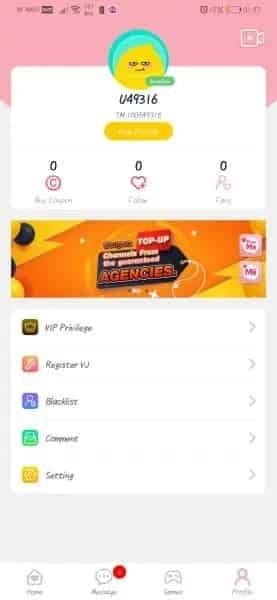
Double-check the digits before submitting your order to ensure the balance is credited to the correct profile.
Step-by-Step Guide: How to Buy U TakeMe Coupons on BitTopup
Recharging your U TakeMe balance takes less than two minutes on BitTopup:
- Select Your Package: Choose the denomination of U TakeMe Coupons you wish to purchase from the live product list.
- Enter Your User ID: Type or paste your U TakeMe User ID (TM ID) into the required field.
- Review Order Details: Confirm the coupon amount and verify that your User ID has no typos.
- Choose Payment Method: Select from the available secure international and regional payment options displayed at checkout.
- Complete Checkout: Finalize your payment. The system will process your order immediately and deliver the coupons directly to your in-app balance.
Check the live checkout interface for current package denominations and real-time prices.
Safe Top-Up Guarantee: 100% UID-Only Transactions
Account safety is essential when purchasing digital currencies online. BitTopup relies on direct UID top-up systems, which provide critical safety advantages:
- Zero Password Sharing: We never request your login password, verification codes, or third-party binding credentials.
- No Account Handover: Your account remains strictly in your hands before, during, and after the transaction.
- Official Delivery Pipeline: Coupons are credited through legitimate direct recharge routes, keeping your account in full compliance with platform terms.
- Data Protection: Your payment information is encrypted using standard industry security protocols.
Why Choose BitTopup for U TakeMe Recharge
BitTopup is designed to provide gamers and livestream enthusiasts with an efficient top-up experience:
- Fast Processing: Orders are handled automatically to reduce waiting times so you can rejoin your favorite live streams immediately.
- Global Accessibility: Multiple payment methods support international users across different regions.
- Clear Pricing: All final costs are shown at checkout without hidden processing fees.
- 24/7 Dedicated Support: Our customer support team is available around the clock to answer inquiries and assist with order verifications.
Troubleshooting: What to Do If Your Coupons Have Not Arrived
Direct top-ups usually credit within moments. If your coupon balance has not updated after completing payment, take the following steps:
- Restart the App: Completely close the U TakeMe application and reopen it to force a server balance refresh.
- Verify User ID: Check your BitTopup order history to make sure the User ID you entered matches your in-app TM ID.
- Check Payment Status: Confirm that your payment method was successfully charged and that you received an order confirmation email.
- Contact Customer Support: If the balance does not appear after a short period, reach out to the BitTopup 24/7 support team with your Order ID and User ID for immediate assistance.
Frequently Asked Questions
How do I find my U TakeMe User ID?
Open the U TakeMe app, tap on the Profile / My Page tab in the bottom right corner, and locate the numeric TM ID displayed under your profile picture and nickname.
What are U TakeMe Coupons used for?
U TakeMe Coupons are used to send virtual gifts to live streamers, start private 1-on-1 video or audio calls, unlock VIP room effects, purchase avatar borders, and enhance your social ranking on the platform.
Do I need to share my password to recharge U TakeMe Coupons?
No. BitTopup requires only your U TakeMe User ID (TM ID). Never share your password, SMS verification codes, or linked social media logins with anyone.
How fast will the U TakeMe Coupons be credited to my account?
Recharges are processed directly after payment verification. In most cases, your coupons are added to your U TakeMe balance shortly after checkout.
Can I recharge U TakeMe Coupons for a friend?
Yes. Enter your friend's U TakeMe User ID (TM ID) instead of your own during checkout. The coupons will be delivered directly to their account.
What should I do if my U TakeMe recharge has not arrived?
First, restart the U TakeMe app to refresh your profile balance. If the coupons still do not appear, check your payment confirmation and contact the BitTopup 24/7 support team with your order details.