

Sugar Live Diamonds Top Up: Instant and Secure Recharge
Sugar Live is a premier live streaming and interactive entertainment platform across Southeast Asia, connecting thousands of talented content creators, musicians, and performers with active viewer communities. Diamonds serve as the core in-app currency within Sugar Live, allowing viewers to send virtual gifts, trigger interactive animations, unlock special room privileges, and back their favorite hosts in real-time PK challenges.
BitTopup provides a direct, secure Sugar Live Diamonds top up service designed for speed and simplicity. By using direct User ID processing, your Diamonds credit straight to your account balance without requiring account passwords, third-party login credentials, or manual order claiming via customer support chats. Select your Diamond denomination, provide your User ID, complete your payment, and get back to enjoying your favorite live streams.
What Are Sugar Live Diamonds and How to Use Them
Diamonds are the premium digital currency on Sugar Live. Acquiring Diamonds gives you access to the full suite of interactive features across live broadcast rooms:
- Sending Virtual Gifts: Shower hosts with animated gifts ranging from flowers, hearts, and lucky items to high-tier luxury cars, yachts, and royal crowns. Gifts reward broadcasters and boost their live rankings.
- Interactive PK Battles: Boost your favorite streamer during live head-to-head PK competitions against other broadcasters. High gift volume helps your chosen host win rounds and secure leaderboard bonuses.
- Fan Badges and Room Status: Sending gifts and spending Diamonds increases your user level, unlocking unique entrance effects, prominent name banners, and exclusive room badges that make you instantly recognizable in busy chat rooms.
- Accessing Fan Club Perks: Join dedicated host fan groups and gain access to custom chat emojis, special broadcast notifications, and member-only chat privileges.
How to Find Your Sugar Live User ID
To ensure your Diamond recharge reaches the correct profile, you only need to locate your numeric Sugar Live User ID. Follow these steps:
- Launch the Sugar Live application on your mobile device.
- Ensure you are signed in to your account.
- Tap the Profile (or Me) tab situated in the bottom right corner of the navigation bar.
- Look at the top section of your profile screen, directly below your display name and avatar.
- You will see your numeric User ID displayed clearly.
- Tap the copy icon next to the number or write down the exact digits.
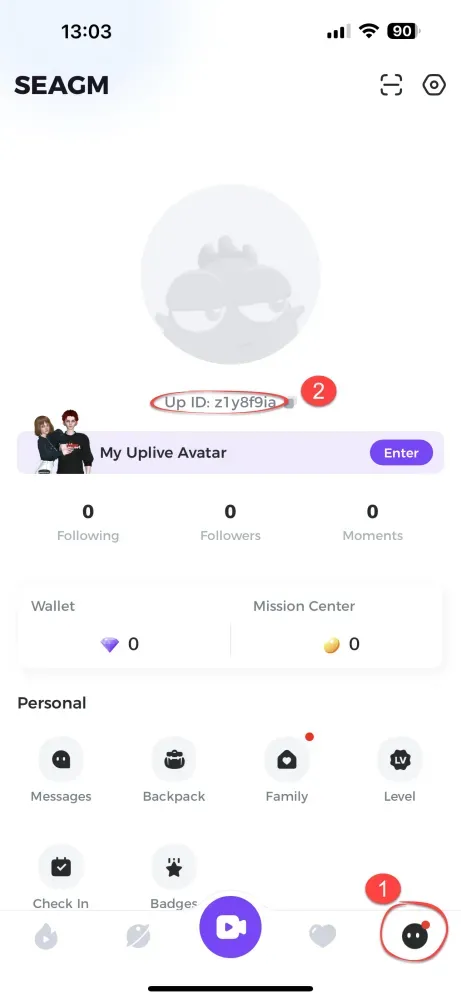
Tip: Always copy and paste your User ID directly into the recharge field to prevent typing errors.
How to Recharge Sugar Live Diamonds on BitTopup
Recharging Diamonds on BitTopup is designed to be straightforward and fast:
- Select Package Denomination: Browse the live listing of Sugar Live Diamond packages on this page and choose the amount you wish to purchase.
- Enter Your User ID: Input your numeric Sugar Live User ID into the designated field.
- Review Order Details: Verify that the package size and your User ID are correct.
- Complete Payment: Pick your preferred payment method and finalize the transaction via the secure checkout gateway.
- Receive Diamonds: Once payment confirmation is received, the automated system routes the Diamonds directly to your Sugar Live account wallet.
Order Overview and Processing Details
| Order Attribute | Specification |
|---|---|
| Required Account Detail | Sugar Live User ID (UID) only |
| Password Required? | No — Never required |
| Supported Platform | Sugar Live (iOS & Android) |
| Region | Southeast Asia |
| Delivery Method | Direct automated wallet credit |
| Live Pricing | Displayed in real time at checkout |
Safe and Secure Sugar Live ID-Only Recharge
Account safety is a top priority for online transactions. BitTopup utilizes an ID-only recharge model that safeguards your personal data and account integrity:
- No Password Sharing: You never need to supply your Sugar Live password, social media login (Google, Facebook, Apple), or phone verification codes. Your login credentials stay completely under your control.
- Protection Against Phishing: Because no login session or OAuth access is requested, your account cannot be compromised or accessed by external parties.
- Safe for Gifting Friends: Because the process only requires a User ID, you can easily top up Diamonds for friends, family members, or your favorite content creators as a surprise gift without asking for their login details.
- Encrypted Checkout Infrastructure: All payments are handled through protected, encrypted gateways to ensure your financial details remain confidential.
Why Choose BitTopup for Sugar Live Top Up in 2026
BitTopup is built to deliver a reliable, cost-effective digital goods experience for live-streaming fans:
- Automated Direct Delivery: Our system automatically processes your order the moment payment clears. You do not have to wait in line or manually contact a live chat representative to release your Diamonds.
- Competitive Pricing: We consistently maintain affordable rates across all Diamond tiers, allowing you to get the most value out of your live stream interactions.
- Transparent Checkout: What you see at checkout is exactly what you pay. Real-time pricing is clearly presented before you confirm your purchase.
- Broad Payment Flexibility: BitTopup provides multiple localized and global payment options to match your preferences.
- Professional Customer Support: If you ever run into a question regarding an order status, our support team is ready to provide prompt assistance.
Troubleshooting Common Sugar Live Recharge Issues
If you experience any delay or issue during your recharge process, use the following troubleshooting guide:
1. Diamonds Have Not Refreshed In-App
- Solution: Close the Sugar Live app completely from your device's recent apps list and reopen it. Check your in-app wallet under the Profile tab. In rare cases of high network congestion, allow a few moments for the server to sync your balance.
2. Typo in the User ID Field
- Solution: If you entered a valid User ID that belongs to another user, automated systems deliver the Diamonds instantly to that account. Because completed digital deliveries cannot be retrieved, always double-check your UID before paying. If the entered User ID was invalid or non-existent, contact BitTopup support with your order number for resolution.
3. Payment Completed but Order Shows Pending
- Solution: Some banking channels or mobile wallets take extra moments to send payment confirmation. Check your transaction statement to ensure funds were deducted. Keep your BitTopup Order ID accessible so our support team can verify your payment status immediately if needed.
Frequently Asked Questions
How do I find my Sugar Live User ID?
Open the Sugar Live app, tap the Me or Profile icon in the bottom right corner, and look directly below your username at the top of the screen. Your numeric User ID is displayed there with a copy button next to it.
How long does it take for Sugar Live Diamonds to arrive after recharge?
Diamonds are credited automatically to your account as soon as payment is confirmed by the payment provider. In most instances, your balance updates in your Sugar Live wallet within moments.
Do I need to share my Sugar Live password to recharge Diamonds?
No. BitTopup only requires your Sugar Live User ID. We will never ask for your account password, email login, or verification codes.
What can I do with Sugar Live Diamonds?
Sugar Live Diamonds allow you to buy animated virtual gifts for live broadcasters, participate in interactive live PK events, increase your profile level, and unlock special room status effects and fan badges.
What should I do if I entered the wrong Sugar Live User ID?
If you realize you entered the wrong User ID before payment, simply cancel the order and start a new checkout with the correct ID. If payment was already completed and the ID was valid, the system immediately credits that account, which cannot be reversed. If the ID was invalid, contact BitTopup customer support with your Order ID for assistance.
Can I recharge Sugar Live Diamonds for another user using their User ID?
Yes. Because our top up system only requires a User ID, you can easily send Diamonds to a friend or streamer. Simply enter their numeric User ID instead of your own during checkout.