Complete Audio Configuration Guide
Master Volume and Channel Balance

Set master volume to 70-80% for audio clarity without ear fatigue. This range provides headroom to detect distant footsteps while preventing distortion during firefights. Volumes above 80% introduce compression artifacts that reduce your ability to distinguish subtle audio differences.
Individual channel settings:
- Footsteps: 100% - Maximizes detection range for player movement
- Gunfire: 100% - Ensures accurate threat assessment during combat
- Ambient: 0% - Eliminates environmental noise interference
These settings create a focused audio profile emphasizing tactical information over atmospheric immersion. Complete removal of ambient sounds might seem extreme, but environmental audio provides no competitive advantage and actively masks critical footstep detection.
Pre-Raid Audio Checklist
Before entering any raid:
- Reset all audio sliders to default
- Check headphone connection for secure contact
- Turn on spatial audio in system settings
- Test audio in a safe area pre-raid
- Select and equip your in-game headset
This prevents audio configuration drift between sessions. Many players overlook pre-raid audio verification, discovering problems only when enemy footsteps go undetected during critical moments.
Dolby Atmos Integration: Spatial Audio Advantages
Spatial audio fundamentally transforms how Arena Breakout renders three-dimensional sound positioning. Unlike traditional stereo or 7.1 surround, spatial audio creates object-based sound placement that accurately represents vertical and horizontal positioning simultaneously.
Directional audio without spatial enhancement performs approximately 10 times worse at distinguishing elevation differences. This massive gap explains why players using standard stereo frequently confuse sounds from different floors, while spatial audio users accurately identify threats above, below, and around their position.
Spatial audio enables detection of ghost steps one floor up by providing distinct vertical audio signatures. Real player footsteps on your level produce centered, grounded sound profiles, while ghost steps from above carry characteristic overhead quality with slightly reduced bass frequencies.
In-Game Headset Performance Comparison
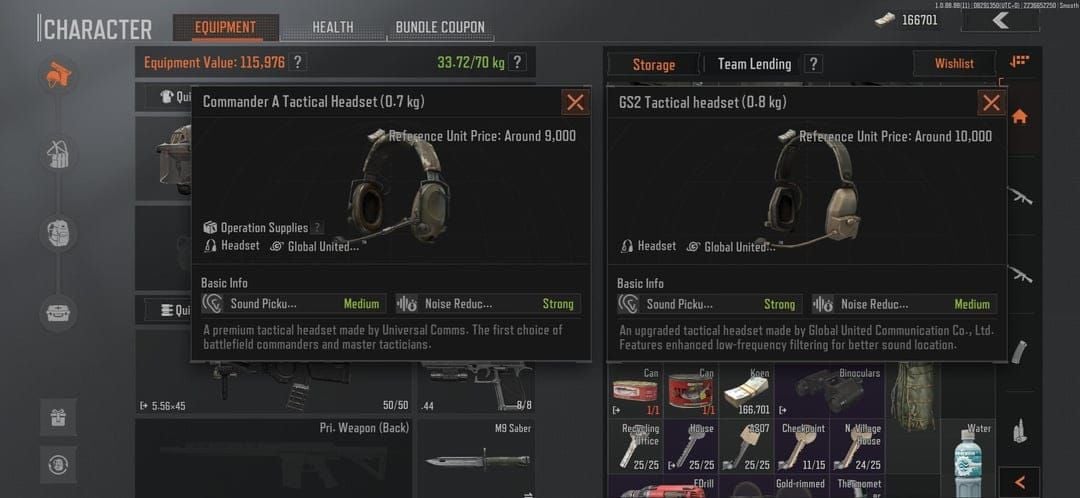
Premium Tier
GS2 Headset - 0.8kg, strong pickup, 30% better detection range vs baseline. Excels in open-area combat where early threat detection provides positioning advantages.
Commander A Headset - 0.7kg, strong reduction, 30% better performance. Balances detection range with reduced weight, ideal for mobile playstyles requiring frequent repositioning.
Mid-Tier Options
Z038 Headset - 0.65kg, medium pickup and reduction. Balanced option for players developing audio recognition skills.
M32 Headset - 0.6kg, medium pickup. Lightweight design supports aggressive movement with adequate footstep detection for close-quarters combat.
Budget Alternative
Com1 Headset - 0.4kg, weak pickup. Entry-level option for learning basic audio mechanics.
For consistent access to premium headsets and tactical gear, buy arena breakout bonds from BitTopup for fast delivery and secure payment processing.
Distinguishing Ghost Steps from Real Footsteps
Audio Signature Analysis
Real player movement produces rhythmic footstep patterns with natural timing variations based on movement speed. Normal walking generates evenly spaced sounds, sprinting creates rapid irregular patterns. Crouch-walking produces footsteps 60% quieter than normal movement.
Ghost steps lack organic rhythm, often appearing as isolated sounds without corresponding movement patterns. They may repeat at unnatural intervals or maintain constant volume regardless of supposed distance changes.
Directional Consistency Testing
Genuine player footsteps maintain directional consistency as enemies move through the environment. Sound source should shift smoothly from left to right or front to back. Ghost steps frequently violate this, appearing to jump between positions or maintaining static locations despite ongoing footstep sounds.
Test directional reliability by rotating your character while listening. Real footsteps shift position relative to your orientation, while many ghost steps remain fixed in space.
Volume and Distance Correlation
Real player footsteps follow predictable volume attenuation based on distance. Enemies detect footsteps from 50 meters maximum, with volume decreasing proportionally as distance increases. Crouch-walking reduces detectability by 60%.
Ghost steps often violate these physics principles, maintaining constant volume despite no actual player movement or appearing at volumes inconsistent with apparent distance. When footstep volume doesn't match visual distance estimates, prioritize visual confirmation.
Environmental Audio Factors
Rain Effects
Northridge Lv11 map features dynamic rain that muffles footsteps by more than 60%. This massive audio reduction creates opportunities for aggressive positioning during precipitation, as enemy detection ranges shrink proportionally. Solo Northridge rain raids provide ideal training for practicing close-range audio detection.
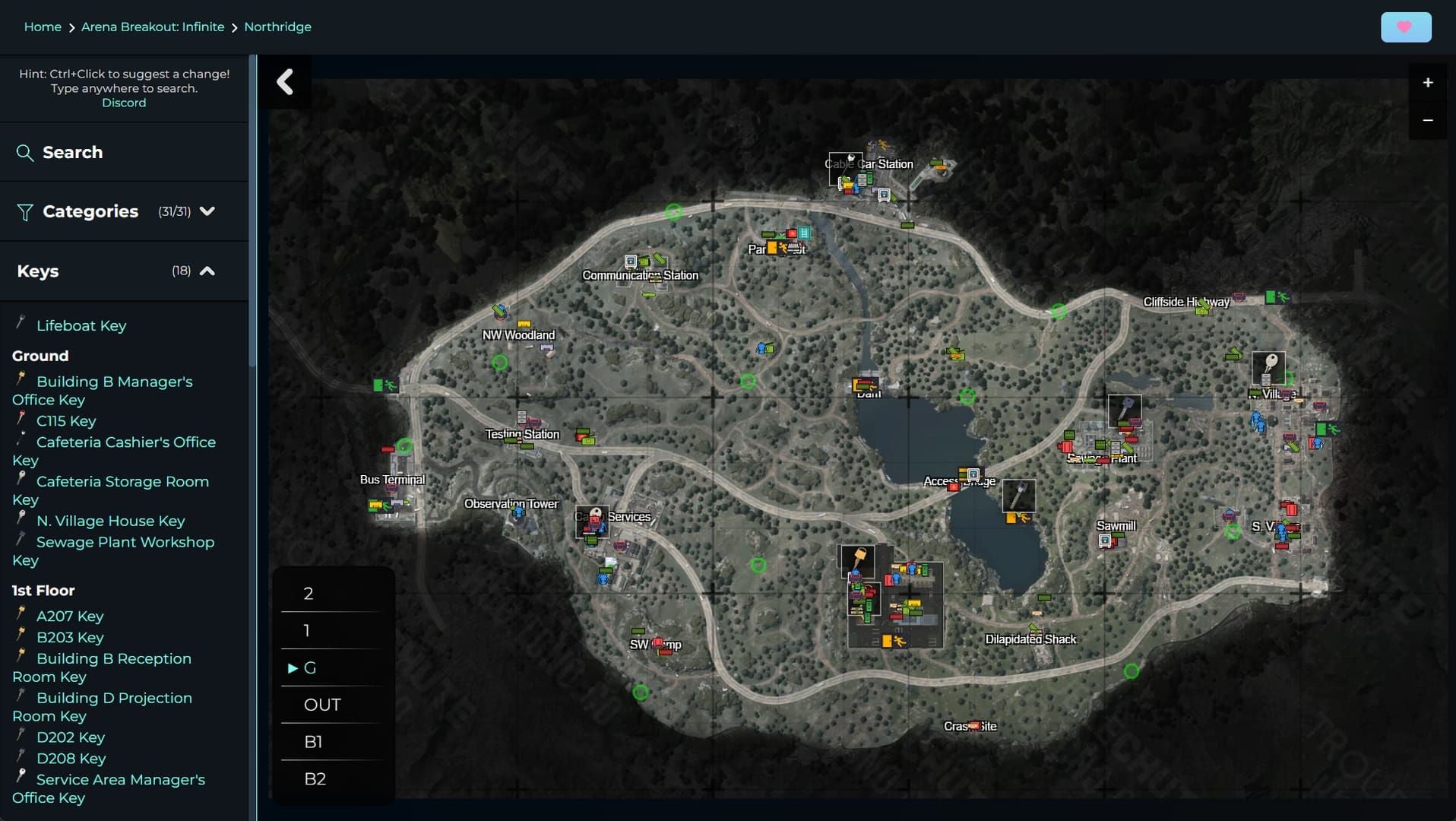
Rain affects all players equally, transforming tactical dynamics by reducing effective range of audio-based threat detection. Adapt by reducing reliance on distant footstep detection and emphasizing visual awareness for close-quarters threats.
Movement Speed and Audio Signature
Crouch-walking near threats reduces your audio signature by 60% compared to normal movement, enabling close approaches without detection. This becomes essential when operating within the standard 50-meter detection radius.
Combine crouch-walking with environmental noise cover like rain for maximum stealth. The cumulative audio reduction creates near-silent movement capabilities enabling aggressive flanking maneuvers.
Advanced Audio Positioning Strategies
Vertical Sound Detection Mastery
Building combat requires accurate identification of threats above and below. Spatial audio provides distinct elevation cues through subtle frequency and reverb differences. Sounds from above carry slightly higher frequencies with reduced bass response, while sounds from below exhibit enhanced low-frequency content.
Practice vertical detection by positioning near stairwells and multi-story structures. Listen for the characteristic overhead quality of footsteps one floor up versus the grounded, bass-heavy signature of same-level movement.
Sound Occlusion and Wall Penetration
Arena Breakout's audio engine simulates realistic sound occlusion based on wall materials and thickness. Footsteps heard through walls exhibit muffled high frequencies and reduced overall volume compared to unobstructed sounds.
Concrete walls provide maximum sound blocking, creating heavily muffled audio signatures. Wooden structures allow greater sound penetration with less frequency filtering. Metal surfaces produce distinctive resonance that enhances footstep detection through barriers.
Multi-Player Audio Tracking
Raids frequently involve multiple simultaneous threats requiring parallel audio tracking. Develop ability to isolate individual footstep patterns from overlapping sounds by focusing on rhythm differences and directional separation.
Aggressive players generate rapid, irregular footstep patterns with frequent direction changes. Cautious players create slow, methodical sounds with extended pauses. Identify these behavioral signatures to predict enemy intentions.
Game Updates and Audio Evolution
Ignition Season update (April 29, 2025) introduced significant audio engine improvements reducing ghost step frequency in multi-story buildings. This update enhanced vertical audio separation, making it easier to distinguish between same-floor threats and phantom sounds from adjacent levels.
Arena Breakout Infinite patch (September 15, 2025) further refined spatial audio positioning accuracy. This update improved directional consistency for footsteps heard through walls and reduced false positives from environmental audio triggers.
Test settings after each major update. Developer refinements may require configuration adjustments to maintain optimal performance as the audio engine evolves.
Hardware Optimization for Maximum Detection
Headphone Selection Principles
Closed-back headphones with 40mm or larger drivers provide optimal footstep detection through enhanced bass response and sound isolation. Open-back designs sacrifice environmental noise blocking for wider soundstage.
Frequency response requirements prioritize 20Hz-100Hz bass extension for footstep fundamentals and 2kHz-8kHz midrange clarity for directional cues. Avoid headphones with excessive bass boost that masks subtle audio differences.
Audio Interface Considerations
Dedicated sound cards or external DACs provide superior audio processing compared to motherboard integrated solutions. These devices reduce electrical interference, lower latency, and provide cleaner amplification.
Audio latency below 10ms maintains synchronization between visual and audio information. High-latency configurations create timing mismatches where footsteps arrive noticeably after corresponding visual movement.
Common Audio Setting Mistakes
Maximum Volume Fallacy
Setting all volumes to 100% reduces detection capability through dynamic range compression. When quiet sounds like distant footsteps and loud sounds like nearby gunfire both play at maximum volume, your audio system can't properly represent volume differences that indicate distance.
The recommended 70-80% master volume with selective channel maximization preserves dynamic range while ensuring critical sounds remain audible.
Expensive Equipment Guarantees
Premium headphones provide advantages, but diminishing returns appear quickly beyond mid-tier equipment. A $150 headphone with proper frequency response outperforms a $500 model with gaming-focused bass boost that masks footstep details.
Ghost Steps Cannot Be Distinguished
While challenging, ghost steps exhibit identifiable characteristics enabling reliable recognition with practice. Systematic analysis of timing, direction, and volume patterns reveals ghost step signatures.
Practical Training Methods
Solo Practice Mode Exercises
Use offline modes or low-risk raids to practice footstep recognition without combat pressure. Move through buildings while listening for your own footstep signatures on different surfaces.
Intentionally create ghost step scenarios by positioning near multi-story structures and listening for phantom sounds from adjacent floors. Practice distinguishing these artifacts from your own movement.
Partner-Based Blind Testing
Coordinate with teammates for controlled audio testing where partners move at predetermined distances and speeds while you identify their positions with eyes closed. This isolates audio detection from visual confirmation.
Record results to track improvement over time and identify persistent weaknesses requiring additional focus.
Troubleshooting Persistent Audio Issues
Driver Updates and Software Conflicts
Outdated audio drivers frequently cause spatial audio malfunctions and ghost step amplification. Update all audio-related drivers including motherboard chipset, sound card, and headphone software.
Background applications with audio processing features may conflict with Arena Breakout's audio engine. Disable equalizers, virtual surround processors, and communication software enhancements during gameplay.
Network Latency Audio Impact
High network latency creates desynchronization between player positions and footstep audio rendering. When server updates arrive delayed, the audio engine may play footsteps for positions enemies occupied 100-200ms ago.
Monitor network performance and prioritize server selection based on ping. Latency below 50ms minimizes audio desynchronization, while connections above 100ms create noticeable timing discrepancies.
FAQ
What are ghost steps in Arena Breakout?
Phantom footstep sounds that don't correspond to actual player positions, typically caused by vertical audio rendering from players one floor above or below.
What is the best audio setting for Arena Breakout 2026?
Master volume 70-80%, Footsteps 100%, Gunfire 100%, Ambient 0%. Enable spatial audio and equip GS2 or Commander A headsets for 30% better detection.
How can I tell if footsteps are real or ghost steps?
Real footsteps maintain consistent directional movement, natural rhythm patterns, and volume correlating with distance. Ghost steps appear at static positions, lack organic timing, and violate distance-volume relationships.
Does Dolby Atmos give an advantage in Arena Breakout?
Yes, spatial audio provides approximately 10 times better directional performance than standard stereo, enabling accurate vertical threat detection and improved ghost step recognition.
How does rain affect footstep sounds?
Rain on maps like Northridge Lv11 muffles footsteps by more than 60%, dramatically reducing detection ranges and creating opportunities for aggressive positioning.
What headphones are best for Arena Breakout?
Closed-back headphones with 40mm+ drivers, 20Hz-100Hz bass extension, and 2kHz-8kHz midrange clarity. Prioritize frequency response specifications over price.
Maximize your Arena Breakout performance with premium in-game resources from BitTopup. Get instant delivery on Koen, gear, and battle passes to dominate every raid. Visit BitTopup now for exclusive deals and secure transactions trusted by millions of players worldwide.