What Are Bigo Diamonds
Bigo Diamonds are Bigo Live's premium currency for purchasing virtual gifts, unlocking features, and supporting broadcasters. Unlike free beans earned through daily activities, diamonds require real money and offer greater purchasing power.
Diamonds convert to beans at fixed rates (one-way only), maintaining platform economy stability. When viewers send diamond-purchased gifts during streams, broadcasters receive beans convertible to real earnings—the foundation of Bigo Live's creator economy.
For viewers, diamonds enable standout gifts with on-screen animations that trigger broadcaster notifications and chat prominence. For broadcasters, diamond gifts are primary revenue and boost platform rankings. Higher diamond activity increases room visibility in recommended feeds, creating a cycle where spending drives discovery.
Why Choose BitTopup
Instant Delivery
98% of orders complete within 3 minutes; 95% credit instantly. PayPal processes in 2-5 seconds, credit cards in 3-8 seconds. Direct API connection to Bigo Live enables real-time balance updates without delays common on other platforms.
Redundant servers and load balancing maintain performance during peak events like the Mid-Year Gala (July 1-30, 2025) when demand spikes.
Security
HTTPS encryption with PCI-DSS compliance protects all transactions. BitTopup never stores complete payment details—tokenization replaces sensitive data with secure references.
Low-cost BIGO Diamonds require only your numeric Bigo ID—no passwords, OTP codes, or login credentials. This eliminates phishing risks and unauthorized access.
Optional two-factor authentication adds extra protection for high-volume users.
Pricing
BitTopup offers 20-60% discounts versus official rates:
- 100 diamonds: $1.96 (vs. $3.14 official—37% savings)
- 660 diamonds: $6.99-$9.99 (22-32% discount)
- 10,000 diamonds: $196.06-$196.30 (37% savings)
First-time buyers get 20-50% bonus diamonds on 500+ packages. The 3,300 diamond package includes 990 bonus diamonds (30% extra).
Seasonal promotions:
- Mid-Year Gala (July 1-30, 2025): 30% bonus diamonds
- Black Friday (November 2025): 10-50% discounts
24/7 Support
Live chat, email, and support pages with under 5-minute response times for urgent issues. Multilingual agents serve global markets with understanding of regional payment methods and platform-specific issues.
Prerequisites
Find Your Bigo ID
- Open Bigo Live, tap Me (bottom right)
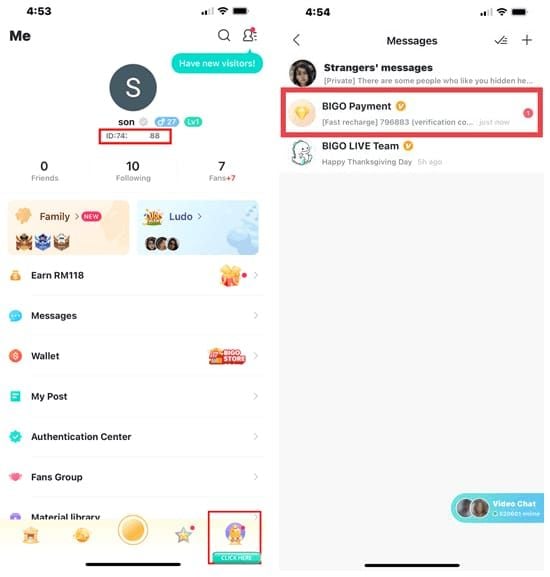
- Your numeric Bigo ID (8-10 digits) appears under your nickname
- Copy numbers only—no ID: prefix or special characters
- Example: 901216366
Screenshot or save this number for future purchases.
Verify Account Status
- Update to Bigo Live version 6.37+ (iOS 13.0+, Android 8.0+)
- Check Settings > Account Security for restrictions or suspensions
- Enable 2FA (optional but recommended for large purchases)
Choose Payment Method
BitTopup accepts:
- PayPal: 2-5 second processing (fastest)
- Visa/Mastercard: 3-8 seconds
- Apple Pay/Google Pay: 2-6 seconds
Contact your bank beforehand to authorize international BitTopup transactions and prevent fraud blocks.
Step-by-Step Top-Up Guide
Step 1: Access BitTopup
Navigate to bittopup.com. Verify HTTPS padlock in URL bar. Bookmark for future use.
Step 2: Navigate to Bigo Section
Search Bigo or scroll to Bigo Live product card. Review promotional banners for active bonuses.
Step 3: Select Package
Entry-level:
Mid-tier:
- 660 diamonds: $6.99-$9.99 (best for regular users)
- 1,000 diamonds: $19.02-$19.61
Premium:
- 3,300 diamonds + 990 bonus (30% extra—best first purchase)
- 10,000 diamonds: $196.06-$196.30
- 33,000 diamonds: $499.99
Affordable BIGO top up packages cost $0.015-$0.0196 per diamond in bulk.
Step 4: Enter Bigo ID
Input your numeric ID carefully. Double-check each digit—errors send diamonds to wrong accounts. Never enter your Bigo password.
Step 5: Choose Payment
Select payment method. Review amount in your local currency (auto-converted).
Step 6: Complete Payment
Enter credentials in secure fields. Don't close browser during processing (takes seconds).
Step 7: Confirm Transaction
Save transaction ID from confirmation page. Check email receipt. Open Bigo Live > Me > Wallet, pull down to refresh balance.

Payment Methods Compared
| Method | Speed | Notes |
|---|
| PayPal | 2-5 sec | Fastest; buyer protection |
| Visa/Mastercard | 3-8 sec | Universal; fraud protection via chargebacks |
| Apple Pay | 2-6 sec | Biometric auth; iOS only |
| Google Pay | 2-6 sec | Biometric auth; Android/Chrome |
Regional options and prepaid cards also accepted.
Verify Delivery
Check Balance
- Open Bigo Live > Me > Wallet
- Pull down to refresh
- Compare new balance: previous + purchased diamonds
Delivery Times
- 95% instant
- 98% within 3 minutes
- Remaining 2% within 5-10 minutes
If Diamonds Don't Appear
- Wait full 10 minutes
- Log out and back in (Settings)
- Clear app cache (Android: Settings > Apps > Bigo Live > Storage > Clear Cache; iOS: reinstall app)
- Contact support with transaction ID if still missing after 10 minutes
Troubleshooting
Transaction Failed
Causes:
- Insufficient funds
- Expired card
- Bank blocking overseas transactions
Fixes:
- Verify payment method balance
- Update card info
- Contact bank to whitelist BitTopup
- Try different browser/device
- Disable VPN
Wrong Bigo ID
Contact support immediately with transaction ID, incorrect ID entered, and correct ID. Recovery difficult after delivery—prevention is key.
Payment Deducted, No Diamonds
- Check BitTopup order history for transaction status
- Wait 10 minutes
- Contact support with transaction ID if still missing
Regional Issues
Check supported countries list. Payment methods vary by region. VPN may trigger fraud detection.
Security Best Practices
Protect Your Account
- Never share Bigo password with any platform
- Enable 2FA (Me > Settings > Account Security)
- Monitor balance and transaction history regularly
Verify Secure Payments
- Check HTTPS padlock before entering payment info
- Look for PCI-DSS compliance badges
- Confirm payment processor branding (official PayPal page, etc.)
Avoid Scams
- Buy only through BitTopup—avoid social media discount sellers
- Ignore phishing emails requesting account verification
- Verify promotions on official BitTopup website
Maximize Your Investment
Strategic Timing
Best purchase windows:
- Mid-Year Gala (July 1-30, 2025): 30% bonus
- Black Friday (November 2025): 10-50% discounts
- First purchase: 20-50% bonus on 500+ packages
Stack seasonal promotions with first-time bonuses and bulk pricing for maximum savings.
Optimal Spending
- Focus diamonds in fewer rooms for stronger broadcaster relationships
- Gift during peak hours for maximum visibility
- Save for special events, competitions, milestones
VIP Benefits
Diamond spending accumulates toward VIP status with exclusive features, badges, and priority treatment. Calculate monthly investment needed to maintain target VIP tier, then buy bulk during promotions.
FAQ
How long does delivery take?
95% instant, 98% within 3 minutes. Remaining 2% take 5-10 minutes. If missing after 10 minutes, refresh wallet, log out/in, or contact support.
What payment methods work?
Visa, Mastercard, PayPal (2-5 sec), Apple Pay, Google Pay. All use HTTPS encryption and PCI-DSS compliance.
Is BitTopup safe?
Yes. HTTPS encryption, PCI-DSS compliance, requires only numeric Bigo ID (never passwords). Optional 2FA available.
Where's my Bigo ID?
Bigo Live > Me icon > numeric ID (8-10 digits) under nickname. Copy numbers only.
Cheapest packages?
100 diamonds: $1.96 (37% off). 660 diamonds: $6.99-$9.99 (22-32% off). 10,000 diamonds: $196.06-$196.30 (37% off). First-timers get 20-50% bonus on 500+ packages.
What if top-up fails?
Verify payment funds and correct Bigo ID. Wait 10 minutes, refresh wallet, log out/in, clear cache. Contact support with transaction ID if unresolved.






















































































































