Apple's Commission Structure
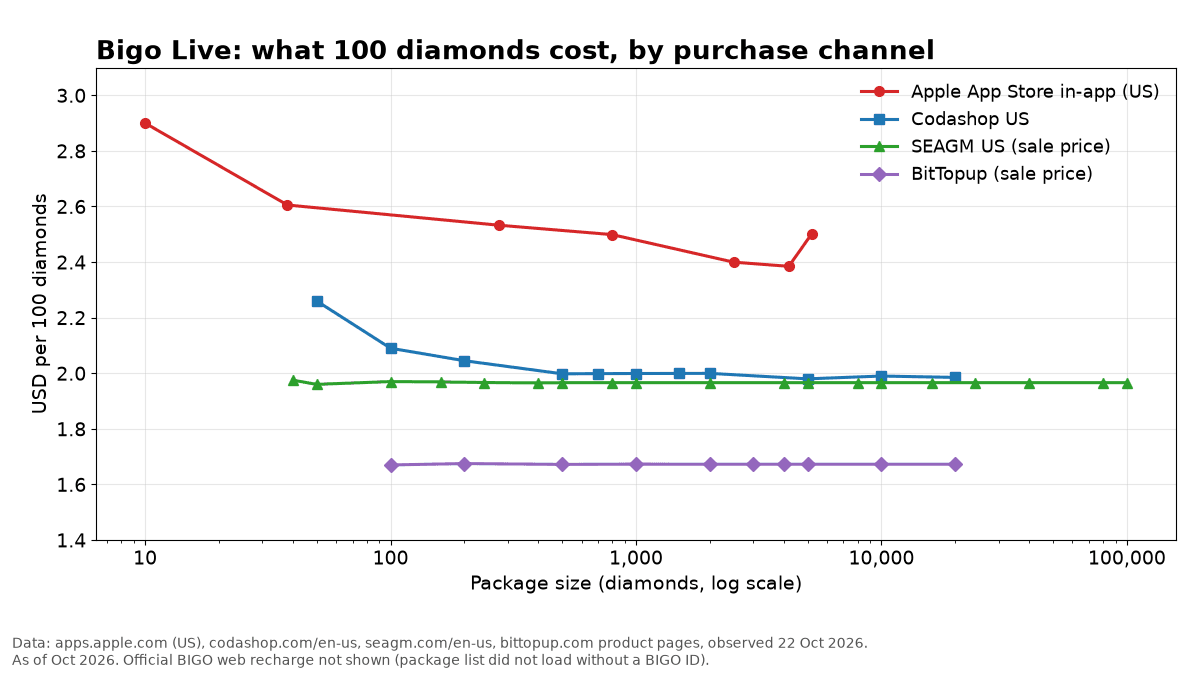
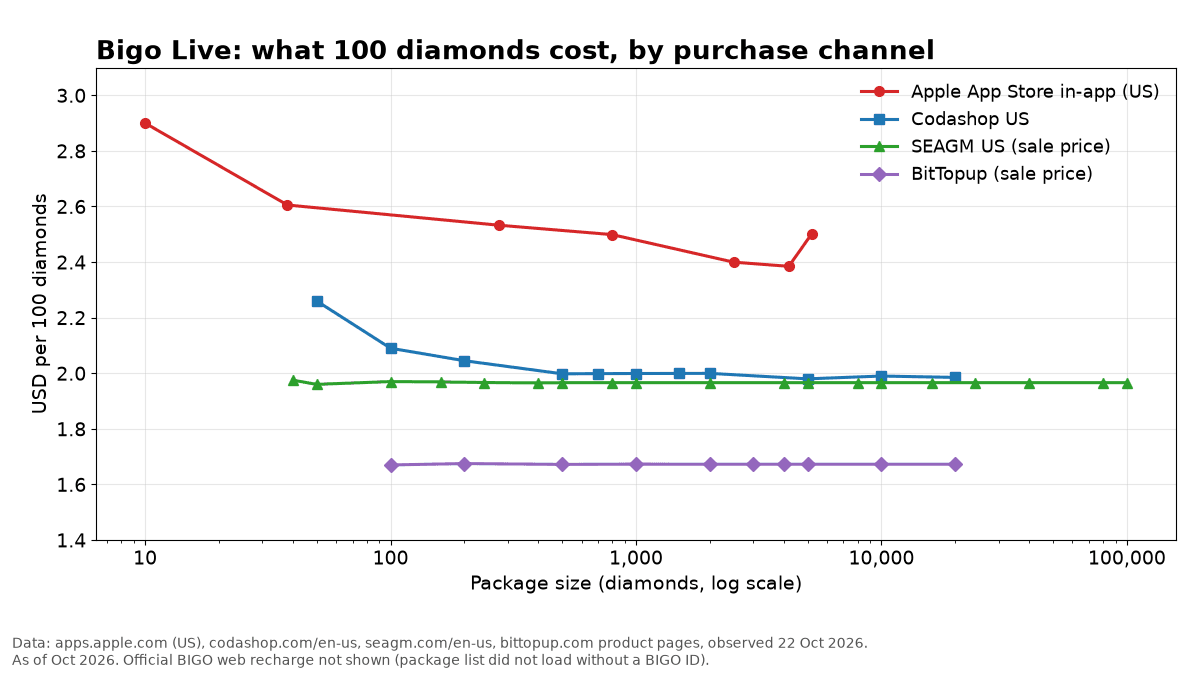
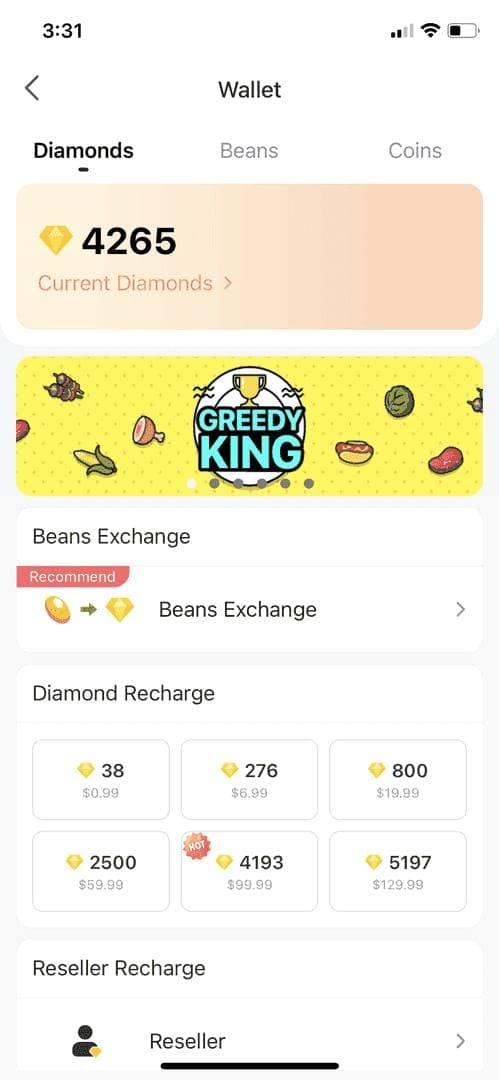
Apple's 30% fee applies universally to digital goods purchased through iOS apps. When you buy 660 diamonds for $9.99, approximately $3.00 goes to Apple before Bigo receives revenue. This forces platforms to set iOS prices significantly higher than operational costs require.
The markup formula: Desired Revenue ÷ 0.70 = Required iOS Price. For 1,000 diamonds where Bigo targets $19.61 revenue, iOS price becomes $28.01, rounded to $31.37 after processing fees.
Annual Cost Impact
Moderate User (5,000 diamonds/month):
- iOS: $900 annually
- Direct: $600 annually
- Savings: $300 (33%)
Heavy User (10,000 diamonds/month):
- iOS: $3,764 annually
- Direct: $2,353 annually
- Savings: $1,411 (37%)
These exclude promotional bonuses (20-40% extra diamonds) and VIP benefits that can increase effective savings to 50-65%.
How to Buy Bigo Diamonds Without Apple Fees
Web-based recharge platforms connect directly to Bigo's API, delivering diamonds within minutes without App Store intermediaries. For U.S. users, platforms offering top up bigo live United States provide localized payment options with transparent pricing.
Legitimate Platform Criteria
Security Indicators:
- HTTPS encryption with valid SSL certificates
- Multiple payment gateways (PayPal, major credit cards)
- Clear refund policies and customer service contacts
- 24/7 support with real-time order tracking
Pricing Transparency:
- Per-diamond rates without hidden fees
- Upfront payment processing charges (PayPal 0% for verified accounts, cards 1-3%)
- Accurate currency conversion
- Detailed promotional bonus breakdowns
BitTopup Features
BitTopup processes 98% of orders within 3 minutes, maximum 5-10 minutes during peak periods. Supports PayPal (0% fees for verified accounts) and major credit cards (1-3% international fees).
Security: HTTPS encryption, numeric ID-only verification (never requires passwords), automated fraud detection. High user ratings reflect consistent delivery and responsive support.
Step-by-Step Purchase Guide
1. Find Your Bigo User ID
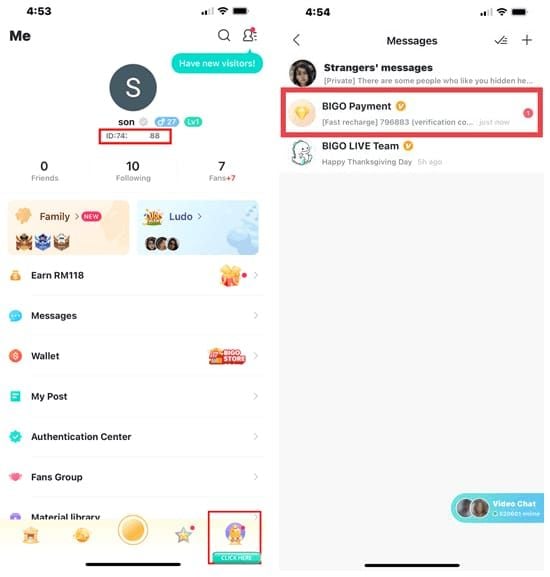
- Open Bigo Live app
- Tap Me icon
- Copy numeric string under your nickname (example: 901216366)
- This 8-10 digit number directs diamonds to your account
2. Select Diamond Package
Value by Package Size:
- 100 diamonds: $1.96 ($0.0196 per diamond)
- 1,000 diamonds: $19.61 ($0.0196 per diamond)
- 10,000 diamonds: $196.06 ($0.0196 per diamond)
Larger packages offer better value. First-time buyers receive 20-40% bonus diamonds.
3. Complete Payment
- Click Buy Now
- Choose payment method
- Review final price including fees
- Complete payment through secure gateway
- Save confirmation number
Processing takes 30-60 seconds. PayPal verified accounts: 0% fees. Credit cards: 1-3% international fees.
4. Verify Delivery

- Open Bigo Live > Me > Wallet
- Check transaction history for new deposit
- Refresh if diamonds don't appear within 3 minutes
- Wait up to 10 minutes before contacting support
If delayed after 10 minutes, verify correct Bigo ID and contact support with order number.
Security Best Practices
What to Never Share
Legitimate purchases require only your numeric Bigo ID. Never provide:
- Account passwords
- Email access or reset codes
- SMS verification codes
- Security question answers
- CVV codes outside payment gateways
- Government IDs
- Remote device access
Enable Two-Factor Authentication
- Navigate to Me > Security
- Select Two-Factor Authentication
- Link phone number and email
- Enable login verification for new devices
- Review and log out unrecognized sessions
2FA blocks unauthorized access even if passwords are compromised.
Transaction Verification
Before Payment:
- Verify website URL (check for misspellings)
- Confirm HTTPS encryption (padlock icon)
- Screenshot order details
After Payment:
- Save email confirmations with transaction IDs
- Verify charge matches quoted price
- Monitor account balance
- Keep receipts 30+ days
Maximize Savings: Strategic Purchasing
VIP Tier Bonuses
- VIP10 ($500+ total spending): 25% extra diamonds on 10,000+ packs
- SVIP Bronze ($150 threshold): 3% discount for 30 days
- First purchase: 20-40% bonus diamonds
VIP10 user buying 10,000 diamonds at $196.06 receives 12,500 total (25% bonus)—effective cost $0.0157 per diamond (50% savings vs iOS).
2025 Promotional Calendar
- Black Friday (Nov 28): 35-50% discounts (year's best pricing)
- Mid-Year Gala (Jul 16-22): 30-60% bonus diamonds
- Anniversary (May): 50% bonus on select packages
- Christmas (Dec 15-31): 35-40% discounts
10,000 diamonds during Black Friday at 50% discount: $98.03 vs $196.06 regular price.
Budget Optimization
- Calculate monthly diamond consumption
- Purchase 2-3 months supply during major promotions
- Use small top-ups only when necessary between events
- Prioritize packages qualifying for VIP bonuses
Example: User consuming 5,000 monthly buys 15,000 during Black Friday (3-month supply) at 50% discount, then smaller purchases in non-promotional months. Captures maximum promotional value.
Common Misconceptions
Myth: External Purchases Violate Bigo Terms
Reality: Bigo's terms don't prohibit authorized reseller platforms. The company operates official web recharge channels and partners with third-party processors. What's prohibited: account sharing, credential theft, fraudulent payments—not legitimate external recharge services.
Confusion stems from Apple's App Store guidelines restricting developers from promoting external payments within iOS apps. This is Apple's policy, not Bigo's restriction.
Myth: Only App Store Purchases Are Secure
Reality: Security depends on payment processor and platform infrastructure, not purchase channel. Reputable external platforms use identical security—HTTPS encryption, PCI-compliant gateways, fraud detection.
External purchases can be more secure because they never require Bigo passwords. Web recharges only need public numeric ID. PayPal transactions offer buyer protection exceeding App Store refund processes.
Myth: Diamonds Won't Transfer to iOS
Reality: Diamonds exist in your account balance, not on devices. Once delivered via numeric ID, diamonds are accessible across all platforms—iOS, Android, web—simultaneously.
Balance synchronizes in real-time. Diamonds purchased through web browser appear instantly in iOS app when you refresh wallet. Delivery mechanism doesn't affect cross-platform availability.
Troubleshooting
Delayed Delivery (0-10 minutes)
- Refresh Bigo app (close/reopen completely)
- Check Me > Wallet > History for pending transactions
- Verify correct Bigo ID entered
- Confirm payment completed (check email/charge)
Extended Wait (10-30 minutes)
- Check for Bigo server maintenance announcements
- Verify account isn't restricted
- Review platform order status with transaction ID
- Prepare order number, payment confirmation, Bigo ID for support
Support Escalation (30+ minutes)
Contact platform customer service with:
- Order number/transaction ID
- Date and time of purchase
- Diamond package amount and price
- Bigo ID used
- Payment method and confirmation number
- Screenshots of confirmation and current balance
Most delays resolve automatically within 15-20 minutes from API synchronization issues.
Payment Failures
Common Causes:
- Credit card international transaction blocks
- Insufficient PayPal verification
- Daily transaction limits exceeded
- Billing address mismatch
- Payment gateway maintenance
Resolution:
- Verify sufficient funds and no restrictions
- Confirm billing info matches payment method
- Try alternative payment method
- Contact bank/PayPal to authorize international gaming transactions
- Wait 24 hours before retrying
Refund Process
Eligibility:
- Diamonds not delivered within 24 hours
- Duplicate charges
- Technical errors (incorrect amounts)
- Unauthorized transactions (requires proof)
Steps:
- Contact support within 7 days
- Provide complete transaction documentation
- Allow 3-5 business days investigation
- Refunds process to original method within 5-10 business days
Cross-Platform Management
Diamond Synchronization
Bigo maintains single server-side balance updating real-time across all devices. Purchasing through any method—iOS, Android, web, third-party—posts to central account within seconds.
Like bank balances, depositing through one channel makes funds available everywhere instantly. No manual transfer or waiting period exists.
Optimal Usage Pattern
- Bookmark web recharge platform
- Make all purchases through web to avoid Apple fees
- Use iOS app exclusively for streaming, gifting, features
- Check balance in app to confirm web purchases delivered
This requires no technical configuration. Simply avoid in-app purchase buttons. iOS app functions identically regardless of where diamonds were purchased.
Multi-Device Setup
- Link account to email and phone (Me > Settings > Account Security)
- Enable login verification for new devices
- Log into Bigo on all regular devices
- Verify numeric ID consistent across platforms
Review active sessions periodically (Me > Security > Device Management). Log out unused devices.
Why BitTopup for iOS Users
Transparent Pricing
Complete pricing breakdowns before payment. Listed prices include all platform fees. Only payment processor charges (PayPal 0%, cards 1-3%) added at checkout.
Bulk rate $0.0196 per diamond stays consistent across package sizes. Price you see is price you pay—no surprise fees.
Instant Delivery
98% delivery within 3 minutes via direct API integration. Maximum 5-10 minutes during peak periods. Automated systems post diamonds immediately after payment confirmation.
24/7 customer support across live chat, email, tickets. Response times under 30 minutes for urgent issues.
Secure Payments
Partners with PayPal and major credit card networks. HTTPS-encrypted connections with valid SSL. Payment data transmits directly to processors through secure tokenization—never stored on BitTopup servers.
Fraud detection monitors transaction patterns, automatically flagging suspicious activity while minimizing false positives.
Ready to stop overpaying? Visit BitTopup now for Bigo Diamonds at true market prices—no Apple tax, instant delivery, complete security. Save 30% on every recharge starting today!
FAQ
Why are Bigo Diamonds more expensive on iOS than Android?
Apple charges mandatory 30% commission on all in-app purchases. Bigo inflates iOS prices to maintain profit margins. 660 diamonds cost $9.99 iOS vs $6.99 direct due to this App Store fee.
Is it safe to buy from third-party platforms?
Yes, when using legitimate platforms with HTTPS encryption, established payment processors, transparent history. Safe platforms require only numeric Bigo ID—never passwords. BitTopup delivers through official API connections with same security as in-app purchases.
How much can I save?
30-65% depending on package size and promotions. 10,000 diamonds: $313.70 in-app vs $196.06 direct (37% base savings). With first-time bonuses (20-40%) and seasonal promotions (35-50%), total savings exceed $1,400 annually for regular users.
Will my account get banned?
No. Bigo's terms don't prohibit authorized reseller platforms. Diamonds deliver through official API. Bigo prohibits account sharing and fraud—not legitimate web recharge services.
How long for delivery?
98% complete within 3 minutes, maximum 5-10 minutes. Diamonds appear automatically across all devices simultaneously. If not within 10 minutes, refresh app and check history before contacting support.
What information needed?
Only numeric Bigo ID (visible under profile nickname in Me section). Legitimate platforms never require passwords, email access, verification codes, or credentials. Numeric ID enables delivery without compromising security.