



Echo Beads Transfer Guide: Steam to PlayStation (2025)
Echo Beads in Where Winds Meet stay locked to your purchase platform—Steam purchases remain on Steam, PlayStation on PlayStation. While the game supports full cross-progression for character data between PC and PS5, premium currency from top-ups and monthly passes won't transfer between platforms. Understanding these restrictions before buying helps multi-platform players avoid frustration and optimize spending.


What Are Echo Beads and Their Primary Uses
Echo Beads are Where Winds Meet's premium currency for purchasing cosmetics, convenience features, and Battle Pass tiers. Available in fixed denominations: 60, 180, 300, 600, 900, 1800, 3000, 6000, and 12000 Echo Beads. The 3,000 package costs $49.99 on PlayStation Store, with standardized pricing across platforms.
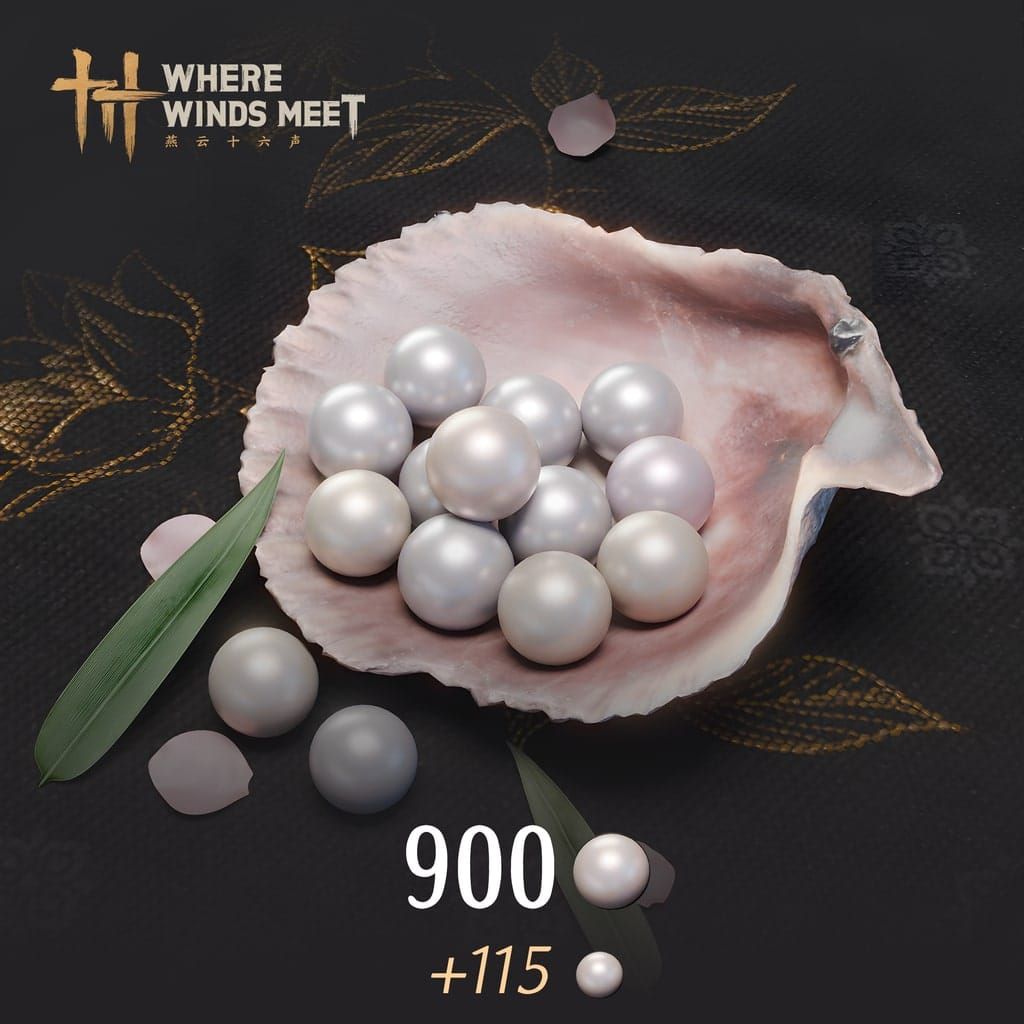
First purchase bonus: buying 3,000 Echo Beads grants 458 bonus Beads plus 3,000 Echo Jades. This one-time bonus applies once per linked account across all platforms—you can't claim it separately on Steam and PlayStation. For competitive pricing and secure transactions, explore Where Winds Meet Payment Methods through BitTopup.
How Echo Beads Differ from Other In-Game Currencies
Echo Beads are direct-purchase premium currency, while Echo Jades serve as earned/bonus currency. Echo Beads come exclusively from real-money transactions, making them subject to platform holder policies.
The fixed denomination system creates clear pricing tiers consistent across platforms. However, platform-locked nature means careful consideration of where to purchase becomes essential for multi-platform users.
The Role of Premium Currency in Wuxia Progression
Premium currency accelerates cosmetic acquisition without creating pay-to-win advantages. Use Echo Beads for appearance customization, convenience items, and Battle Pass progression—elements that enhance experience without compromising competitive balance.
Battle Pass integration: Premium and Elite tier purchases unlock exclusive rewards, but rewards remain claimable only on the purchase platform. This extends platform-lock beyond currency balances to purchased content access.
Cross-Platform Currency Transfer: The Definitive Answer
Official Policy on Echo Beads Between Steam and PlayStation
Echo Beads from top-ups appear only on the purchase platform. Buy 3,000 Echo Beads on Steam? They won't appear on PlayStation 5. This applies universally—PlayStation purchases stay on PlayStation Network, Steam purchases stay on Steam, same for Epic Games Store and standalone PC launcher.
Monthly pass Echo Beads follow identical restrictions. Subscription-based Beads remain locked to the specific platform, preventing cross-platform currency pooling.
Technical Reasons Behind Platform-Locked Currencies
Platform holders like Sony and Valve maintain separate payment processing with distinct revenue-sharing agreements. PlayStation Store purchases go through Sony's system with platform fees; Steam Wallet through Valve's infrastructure. These separate financial ecosystems create technical and contractual barriers to currency transfer.
The restriction protects platform holders' revenue streams and prevents price arbitrage—players buying on cheaper regional platforms and using currency elsewhere would undermine platform-specific pricing strategies.
Real Testing Results: Switching Between PC and PS5
Testing confirms Echo Beads balances remain completely separate. A player with 5,000 Echo Beads on Steam sees zero Echo Beads on PS5 (unless they made separate PlayStation purchases). The reverse holds true.
This separation persists even with properly linked NetEase User Center accounts. Cross-progression transfers character levels, equipment, quest progress, and inventory items, but draws a firm line at premium currency balances.
What Actually Transfers vs What Stays Platform-Locked
Transfers completely:
- Character progression
- Martial arts skills
- Story completion
- Cosmetic unlocks earned through gameplay
- Inventory items
Platform-locked:
- Echo Beads from top-ups
- Monthly pass Echo Beads
- Premium Battle Pass rewards
- Elite Battle Pass level-up rewards
Exception: Purchase Elite Battle Pass on one platform and Premium on another to claim rewards from both on respective platforms (requires separate purchases).
Complete Breakdown of Cross-Platform Account Mechanics
How Cross-Save Works in Where Winds Meet
Cross-progression enables seamless character sharing between Steam, Epic Games, standalone PC launcher, and PlayStation 5. Requires linking all platforms to a single NetEase account through User Center. Once linked, character data synchronizes automatically.
The system shares comprehensively—levels, equipment, skills, quest completion, achievements, and earned cosmetics all transfer. Your only consideration when switching platforms is which premium currency balance you'll access.
Character Data vs Currency Data Synchronization
Character data resides on NetEase's servers, linked to your NetEase account identifier—platform-agnostic. Currency data includes platform-specific identifiers tying each balance to the originating storefront.
You'll see your fully-progressed character on any linked platform, but the shop displays different Echo Beads balances depending on current platform. The game maintains multiple currency wallets under one account—Steam, PlayStation, Epic, and PC launcher wallets.
Step-by-Step Account Linking Process
Critical rule: Link accounts before creating characters on the second platform. Existing characters on both platforms can't be linked.
On Steam, Epic, or PC Launcher:
- Navigate to Settings → Other → User Center → Link Account (or from title screen)
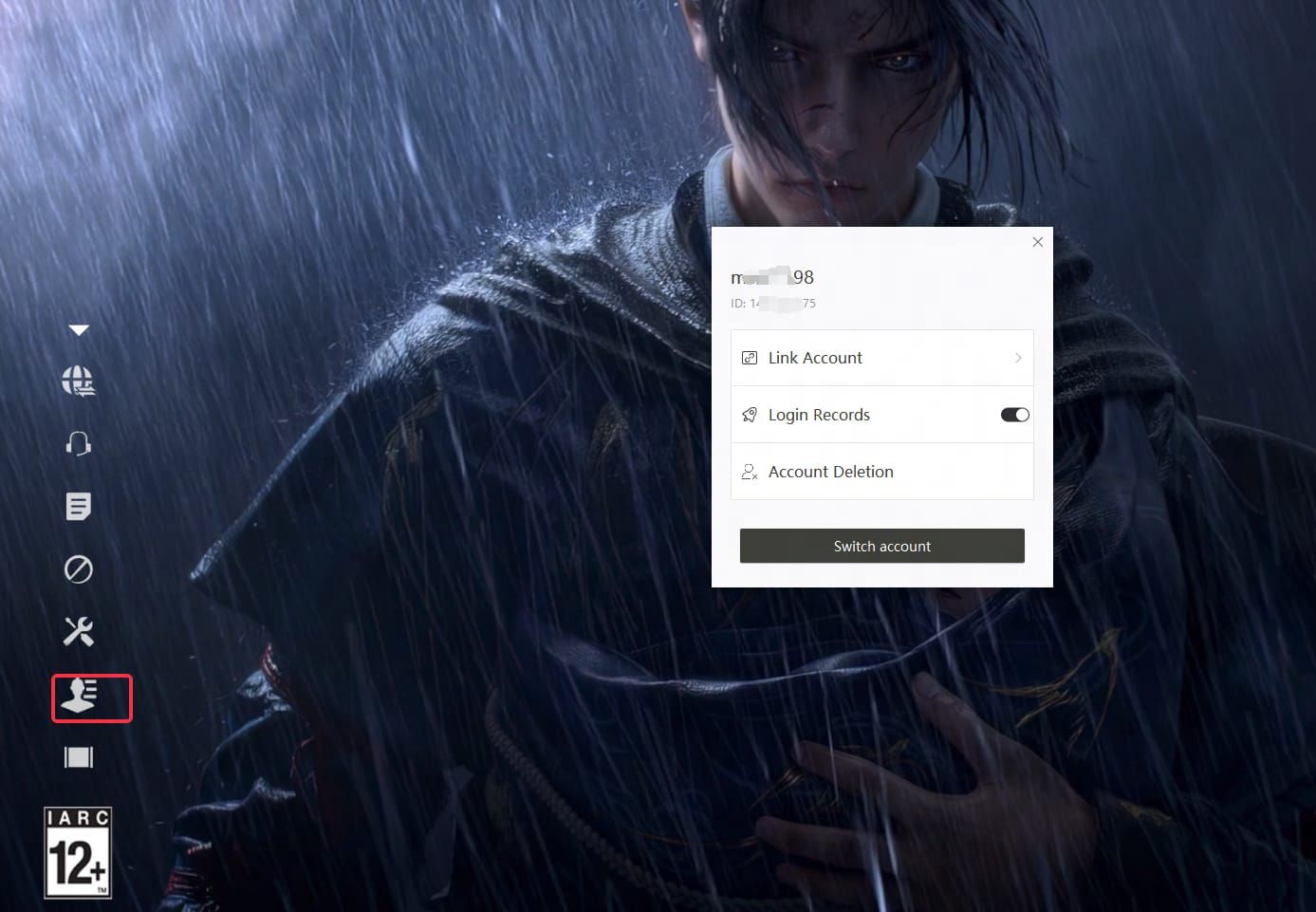
- Link your NetEase account first as central hub
- Log in with linked NetEase account before creating characters on subsequent platforms
On PlayStation 5:
- Create initial character (required to unlock settings)
- Access in-game menu → Settings → Other → User Center → Bind Account
- Log in with linked NetEase account
For reliable top-up options, Where Winds Meet Top Up through BitTopup provides secure transactions with competitive pricing for both PC and PlayStation versions.
Verification Methods and Security Considerations
Account linking creates permanent association between NetEase account and platform-specific accounts. Character creation automatically links that platform's account to your NetEase ID—irreversible through normal means.
Need to unlink? Contact wherewindsmeet@global.netease.com directly. No manual unlinking option exists in-game. This prevents unauthorized manipulation but means mistakes require customer support intervention.
Strategic Spending Guide for Multi-Platform Players
Choosing Your Primary Platform for Purchases
Designate one platform as primary purchase point to consolidate spending. Consider where you play most—if primarily PlayStation with occasional Steam use, make PlayStation your purchase platform for Echo Beads availability during main sessions.
First purchase bonus consideration: Since it applies once per linked account, claim it on your preferred platform for future purchases. The 458 bonus Beads and 3,000 Echo Jades from first 3,000 Echo Beads purchase represent significant value.
Price Comparison: Steam vs PlayStation Regional Pricing
Base price remains consistent—3,000 Echo Beads costs $49.99 on both platforms. However, regional pricing variations, platform-specific sales, and payment method fees can create differences. Steam's regional pricing adjusts more granularly; PlayStation follows Sony's regional structure.
Maximizing Value with Platform-Specific Promotions
Platform holders occasionally run promotions affecting premium currency. PlayStation Plus subscribers sometimes receive discounts; Steam seasonal sales might include bonus currency offers. Monitor both platforms for promotional periods.
Battle Pass consideration: Playing equally on both platforms? Purchasing Premium on one and Elite on another allows claiming rewards from both tiers, though this requires double investment. For most, purchasing highest tier on primary platform provides better value.
Long-Term Account Planning Strategies
Plan spending with platform longevity in mind. Anticipating shift from PC to console? Concentrate purchases on PlayStation. Primarily PC player with occasional PlayStation use? Steam or Epic makes more sense.
Create a spending log tracking which platform holds which currency balances. This prevents confusion and frustration when currency is available but not accessible on current platform.
Troubleshooting Missing Currency and Sync Issues
Why Echo Beads Don't Appear After Platform Switch
Most common missing currency issue: misunderstanding platform-lock. Purchase on Steam, log into PlayStation, wonder where currency went. The Beads aren't missing—they're not visible on PlayStation because they're locked to Steam. Switch back to Steam to see full balance.
This is working-as-designed, not a glitch. No troubleshooting steps will make Steam-purchased Beads appear on PlayStation.
Verifying Purchase Completion on Original Platform
If Echo Beads don't appear on purchase platform, verify transaction completed. Check Steam Wallet transaction history or PlayStation Store purchase history. Payment authorization doesn't guarantee completion.
Log out and back in on purchase platform to force currency balance refresh. If purchase appears in platform's transaction history but doesn't show in-game after relogging, you have a genuine technical issue requiring support.
Contacting Support: What Information to Provide
Email wherewindsmeet@global.netease.com with:
- NetEase account ID
- Purchase platform (Steam, PlayStation, etc.)
- Purchase date and time
- Transaction ID from platform's purchase history
- Echo Beads amount
- Screenshots of platform purchase receipt
Distinguish between platform-locked currency (working as intended) and genuinely missing currency (technical issue). Support resolves technical problems but won't transfer currency between platforms.
Expected Resolution Timeframes
Technical issues preventing currency from appearing on correct platform typically resolve within 24-48 hours with complete information. Support verifies server-side transaction records and manually credits missing currency if needed.
Account unlinking requests take several business days—require manual intervention and verification. Submit early and avoid creating new characters until unlinking completes.
Battle Pass Mechanics and Cross-Platform Considerations
Premium and Elite Battle Pass Platform Restrictions
Battle Pass purchases follow platform-lock principle. Buy Premium on Steam? Claim Premium rewards only on Steam. Elite Battle Pass level-up rewards similarly restrict to purchase platform.
Workaround: Purchase Elite on one platform and Premium on another to claim rewards from both on respective platforms. Requires buying both passes separately—doubles investment but provides access to all reward tiers regardless of current platform.
Battle Pass Progression vs Reward Claiming
Battle Pass level progression synchronizes across linked platforms. Reach level 30 on Steam? You'll see level 30 on PlayStation. However, claimable rewards depend on which tier you purchased on each platform.
Progression is universal, reward access is platform-specific. Frequent platform switchers might find value purchasing at least Premium tier on both primary and secondary platforms.
Safe and Reliable Top-Up Methods with BitTopup
Why BitTopup Is the Trusted Choice for Cross-Platform Players
BitTopup provides secure Echo Beads top-ups with competitive pricing, fast delivery, and excellent customer service. Supports purchases for both Steam and PlayStation versions, giving multi-platform players a single trusted source. High user ratings reflect consistent service quality.
Wide game coverage means managing all gaming top-up needs in one place, while secure transaction protocols protect payment information.
Security Features and Buyer Protection
BitTopup implements multiple security layers protecting payment information and game accounts. Transactions process through secure payment gateways. Platform never requests game account password—only necessary account identifier for delivery.
Buyer protection policies cover transaction issues, providing recourse if Echo Beads fail to deliver. Customer service assists with delivery verification and coordinates with publishers if technical issues prevent currency from appearing.
Competitive Pricing and Bonus Offers
Competitive pricing often matches or beats official platform prices, particularly during promotions. Platform occasionally offers bonus currency or discounted rates, providing additional value.
When purchasing, verify you're selecting correct platform version—Steam, PlayStation, Epic, or PC launcher—to ensure Echo Beads arrive on intended platform.
Future-Proofing Your Where Winds Meet Investment
Best Practices to Avoid Purchase Regrets
Before purchasing Echo Beads, verify current platform and confirm that's where you want currency. This prevents buying on wrong platform and finding it inaccessible.
Take advantage of first purchase bonus strategically. Claim it on the platform where you'll make majority of future purchases. The bonus value—458 extra Beads plus 3,000 Echo Jades—represents significant savings.
Staying Updated on Policy Changes
Monitor official Where Winds Meet announcements for potential changes to cross-platform currency policies. While current restrictions seem firmly established, game updates occasionally revise monetization systems.
Join community discussions to learn how other multi-platform players manage spending. Experienced players share strategies for maximizing value, such as timing purchases around platform-specific sales or coordinating Battle Pass purchases.
FAQ
Do Echo Beads transfer from Steam to PlayStation in Where Winds Meet?
No. Echo Beads purchased on Steam stay locked to Steam and won't appear on PlayStation. Same restriction in reverse. Only character progression and earned items transfer through cross-save.
Can I use the first purchase bonus on both Steam and PlayStation?
No. First purchase bonus applies once per linked NetEase account across all platforms. Claim it on one platform, you can't claim it again on another. Choose carefully.
What happens to Battle Pass rewards when I switch platforms?
Battle Pass level progression synchronizes, but you can only claim rewards on the purchase platform. Bought Premium on Steam? Must play on Steam to claim Premium rewards, even though progression level appears on PlayStation.
How do I link my Steam and PlayStation accounts for cross-progression?
Link NetEase account first, then connect each platform through Settings → Other → User Center → Link Account. Must link before creating character on second platform. Contact wherewindsmeet@global.netease.com to unlink accounts.
Why can't I see my Echo Beads after switching from PC to PS5?
Normal behavior, not a bug. Echo Beads appear only on purchase platform. PC Echo Beads stay on PC; PlayStation Echo Beads stay on PlayStation. Switch back to purchase platform to access those Beads.
Where should I buy Echo Beads if I play on multiple platforms?
Choose one platform as primary purchase point—ideally where you play most. Consolidating purchases on main platform ensures currency access during most sessions. BitTopup offers secure top-ups for both PC and PlayStation with competitive pricing and fast delivery.
Recommended News

Recommend products


Table of Contents
- Understanding Echo Beads in Where Winds Meet's Economy
- What Are Echo Beads and Their Primary Uses
- How Echo Beads Differ from Other In-Game Currencies
- The Role of Premium Currency in Wuxia Progression
- Cross-Platform Currency Transfer: The Definitive Answer
- Official Policy on Echo Beads Between Steam and PlayStation
- Technical Reasons Behind Platform-Locked Currencies
- Real Testing Results: Switching Between PC and PS5
- What Actually Transfers vs What Stays Platform-Locked
- Complete Breakdown of Cross-Platform Account Mechanics
- How Cross-Save Works in Where Winds Meet
- Character Data vs Currency Data Synchronization
- Step-by-Step Account Linking Process
- Verification Methods and Security Considerations
- Strategic Spending Guide for Multi-Platform Players
- Choosing Your Primary Platform for Purchases
- Price Comparison: Steam vs PlayStation Regional Pricing
- Maximizing Value with Platform-Specific Promotions
- Long-Term Account Planning Strategies
- Troubleshooting Missing Currency and Sync Issues
- Why Echo Beads Don't Appear After Platform Switch
- Verifying Purchase Completion on Original Platform
- Contacting Support: What Information to Provide
- Expected Resolution Timeframes
- Battle Pass Mechanics and Cross-Platform Considerations
- Premium and Elite Battle Pass Platform Restrictions
- Battle Pass Progression vs Reward Claiming
- Safe and Reliable Top-Up Methods with BitTopup
- Why BitTopup Is the Trusted Choice for Cross-Platform Players
- Security Features and Buyer Protection
- Competitive Pricing and Bonus Offers
- Future-Proofing Your Where Winds Meet Investment
- Best Practices to Avoid Purchase Regrets
- Staying Updated on Policy Changes
- FAQ


Recommended News
Are Microsoft Rewards Milestones Worth It for Office in 2026?
How to Get Free Gold in Marvel Snap in 2026 (All F2P Methods)

How to Lower PS5 Ping Japan Servers for Smooth Online Play
How to Reach Eggsecutive VP Salmon Run in Solo Freelance Matches
Be The King Event Guide: Mastering Imperial Hunt in 2026
Honkai Star Rail 4.5 Pull Guide | August 2026
Robin Summeretto Best Build | August 2026
Honkai Star Rail 4.5 Who to Pull | August 2026


































































































