Account vs Server Issues
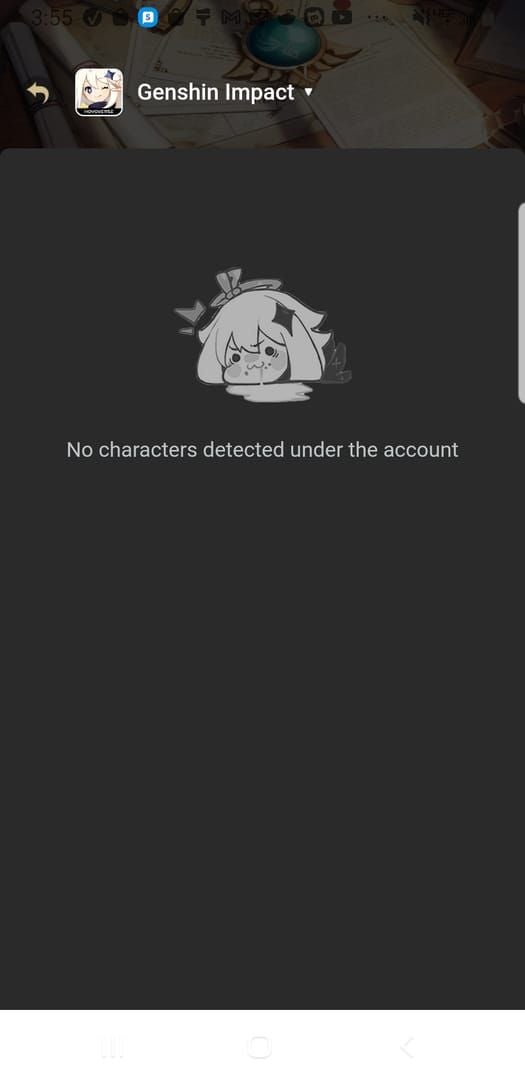
The error triggers when three data points misalign: HoYoverse credentials, selected server region, and your actual character's server. Each account can have characters on multiple servers (America, Europe, Asia, TW-HK-MO), but codes must match your active server.
Server mismatch is most common. If your character's on America but you select Europe during redemption, the system correctly reports No Character Found.
Account verification is second. Players using Game Center or third-party logins may lack verified HoYoverse emails. The system requires email verification to confirm ownership.
Why Email Links Fail More
Email redemption links contain temporary authentication tokens that expire quickly. Opening emails hours later or browser cookie clearing invalidates embedded session data.
Mobile email clients often use simplified browsers that don't handle HoYoverse session cookies properly. Safari's tracking prevention and Firefox's privacy settings block required cross-site authentication.
Web redemption takes 12 seconds per code vs 45 seconds in-game, making it preferred for time-sensitive livestream releases.
AR 2 Character Creation Requirement
AR 2 unlocks the mailbox where rewards deliver. You can redeem codes at AR 1, but can't claim rewards until AR 2.
Rewards deliver within 24-48 hours and expire after 30 days unclaimed. This two-tier system (redemption vs claiming) explains why GENSHINGIFT works at AR 1 but requires AR 2 for actual rewards—about 15-20 minutes of gameplay.
Instant Fixes
Step 1: Verify Account-Server Match
Launch Genshin and note your server name on login screen:
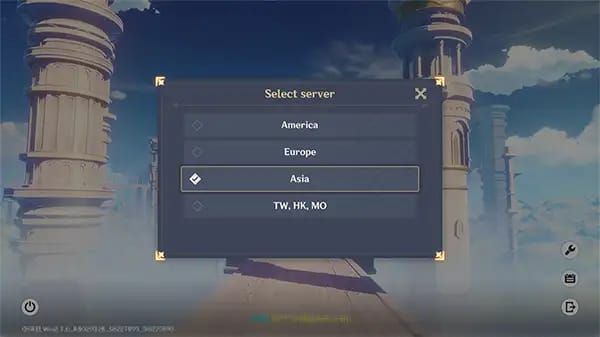
- America: North/South America
- Europe: Europe/Africa
- Asia: Most Asian countries
- TW-HK-MO: Taiwan, Hong Kong, Macau
On the redemption website, select your exact server. Enter your character nickname precisely—case-sensitive, including spaces/special characters.
Cross-server redemption always fails. Each code works once per account on one server only.
Step 2: Clear Cache & Cookies
Chrome/Edge:
- Press F12 (Developer Tools)
- Right-click refresh button
- Select Empty Cache and Hard Reload
Firefox:
- Settings > Privacy & Security
- Cookies and Site Data > Manage Data
- Search hoyoverse and remove all
- Restart browser
Mobile users should switch to desktop browsers for reliability.
Step 3: Switch Redemption Methods
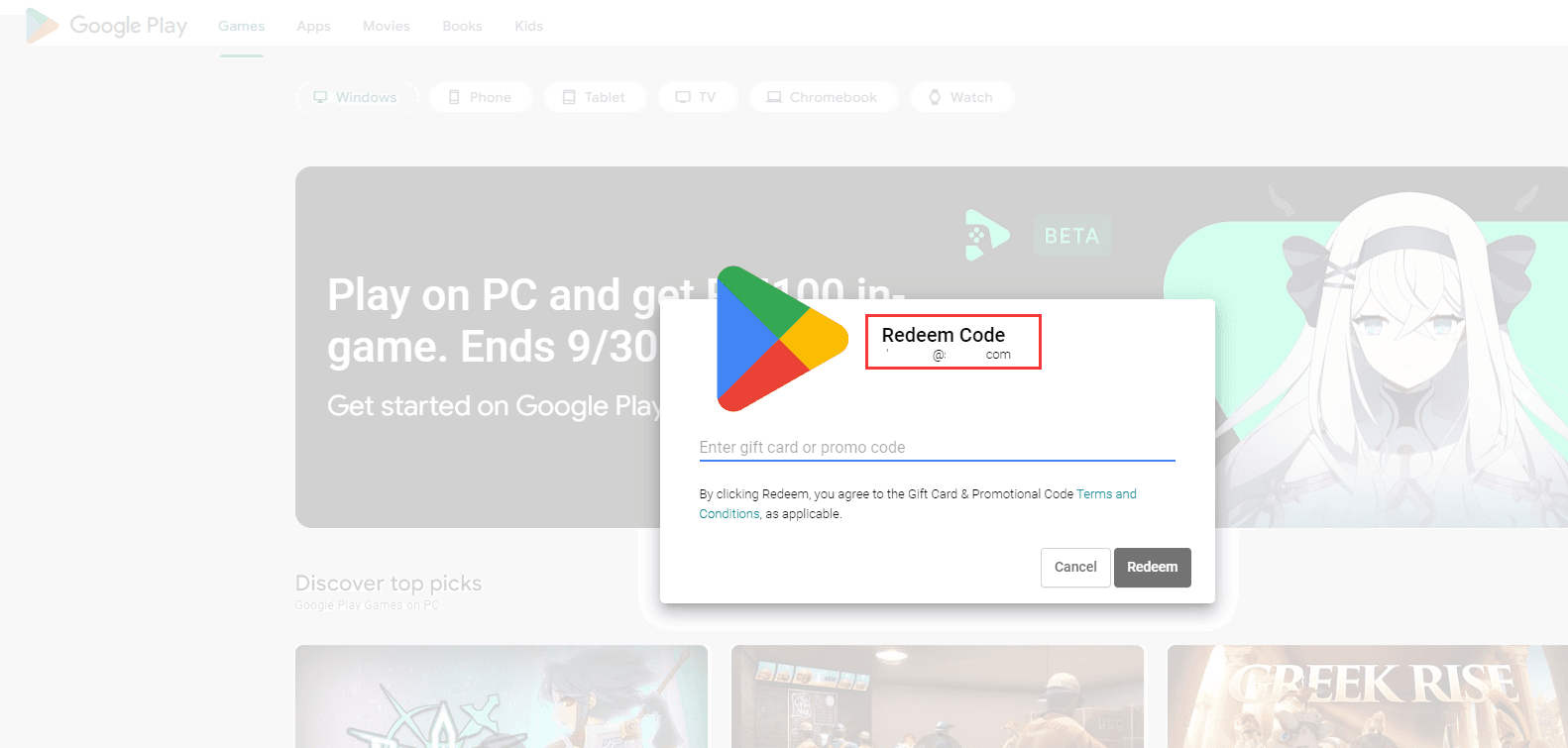
When web fails, use in-game: Paimon menu > Settings > Account > Redeem Code. This bypasses browser issues entirely and auto-uses your current server.
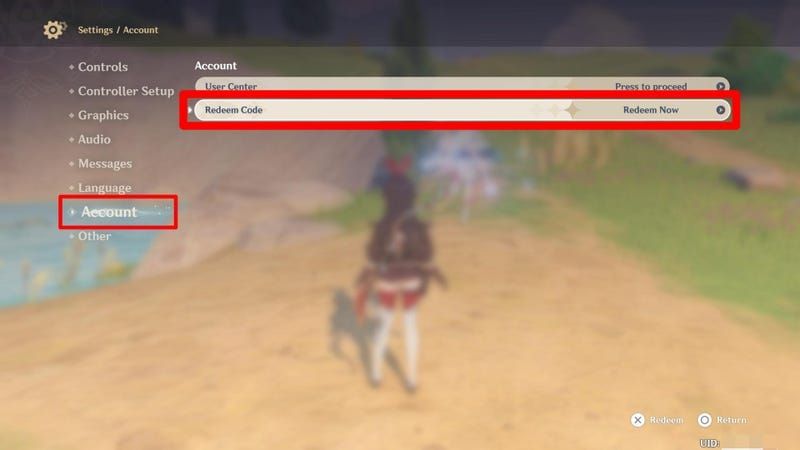
In-game requires manual entry (no copy-paste on some platforms), increasing typo risk. Codes are case-sensitive.
Web redemption remains superior for bulk entry during livestreams with multiple codes.
For reliable alternatives, buy Genshin Genesis Crystals online at BitTopup—fast delivery, secure transactions, excellent ratings.
Step 4: Check Code Expiration
Livestream codes last 48 hours from premiere. Version 6.3 livestream (Jan 2, 2026, 00:00 UTC-5) codes expired Jan 5, 2026, 4:00 AM—76-hour window.
Special programs occur every 42 days. Three codes drop at:
- First: 15-20 min into stream
- Second: Mid-program (40-50 min)
- Third: Near conclusion (70-80 min)
Community/promotional codes may expire in 12-24 hours. Redeem immediately—don't save for later.
Email-Link Error Solutions
Why Email Links Fail
Email links embed temporary tokens generated when the email's created. Clicking hours later means expired tokens, causing character detection failure.
Email preview panes pre-load links, consuming single-use tokens before you actually click. Corporate/school security filters may strip authentication parameters entirely.
Account Linking Verification
Navigate to HoYoverse User Center to verify email status. Players using Game Center/Facebook logins may lack verified emails.
Link email:
- Log in with current method
- Account Settings > Email Linking
- Enter valid email
- Check inbox for verification code
- Enter code to complete
Takes 2-3 minutes, permanently fixes email-link errors.
Manual Entry Alternative
Extract the code from email body and enter manually through standard web redemption. Email links provide convenience, not exclusive access.
Copy carefully—codes are case-sensitive. GENSHINGIFT ≠ genshingift. Avoid extra spaces.
Manual entry provides better error messaging than generic email-link failures.
PlayStation Limitations
PSN accounts can't use web redemption due to Sony policies. PlayStation players must use in-game redemption exclusively: Paimon menu > Settings > Account > Redeem Code.
Cross-save adds complexity. If you created your account on PC/mobile then linked PSN, you retain web access on PC/mobile. If you started on PlayStation, you're PSN-authenticated permanently—no web redemption even on PC/mobile.
Never Miss Livestream Codes
Livestream Timing (2026 Patterns)
Version updates follow 42-day cycles. Special programs premiere Friday evenings CST (UTC+8)—Friday mornings North America, Friday afternoons Europe.
Three codes drop predictably:
- Code 1 (15-20 min): Primogems + Mora
- Code 2 (40-50 min): Primogems + Hero's Wit/Enhancement Ore
- Code 3 (70-80 min): Largest Primogem quantity
All valid for 48 hours from premiere, accommodating global time zones.
Instant Notifications
Monitor multiple sources:
- Official livestream chat
- Community Discord servers (role-based pings)
- Social media (post notifications enabled)
- Community websites (real-time updates)
Enable push notifications 24 hours before events. Test delivery in advance.
Time Zone Conversion
Version 6.3 livestream (Jan 2, 2026, 00:00 UTC-5) converted to:
- 22:00 PST (Jan 1): Pacific
- 05:00 GMT (Jan 2): Greenwich
- 13:00 CST (Jan 2): China
- 14:00 JST (Jan 2): Japan
Set calendar reminders 15 minutes before premiere.
Multi-Account Strategy
Each code works once per account. Players with multiple accounts can redeem the same code on each.
Prepare before codes release:
- Open redemption website in multiple tabs (one per account)
- Pre-login and verify server selection
- Document character nicknames
- Queue codes in text editor for instant copy-paste
Web redemption's 12-second speed lets you redeem across 3-4 accounts within two minutes.
Common Errors Beyond No Character Found
Already Redeemed vs Invalid
Already Redeemed: Code was valid, but you've used it. Each code works once per account.
Invalid: Code is expired, mistyped, region-restricted, or fake. Verify spelling (case-sensitive), check expiration, confirm no regional restrictions.
Server Region Restrictions
Some codes only work on specific servers due to promotional licensing. North American retail codes may only function on America servers. No workaround exists—region-locked codes can't be used elsewhere.
Version Update Timing
Maintenance periods (5 hours before updates) disable redemption. Plan around maintenance—redeem expiring codes immediately.
Post-maintenance surges overload servers, causing temporary service unavailable errors. Wait 30-60 minutes and retry.
Browser Compatibility
Safari: Intelligent Tracking Prevention blocks required cookies. Temporarily disable in Safari > Preferences > Privacy > Prevent cross-site tracking.
Mobile browsers: Aggressive memory management terminates sessions when switching apps. Desktop browsers (Chrome, Edge, Firefox) provide most reliable experience.
Platform-Specific Troubleshooting
PC/Mobile Best Practices
Optimize workflow:
- Bookmark official redemption website
- Use password managers for quick login
- Save character nickname in notes app
- Maintain logged-in session during events
Clear cache weekly to prevent session corruption.
PlayStation Workarounds
PSN accounts can't access web redemption—Sony requires in-game redemption for all content distribution.
In-game redemption:
- Launch Genshin on PlayStation
- Paimon menu (Options) > Settings > Account > Redeem Code
- Manually type code (no copy-paste)
- Confirm and check mailbox
Double-check each character—typos waste time during limited windows.
Cross-Save Complications
Authentication method determines redemption eligibility, not current platform.
- PC/mobile account + PSN cross-save: Retain web access on PC/mobile
- PSN account + PC/mobile cross-save: PSN-authenticated permanently, in-game only
Check User Center > Account Security for primary login method.
Mobile App vs Browser
Mobile browsers suspend sessions when switching apps. In-game mobile redemption avoids browser issues but requires keyboard switching for numbers.
Hybrid approach: Use desktop browsers when possible, reserve in-game mobile for emergencies.
Maximizing Rewards
Typical Livestream Rewards
Standard package (300 total Primogems):
- Code 1: 100 Primogems + 50,000 Mora
- Code 2: 100 Primogems + 10 Hero's Wit
- Code 3: 100 Primogems + 5 Mystic Enhancement Ore
Anniversary events may increase to 400-500 Primogems. Mailbox rewards expire after 30 days—set weekly reminders.
Stacking with Top-Ups
Free codes (300 Primogems) + BitTopup purchases = faster pity thresholds. BitTopup offers instant delivery, secure payments, 24/7 support—no AR requirements, server restrictions, or technical issues.
Calculate needs:
- Current Primogem count
- Add livestream codes (300)
- Calculate remaining for wish goals
- Purchase difference through BitTopup
Maximizes free resources, minimizes spending.
Priority Redemption Order
Redeem by expiration timeline, not reward value. During livestreams with three codes:
- Redeem Code 1 when announced
- Redeem Code 2 when announced
- Redeem Code 3 when announced
Chronological approach ensures you capture all before any expire.
Primogem Value Calculation
300 Primogems ≈ $4.99 USD in Genesis Crystals. Eight version updates yearly = 2,400 Primogems ($39.92 value).
Consistent redemption significantly impacts long-term accumulation. Missing one livestream = losing a small purchase equivalent.
Prevention Checklist
Monthly Account Health Check
- Email verification status (User Center)
- Password functionality test
- Server region documentation
- Character nickname saved (exact capitalization/spacing)
- Adventure Rank tracking (AR 10 requirement)
Takes 5 minutes monthly, prevents hours of troubleshooting.
Bookmark Official URLs Only
Phishing sites steal credentials. Bookmark official redemption website after verifying through official Genshin website.
Verify authenticity:
- HTTPS encryption (padlock icon)
- Exact HoYoverse domain match
- SSL certificate validation
- No suspicious subdomains/misspellings
Security Best Practices
- Enable two-factor authentication (User Center)
- Use unique passwords (password managers recommended)
- Monitor login history (User Center > Security)
Contact Support
Settings > Feedback > Events and Web Events. Response time: 24-48 hours.
Provide:
- UID (User ID)
- Server region
- Exact error message
- Redemption method (browser type or in-game)
- Specific code attempted
- Troubleshooting already performed
Advanced Strategies
Community Code-Sharing
Contribute by:
- Sharing codes immediately when discovered
- Confirming validity after redemption
- Reporting expiration times
- Thanking contributors
Speed optimization:
- Enable push notifications
- Keep redemption website open during livestreams
- Use text expansion for character nickname
- Prepare codes in text editor
Fastest members redeem within 30-60 seconds of announcement.
Automated Alerts
Discord: Join servers with code channels, assign notification roles, enable push notifications with distinct sounds.
Social media: Follow official accounts with post notifications, bypass Do Not Disturb for these accounts.
Community websites: Subscribe to email/SMS alerts (lag 5-10 minutes behind real-time).
Test all systems 24 hours before livestreams.
Multi-Region Tracking
Some events distribute different codes across servers. Monitor Chinese/Japanese/Korean communities for advance notice.
Use translation tools and browser extensions. Maintain world clock widget (CST, JST, local time).
Personal Code Archive
Spreadsheet with columns:
- Code (exact string)
- Redemption date
- Expiration date
- Rewards
- Source
Prevents duplicate attempts, quantifies annual acquisition, identifies best monitoring sources. Export monthly as backup. Use cloud-based spreadsheets (Google Sheets, Excel Online).
Beyond Free Codes
BitTopup Value
- Instant delivery (minutes, not 24-48 hours)
- No AR requirements
- 24/7 customer support
- Secure payment processing
- High user ratings
Works reliably regardless of account status, server, or platform.
Strategic Top-Up Combination
- Redeem all free codes (baseline count)
- Calculate wishes needed (90 for guaranteed 5-star)
- Determine shortfall after free codes/events
- Purchase exact quantity through BitTopup
Minimizes spending while ensuring character acquisition.
Monthly Budget Optimization
Free sources (4,700 Primogems monthly):
- Daily commissions: 1,800
- Spiral Abyss: 1,200 (36-star)
- Events: 800-1,000 per version
- Codes: 300 per version
- Maintenance: 600 per version
Paid sources:
- Welkin Moon: 2,700 ($4.99)
- Battle Pass: 680 + 4 Fates ($9.99)
- Genesis Crystals: Variable
Free + Welkin = 7,400 monthly (46 wishes). BitTopup fills gaps for limited characters.
FAQ
Why does my code say no character found?
Account lacks verified character on selected server. Verify correct server selection, email verification in User Center, and AR 2 for mailbox access. Server mismatch is most common—double-check selection.
How long do livestream codes last?
48 hours from premiere. Version 6.3 codes lasted 76 hours due to delayed schedule. Promotional codes may expire in 12-24 hours. Redeem immediately.
Can I use codes from different servers?
No. Codes work once per account on one server only. Cross-server redemption fails.
What's the minimum AR?
Most codes need AR 10. GENSHINGIFT and Prime Gaming work at AR 1. All require AR 2 to claim mailbox rewards.
Why is my new code invalid?
Code is expired, mistyped, region-restricted, or wrong server. Verify case-sensitive spelling, check expiration (48 hours for livestreams), confirm no regional restrictions.
How do I fix redemption page not loading?
Clear browser cache/cookies for HoYoverse domains, disable VPN/proxy, try different browser (Chrome/Edge), verify internet stability. If errors persist after login, use in-game redemption: Paimon menu > Settings > Account > Redeem Code.
Don't let errors slow progress! While troubleshooting codes, secure guaranteed Primogems with BitTopup's instant Genesis Crystal delivery. Best rates, fastest processing, 24/7 support—no character not found errors. Top up now!