Account Binding and Regional Locks
Your Identity V account locks to a specific server at initial setup. This lock extends beyond gameplay—it determines which player pool you interact with, which events you access, and who can send or receive gifts from you. The regional lock persists even if you change physical location or use network tools from different countries.
Cross-platform data transfer represents the only exception to Echo immobility, but works exclusively within the same account across devices. Transferring your account from iOS 10.0+ to Android 4.3+ or between mobile and PC moves your Echoes completely because you're moving the same account data, not transferring currency between separate accounts.
What Are Echoes and How Does the Currency System Work?
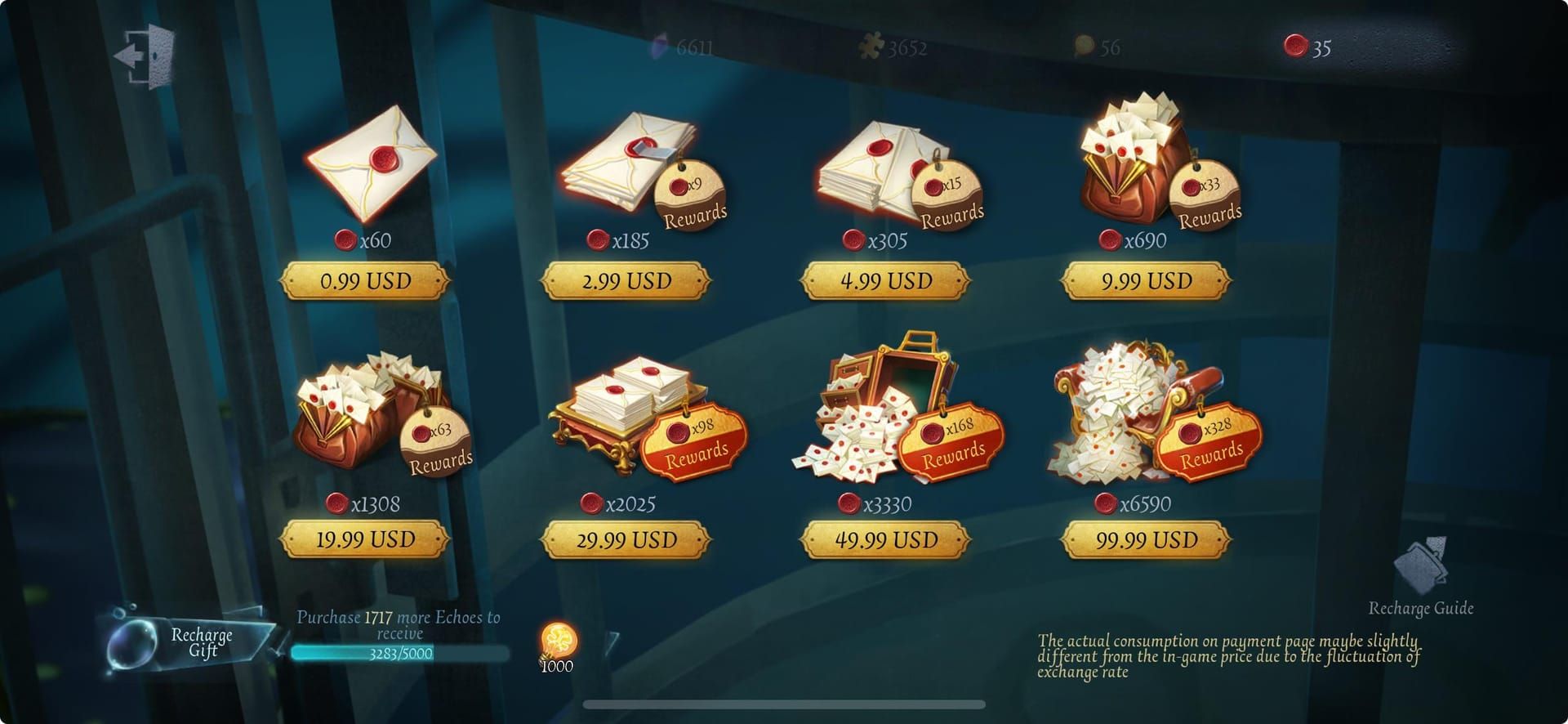
Echoes serve as Identity V's premium currency, sitting atop the game's economic hierarchy. Players use Echoes to:
- Purchase exclusive cosmetics
- Unlock limited-time crossover content
- Acquire Memory Spheres for guaranteed A-Tier and S-Tier skins
- Access Season Pass premium tracks
The Identity V economy operates on three tiers:
- Echoes: Premium paid currency with highest purchasing power
- Clues: Primary free currency earned through gameplay for standard Essence purchases
- Inspirations: Crafting currency from dismantling duplicates for direct cosmetic purchases
Regional Pricing Variations
Echo pricing varies significantly across regional servers due to currency conversion rates, regional purchasing power adjustments, and local taxation. Asia server typically prices Echoes in Chinese Yuan, Japanese Yen, or regional equivalents, while NA/EU servers use USD and EUR. Identical Echo packages may cost different amounts depending on server region.
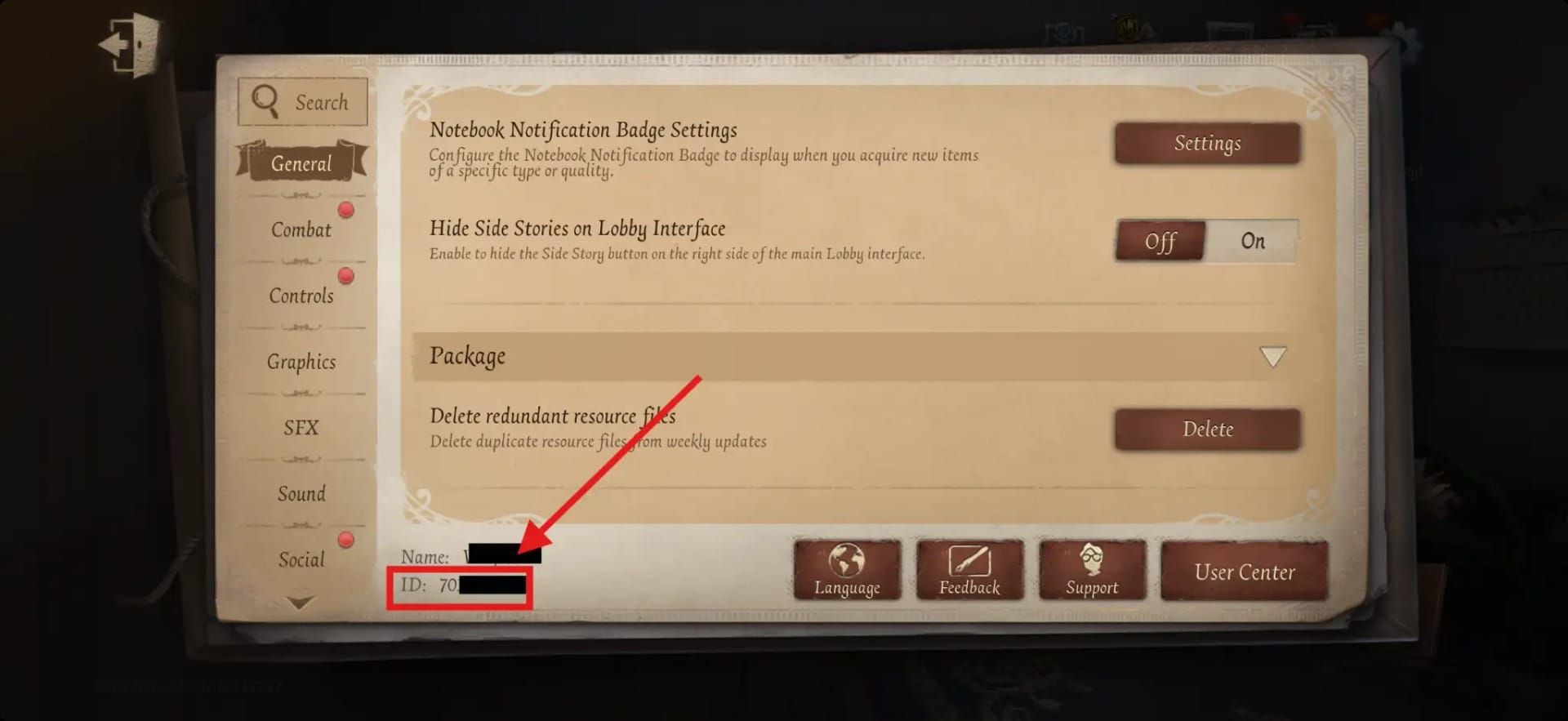
Players acquire Echoes through in-game shop by entering their UID and selecting Game Server (Asia or NA/EU). The UID differs from Steam ID for PC players—locate your in-game UID through Settings → Games tab copy button, or tap your lobby portrait and find the profile section under your username.
Can You Send Echoes from Asia to NA/EU Accounts?
No, you can't send Echoes from Asia server accounts to NA/EU server accounts. This restriction is absolute and built into Identity V's core architecture. Echoes can't be transferred directly between any accounts, regardless of same or different regional servers. The backend treats each server's currency as completely separate with no transfer mechanisms.
When attempting cross-server Echo gifting, the game provides no interface or option to complete the action. Friend requests require both players on the same server—EU-US or Asia. You can't add friends across regional boundaries, eliminating the foundational requirement for gifting interaction.
Technical Limitations
The technical architecture preventing cross-server transfers stems from database isolation. Each regional server maintains independent databases with separate currency tracking, transaction logs, and account balances. Echoes purchased on Asia server exist only as database entries on Asia server infrastructure. NA/EU servers have no access to these records and no mechanism to recognize or process currency from external databases.
This isolation serves security and regulatory functions: prevents currency duplication exploits, ensures compliance with regional financial regulations, and maintains economic balance within each server's marketplace. NetEase hasn't issued statements suggesting this policy will change.
Identity V's Friend Gifting System: What Works
Identity V offers legitimate gifting options functioning exclusively within the same server region. Players can gift skins, crates, and premium items directly through in-game shop to friends on their friend list. These gifts provide 10 intimacy points per transaction, with daily intimacy cap of 200 points per friend and total daily cap of 400 points across all friends.
The intimacy system creates friendship progression, with Intimacy Level 8 unlocking Confidant status. Players can maintain maximum 5 Confidants. This system encourages regular gifting interactions among players sharing the same regional server.
Items That Can Be Gifted Within Same Server
Team and guild systems enable in-game gifts of premium items during special event features. These seasonal opportunities typically coincide with major holidays or crossover events. However, all mechanisms verify both sender and recipient exist on same server before processing transactions.
To add friends and access gifting features, reach level 5 and complete the 18-quest tutorial. Then search for friends by username or digital ID, but only within your server region.
Alternative Ways to Support Friends on Different Servers
While direct Echo transfers remain impossible, practical alternatives exist. The most effective approach involves specialized top-up services that deliver Echoes directly to accounts on any server region. For players seeking to identity v echoes recharge for friends on different servers, BitTopup provides reliable solution with competitive pricing, fast delivery, and secure transactions across all Identity V regional servers.
Method 1: Regional Echo Top-Up Services
Regional top-up services process Echo purchases directly on the recipient's server. Instead of attempting currency transfer between accounts, these services purchase Echoes using the recipient's UID and correct server selection, delivering premium currency as if the recipient made the purchase themselves. This bypasses cross-server restrictions by operating within the target server's normal purchase mechanisms.
When using top-up services, accuracy is critical. Obtain your friend's exact in-game UID (not username or Steam ID) and confirm server region. Incorrect information results in delivery to wrong account or failed transactions. BitTopup's interface guides users through this process with clear server selection options and UID verification steps.
Method 2: Coordinated Purchase During Sales
Another approach involves coordinating with your friend to make purchases during limited-time sales events. Provide financial support through external payment methods while your friend makes the actual in-game purchase on their account. This ensures Echoes reach the correct account while you contribute to your friend's ability to acquire desired content.
This works particularly well during major sales events when Echo packages include bonus amounts or when limited-time crossover content becomes available.
Christmas 2025 Gifting Options
The Christmas season typically brings special event features expanding gifting possibilities within server regions. Limited-time holiday cosmetics, exclusive Memory Spheres, and seasonal Essence collections create valuable gifting opportunities for same-server players.
Season Pass purchases represent particularly high-value gifts during holiday periods. The premium Season Pass track unlocks exclusive cosmetics, Echoes refunds, and guaranteed A-Tier skins unavailable through standard shop purchases.
Time-Sensitive Opportunities
Crossover events during Christmas often feature time-limited S-Tier skins and exclusive accessories that never return to shop. These limited availability items create urgency for players wanting to complete collections.
For cross-server support during Christmas 2025, use top-up services to deliver Echoes before major sales or crossover events begin, ensuring your friend has purchasing power ready when exclusive content launches.
Step-by-Step: How to Top Up Echoes for Friends on Different Servers
Successfully delivering Echoes to friends on different regional servers requires precise process with verified account information:
- Obtain recipient's in-game UID: Ask your friend to navigate to Settings → Games tab and use copy button, or tap lobby portrait and locate profile section under username. Verify they're providing UID, not username or external platform ID.
Confirm exact server region: Explicitly verify whether your friend plays on Asia, NA/EU, or Japan servers. This is critical for successful delivery.
Select appropriate Echo package: Determine how many Echoes your friend needs. Consider bonus Echo promotions active on their server.
Use reliable top-up service: Access BitTopup's Identity V section, select correct server region, enter verified UID, and choose Echo package. BitTopup offers competitive pricing, secure payment processing, and fast delivery across all regional servers.
Complete secure payment: Use trusted payment methods and verify all transaction details before confirming. Save transaction records.
Confirm delivery with recipient: Ask your friend to check Echo balance after estimated delivery time. Most top-up services deliver within minutes.
Verifying Recipient Account Details
Account detail verification prevents common delivery failures. Double-check UID contains correct number of digits and matches Identity V account format. Cross-reference server selection with your friend's confirmation—selecting Asia server when your friend plays on NA/EU results in delivery to different account with same UID on wrong server.
If uncertain about account details, request screenshots from your friend showing their UID in game interface. BitTopup's customer service can assist with verification questions before you complete payment.
Asia vs NA/EU Server Comparison
Understanding practical differences between Asia and NA/EU servers helps set appropriate expectations for cross-region support. Content release schedules often differ between regions, with some servers receiving updates, events, or crossover content days or weeks before others.
Asia server typically features larger active player base with more competitive ranking environments and faster matchmaking times. NA/EU servers maintain robust communities but may experience slightly longer queue times during off-peak hours.
Event Timing and Regional Exclusives
Promotional events and sales may occur at different times across regional servers due to timezone considerations and regional holiday calendars. A Christmas sale might begin several hours earlier on Asia servers compared to NA/EU servers.
Some regional servers occasionally receive exclusive cosmetic items or promotional events tied to local holidays or cultural celebrations.
Safety and Best Practices
Maintaining account security during cross-region Echo transactions requires following established best practices. Never share your own account credentials or request your friend's login information—legitimate top-up services only require recipient's UID and server region, never passwords or authentication codes.
Use secure payment methods with buyer protection when accessing top-up services. Reputable platforms like BitTopup implement secure payment processing with encryption and fraud protection.
Avoiding Account Suspension
Identity V's terms of service prohibit account sharing and unauthorized access but don't restrict using legitimate top-up services to purchase Echoes for other accounts. As long as you're using recipient's correct UID and not accessing their account directly, Echo top-ups through authorized services comply with game policies.
Avoid third-party tools, mods, or exploits claiming to enable direct cross-server transfers or currency generation. These violations can result in permanent account suspension for both sender and recipient.
What to Do If Echo Delivery Fails
If Echoes don't appear in your friend's account within expected delivery timeframe, follow systematic troubleshooting:
First, verify your friend is checking correct account on correct server—if they have multiple accounts or play on multiple servers, they may be checking the wrong one.
Review transaction confirmation from your top-up service to verify UID and server region you entered. Compare these details against your friend's actual account information. If you discover mismatch, contact top-up service's customer support immediately with transaction ID and correct account details.
BitTopup provides responsive customer service for delivery issues, with support teams that can track transactions and resolve delivery problems.
FAQ
Can I merge accounts from different servers?
No, Identity V doesn't support account merging between different regional servers. Each account remains permanently bound to its original server region. Cross-platform data transfer works only for moving the same account between devices, not merging separate accounts.
Will cross-server gifting ever be enabled?
NetEase hasn't announced plans to enable cross-server Echo transfers or gifting. The technical and regulatory infrastructure supporting regional server separation makes this feature unlikely.
How do I check which server my friend plays on?
Ask your friend to check server region in game's login screen or settings menu. The server selection appears during initial login.
Are there any items that work cross-server?
No items, currency, or account progress transfer between different regional servers. All content remains locked to the server where it was acquired.
Can I play matches with friends on different servers?
No, matchmaking only connects players within the same regional server. To play together, one player would need to create new account on the other's server.
What's the fastest way to send Echoes to a friend on another server?
Use specialized top-up service like BitTopup that supports all Identity V regional servers. Obtain your friend's exact UID and server region, select appropriate Echo package, and complete secure transaction. Delivery typically occurs within minutes.
Ready to gift Echoes to your Identity V friends across any server? BitTopup offers secure, instant Echo top-ups for Asia, NA/EU, and all regional servers. Fast delivery with competitive pricing and excellent customer service for your holiday gifting needs!