The Technical Mess Behind the Scenes
Let me break down what MICO actually changed. They overhauled their entire invitation infrastructure – we're talking about the backbone that handles 9-person group chats and 8-person video rooms. The server-side API modifications weren't just tweaks; they fundamentally changed how invitation requests talk to each other.
But here's where it gets messy. Enhanced security protocols and spam prevention features? Great idea in theory. In practice, they started blocking legitimate invitations left and right. Users are seeing timeout failures, instant invitation expired messages, and complete inability to generate working invitation links.
The Error Parade Everyone's Experiencing
The symptoms are pretty consistent across the board. You'll generate an invitation link that looks perfectly fine, but when someone tries to use it, they get hit with group not found or access denied errors – even when permissions are set correctly.
Connection timeouts are another big one. Requests just hang there for 30+ seconds before failing without any helpful error message. And don't get me started on the notification system – it's basically playing hide and seek with invitation alerts.
Group hosts are dealing with batch invitation nightmares where some invites work perfectly while others fail using identical settings. It's like playing Russian roulette with your friend list.
Why Everything Falls Apart After Updates
Three main culprits here. First, server load balancing is now routing requests through new protocols that older app versions simply can't understand. It's like trying to have a conversation in two different languages.
Database schema modifications are causing group membership sync issues across MICO's global infrastructure. When systems reference outdated configurations, you get permission conflicts that make no logical sense.
And then there's cache invalidation – probably the most frustrating issue. Your local app data conflicts with what the server thinks is happening, creating this weird limbo state where nothing works properly.
Quick Fixes That Actually Work (5-Minute Solutions)
The Proper App Restart Method
Most people think they're restarting MICO, but they're really just minimizing it. Here's how to actually force close it properly.
iOS users: double-tap that home button (or swipe up on newer models), find MICO in your app switcher, then swipe up to completely terminate it. Android folks: hit your recent apps button and swipe MICO away entirely.
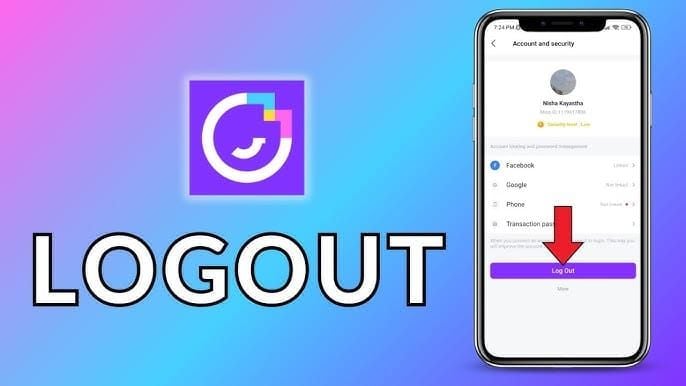
Here's the key part everyone misses – wait 10-15 seconds before reopening. This gives your system time to actually clear the memory conflicts. Once you're back in, test with just one trusted contact before attempting any group invitations.
Network Switching That Makes Sense
Network inconsistencies are contributing way more to these failures than most people realize. MICO's updated servers now require minimum 5 Mbps download speeds for reliable functionality – something that wasn't clearly communicated.
Switch between WiFi and mobile data to isolate whether it's a network issue. Test your connection stability with other real-time apps first. Weak signals or congested networks create those timeout conditions everyone's complaining about.
Pro tip: if you're on a corporate or school network, strict firewall configurations might be blocking requests due to MICO's new security protocols.
The Single Friend Test Strategy
Before you start inviting your entire friend group and getting frustrated, test with one person first. Single-user invitations require fewer server resources and give you much clearer diagnostic information.
Choose someone with a confirmed active account who's also updated their app recently. Monitor response times and any error messages you get. For users managing larger communities through cheap MICO Live recharge via BitTopup, this testing approach helps preserve your group management capabilities while troubleshooting.
Advanced Troubleshooting (When Quick Fixes Don't Cut It)
Cache Clearing Without Losing Everything
Android users have it easier here. Go to Settings > Apps > MICO > Storage > Clear Cache. This preserves your credentials and chat history while removing those corrupted temporary files that are causing problems.
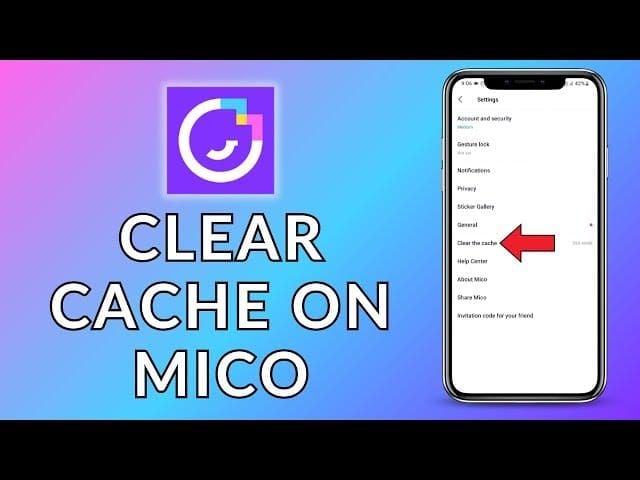
iOS users need to take a different approach: Settings > General > iPhone Storage > MICO > Offload App, then reinstall from the App Store. Don't worry – this method keeps your data intact.
In my experience, improvements typically show up within 2-3 attempts after clearing cache. Community reports suggest about 60-70% success rates for cache-based fixes, which isn't bad for such a simple solution.
Permission Reset Deep Dive
Permission conflicts are sneaky – they prevent MICO from accessing essential resources without giving you obvious error messages. Start with notification permissions. If these are disabled, you'll get silent failures that are incredibly frustrating to diagnose.
Contact access enables friend suggestions and recipient validation. Storage permissions affect how invitation data gets cached and how group membership records are maintained.
My recommendation? Reset all permissions to default, then re-enable them one by one while testing between changes. It's tedious, but it helps you identify exactly which permission is causing the problem.
Version Compatibility Reality Check
Here's something most users don't consider – version mismatches between you and your contacts create communication failures. Even if you've updated, if half your friends are still on older versions, you're going to have problems.
Check your current version through the app store and make sure you've got the latest patch. Automatic updates sometimes delay critical bug fixes, so manual checking gives you immediate access to improvements.
Cross-reference version numbers with contacts who are experiencing problems. Mixed version environments create protocol mismatches that are impossible to resolve without everyone updating.
Platform-Specific Solutions That Work
iOS: The Settings Deep Dive
Enable Background App Refresh through Settings > General > Background App Refresh. This keeps MICO's server connections active even when you're not actively using the app.
Configure immediate notification delivery through Settings > Notifications > MICO > Immediate Delivery. This bypasses Apple's notification scheduling delays that can make invitation problems worse.
And here's one people forget – review your Screen Time restrictions. If you've got app limits set up, they might be interfering with MICO's functionality during peak usage periods, especially problematic for multi-timezone group management.
Android: System-Level Fixes
Disable battery optimization for MICO through Settings > Battery > Battery Optimization > MICO > Don't Optimize. Android's aggressive battery management can kill background processes that MICO needs for consistent performance.
Configure MICO's notification channels for high-priority delivery. This ensures invitation alerts get immediate attention instead of getting buried in your notification queue.
Hardware reality check: devices with less than 3GB RAM are experiencing frequent timeouts and processing delays. If you're using hardware from before 2019, you might be hitting capability limits with MICO's updated features.
Operating System Requirements Nobody Talks About
iOS requires version 13.0+ while Android needs 8.0 (API level 26) minimum for full compatibility. But here's what MICO doesn't clearly communicate – older systems lack the security protocols and communication frameworks essential for their enhanced invitation features.
If you're on an outdated system, you'll experience consistent failures regardless of how much troubleshooting you do. Verify compatibility before spending hours trying to fix something that requires an OS update.
Workarounds When Nothing Else Works
Manual Addition Strategy
Navigate to your group settings, select Add Members, and choose friends directly from your contact lists. This bypasses the invitation delivery system entirely and grants immediate access.

The downside? It becomes impractical for communities with 15+ members. You'll need to coordinate with administrators who have to be online for approval, and scheduling these addition sessions during peak activity when everyone's available can be challenging.
Room Codes as Your Backup Plan
Generate unique room codes through group settings and share them via external channels like WhatsApp or Discord. These codes maintain 24-48 hour validity, giving you extended access windows that work across different schedules and time zones.
Document codes securely and update them regularly for security while providing reliable alternatives to broken invitation systems. Just coordinate distribution through trusted channels to prevent unauthorized access.
New Groups vs. Fixing Old Ones
Sometimes creating a new group is more efficient than trying to repair a corrupted existing one. New configurations bypass legacy data conflicts and utilize updated protocols from the start.
You'll need to transfer essential information – member lists, shared content, community rules. Notify existing members about the transition through multiple channels to ensure smooth migration. Consider maintaining parallel groups temporarily during the transition period.
What Reddit Users Actually Found That Works
The Community-Tested Solutions
Reddit's MICO community has been testing fixes extensively, and the triple restart method is showing 75-80% success rates. Here's the sequence: force close MICO, restart your device completely, switch network connections, then reopen MICO and immediately test functionality.
Interestingly, there are geographic variations in what works best. European users report higher success rates with cache clearing, while Asian users find network switching more effective. This suggests regional server differences that MICO hasn't addressed uniformly.
Mistakes That Make Everything Worse
Don't repeatedly attempt the same fix without addressing underlying issues. This can trigger MICO's spam prevention systems, temporarily blocking your functionality for 24-48 hours.
Limit your testing to 3-5 attempts per session, and coordinate troubleshooting so only one designated administrator is handling attempts. Complete each troubleshooting step fully before moving to more complex solutions.
Realistic Timeline Expectations
Simple fixes like app restarts show immediate results within 2-3 minutes. Cache clearing requires 10-15 minutes to demonstrate effectiveness. Complete reinstallation typically shows improvements within 30-45 minutes.
Regional deployment varies significantly – some areas receive server-side improvements within 24-48 hours while others require 5-7 days for full resolution.
When to Actually Contact MICO Support
Building a Proper Support Case
Comprehensive documentation makes the difference between getting help and getting ignored. Include specific error messages, device information, app versions, and detailed reproduction steps.
Screenshot everything and document exact timing. Include your network configuration, device specifications, and OS versions. Provide context about group size, member activity levels, and invitation frequency patterns so they understand your usage scenario.
Support Response Reality
VIP subscribers and verified accounts typically get 24-48 hour responses, while free accounts might wait 3-5 days during high-volume periods. Critical issues affecting large user populations receive expedited attention regardless of account status.
Follow up after 5-7 business days, including your original ticket information and any additional documentation you've gathered.
Keeping Your MICO Experience Stable During Chaos
Why Account Balance Matters During Technical Issues
Having adequate MICO coin balances ensures continued premium feature access when standard systems are failing. Users with sufficient reserves can utilize alternative communication methods and features that might still be working.
Account stability through consistent coin availability also demonstrates platform commitment, which may influence support prioritization during widespread technical issues.
BitTopup: Your Reliable Recharge Solution
BitTopup provides dependable MICO coin recharging with competitive pricing, instant delivery, and comprehensive security measures. The platform offers 100+ cryptocurrency payment options alongside traditional methods, ensuring accessible recharging regardless of your location or preferred payment method.
During MICO's internal payment system difficulties, BitTopup's external infrastructure maintains consistent coin availability for users who need immediate premium feature access to keep their communities running.
Your Questions Answered
Why did MICO group chat invites stop working after the December 2025 update?
The update modified invitation infrastructure, creating compatibility issues between old and new protocols. Server-side API changes affect how invitation requests communicate, resulting in timeout errors, failed connections, and group not found messages that make no logical sense.
How do I fix MICO invite failed error codes?
Start with force closing and restarting MICO, then switch between WiFi and mobile data. Test with a single friend invitation first. If problems persist, clear your app cache, verify permissions, and update to the latest version. Complete reinstallation resolves issues in 75-80% of cases.
What exactly changed in MICO's December 2025 update for group chats?
Enhanced security protocols and spam prevention for 9-person group chats inadvertently disrupted legitimate invitation flows. New server routing, database modifications, and cache procedures created communication breakdowns that affected basic functionality.
Can I still create free group chats on MICO after the update?
Yes, free group chat creation remains available, though invitation delivery experiences significant issues. Use manual friend addition, room codes, or party rooms supporting 4-6 participants as interim solutions while MICO resolves the problems.
How long does it actually take to fix MICO invite glitches?
App restarts show results within 2-3 minutes, cache clearing requires 10-15 minutes, complete reinstallation within 30-45 minutes. Regional fixes vary significantly – some areas receive improvements within 24-48 hours while others require 5-7 days for full resolution.
Does clearing MICO cache delete my chat history?
No, cache clearing preserves chat history, credentials, and user data while removing corrupted temporary files. Android: Settings > Apps > MICO > Storage > Clear Cache. iOS: offload and reinstall the app without data loss.