How It Works
The AI processes two input types:
Video clips: Analyzes terrain layouts, building placements, cover positions, and combat flow patterns from actual gameplay, then reconstructs them as editable map components.
Text prompts: Generates grouped objects from descriptions like urban combat zone with three-story buildings and rooftop access without reference footage.
This democratizes advanced map creation. Previously, competitive-quality maps required extensive technical knowledge. The AI handles implementation while you focus on gameplay design.
Traditional Editor vs AI Assistant
Traditional editing requires manual placement of every terrain feature, building, and prop. A single complex building takes 30-60 minutes.
The AI condenses this to minutes. A 45-second clip of Pochinki's apartments generates similar layouts with appropriate density, street widths, and cover distribution. You then refine specifics rather than build from scratch.
The AI excels at initial layouts and grouped structures. Fine-tuning balance, custom mechanics, and advanced features like Skill Editor or Monster Creation Tools still need manual work.
Device Requirements
Functions on devices meeting PUBG Mobile 4.2's baseline requirements (1.18 GB update). Processing speed varies by hardware:
- Mid-range (6GB RAM): 2-3 minutes for simple prompts
- High-end (8GB+ RAM): Under 60 seconds for complex video analysis
The resizable interface adapts to different screens, though tablets provide superior workflow efficiency.
Access Steps
- Update to version 4.2 (January 7, 2026, 11:00 UTC+0)
- Navigate to World of Wonder > Create
- Locate AI Assistant icon (sparkle symbol) in top toolbar
- Complete tutorial demonstrating video upload and text prompts
- Grant device video storage permissions
Available immediately after tutorial with no additional unlocks or UC purchases. Premium asset libraries may require WOW Pass subscription (January 7, 2026 7:00 UTC+0 to March 10, 2026 23:59 UTC+0).
The $10 Million Creator Pool
PUBG Mobile allocates $10 million across creator reward programs, with Next Star representing $6 million annually. This investment supports the 3.3 million existing maps and 24 billion play sessions.
Payment Structure
Next Star operates on performance-based tiers where map popularity, retention, and ratings determine monthly payouts:
- Top-tier: 100,000+ monthly plays = guaranteed minimum + performance bonuses
- Mid-tier: 10,000-100,000 plays = smaller base + proportional bonuses
- Entry-level: Under 10,000 plays = contest prizes and featured opportunities
Additional revenue: Ultimate Set Design Contest ($120,000 prizes), Ptopia Design Project (50 items implemented from 400,000 submissions with one-time payments + ongoing royalties).
Eligibility
Next Star requires 2 PUBG Mobile-related videos within 3 months, zero follower minimum.
Map earnings require:
- One published map meeting quality standards (no game-breaking bugs)
- 3.5+ average community rating
- Minimum 1,000 plays for initial eligibility
- Content guideline compliance (no copyrighted material, inappropriate themes)
- Account verification
Violations result in temporary ineligibility for first offenses, allowing corrections and resubmission.
Earnings Calculation
The algorithm weighs multiple factors beyond play counts:
Retention metrics: Session duration, completion rates, return player rates. High retention signals engaging content deserving greater rewards.
Community ratings: Verified players (30+ minutes played) weighted more heavily than brief visitors, preventing manipulation.
Share rates: Social media mentions contribute smaller percentages but identify trending maps.
Seasonal multipliers: Adjust payouts based on active player populations, maintaining fairness across peak and off-season.
For competitive loadouts and resources, safe pubg mobile uc top up through BitTopup provides secure transactions.
Success Patterns
Training maps replicating tournament settings achieve high retention as players practice specific scenarios. Innovative game modes combining PUBG mechanics with novel objectives generate viral interest. Seasonal event tie-ins (like Primewood Genesis on Erangel, Livik, Sanhok) capture immediate player interest when incorporating new mechanics like Barkle allies or Bramblewood Scorpion vehicles.
Recording Gameplay Clips for AI Conversion
Input quality determines output accuracy. Well-prepared clips produce accurate reconstructions requiring minimal correction.
Optimal Recording Settings
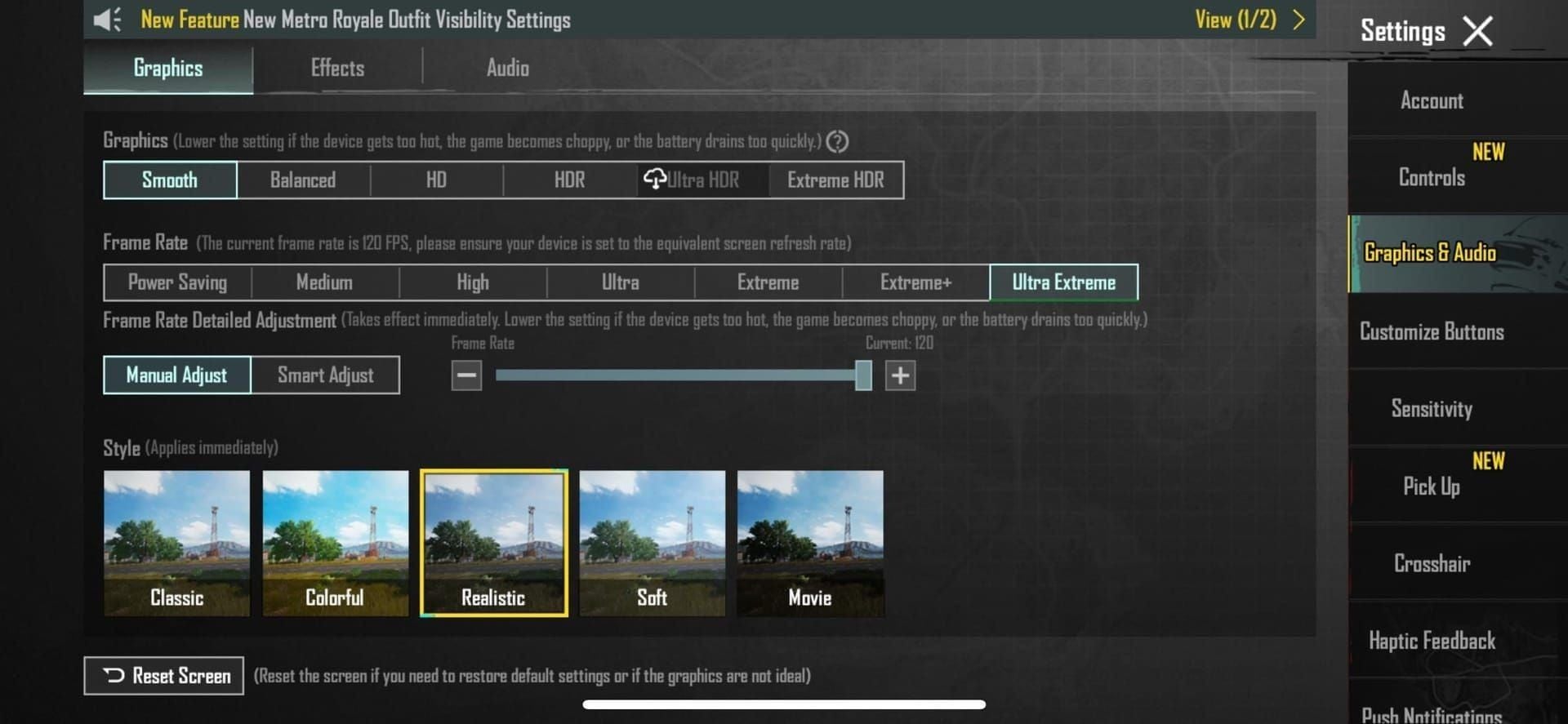
- Graphics: Smooth
- Frame Rate: Extreme (120 FPS on compatible devices)
- Disable: Anti-Aliasing, Shadows (don't improve AI recognition)
- Orientation: Landscape only
- Camera movement: Steady gyroscope controls, smooth panning
The AI analyzes spatial relationships and object placement, not maximum graphical fidelity.
Best Clip Types
Combat zones: 30-45 second clips showing complete engagement areas with cover positions, sightlines, movement routes. Include vertical camera movement for multi-story structures.
Terrain features: Vehicle drives across varied terrain demonstrating slope angles, vegetation density, landmark spacing.
Building layouts: Interior walkthroughs showing room connections, stairwells, entry/exit points. Slowly navigate while focusing on architectural elements, avoiding excessive combat action.
Technical Requirements
- Length: 20-60 seconds optimal
- Resolution: 720p minimum, 1080p recommended
- Frame rate: 30 FPS minimum, 60 FPS improves accuracy
- Format: MP4, MOV, AVI with H.264 encoding
- File size: 500MB max (most 45-second clips under 150MB)
Pre-Processing Tips
- Remove segments with heavy visual effects (smoke, Molotovs, zone damage)
- Trim to focus on map elements, excluding HUD, teammate indicators, kill feeds
- Capture during practice mode for controlled pacing
- Record same area from multiple angles (exterior, interior, rooftop)
- Upload separate clips that AI can merge into comprehensive structures
Mastering Prompt Engineering
Well-crafted prompts produce usable results needing minor adjustments. Vague descriptions yield generic layouts requiring extensive rebuilding.
Effective Prompt Anatomy
Four essential components:
- Spatial scope:Zone equivalent to Georgopol's shipping yard
- Architectural style:Soviet-era apartment blocks like Yasnaya Polyana
- Functional purpose:Close-quarters combat training with multiple entry points and vertical gameplay
- Density specifications:Medium building density allowing vehicle navigation between structures
Proven Prompt Templates
Urban Combat:
- Three-block urban area with 2-3 story buildings, narrow streets, rooftop access, similar to Pochinki's apartment district, designed for 4v4 team deathmatch
- Dense marketplace with vendor stalls, tight corridors, multiple elevation levels, inspired by Sanhok's Paradise Resort, optimized for shotgun and SMG combat
Open Terrain:
- Rolling hills with scattered rocks and trees, 300-meter sightlines, similar to Erangel's fields between Mylta and Shelter, for long-range rifle practice
- Desert landscape with sand dunes and minimal cover, vehicle-focused gameplay, comparable to Miramar's open regions
Mixed Environment:
- Coastal compound with warehouse buildings, shipping containers, beach access, similar to Erangel's Novorepnoye, supporting varied engagement ranges
- Forest clearing with wooden cabins, dense tree coverage at edges, inspired by Vikendi's lumber yard areas
Training:
- Symmetrical arena with identical cover layouts on opposing sides, competitive 5v5 format, minimal environmental clutter
- Obstacle course with climbing walls, gap jumps, timed gates for movement skill practice
Experimental:
- Vertical tower structure with spiral staircases, multiple floor levels, central atrium, designed for Florawings mobility testing
- Underground tunnel network with branching paths, choke points, vertical shafts connecting to surface level
Vehicle-Focused:
- Off-road racing circuit with jumps, tight turns, straightaways, incorporating natural terrain obstacles
- Urban streets wide enough for Bramblewood Scorpion navigation with destructible barriers and shortcut alleys
Objective-Based:
- Fortress layout with central capture point, defensive walls, multiple breach points, asymmetric attacker/defender spawns
Combining Clips with Prompts
Upload gameplay clip showing desired spatial layout, then supplement with text specifying modifications: Reduce building count by 30%, increase spacing for vehicle combat, add elevated sniper positions on building edges.
This preserves proven layout fundamentals while customizing specific elements.
Sequential prompting: After initial generation, use follow-up prompts like Add more vertical gameplay elements to eastern section or Reduce cover density in central area by 20%.
Advanced Techniques
Layering: Generate map sections separately then combine. Create base terrain with Gently rolling hills with sparse vegetation, then add structures with Industrial compound in northwest quadrant, residential area in southeast.
Iteration: Generate test section, evaluate, refine prompt language, regenerate. Document which phrasings produce desired outcomes.
Negative prompting:Urban environment without multi-story buildings, excluding vehicles, no water features prevents unwanted elements.
Common Mistakes
- Vague descriptors:Cool combat area lacks actionable direction. Use specific measurements and comparative references.
- Overly complex prompts:Urban area with buildings and also some open spaces but not too open and maybe some vehicles contains contradictions. Break into multiple focused prompts.
- Ignoring gameplay context: Describing aesthetics without considering sightlines, movement flow, engagement distances creates maps that look good but play poorly.
- Unrealistic expectations: AI handles conventional structures and terrain but struggles with abstract concepts or mechanics requiring custom scripting.
Clip-to-Map Conversion Workflow
Step 1: Upload Clips
Open AI Assistant floating window, select video input, navigate to device storage. Interface displays clip previews with duration and file size. Select prepared 20-60 second clip.
Before confirming, add metadata: clip description, primary focus (terrain/buildings/mixed), intended map section. Upload progress shows estimated processing time (2-3 minutes mid-range devices, under 60 seconds high-end).
Step 2: Write Prompt
Access prompt input field (optimal 50-200 characters). Begin with spatial scope, add architectural details, functional purpose, density specifications.
Real-time preview suggestions appear based on keywords. Save frequently used prompts to personal library with tagged organization.
Step 3: AI Processing
Status updates show: input analysis → wireframe preview → detailed object placement → texture/lighting application.
Intermediate previews allow early cancellation if AI misinterprets input. Stop at wireframe stage (20-30% completion) to save time on flawed generations.
Step 4: Review Preview
Navigate completed generation with free camera controls. Evaluation checklist:
- Building densities match intended gameplay pace?
- Sightlines appropriate for target engagement ranges?
- Elevation changes create tactical options?
- Unintended gaps or overlapping objects?
- Layout supports intended player counts and game modes?
Annotation tools mark specific issues for manual editing priority.
Step 5: Accept or Regenerate
Acceptable generations transfer to main editor as grouped objects allowing repositioning, rotation, scaling before ungrouping.
Unsatisfactory results offer complete regeneration with revised prompts or partial regeneration of specific sections. Regeneration history tracks previous attempts with associated prompts.
Editing AI-Generated Maps
Integrated Editor Access
AI-generated sections load into full World of Wonder editor with standard tools alongside AI-specific features. Layer management organizes AI content separately from manual additions. Lock completed layers to avoid unintended changes.
Fine-Tuning Elements
Terrain: Smooth elevation transitions, enhance strategic positions with subtle height advantages, add micro-terrain features like small ridges for prone cover.
Buildings: Adjust window placements for specific sightlines, modify interior walls to control movement flow, change roof access points to balance vertical gameplay.
Combat zones: Use heat mapping tools showing probable engagement positions. Add cover to overexposed areas, remove obstacles creating blind spots, ensure balanced advantages for different tactics.
Custom Assets and Interactive Elements
Import custom textures, create signature landmarks, design interactive objects. Interactive elements require manual scripting through Skill Editor: timed doors, destructible barriers, moving platforms, environmental hazards.
Monster Creation Tools add PvE elements: Giant Ice Dragons as environmental threats, Smog Zombies in contaminated areas, Mech Hounds as mobile obstacles. Balance creature difficulty to enhance rather than dominate PvP.
Balance Testing
Run simulated matches with varying player counts testing spawn fairness, resource distribution, objective accessibility. Invite community members for blind testing.
Weapon-specific testing: Verify sniper positions exist without dominating, close-quarters areas reward aggression without becoming death traps, mid-range zones offer tactical depth.
Spawn balancing: Measure distances from each spawn to key objectives. Asymmetric maps require compensating advantages.
Performance Optimization
Target 60+ FPS on mid-range devices:
- Merge static objects into single meshes reducing draw calls
- Remove objects outside playable boundaries
- Use lower-polygon alternatives for distant background elements
- Implement occlusion culling hiding objects behind solid structures
- Reduce particle effects and dynamic lighting sources
Test on multiple device tiers. Creator dashboard shows player device distribution—optimize for actual audience hardware.
Publishing and Maximizing Discoverability
Metadata That Converts
Titles: Communicate core gameplay immediately. Urban CQB Training - 4v4 TDM indicates environment, purpose, format. Include keywords: game mode, map size, skill focus.
Descriptions:
- Opening hook (1 sentence summarizing unique value)
- Gameplay overview (2-3 sentences on objectives and flow)
- Recommended player count and skill level
- Special features or mechanics
- Creator notes on strategy or Easter eggs
Tags: Use all available slots with mix of broad categories (Team Deathmatch, Training, Urban) and specific descriptors (Close Quarters, Vertical Gameplay, Competitive). Research trending tags.
Thumbnail Best Practices
- High-contrast color schemes standing out in grid layouts
- Clear focal points showing signature map features
- Minimal text (map name and mode only)
- Action-oriented compositions suggesting gameplay intensity
- Consistent branding for map series
Capture during golden hour lighting in preview mode. A/B test different options tracking click-through rates.
Publishing Requirements
Pre-publication checklist:
- Complete automated quality scan
- Verify all metadata fields populated
- Confirm map meets minimum size requirements for selected mode
- Test on at least two device types
- Review community content guidelines
Approval takes 24-48 hours for automated checks plus community review. Flagged maps enter manual review (3-5 days). Rejection notices explain specific issues allowing corrections and resubmission.
Promotion Strategies
Internal: Share map codes in clan chat, friend lists, World of Wonder forums. Participate in creator discussions offering constructive feedback—reciprocal engagement builds visibility.
Timing: Coordinate launches with community events. Publishing Primewood Genesis-themed maps during January 7 - March 10, 2026 event captures players exploring Barkle allies or Bramblewood Scorpion vehicles.
Collaboration: Partner with established creators for cross-promotion. Guest appearances in popular showcases expose work to established audiences. Create custom maps for community tournaments or clan events.
Leveraging Seasonal Events
Monitor official updates and beta testing. PUBG Mobile 4.2 Beta launched December 4, 2025, providing advance notice of Primewood Genesis mechanics. Early adopters creating content around new features capture initial interest.
Metro Royale Chapter 30 (January 8) and Season 28 (January 11) create opportunities for themed content. Maps incorporating Glacix Arbiter melee combat or training for new seasonal challenges attract timely interest.
Submit to official contests like Ultimate Set Design Contest. Even non-winning entries receive exposure through contest promotion and community voting.
Troubleshooting Common Issues
AI Conversion Errors
Insufficient data: Record longer clips, capture additional angles, supplement with text prompts.
Object recognition failure: Re-record in practice mode with controlled conditions. Disable graphics settings creating visual noise.
Generation timeout: Close background apps, ensure 2GB+ free storage, reduce clip length or prompt complexity. Lower-end devices benefit from generating smaller sections sequentially.
Upload Failures
Convert clips to MP4 with H.264 encoding. Verify file integrity by playing fully before upload.
Size limit errors (500MB max): Reduce resolution to 720p or decrease bitrate. Use stable WiFi for large uploads. System supports resume functionality for interrupted uploads.
Prompt Issues
Replace vague descriptors with specific measurements or comparative references. Large building becomes four-story structure approximately 30 meters tall similar to Pochinki apartments.
Separate conflicting instructions into sequential prompts. Dense urban area with open sightlines contains contradictions—generate dense layout first, then add specific sightlines.
Recognize when manual creation better serves unusual visions. AI handles conventional structures but struggles with abstract concepts.
Performance on Lower-End Devices
Devices with 4GB RAM: Generate smaller map sections (quarter-size areas) and combine manually.
Reduce AI quality settings in advanced options. Lower quality modes use simplified algorithms requiring less processing power.
Schedule intensive processing during charging periods to prevent unexpected shutdowns.
Support vs Self-Troubleshoot
Self-troubleshoot: Format problems, prompt refinement, performance optimization, workflow questions. Consult community forums and creator guides first.
Contact support: Persistent crashes after troubleshooting, account-specific access issues, suspected AI bugs, payment/Creator Pool eligibility questions, content approval disputes.
Effective tickets include: detailed issue descriptions, steps attempted, device specs, screenshots/recordings, specific error messages.
Advanced Creator Pool Strategies
Analytics Dashboard
Tracks: total plays, unique players, average session duration, completion rates, rating distribution, share counts. Daily/weekly/monthly views reveal trends.
Comparative analytics show performance against category averages. Demographic breakdowns reveal device types, regional distribution, skill levels, play time preferences—informing optimization decisions.
Understanding Algorithms
Play counts measure popularity but don't directly correlate with earnings. Algorithm weights retention more heavily—1,000 plays with 80% completion earn more than 5,000 plays with 20% completion.
Retention metrics: completion percentage, average session duration versus expected duration, return player rates. High retention signals quality content deserving promotional boosts.
Rating algorithms discount suspicious patterns. Sudden spikes from new accounts trigger fraud detection. Organic accumulation from verified players carries full weight. Never attempt manipulation—penalties include Creator Pool disqualification.
Iterative Updates
Regular updates maintain player interest and algorithmic favor. Platform prioritizes recently updated content. Schedule monthly refinements addressing feedback, balancing issues, seasonal themes.
Update strategies:
- Balance patches adjusting overpowered positions
- Seasonal variants adding limited-time features
- Expansion content increasing map size
- Community-requested features from comments
- Performance optimizations for broader compatibility
Communicate updates through descriptions and creator channels. Responsive creators build loyal communities.
Collaboration Features
Multi-creator projects combine complementary skills. Partner with terrain designers, building architects, gameplay balancers, visual artists.
Editor supports simultaneous multi-user editing with permission controls. Define roles: lead designer approves major changes, builders implement structures, testers identify issues.
Revenue sharing distributes Creator Pool earnings based on contribution percentages. Document agreements before publication.
Future-Proofing
Monitor official announcements and beta programs. Early adopters creating content around new features capture initial interest waves.
Design maps with modular architecture allowing easy integration of future mechanics. When new items, vehicles, abilities release, modular maps accommodate additions without complete rebuilds.
Participate in creator feedback programs influencing future World of Wonder features.
Funding Your Creator Journey
Why UC Matters
While basic AI features remain free, premium asset libraries, advanced Skill Editor components, Monster Creation Tools require UC or WOW Pass subscriptions. These resources significantly expand creative possibilities.
Premium assets include exclusive building models, unique terrain textures, special effects, interactive objects. Maps utilizing premium content stand out visually and mechanically.
Promotional features like featured placement bids or discovery boosts require UC investment, accelerating new map visibility.
BitTopup for UC Top-Up
BitTopup provides reliable UC top-up with competitive pricing, fast delivery, secure transactions. Multiple payment methods accommodate international creators. Instant delivery ensures uninterrupted workflow. Transparent pricing without hidden fees allows accurate budget planning.
Security features protect account information. Established reputation and wide game coverage demonstrate reliability for long-term creator careers.
Budget Planning
Allocate budgets: premium assets (40%), promotional features (30%), WOW Pass subscription (20%), experimental tools (10%).
Track ROI comparing UC expenditures against Creator Pool earnings. Premium assets generating higher play counts and ratings justify costs through increased revenue.
Start with free tools, gradually investing earnings into premium resources. Reinvest initial Creator Pool payments into quality improvements creating positive growth cycles.
Free vs Paid Features
Free: Core AI functionality (video conversion, text prompts, basic object generation), 50 generations monthly.
Paid: Priority processing queues, premium asset libraries for AI-generated objects, advanced prompt templates, unlimited monthly generations.
Casual creators (1-2 maps monthly) function effectively on free tiers. Professional creators (weekly content) benefit from paid enhancements' efficiency gains.
FAQ
What is PUBG Mobile 4.2 World of Wonder AI Assistant?
Creation tool launching January 7, 2026 that converts gameplay clips and text prompts into editable map sections. Automates layout generation, building placement, terrain creation, reducing manual editing time while maintaining creative control.
How do I access the AI map creator?
Update to version 4.2, navigate to World of Wonder > Create, locate AI Assistant icon (sparkle symbol) in top toolbar, complete tutorial. Available immediately with no additional unlocks or purchases for basic functionality.
Can I earn real money from custom maps?
Yes, through $10 million Creator Pool including $6 million annual Next Star program. Earnings depend on play counts, retention, completion rates, ratings. Requires 2 PUBG Mobile-related videos within 3 months, zero follower minimum.
What clips work best for AI generation?
20-60 second clips at 720p minimum, 30+ FPS showing complete areas with steady camera movement. Best from practice mode footage of combat zones, building interiors, terrain features. Graphics set to Smooth, disable Anti-Aliasing/Shadows, landscape orientation. Avoid heavy visual effects.
How do I write effective prompts?
Include spatial scope (size comparisons), architectural style (specific building types), functional purpose (intended gameplay), density specifications (building spacing). Use 50-200 characters with specific measurements and comparative references, not vague descriptors.
What are Creator Pool requirements?
Publish 2 PUBG Mobile videos within 3 months (zero follower minimum) for Next Star. For map earnings: publish one quality map, maintain 3.5+ average rating, achieve 1,000+ plays, comply with content guidelines, complete account verification.
Ready to dominate the Creator Pool? Top up your UC instantly at BitTopup for fast, secure transactions and exclusive creator discounts!