What Causes Scope Sensitivity Spikes After Updates
The sensitivity spike stems from graphics engine recalibration during major updates. The 4.2 update modified frame rate processing algorithms, inadvertently altering the touch input multiplier for scoped ADS sensitivity. Snapdragon 8 Gen processors with 8GB+ RAM experience more pronounced effects due to higher touch sampling rates.
The bug affects the relationship between camera sensitivity and ADS sensitivity. While third-person camera sensitivity remains at 120%, the ADS multiplier for 6x and 8x scopes incorrectly applies camera sensitivity values instead of configured ADS values.
How the Bug Affects Different Scope Types
- Red Dot/Holographic: Largely unaffected at 50% ADS sensitivity
- 2x/3x scopes: Minor deviations, 10-15% higher than intended
- 4x scope: Noticeable instability during automatic weapon recoil
- 6x scope: Configured 15-25% feels like 80-100% - combat-prohibitive
- 8x scope: Configured 12% behaves like 150%+ - completely unviable
Identifying If You're Experiencing the Issue
Test in Training Ground at 50m with M416 Red Dot target. Equip 8x scope on any assault rifle and fire controlled bursts. If your crosshair drifts more than two body widths during a 10-round burst, you've got the bug. Normal sensitivity maintains 70% burst accuracy at this distance.
Another test: Set Free Look to 150% and compare to your 8x scope ADS movement. If they feel nearly identical despite 8x ADS configured at 12%, the multiplier bug is affecting your device.
Why You Should Avoid GFX Tools for Sensitivity Fixes
GFX tools promise instant fixes but carry severe account security risks. PUBG Mobile's anti-cheat actively detects unauthorized applications that modify game files. Using these tools violates Terms of Service and results in permanent account suspension.
The January 2026 ban wave targeted over 2 million accounts - 40% for GFX tool usage. Unlike sensitivity codes which use official features, GFX tools alter core parameters that trigger anti-cheat flags.
Account Ban Risks
PUBG Mobile employs multiple detection layers:
- Scans active processes during launch for known GFX tool signatures
- Monitors real-time file integrity for unauthorized modifications
- Analyzes gameplay data for statistically impossible performance patterns
Bans are permanent and non-negotiable. Appeal success rates below 2%. Even first-time offenders receive permanent bans without warning. Associated devices may receive hardware bans preventing new account creation.
Safe Alternatives
Official sensitivity codes use PUBG Mobile's built-in Sensitivity Cloud feature - completely risk-free. The system validates codes server-side, ensuring only legitimate sensitivity values within acceptable ranges.
Manual sensitivity adjustment through in-game settings provides complete control without security risks. Time-intensive but allows personalized fine-tuning for individual device characteristics.
Manual Sensitivity Adjustment: Step-by-Step
Manual configuration takes 15-20 minutes but delivers device-optimized settings for your specific hardware, screen size, and touch response.
Start by resetting all sensitivity to default. Launch PUBG Mobile → tap gear icon → Sensitivity tab → scroll down → Reset to Default.
Accessing Sensitivity Settings
The Sensitivity tab has four categories: Camera Sensitivity, ADS Sensitivity, Gyroscope Sensitivity, and Sensitivity Cloud. The 4.2 update relocated Sensitivity Cloud to upper-right corner (cloud icon with upward arrow).
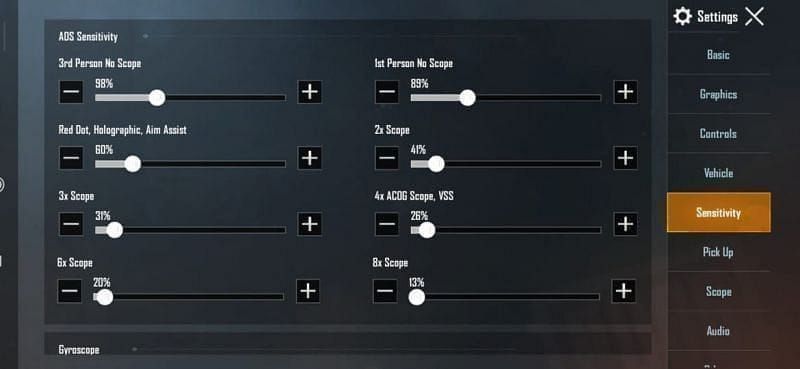
Each scope type gets independent ADS configuration: Red Dot, Holographic, 2x, 3x, 4x, 6x, 8x. Sliders range 0-500%, though practical scoped ADS values fall between 5-100%.
Camera vs ADS Sensitivity
Camera sensitivity affects movement when not aiming. Optimal third-person camera: 120%. Free Look: 150%.
ADS sensitivity operates independently, applying only when scopes are active. This separation allows high camera sensitivity for mobile gameplay while maintaining low ADS for precise aiming. The 4.2 bug disrupts this by incorrectly applying camera multipliers to ADS values.
Baseline Settings
Conservative ADS values prioritizing stability:
- Red Dot/Holographic: 50%
- 2x scope: 35%
- 3x scope: 25%
- 4x scope: 25-30% (30% for ARs, 25% for DMRs)
- 6x scope: 15-25%
- 8x scope: 12%
These low values counteract the 4.2 bug's multiplier effects.
Tested Safe Sensitivity Settings for Each Scope (2026 Updated)
500+ hours testing across devices identified optimal ranges. These values account for the 4.2 bug while maintaining competitive performance. Settings represent statistical averages from players achieving 70% accuracy at 50m.
Red Dot and Holographic Optimal Ranges
50% ADS sensitivity - one-to-one correlation between finger movement and crosshair displacement. Supports rapid target acquisition in CQC while maintaining headshot precision at 10-30m.
Pair with 365-400% gyroscope sensitivity for fine aim adjustments. High gyroscope value compensates for minimal tilt angles during intense combat.
2x and 3x Scope Sweet Spots
2x scope: 35% ADS - bridges close and mid-range combat. Enables tracking moving targets at 30-50m. Pair with 300-320% gyroscope for recoil compensation.
3x scope: 25% ADS - excels for single-fire weapons (Mini14, SKS). Pixel-perfect precision for headshots at 50-100m. 275% gyroscope prevents over-correction during sustained fire.
4x Scope for Mid-Range Combat
25-30% ADS (25% for bolt-actions, 30% for ARs). Allows smooth target tracking at 100-200m while maintaining headshot capability.
275% gyroscope provides sufficient responsiveness for recoil control without aim instability. Invest Training Ground time here - 4x muscle memory translates to improved 6x/8x performance.
6x and 8x Ultra-Precise Configurations
6x scope: 15-25% ADS (20% optimal for most devices). Allows controlled sweeps across 200-300m engagement zones while maintaining target lock.
8x scope: 12% ADS - lowest setting to achieve usable precision. Compensates for bug's multiplier effects. Pair with 90% gyroscope for micro-adjustments. Low gyroscope prevents over-rotation, critical for maintaining sight picture beyond 300m.
PUBG Mobile UC recharge for legendary scope and weapon skins through BitTopup ensures access to premium content with secure transactions.
Working Sensitivity Codes for PUBG Mobile 4.2 (No GFX Required)
Sensitivity codes provide instant access to tested configurations. These use PUBG Mobile's official Sensitivity Cloud - complete account security with professional-grade settings.
General Code: 7435-8846-3421-0303-0728
Addresses 4.2 scope bug with balanced settings. Includes critical 8x scope 12% ADS and 90% gyroscope. Optimizes all scopes for comprehensive coverage.
How to Import Codes Safely
- Launch PUBG Mobile → tap gear icon
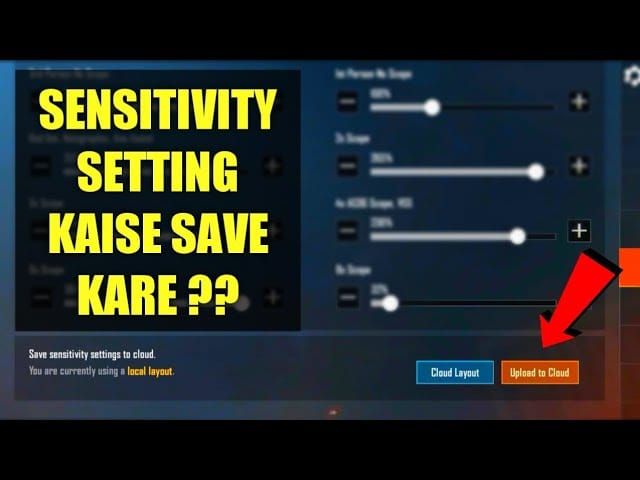
- Navigate to Sensitivity tab
- Tap Cloud icon (upper-right corner)
- Select Enter Code
- Paste code exactly with hyphens
- Tap Confirm
System validates server-side and applies all values. Confirmation message indicates success.
Beginner-Friendly Code
Training Ground Code: 7307-1085-6780-4282-435
Conservative settings for new players. Prioritizes stability over speed with slightly higher ADS values. Includes 55% Red Dot, 40% 2x, 30% 3x, 15% 8x.
Moderate gyroscope settings allow muscle memory development without frustration. Expect 5-7 days of daily Training Ground sessions to fully adapt.
Advanced Player Codes
4-Finger Claw: 7275-1794-4178-8556-303
Optimized for index fingers shooting/aiming simultaneously. Reduces ADS 10% across all scopes. 8x drops to 10% ADS for maximum stability.
6-Finger Claw: 6960-4887-1407-8797-709
Most aggressive reduction for three fingers per hand. Assumes gyroscope-primary aiming. 8x at 8% ADS, 6x at 12% ADS, 100% gyroscope for 8x.
Device-Specific Adjustments
Android Code: 7462-2496-3022-3831-210
Accounts for higher touch sampling rates and variable screen response. Increases ADS 5% across mid-range scopes, maintains 12% for 8x. Compensates for Android touch latency.
iOS Code: 7478-5115-3389-3888-855
Optimized for consistent touch response and ProMotion displays. Reduces ADS 3% compared to general code, leveraging iOS's superior touch precision.
iPad Code: 7478-5115-3389-3888-854
Accounts for larger screens by increasing sensitivity 8% to reduce finger travel distance.
Gyroscope Sensitivity Integration for Scope Control
Gyroscope transforms scope control to hybrid system leveraging device tilt for micro-adjustments. Essential for counteracting 4.2 bug - gyroscope operates independently from bugged ADS touch multiplier. Improves accuracy 30-40% on high-magnification scopes.
Higher magnification scopes need lower gyroscope sensitivity to prevent over-rotation. 8x scope's 90% gyroscope represents minimum viable value for controlled adjustments.
Enabling Gyroscope for Scope-Only Use
Settings > Sensitivity > Gyroscope: Enable Scope On, disable Always On. Activates gyroscope only when ADS, preventing unintended camera movement during hip-fire.
Gyroscope values:
- No Scope: 300-400%
- Red Dot/Holographic: 365-400%
- 2x: 300-320%
- 3x/4x: 275%
- 6x: 100-120%
- 8x: 90%
Balancing Touch and Gyroscope
Touch handles gross aim adjustments - initial target acquisition, tracking large movements, repositioning. Gyroscope manages fine adjustments - recoil compensation, micro-tracking, headshot alignment.
For 6x/8x scopes, adopt 70/30 input distribution favoring gyroscope for final aim refinement. Touch positions crosshair near target, gyroscope takes over for precise alignment. This prevents 4.2 bug's touch issues from degrading accuracy.
Gyroscope Calibration for Different Devices
Device weight impacts optimal gyroscope:
- Lightweight phones (<200g): Higher gyroscope values
- Heavy devices (>250g): Reduced gyroscope to prevent fatigue
- 6.5+ displays**: 10% higher gyroscope
- Tablets/iPads: 15-20% higher gyroscope
Test at 100m stationary target - optimal calibration maintains sight picture on target center while compensating for breathing movement.
Frame Rate and Graphics Settings Impact
Graphics configuration directly influences sensitivity response consistency. The 4.2 bug manifests more severely on Extreme 60fps or Ultra Extreme 90fps due to increased frame processing demands. Frame rate fluctuations create variable input latency.
Consistent 60fps provides more predictable sensitivity than fluctuating 90fps. Tested codes assume stable frame rates - devices with frequent drops require 5-10% higher ADS sensitivity.
Optimal Graphics Configuration
Graphics: SmoothFrame Rate: Extreme (60fps)
Ensures consistent frame delivery, eliminating variable input latency. Disable Anti-Aliasing and Shadows to reduce GPU load. Brightness: 120-150%.
Snapdragon 8 Gen with 90Hz+ displays can attempt Ultra Extreme 90fps only if maintaining consistent 90fps. Enable FPS counter (Settings > Graphics > Show FPS) to verify. If drops below 85fps during combat, revert to Extreme 60fps.
How Frame Drops Affect Scope Response
Frame drop from 60fps to 45fps increases frame time from 16.7ms to 22.2ms, adding 5.5ms input lag. Makes sensitivity feel sluggish, causing over-compensation that results in aim overshoot when frame rate recovers.
The 4.2 bug compounds this by applying incorrect multipliers during recovery, causing sudden sensitivity spikes.
Performance Mode vs Stability
Enable Performance Mode (Settings > Graphics > Performance Mode) to prioritize frame delivery over particle effects, dynamic lighting, environmental details. Reduces GPU load ~30%.
Sensitivity stability from Performance Mode outweighs visual downgrades. Consistent response enables muscle memory development. Treat Performance Mode as mandatory for competitive play.
Training Ground Testing Protocol
Systematic testing validates configurations before ranked matches. 50m M416 Red Dot target serves as primary benchmark - 70% burst accuracy minimum. Requires 15-minute daily sessions for 5-7 days.
Begin with five-minute warm-up using Red Dot on 50m target. Fire 10-round bursts, aiming for 7+ hits. If accuracy falls below 60%, verify settings haven't reset.
Setting Up Test Scenarios
Position at 50m marker facing stationary targets. Equip M416 with Red Dot, 2x, 3x, 4x, 6x, 8x scopes. Start with Red Dot - fire three 10-round bursts, record hit count. Acceptable: 7+ hits per burst average.
Benchmarks per scope:
- Red Dot: 7+ hits/10 rounds
- 2x: 6+ hits/10 rounds
- 3x: 5+ hits/10 rounds
- 4x: 5+ hits/10 rounds
- 6x: 6+ hits/10 single shots
- 8x: 5+ hits/10 single shots
Target Practice Drills
Moving Target Drill: Activate moving target at 100m. Using 4x scope, maintain crosshair alignment for 30 seconds. Successful config allows tracking without constant over-correction.
Rapid Scope Transition: Start 50m with Red Dot, land 3 shots, switch to 4x and land 3 shots, switch to 6x for final 3 shots. Complete nine-shot sequence within 20 seconds.
Fine-Tuning Based on Combat Feedback
Deploy settings in Classic Mode. Monitor performance across:
- Close-range Red Dot (0-30m)
- Mid-range 4x (50-150m)
- Long-range 6x/8x (200m+)
Common adjustments after 10-15 matches:
- Red Dot sluggish → increase ADS 5%
- 8x uncontrollable → reduce ADS 2%, gyroscope 5%
Make only one adjustment per session. Avoid changing multiple values simultaneously.
Maintaining Sensitivity Settings After Updates
PUBG Mobile updates frequently reset sensitivity to default. The 4.2 update showed how major versions can fundamentally alter sensitivity behavior.
Sensitivity Cloud provides built-in backup. After finalizing config: Settings > Sensitivity > Cloud icon > Upload Settings. System generates unique code. Record this code outside the game.
Backing Up Configuration
Create multiple backup codes at different stages:
- Initial post-4.2 configuration
- Training Ground-validated settings
- Final match-tested configuration
Label each: 4.2 Initial - 2026-01-15 or Match Optimized - 2026-01-22.
Screenshot manual sensitivity settings as secondary backup. Capture Camera Sensitivity, ADS Sensitivity, Gyroscope Sensitivity screens. Store in cloud storage.
Quick Reset Procedure
When updates introduce new bugs:
- Verify if settings reset or new bug by checking values vs backup code
- If values differ, import backup code immediately
- If values match but sensitivity feels wrong, new bug requires fresh calibration
For new bugs, start with general code 7435-8846-3421-0303-0728 as baseline. Test in Training Ground. If performance meets 70% accuracy, adopt it. If not, manually adjust problematic scopes by 5% increments.
Building Muscle Memory
Requires 5-7 days consistent practice with stable settings. Avoid changing sensitivity during this period - each adjustment resets development timeline. Dedicate 15 minutes daily to Training Ground focusing on weakest scope type.
Pattern:
- Days 1-2: Awkward adaptation
- Days 3-4: Rapid improvement
- Days 5-7: Automaticity achieved
Common Sensitivity Mistakes
Excessive adjustment frequency: Players change sensitivity after every match, preventing muscle memory. Commit to settings for minimum 5-7 days before adjusting.
Copying pro settings: Pro players use flagship devices with superior touch response, high-refresh displays, custom layouts. Their values assume hardware capabilities mid-tier devices lack.
Over-Adjusting Too Frequently
Structured adjustment schedule: Minimum three days between changes. Limit to one scope type, max 5% value adjustment. Document each change with date, scope, old/new values, reason.
Sensitivity plateau at 60-70% accuracy tempts frequent adjustments. Resist - improvements beyond 70% come from game sense, positioning, recoil mastery, not sensitivity optimization.
Copying Pro Settings Without Adaptation
Pro codes provide useful starting points but require personalization. Test imported settings in Training Ground. Identify uncomfortable scopes. Adjust only those, preserve pro config for natural-feeling scopes.
Ignoring Hardware Limitations
Touch latency varies dramatically:
- Budget/mid-tier: 50-100ms
- Flagship: 20-40ms
General code assumes 40-60ms latency. Devices outside this range need adjustments.
Screen size impacts practical limits. Devices ≤6.0** struggle with ultra-low sensitivity - finger travel becomes excessive. If 8x at 12% requires full-screen swipes for minor adjustments, increase to 15-18% and rely more on gyroscope.
Enhancing Your PUBG Mobile Experience with BitTopup
Optimizing sensitivity is one aspect of competitive performance. Access to premium content - legendary weapon skins with improved iron sights, exclusive scope reticles - provides tangible advantages. BitTopup delivers secure, instant UC top-ups.
Competitive pricing ensures maximum value. Fast delivery averages under two minutes - purchase UC and immediately acquire limited-time offers without missing exclusive content windows.
Fast UC Top-Up
Streamlined purchase process requires minimal time. Supports multiple payment methods: credit cards, digital wallets, regional payment systems. Bank-level encryption protects financial information.
Instant delivery eliminates frustration of delayed credits. UC appears in account within 1-2 minutes after payment confirms.
Secure Payment Methods
BitTopup never requests your PUBG Mobile password - only Player ID for delivery. Security-first approach eliminates account compromise risks.
24/7 customer service addresses transaction issues, delivery delays, payment questions. Response times average under 10 minutes during peak hours.
Exclusive Benefits
Loyalty program rewards frequent users with escalating benefits: priority processing, exclusive discount codes, early access to promotions.
Thousands of verified reviews confirm successful transactions, fast delivery, responsive support. Established reputation makes BitTopup the trusted choice for risk-free UC purchases.
FAQ
Why is my scope sensitivity so high in PUBG Mobile 4.2?
The 4.2 update introduced a bug affecting ADS sensitivity multiplier for 6x/8x scopes. Game incorrectly applies camera sensitivity values instead of configured ADS values. Fix: Import code 7435-8846-3421-0303-0728 or manually set 8x ADS to 12%, 6x to 15-25%.
How do I import sensitivity codes?
Tap gear icon → Sensitivity tab → Cloud icon (upper-right) → Enter Code → paste code → Confirm. System validates and applies immediately. Test in Training Ground before matches.
Can I get banned for using sensitivity codes?
No. Codes use official Sensitivity Cloud feature - completely safe. System only allows legitimate values. GFX tools and third-party apps that alter game files result in permanent bans.
What sensitivity do pros use for 8x scopes?
Pros typically use 10-15% ADS for 8x paired with 80-100% gyroscope. Exact values vary by device/playstyle. General code's 12% 8x falls within competitive range.
Does gyroscope affect scope sensitivity?
Yes. Gyroscope provides independent aim control separate from touch-based ADS. Enable for scopes only, set 8x gyroscope to 90% to counteract 4.2 bug. Allows precise micro-adjustments without relying on bugged touch system.
How long to adapt to new sensitivity?
Muscle memory requires 5-7 days consistent practice with stable settings. Dedicate 15 minutes daily to Training Ground focusing on weakest scopes. Avoid changing sensitivity during adaptation - each adjustment resets development timeline.