What Makes 4.2 Beta Different
Weapon Balance Changes:
- DMRs buffed: Mini-14 now deals 48 damage at 990 m/s velocity, 70%+ burst accuracy at 50-100m
- ARs nerfed 10-15% damage/velocity past 100m: M416 reduced to 41 damage, 482 DPS
- AR pickup rates dropped from 85% to 60-65% in beta matches
Map Updates:
- Rondo map debuts in solo, duo, squad modes
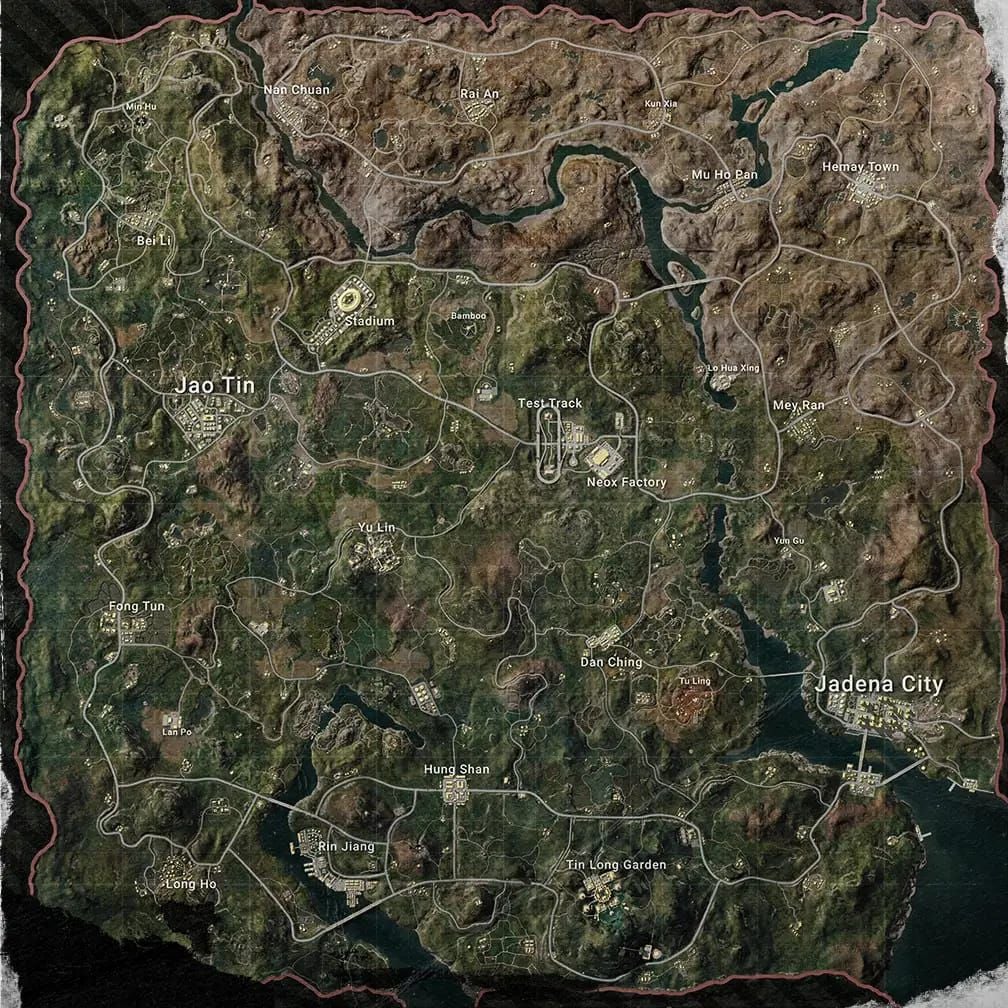
- Erangel Boatyard loot density: +28% overall, +64% assault rifles, +177% snipers
- Training Grounds code: 7307-1085-6780-4282-435
Why Official Channels Matter
Official beta access through Google Play Store (Android) and TestFlight (iOS) provides verified builds with proper security certificates.
Legitimate PUBG Mobile 4.2 Beta APK SHA256 hash:f03c950d072793131d90d613805b35068770fd056ce97d8ed607005647af6d93
Any file without this exact checksum is a security threat.
Beta stats:
- 24.6 million downloads
- 4.4/5 rating from 4,956 reviews
- Queue times: 2-5 minutes vs 30-60 seconds in live servers
- Battery drain: +20-30% on mid-range devices
Unofficial sources risk account compromise, malware installation, and permanent bans.
The Growing Threat of Fake PUBG Mobile APK Scams
Fraudulent APK distribution exploits player eagerness for early access. Malicious files contain keyloggers, credential harvesters, and remote access trojans disguised as game updates.
Common Scam Tactics
Deceptive strategies:
- Countdown timers claiming limited beta slots remaining
- Promises of free UC or rare skins
- Domain names resembling official sources (single letter changes, added hyphens)
- Unnecessary permissions: contacts, messages, storage access
- Bundled software requiring multiple installations
Security Risks Beyond Account Theft
Compromised APKs establish persistent backdoors, allowing ongoing access after uninstalling. They intercept two-factor authentication codes, monitor clipboard activity for cryptocurrency/banking credentials, and drain UC balances through unauthorized purchases.
Recovery processes take weeks, during which you lose account access and accumulated progress.
Step-by-Step: Joining Official PUBG Mobile Beta
Android (Google Play Store):
- Search for PUBG Mobile
- Scroll to bottom of app page
- Locate Join the beta section
- Tap Join
- Wait 24-48 hours for confirmation
iOS (TestFlight):
- Visit official PUBG Mobile website for TestFlight invitation link
- Install TestFlight app from App Store
- Open invitation link
- Add PUBG Mobile 4.2 Beta to testing library
Direct APK (Advanced):
Visit official PUBG Mobile website for beta sign-up link. Requires manual installation with security verification.
Account Requirements
Beta participation requires:
- Verified PUBG Mobile account with established play history
- Two-factor authentication enabled
- Unique passwords rotated quarterly
New accounts rarely receive access—developers prioritize experienced players for meaningful feedback.
Pro tip: Use guest accounts for beta testing to isolate experimental builds from main account progress, preventing data corruption or security breaches.
Official Announcement Channels
Important: No verified official PUBG Mobile Discord servers provide safe beta downloads. Official channels include:
- In-game announcements
- Official website
- Verified social media accounts
Exercise extreme caution with Discord servers claiming official beta access—these frequently represent scam operations.
Safe APK Download & Verification
File verification checklist:
- SHA256 checksum:
f03c950d072793131d90d613805b35068770fd056ce97d8ed607005647af6d93 - File size: 1.18 GB (significant deviation indicates tampering)
- Requirements: Android 5.0+, 4 GB free storage minimum
- Recommended: 8 GB RAM, Snapdragon 660+ processors
Use checksum verification tools:
- Android: Hash Droid app
- Desktop: Verify before transferring to mobile
Checking Digital Signatures
Navigate to Settings > Security > Install unknown apps. Verify APK signature matches official Tencent Games certificates. Never install mismatched or unsigned applications.
Pre-installation:
- Clear device storage
- Restart device
- Ensure 8-10 GB total storage space
- Monitor for unexpected permission requests
Red Flags: Spotting Fake APK Sources
Suspicious website characteristics:
- Lacks HTTPS encryption
- Excessive advertisements
- Requires survey completion before downloads
- Demands payment, personal information, or social media sharing
Legitimate beta distribution never charges fees or requires information beyond basic account credentials.
Fake Discord Servers
Warning signs:
- No verification badge next to server name
- Poor grammar
- Aggressive external link promotion
- Promises of guaranteed beta access
- Moderators requesting passwords/verification codes via DM
- VIP access for fees
- Claims of filling fast beta slots
Authentic servers display verified checkmarks, maintain professional moderation, and never request sensitive credentials.
Too-Good-To-Be-True Promises
Scam operations promise:
- Unlimited UC
- Rare skins
- Guaranteed legendary item drops
These violate terms of service and indicate fraudulent activity. Legitimate beta testing focuses on gameplay feedback, not rewards.
For secure UC purchases, buy PUBG UC online through BitTopup with verified transactions, instant delivery, and 24/7 support.
Installation Best Practices
Device compatibility:
- Android 5.0+
- 8 GB RAM
- Snapdragon 660+ processors
- Graphics: Smooth with High FPS
- Gyroscope sensitivity: 160-200% for DMRs, 300% for Vector
Backing Up Main Account
Before installing beta:
- Link account to Facebook, Google Play, Twitter
- Screenshot current rank, UC balance, inventory
- Export game settings (sensitivity, controls, graphics)
Beta versions may reset settings—backups accelerate reconfiguration.
Safe Installation Steps
- Enable Install unknown apps temporarily for specific APK only
- Navigate: Settings > Security > Install unknown apps > Select file manager > Grant permission
- Install APK
- Immediately revoke permission after installation
Beta client installs separately from production version—both consume 16-20 GB combined space. Monitor device temperature during first launch due to shader compilation.
Post-Installation Verification
Check app signature: Settings > Apps > PUBG Mobile Beta > Advanced > App details
Verify:
- Version number matches announced beta builds
- Signature matches official certificates
- Launch using ethernet (avoid VPNs—may trigger anti-cheat)
Don't use macros or third-party tools—detection systems operate aggressively during testing.
Protecting Your Account During Beta
Security essentials:
- Enable 2FA through account management portal
- Use authenticator apps (not SMS codes)
- Unique passwords rotated quarterly
- Enable login notifications for new device access
Separating Beta and Live Data
Beta progress doesn't transfer to live servers. UC purchases in beta may not persist after official release.
Primewood Genesis features (beta-exclusive):
- Lumina Fruit system: plant buds underground, harvest across matches
- Features reset upon official release
Use guest accounts for testing without investment risk.
If Account Compromised
Immediate actions:
- Change passwords
- Revoke active sessions through account management
- Contact support with timestamps, device info, suspicious activity descriptions
- Monitor linked email for password reset requests
- Document all activity with screenshots
Beta Tester Responsibilities & Rewards
Effective bug reporting:
- Specific reproduction steps
- Device specifications
- Graphics settings
- Network conditions
- Screenshots/screen recordings
- Note if issues occur consistently or intermittently
Prioritize:
- Game-breaking bugs: crashes, infinite loading, progression blockers
- Weapon balance concerns with specific scenarios, damage numbers, engagement ranges
Working as designed (not bugs):
- Bramblewood Scorpion underground burrow movement
- Spike Bomb AoE damage
- Pincer Strike melee attacks
Legitimate bugs:
- Launch Slide not ejecting passengers
- Vine Manipulation health bars not displaying
Exclusive Rewards
Beta participants typically receive:
- Exclusive titles
- Avatar frames
- Commemorative items
- Potential: Honey Badger ability (restores health on knockdown, energy on elimination)
Consistent participation and quality feedback increase reward eligibility.
Managing UC During Beta
Beta versions impose purchase limitations. UC balances may not synchronize between beta and live versions—large purchases during testing are financially risky.
Beta-specific progression (no UC required):
- Corruption Plant Zone mechanic
- Sacred Tree supply rewards
Purchase Limitations
Test server economies operate independently. UC purchases potentially reset upon official release. Focus beta spending on testing cosmetics, weapon skins, vehicle customization—not permanent investments.
Save major UC purchases for live server deployment when transactions carry guaranteed permanence.
BitTopup provides secure UC top-up with competitive pricing, fast delivery, and excellent customer service for both beta and live versions without account security risks.
FAQ
How do I join the official beta test program?
Google Play Store: Visit PUBG Mobile app page, select Join the beta at bottom. iOS: Use TestFlight with invitation link from official website. Beta 1: December 4, 2025; Beta 2: December 11, 2025.
What are signs of fake APK files?
Missing official SHA256 checksum (f03c950d072793131d90d613805b35068770fd056ce97d8ed607005647af6d93), excessive permissions, file size ≠ 1.18 GB, sources requiring payment/surveys/personal info.
Can I safely use my main account for beta testing?
Yes, but guest accounts provide better security by isolating experimental builds from your main profile, preventing data corruption or progression loss.
What device requirements are needed?
Android 5.0+, 4 GB free storage (8-10 GB total recommended), 8 GB RAM, Snapdragon 660+. Graphics: Smooth with High FPS. Gyroscope: 160-200% for DMRs.
Will UC and progress transfer from beta to live?
No. Beta operates independently—progression resets upon official release (early-mid January 2026). Save major UC purchases for live servers.
How can I verify official download links?
Official downloads only from Google Play Store, Apple TestFlight, or official PUBG Mobile website. Verify APK SHA256 checksum, check signatures match Tencent Games certificates. Avoid Discord servers, third-party sites, or social media links claiming official access.
Ready to explore PUBG Mobile 4.2 Beta's Primewood Genesis mode with Bramblewood Scorpions, Sacred Deer vehicles, and rebalanced weapons? Secure your UC through BitTopup—the safest, fastest way to top up with instant delivery, best rates, and 24/7 support!