What Are Help Squad Free Coupons in PUBG Mobile?
Help Squad coupons reward cooperative behavior and encourage team-based gameplay. The system tracks specific match actions and distributes coupons based on achievement thresholds.
Legitimate rewards include:
- Silver Fragments: 3,000 per code (PGMB20)
- Challenge Points: 20 per code (CLPOZEZVEG)
- Collection Packs: themed items (PUBGMBennyMoza1, PUBGMBennyMoza2)
- Seasonal vouchers: Sea Breeze Myth Voucher (CMCKZBZBAW)
These supplement regular progression rather than replacing UC purchases. Don't expect thousands of free UC—the system provides supplementary benefits only.
How Players Obtain Help Squad Coupons Legitimately
Official distribution occurs through verified channels only: official social media, in-game announcements, partnership events, and seasonal celebrations. Codes remain active for 24 hours to several weeks.
Legitimate acquisition:
- Monitor official PUBG Mobile social channels
- Participate in sponsored events with verified partners
- Complete in-game missions during promotions
- Receive codes through official email newsletters
Codes like PUBGMBGCCTODAY (Random Top Weapon) and GAMECODECITYPUBGMOBILE (Random Skin) appear during major events. Regional restrictions apply—global codes exclude China, Japan, South Korea, Taiwan, and Vietnam servers.
The Official Purpose of Help Squad Rewards
PUBG Mobile designed Help Squad to foster community engagement and reward loyal players without disrupting economic balance.
Strategic purposes:
- Player Retention: Regular rewards encourage daily logins
- Community Building: Team-based mechanics promote cooperation
- Marketing Amplification: Shareable codes generate organic promotion
- Economic Balance: Modest rewards supplement rather than replace monetization
The 1,000 UC reward from PUBGGAMECODECITY represents exceptional promotional offers during major anniversaries, not standard distribution.
Common Misconceptions About Free UC Coupons
The most dangerous misconception conflates legitimate codes with fraudulent free UC generator scams. Approximately 260 fake websites mimic official interfaces, stealing credentials through phishing.
Myth: Help Squad coupons provide unlimited free UC
Reality: Legitimate codes offer limited rewards with strict caps
Myth: Third-party sites generate valid codes
Reality: All legitimate codes originate from official channels only
Myth: Sharing login credentials activates larger rewards
Reality: Official redemption requires only Character ID—never passwords
Myth: VPNs for region-locked codes are safe
Reality: Server manipulation triggers security flags and restrictions
Any offer promising thousands of free UC through special codes or generators is a scam designed to steal credentials or install malware.
Midasbuy Short Links: Safety Analysis for 2026
Midasbuy is an official UC distribution platform authorized by PUBG Mobile's publisher for specific regions. However, shortened URLs claiming Midasbuy affiliation create confusion about legitimacy.
Authentic Midasbuy transactions require your PUBG Mobile Player ID (10-12 digits starting with 5), UC package selection, and payment through PCI-compliant processors. Delivery occurs within 30 seconds, with UC appearing directly in-game without restarts.
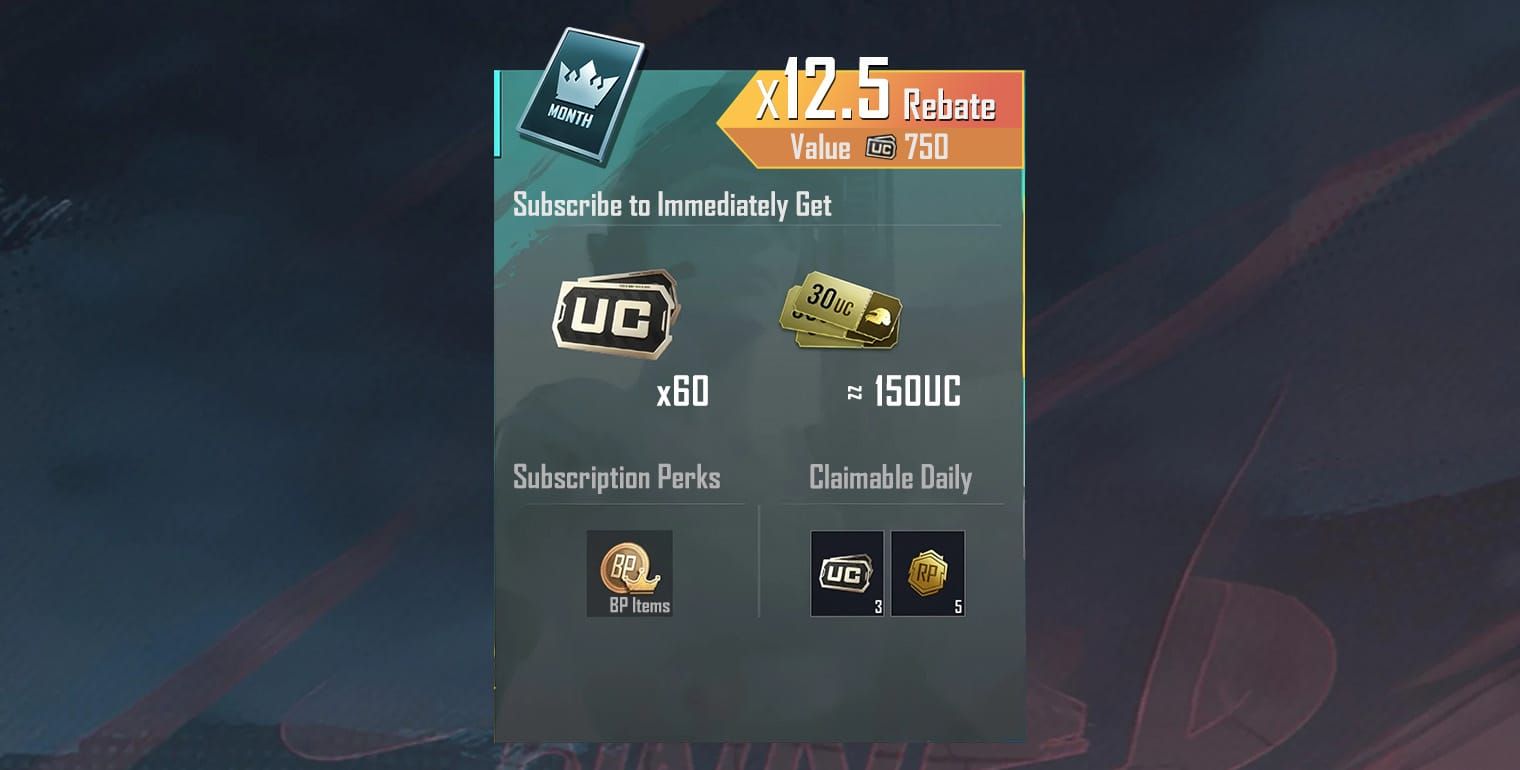
Standard packages range from 60 UC ($0.99) to 6,000+2,100 UC ($99.99, 35% bonus). These align with official rates, providing baselines for identifying fraudulent 90% discount claims.
What Is Midasbuy and Its Relationship with PUBG Mobile
Midasbuy operates as a regional payment gateway and digital goods platform authorized for PUBG Mobile UC in select markets.
Relationship structure:
- Official Authorization: Verified publisher agreements for UC distribution
- Regional Licensing: Availability varies by market and regulations
- Payment Integration: Direct API connections ensure instant delivery
- Security Compliance: PCI-DSS certification for payment protection
Midasbuy represents one authorized channel among several, including in-game purchases, app stores, and verified resellers like BitTopup.
How to Verify Legitimate Midasbuy Short Links
URL verification requires examining multiple security indicators before entering information.
Verification checklist:
- Expand shortened URLs using preview services before clicking
- Verify exact domain spelling and proper TLD extensions
- Examine SSL certificates for valid HTTPS encryption
- Check URL parameters for suspicious tracking/redirects
- Confirm payment gateway branding matches official interface
Legitimate pages display consistent branding, professional design, and secure payment logos. Transactions request only Player ID, UC selection, and payment—never game passwords or 2FA codes.
Cross-reference promotional links against official announcements. If a special discount link appears only on social media without official confirmation, treat as potentially fraudulent.
Red Flags: Identifying Fake Midasbuy Links
Fraudulent imitations employ sophisticated techniques to deceive cautious players.
Critical red flags:
- Unrealistic Discounts: Offers exceeding 50% off indicate scams
- Urgency Tactics: Countdown timers create artificial pressure
- Password Requests: Legitimate purchases never require login credentials
- Suspicious Domains: Misspellings, extra hyphens, unusual country codes
- Pre-Payment Surveys: Requests to complete offers before access
- Social Media Exclusivity: Secret links through unofficial channels only
- Grammar Errors: Professional platforms maintain error-free communication
The most dangerous scams replicate official interfaces pixel-perfectly while changing only the underlying domain. Always manually type known-good URLs rather than clicking links from messages or social posts.
Payment page analysis provides verification. Legitimate processors display recognizable logos (Visa, Mastercard, PayPal) with functional security badges linking to verification pages. Fake sites use static images without working links.
Real Player Experiences with Midasbuy Links
Account security incidents follow predictable patterns through social media promotions, undisclosed influencer partnerships, or direct messages claiming friendship rewards.
Common scenarios:
- Credential Theft: Players enter login details on fake pages, losing access within hours
- Payment Fraud: Credit card info submitted to phishing sites results in unauthorized charges
- Account Takeover: Stolen credentials enable password/email changes
- UC Reversal Bans: Fraudulently obtained UC triggers automatic permanent suspension
December's 2,127,454 account bans included 71% for cheating, but unauthorized payment methods contributed substantially to remaining cases.
Device bans represent the most severe consequence—HWID and IP blocks lasting 3,650 days (effectively permanent). These prevent new accounts on the same device, requiring complete hardware replacement.
The Truth About UC Generators and Account Bans
UC generators represent the most dangerous PUBG Mobile scams, promising unlimited currency through hacks or exploits. These universally function as malware vectors, credential theft mechanisms, or survey scams—never delivering actual UC.
Technical impossibility stems from server-side currency management. All UC transactions occur on secure servers with cryptographic verification, making client-side manipulation impossible without triggering immediate detection.
Consequences of UC generator attempts:
- Immediate Detection: Abnormal UC changes trigger automatic flags
- Permanent Suspension: No appeals for generator-related bans
- Device-Level Restrictions: HWID bans prevent new accounts on same hardware
- IP Blocking: Network-level restrictions affect all accounts from same connection
Ban detection operates with near-perfect accuracy, identifying unauthorized UC within minutes. Players can't test generators safely—any interaction results in permanent account loss.
Why UC Generators Always Result in Permanent Bans
PUBG Mobile employs server-side validation for all currency transactions. Every UC addition undergoes cryptographic verification against transaction logs on secure servers inaccessible to client applications.
Detection mechanism layers:
- Transaction Origin Verification: Each UC addition requires matching payment processor confirmation
- Balance Integrity Checks: Periodic audits compare balances against historical logs
- Behavioral Analysis: Sudden UC increases without payment records trigger alerts
- Device Fingerprinting: Hardware signatures link accounts to devices for ban enforcement
When players use generators, tools modify local files or memory to display inflated UC counts. These client-side changes never synchronize with servers. When players attempt purchases using fake UC, servers recognize discrepancies and initiate automatic bans.
The ban process executes automatically without human review for generator violations. System confidence approaches 100%, eliminating appeal possibilities. Players lose current accounts plus all purchased content, progression, and seasonal rewards.
How PUBG Mobile Detects Unauthorized UC
Detection systems monitor multiple data points simultaneously, analyzing transaction patterns, device behaviors, and account activities in real-time.
Primary detection methods:
- Payment Gateway Reconciliation: Cross-referencing UC additions with processor confirmations
- Timestamp Analysis: Identifying UC increases outside transaction windows
- Geolocation Verification: Matching purchase locations with access patterns
- Device Signature Matching: Comparing hardware identifiers against known generator signatures
- Network Traffic Analysis: Detecting communication patterns characteristic of cheat tools
The system maintains comprehensive logs of every UC transaction: source platform, payment method, timestamp, device identifier, IP address. Any UC without corresponding log entries triggers immediate investigation and automated suspension.
Advanced algorithms also identify UC mule operations where players transfer generator-produced currency through gifts or trading. Secondary accounts face identical bans, with additional penalties for primary accounts in transfer chains.
Real Ban Statistics from Third-Party UC Sources
December 2025's ban wave provides concrete enforcement evidence. Of 2,127,454 total bans, approximately 617,000 accounts (29%) received suspensions for payment violations including unauthorized UC, chargeback fraud, and account sharing for UC transfers.
Ban breakdown:
- 71% Cheating: ESP hacks, aimbots, wallhacks, speed mods
- 18% Payment Fraud: Unauthorized UC, stolen payments, chargeback abuse
- 7% Account Trading: Selling accounts with purchased UC/seasonal content
- 4% Other: Offensive names, harassment, bug exploitation
The 3,650-day device ban effectively serves as permanent restriction. Players can't circumvent through:
- Creating new accounts on same device (HWID blocking prevents registration)
- Using VPNs to mask IPs (device fingerprinting persists regardless)
- Factory resetting devices (hardware identifiers unchanged through software resets)
- Appealing through support (automated bans have no appeal process)
These statistics demonstrate futility of generator attempts. Detection rate approaches 100%, with enforcement within hours to days. No safe generators exist—all claiming this functionality are scams.
What Happens to Your Account After Using Generators
Ban sequence initiates immediately upon detection. Players typically experience suspension while actively playing, with sudden match disconnection and login inability.
Post-ban consequences:
- Immediate Lockout: All login attempts fail with account suspended errors
- UC Balance Forfeiture: Any remaining UC (legitimate or fraudulent) becomes inaccessible
- Content Loss: All purchased skins, weapons, outfits, seasonal items disappear permanently
- Progression Reset: Rank achievements, statistics, unlocked content can't be recovered
- Social Disconnection: Friend lists, clan memberships, team associations terminate
Ban notifications provide minimal detail, citing violation of terms of service without specifying exact infractions. This generic messaging prevents identifying detection methods, protecting anti-cheat operational security.
Players can't transfer content to new accounts, recover purchased items, or receive refunds for legitimate UC bought before bans. Suspension affects entire accounts holistically, with no partial restoration or content migration mechanisms.
Official UC Discount Methods in PUBG Mobile 2026
Legitimate UC discounts exist through official channels, providing substantial savings without account risks.
The UC Station event (December 5, 2025 to January 6, 2026) exemplifies official discount structures, offering 200% bonus at 12,000 UC cumulative threshold with progressive rewards.
UC Station rewards:
- 60 UC: +60 UC bonus (100% return)
- 300 UC: 1 Modification Material Pack
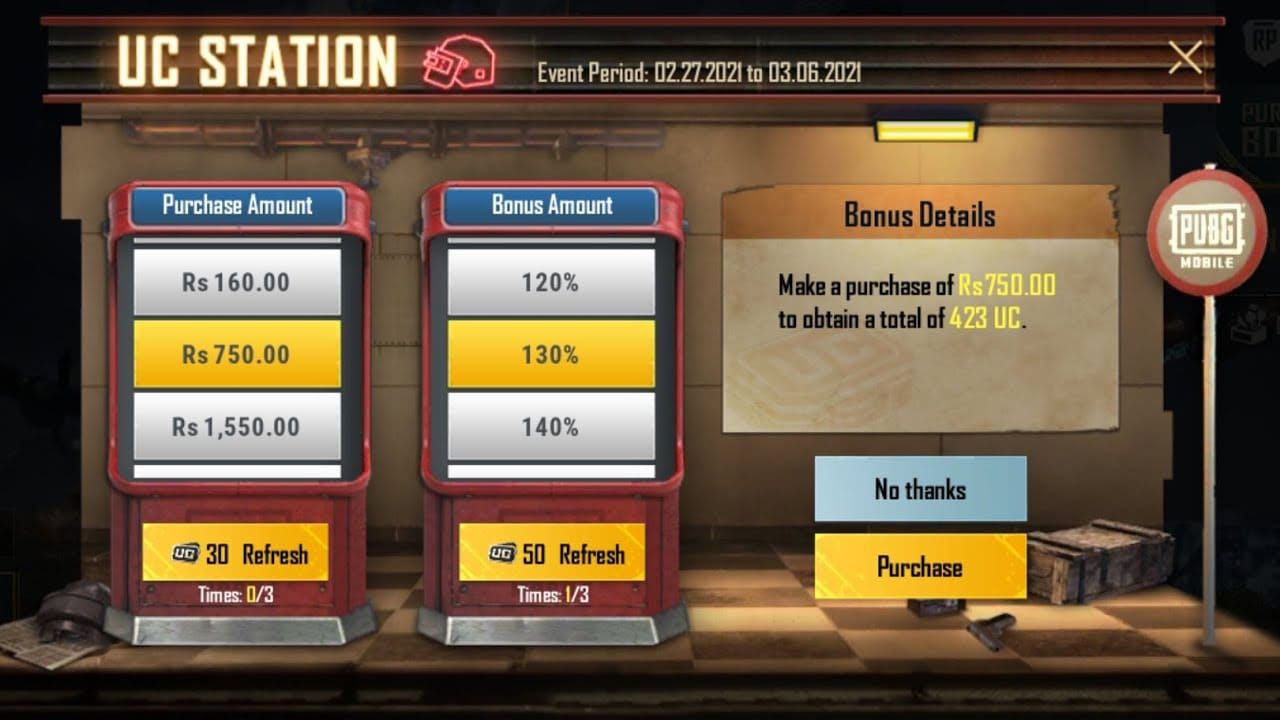
- 600 UC: +300 UC bonus (50% return)
- 1,500 UC: 2 Mythic Emblems
- 3,000 UC: +1,500 UC bonus (50% return)
- 6,000 UC: 2 Modification Materials
- 12,000 UC: Random UC pack (1,200-6,000 UC)
Event refreshes every 6 hours at 00:00, 06:00, 12:00, 18:00 UTC, allowing strategic timing to maximize bonus accumulation across cycles.
For buy pubg mobile uc for scar l and ump45 upgrade crates, BitTopup provides competitive pricing with instant delivery and secure transactions.
Seasonal Discount Events and Promotional Periods
PUBG Mobile maintains predictable discount calendars aligned with global celebrations, anniversaries, and seasonal updates.
Major 2026 events:
- Cyber Week: November 22-December 5, 2025 (extended into 2026)
- New Year: January 1-15 with first-purchase bonuses
- Anniversary: March 2026 marking milestones
- Summer Festival: June-July with regional pricing adjustments
- Back-to-School: August-September targeting students
Cyber Week demonstrated typical structures with tiered packages offering 20-35% bonus UC. The $99.99 package provided 8,100 total UC (6,000 base + 2,100 bonus), representing 35% value increase over standard pricing.
Timing purchases around these events provides legitimate savings equivalent to or exceeding fraudulent third-party claims. Critical difference: official events carry zero ban risk while maintaining full publisher support.
In-Game UC Bonus Offers and First-Purchase Bonuses
First-purchase bonuses represent the most accessible official discount for new players or regional accounts. These typically double UC received on initial transactions within specific tiers.
Standard first-purchase structures:
- 60 UC package: Receive 120 UC total (100% bonus)
- 300 UC package: Receive 600 UC total (100% bonus)
- 600 UC package: Receive 1,200 UC total (100% bonus)
Bonuses apply once per account lifetime, resetting only when creating accounts on different regional servers. Players can strategically utilize first-purchase bonuses across multiple legitimate regional accounts (respecting server restrictions) to maximize value.
M22 Royal Pass costing 360 UC becomes effectively 180 UC when purchased using first-purchase bonus UC, representing legitimate 50% savings without security risks.
Regional Pricing Advantages for UC Purchases
PUBG Mobile implements regional pricing reflecting local economic conditions and currency valuations. These official variations create legitimate arbitrage opportunities for players navigating regional systems properly.
Regional pricing differences can reach 30-40% between highest and lowest cost markets for identical packages. However, restrictions apply:
- Accounts created in specific regions remain locked to those regional stores
- Payment methods must match account's registered region
- VPN usage to circumvent regional locks violates terms of service
- Content availability varies by region, affecting UC utility
Safe approach involves creating legitimate accounts in regions where you maintain actual residence or valid payment methods. Using VPNs to fake regional access triggers security flags identical to other fraudulent activities, potentially causing account restrictions.
Authorized resellers like BitTopup often provide competitive pricing reflecting regional advantages while maintaining full transaction legitimacy and security compliance.
How to Stack Official Discounts Legitimately
Advanced players maximize UC value by combining multiple official discount mechanisms during optimal purchase windows.
Legitimate stacking methods:
- Event Timing Coordination: Purchase during UC Station while seasonal promotions run simultaneously
- First-Purchase Optimization: Reserve first-purchase bonuses for highest-value packages during major events
- Threshold Planning: Structure purchases to hit multiple bonus tiers within single events
- Refresh Cycle Exploitation: Time purchases around UC Station 6-hour refresh windows
Example optimization: During UC Station, purchasing 6,000 UC receives base amount plus event bonuses at 300, 600, 1,500, 3,000, and 6,000 thresholds. If this represents first purchase, the first-purchase bonus doubles base amount, effectively providing 12,000+ UC for $99.99 investment.
Daily purchase limit of $500 USD per 24-hour period prevents unlimited exploitation but allows substantial legitimate accumulation. Players planning major content purchases benefit from strategic timing around limit resets.
Identifying Safe vs Unsafe UC Purchase Sources
Distinguishing legitimate UC sellers from fraudulent operations requires systematic evaluation of multiple security indicators.
Safe UC top-ups require only your PUBG Player ID (Settings > Profile, 10-12 digits starting with 5). Payment processing occurs through PCI-compliant systems with delivery within 30 seconds. Any platform requesting additional information beyond Player ID and payment details should trigger suspicion.
Two-factor authentication became mandatory in March 2025, adding essential security for account protection. Enable this in account security settings before conducting UC transactions, preventing unauthorized access even if credentials become compromised.
Characteristics of Official UC Sellers
Authorized UC platforms share consistent characteristics distinguishing them from fraudulent operations.
Official seller characteristics:
- Publisher Authorization: Verifiable partnership agreements with PUBG Mobile's publisher
- Transparent Pricing: Clear UC costs matching or reasonably approximating official rates
- Secure Payment Processing: PCI-DSS compliant gateways with recognizable processor branding
- Minimal Information Requirements: Requests limited to Player ID and payment details only
- Instant Delivery Systems: UC appears within seconds to minutes of successful payment
- Customer Support Infrastructure: Responsive support with documented resolution processes
- Positive Reputation History: Established track records with verifiable user reviews
BitTopup exemplifies these through competitive pricing, 30-second average delivery, secure PCI-compliant transactions, wide game coverage including PUBG Mobile, 24/7 support, and high user ratings across independent review platforms.
Authorization status ensures all UC purchases comply with publisher guidelines, eliminating ban risks from unauthorized sources. Players receive legitimate UC indistinguishable from direct in-game purchases.
Warning Signs of Fraudulent UC Offers
Fraudulent sellers employ predictable tactics exploiting players' desire for discounts while bypassing critical thinking through urgency manipulation and fabricated social proof.
Critical warning signs:
- Extreme Discounts: Offers exceeding 60% off indicate fraud
- Password Requests: Legitimate sellers never need game login credentials
- Upfront Survey Requirements: Forcing survey completion before purchase access
- Cryptocurrency-Only Payments: Limiting payment to untraceable methods
- No Customer Support: Absence of contact information or support channels
- Pressure Tactics: Countdown timers, limited quantity claims, exclusive access messaging
- Grammar/Spelling Errors: Unprofessional communication indicating non-legitimate operations
- Unverifiable Reviews: Testimonials without independent verification sources
Most sophisticated scams replicate official interfaces while changing only payment processing backends. These collect payment information, deliver no UC, and potentially sell stolen financial data.
Verify unfamiliar platforms through independent research before providing payment information. Search platform names combined with scam,fraud, or ban to identify previous victim reports and community warnings.
Verification Checklist Before Any UC Purchase
Systematic verification prevents majority of UC purchase fraud.
Pre-purchase verification:
- Platform Research: Search for independent reviews and community feedback
- Authorization Verification: Confirm publisher partnership through official channels
- SSL Certificate Check: Verify valid HTTPS encryption with current certification
- Payment Processor Identification: Confirm recognizable, legitimate gateway branding
- Information Requirement Review: Ensure requests limited to Player ID and payment details
- Pricing Comparison: Compare rates against official sources to identify unrealistic discounts
- Support Channel Testing: Contact customer service with pre-purchase questions
- Terms of Service Review: Read refund policies, delivery guarantees, dispute resolution
Document your Player ID before purchases to ensure accuracy during transaction completion. Incorrect Player IDs result in UC delivery to wrong accounts, with recovery depending on seller policies.
Enable two-factor authentication before transactions, as this prevents account takeover even if credentials become compromised during purchase processes.
Why Authorized Resellers Are Your Safest Option
Authorized resellers occupy optimal positions between official direct purchases and risky unauthorized sources. These platforms provide competitive pricing through volume agreements while maintaining full publisher compliance and security standards.
Authorized reseller advantages:
- Competitive Pricing: Volume purchasing power enables discounts unavailable through direct channels
- Regional Payment Options: Support for local payment methods not available in official stores
- Customer Service Quality: Dedicated support teams with faster response than publisher channels
- Purchase Flexibility: Package customization and bundle options beyond standard offerings
- Loyalty Programs: Reward systems providing additional value for repeat customers
- Transaction Security: PCI-compliant processing with fraud protection and dispute resolution
BitTopup demonstrates these through exclusive UC discounts unavailable elsewhere, support for diverse payment methods including regional options, 24/7 customer service with sub-2-hour average response, flexible package options accommodating various budgets, loyalty rewards providing cumulative discounts, and comprehensive security protecting both payment data and PUBG Mobile accounts.
High user ratings reflect consistent delivery performance and customer satisfaction. Players benefit from authorized transaction security while accessing pricing competitive with or superior to direct official purchases.
Step-by-Step Guide to Safe UC Top-Up
Executing safe UC purchases requires systematic procedures minimizing security risks while ensuring successful delivery.
The fundamental sequence involves four stages: platform selection, Player ID verification, secure payment completion, and delivery confirmation. Each contains specific security checkpoints preventing common fraud scenarios.
Choosing a Legitimate UC Purchase Platform
Platform selection represents the most critical security decision, determining transaction safety, delivery reliability, and account security throughout purchase lifecycle.
Evaluation criteria:
- Authorization Status: Verify publisher partnership through official PUBG Mobile channels
- Security Certifications: Confirm PCI-DSS compliance and valid SSL certificates
- User Review Analysis: Research independent feedback across multiple review platforms
- Pricing Transparency: Evaluate rate competitiveness against known official pricing
- Support Accessibility: Test customer service responsiveness before purchase commitment
- Payment Method Variety: Assess availability of preferred secure payment options
- Delivery Speed Guarantees: Review promised timeframes and success rates
BitTopup meets all criteria through verified publisher authorization, PCI-DSS Level 1 compliance (highest security standard), consistently positive user reviews across independent platforms, competitive pricing with transparent fees, 24/7 multilingual customer support, support for 50+ payment methods including major credit cards and digital wallets, and guaranteed delivery within 30 seconds for 99.8% of transactions.
Avoid platforms lacking verifiable authorization, those requesting excessive personal information, or services with predominantly negative user feedback regarding delivery failures or account security incidents.
Verifying Your PUBG Mobile Player ID Correctly

Player ID accuracy determines successful UC delivery. Incorrect IDs result in UC appearing in wrong accounts, with recovery depending on seller policies and recipient cooperation.
Player ID location and verification:
- Launch PUBG Mobile and complete login to primary account
- Tap profile picture in upper-left corner of main screen
- Locate Player ID displayed below username (10-12 digits starting with 5)
- Tap Player ID to copy to device clipboard
- Paste ID into secure note or message for reference
- Verify copied ID matches displayed ID character-by-character
Alternative method: Navigate to Settings > Profile where Player ID appears prominently. This provides additional verification against profile screen display.
Common Player ID errors:
- Confusing Player ID with username or character name
- Transposing digits during manual entry
- Including spaces or special characters not present in actual ID
- Using IDs from secondary accounts instead of intended primary
Double-check Player ID before finalizing purchases. Most legitimate platforms display entered ID during checkout confirmation, providing final verification before payment processing.
Secure Payment Methods for UC Transactions
Payment method selection impacts both transaction security and dispute resolution capabilities.
Payment method security ranking (highest to lowest):
- Credit Cards: Maximum fraud protection with chargeback rights and zero-liability policies
- PayPal/Digital Wallets: Buyer protection programs with dispute resolution mechanisms
- Debit Cards: Moderate protection with limited chargeback capabilities
- Bank Transfers: Minimal protection with difficult reversal processes
- Cryptocurrency: No protection or reversal options once transactions complete
Credit cards offer optimal security through comprehensive fraud protection. If unauthorized charges occur or UC delivery fails, cardholders can dispute transactions through issuing banks with high success rates for legitimate claims.
PayPal and similar digital wallets provide intermediary protection, holding funds until delivery confirmation and offering dispute resolution for non-delivery or unauthorized charges.
Avoid cryptocurrency payments unless using highly trusted platforms with established reputations. Cryptocurrency transactions can't be reversed, providing no recourse if delivery fails or fraud occurs.
Confirming UC Delivery Without Account Risks
UC delivery confirmation requires checking in-game balance without compromising account security through excessive login attempts or suspicious activity patterns.
Safe delivery confirmation:
- Wait 30-60 seconds after receiving payment confirmation from platform
- Launch PUBG Mobile using normal login method (avoid VPNs or unusual networks)
- Check UC balance displayed in upper-right corner of main screen
- Verify increase matches purchased amount plus applicable bonuses
- Document transaction with screenshots showing new balance and purchase confirmation
If UC doesn't appear within 5 minutes of successful payment, contact platform customer support before attempting additional purchases or account actions. Provide transaction ID, Player ID, and payment confirmation for investigation.
Avoid repeatedly logging in/out to check delivery, as excessive login attempts from unusual locations or devices may trigger security flags. Most legitimate platforms complete delivery within 30 seconds, with delays beyond 5 minutes indicating potential issues requiring support intervention.
Protecting Your PUBG Mobile Account During UC Purchases
Account security during UC transactions requires proactive measures beyond basic password protection. Purchase processes create vulnerability windows where credential theft attempts intensify through targeted phishing and social engineering.
Two-factor authentication became mandatory in March 2025, requiring all players to enable this through account security settings. This authentication layer prevents unauthorized access even if passwords become compromised during purchase-related phishing.
Essential Security Practices for UC Top-Ups
Comprehensive security practices minimize vulnerability during UC purchases.
Critical practices:
- Unique Password Usage: Never reuse PUBG Mobile passwords on other platforms
- Two-Factor Authentication: Enable and maintain 2FA through official account security settings
- Secure Network Connections: Conduct purchases only on trusted networks, avoiding public WiFi
- Browser Security: Keep browsers updated with current security patches
- Payment Information Isolation: Use dedicated payment methods for gaming purchases when possible
- Regular Security Audits: Review account activity logs monthly for unauthorized access attempts
- Email Security: Protect email accounts associated with PUBG Mobile using strong passwords and 2FA
Update PUBG Mobile password immediately before and after conducting UC purchases from new platforms. This limits exposure windows if credential theft occurs during transaction processes.
Monitor accounts for unusual activity following UC purchases, including unexpected login locations, friend list changes, or UC expenditures you didn't authorize. Early detection enables faster response and potential recovery before significant damage.
What Information You Should Never Share
Legitimate UC purchases require minimal information—exclusively Player ID and payment details. Any platform requesting additional data operates outside standard security protocols.
Information that should NEVER be shared:
- Game Login Password: No legitimate UC seller requires PUBG Mobile password
- Email Account Credentials: UC delivery never requires email access
- Two-Factor Authentication Codes: These serve only for your personal login attempts
- Account Recovery Information: Security questions and backup emails remain confidential
- Social Media Credentials: Unrelated to UC purchases and frequently targeted by scammers
- Government ID Documents: Excessive verification requirements indicate potential identity theft
Phishing attempts often disguise credential requests as account verification or delivery confirmation requirements. Legitimate platforms complete UC delivery using only Player ID without requiring account access.
If platforms request information beyond Player ID and payment details, terminate transactions immediately and report through official PUBG Mobile support channels. These requests indicate either incompetent platform design or deliberate credential theft operations.
How to Enable Two-Factor Authentication
Two-factor authentication (2FA) provides essential protection against account takeover. March 2025's mandatory implementation requires all players to activate this through official account settings.
2FA activation:
- Launch PUBG Mobile and navigate to Settings (gear icon)
- Select Account Security from settings menu
- Choose Two-Factor Authentication option
- Select preferred 2FA method (SMS, authenticator app, or email)
- Follow verification process to link chosen 2FA method
- Save backup codes in secure location separate from device
- Test 2FA by logging out and back in to confirm functionality
Authenticator apps (Google Authenticator, Authy) provide superior security compared to SMS-based 2FA due to SIM-swapping vulnerabilities. These apps generate time-based codes refreshing every 30 seconds, preventing interception or reuse.
Store backup codes in secure physical locations or encrypted password managers. These enable account recovery if you lose access to primary 2FA method, preventing permanent account lockout.
Recovery Steps If You Suspect Unauthorized Access
Rapid response to suspected account compromise minimizes damage and improves recovery success rates.
Emergency response protocol:
- Immediate Password Change: Update PUBG Mobile password from secure device
- 2FA Verification: Confirm your 2FA method remains under your control
- Email Security Check: Verify linked email account hasn't been compromised
- Activity Log Review: Examine recent login locations and device access history
- UC Balance Verification: Check for unauthorized purchases or transfers
- Friend List Audit: Review friend additions or deletions you didn't authorize
- Support Contact: Report suspected compromise through official PUBG Mobile support
Document all suspicious activity with screenshots showing unauthorized logins, unusual purchases, or account changes. This evidence supports recovery requests and potential investigation of credential theft sources.
If attackers changed your password before you could respond, use account recovery through official PUBG Mobile support. Provide Player ID, linked email address, purchase history, and available account creation details to verify ownership.
2026 PUBG Mobile UC Discount Calendar and Best Practices
Strategic UC purchase timing maximizes value through official discount events and promotional periods. Understanding the annual event calendar enables players to plan major purchases around optimal discount windows.
The 2026 discount calendar follows established patterns from previous years with confirmed events and expected seasonal promotions. Official announcements typically occur 1-2 weeks before event launches, providing preparation time for significant UC investments.
Upcoming Official Discount Events Throughout 2026
Major confirmed and expected discount events:
Q1 2026 (January-March)
- New Year Celebration: January 1-15 with first-purchase bonuses and starter packages
- Valentine's Day Event: February 10-17 featuring themed content and UC bonuses
- Anniversary Celebration: March 15-31 marking milestones with maximum discount percentages
Q2 2026 (April-June)
- Spring Festival: April 1-14 with seasonal content and progressive UC bonuses
- Mid-Year Sale: June 15-30 offering competitive discounts ahead of summer updates
Q3 2026 (July-September)
- Summer Festival: July 1-31 with extended duration and regional pricing adjustments
- Back-to-School Promotion: August 15-September 15 targeting students with budget-friendly packages
Q4 2026 (October-December)
- Halloween Event: October 20-November 5 with themed content and bonus structures
- Black Friday/Cyber Monday: November 27-December 2 featuring year's highest discount percentages
- Year-End Celebration: December 15-31 with cumulative bonus systems similar to UC Station
These events typically offer 20-35% bonus UC on purchases above specific thresholds, with first-purchase bonuses providing up to 100% additional UC on initial transactions.
Timing Your UC Purchases for Maximum Value
Optimal purchase timing combines event schedules with personal content goals and budget constraints.
Value maximization strategies:
Event Coordination
- Reserve large purchases for Black Friday/Cyber Monday and Anniversary events offering maximum discounts
- Use smaller purchases during monthly events to maintain progression without overspending
- Coordinate first-purchase bonuses with highest-value packages during major events
Content Release Alignment
- Purchase UC 1-2 weeks before anticipated Mythic outfit releases to ensure availability
- Time Royal Pass purchases to early season periods maximizing progression time
- Accumulate UC during discount events for future limited-time content
Budget Optimization
- Establish monthly UC budgets aligned with discount event schedules
- Prioritize quality over quantity, focusing on desired content rather than maximum UC accumulation
- Utilize authorized resellers like BitTopup for consistent competitive pricing between official events
Daily purchase limit of $500 USD per 24-hour period allows substantial accumulation during major events while preventing impulsive overspending. Plan large investments across multiple days if exceeding this threshold.
Combining Discounts with In-Game Events
In-game events frequently coincide with UC discount promotions, creating opportunities for compounded value through strategic purchase and spending timing.
Combination strategies:
Lucky Spin Events
- Purchase discounted UC during promotional periods
- Spend accumulated UC during Lucky Spin events offering guaranteed rewards at specific thresholds
- Target events featuring desired Mythic or Legendary items matching collection goals
Crate Opening Promotions
- Accumulate UC through discount events before crate opening promotions
- Utilize guaranteed drop mechanics during special events for specific weapons like SCAR-L and UMP45 upgrades
- Time purchases to coincide with reduced crate costs or increased drop rates
Royal Pass Seasons
- Purchase UC during discount events preceding new Royal Pass launches
- Invest in Elite Pass Plus options during first-purchase bonus periods
- Accumulate UC for mid-season rank boost purchases if needed for completion
M22 Royal Pass costing 360 UC becomes more accessible when purchased using first-purchase bonus UC or during events offering 50%+ bonus UC on small packages. Strategic timing reduces effective cost to approximately 180-240 UC depending on bonus structures.
Long-Term UC Budget Planning for Serious Players
Dedicated players benefit from annual UC budget planning aligning spending with content release schedules and personal financial constraints.
Annual budget planning framework:
- Content Goal Setting: Identify desired Mythic outfits, weapon skins, seasonal content for the year
- Cost Estimation: Calculate total UC requirements based on historical pricing for similar items
- Event Mapping: Align major purchases with confirmed discount events for maximum value
- Monthly Allocation: Distribute annual budget across months based on content release schedules
- Emergency Reserve: Maintain 10-15% budget reserve for unexpected limited-time content
- Platform Selection: Choose authorized resellers offering consistent competitive pricing
Example annual budget for serious player:
- Total Annual Budget: $600 USD
- Monthly Allocation: $50 USD average with variations based on event schedules
- Major Event Reserves: $150 USD for Black Friday, Anniversary, Year-End events
- Royal Pass Budget: $40 USD per season (4 seasons = $160 annually)
- Mythic Content Reserve: $200 USD for 1-2 desired Mythic outfits
- Flexibility Reserve: $90 USD for unexpected content or emergency purchases
This structured approach prevents overspending while ensuring UC availability for desired content. Adjust allocations based on personal priorities, content preferences, and financial circumstances.
Frequently Asked Questions About PUBG Mobile UC Safety
Are PUBG Mobile Help Squad free coupons legitimate?
Yes, Help Squad coupons distributed through official PUBG Mobile channels are completely legitimate. These redemption codes provide modest rewards including Silver Fragments (3,000 from PGMB20), Challenge Points (20 from CLPOZEZVEG), and occasional themed items. However, they never offer massive UC quantities—any coupon promising thousands of free UC represents a scam. Legitimate codes appear on official social media, in-game announcements, and verified partnership events, requiring only your Character ID for redemption without passwords or login credentials.
Will I get banned for using UC generators in PUBG Mobile?
Yes, UC generator usage results in guaranteed permanent account bans with 100% detection rates. PUBG Mobile's server-side currency validation identifies unauthorized UC within minutes through transaction origin verification, balance integrity checks, and behavioral analysis. December 2025's ban wave suspended 2,127,454 accounts, with 29% involving payment-related violations including generator usage. Bans utilize HWID and IP blocks lasting 3,650 days (effectively permanent), preventing new account creation on the same device. No safe generators exist—all such tools function exclusively as malware distribution vectors or credential theft mechanisms.
What is the official way to get UC discounts in PUBG Mobile?
Official UC discounts occur through seasonal events, first-purchase bonuses, and promotional periods like UC Station event (December 5, 2025 to January 6, 2026) offering 200% bonuses at 12,000 UC cumulative thresholds. First-purchase bonuses provide 100% additional UC on initial transactions, effectively halving costs for items like M22 Royal Pass (360 UC). Major events including Black Friday, Anniversary celebrations, and Year-End promotions offer 20-35% bonus UC on packages above specific thresholds. Authorized resellers like BitTopup provide consistent competitive pricing between official events while maintaining full transaction security and publisher compliance.
How do I verify if a PUBG Mobile coupon is real?
Verify coupon legitimacy by confirming distribution through official PUBG Mobile social media accounts, in-game announcements, or verified partnership events. Legitimate redemption requires only your Character ID (obtained by tapping profile picture), case-sensitive code, and CAPTCHA verification—never passwords or login credentials. Real codes offer modest rewards (Silver Fragments, Challenge Points, themed items) rather than massive UC quantities. Cross-reference codes against official announcements and community verification on established forums. Any coupon requesting account passwords, requiring survey completion, or promising unrealistic rewards (1,000+ UC) represents a scam operation designed to steal credentials.
What are the safest platforms to buy PUBG Mobile UC?
The safest UC purchase platforms include official in-game stores, verified app store transactions (Google Play, Apple App Store), authorized regional distributors like Midasbuy, and certified resellers such as BitTopup. Safe platforms require only your Player ID (10-12 digits starting with 5) and payment details, delivering UC within 30 seconds through PCI-compliant payment processing. BitTopup exemplifies safe platform characteristics through verified publisher authorization, PCI-DSS Level 1 compliance, competitive pricing with transparent fees, 24/7 multilingual customer support, 99.8% delivery success rates within 30 seconds, and consistently positive independent user reviews. Avoid platforms requesting passwords, offering unrealistic discounts exceeding 60%, or lacking verifiable authorization.
Does PUBG Mobile ban accounts for third-party UC purchases?
PUBG Mobile bans accounts for unauthorized third-party UC sources including generators, stolen payment methods, and fraudulent resellers, but not for purchases through authorized third-party platforms. The critical distinction lies in authorization status—certified resellers like BitTopup maintain publisher agreements ensuring all UC originates from legitimate sources indistinguishable from direct purchases. December 2025's ban wave included approximately 617,000 accounts (29% of total) for payment-related violations, primarily involving generators and stolen credentials rather than authorized reseller transactions. Safe third-party purchases require verifying platform authorization, using secure payment methods, and ensuring delivery occurs through official game systems rather than account manipulation.
Ready to top up UC safely with exclusive discounts? Visit BitTopup now for the most secure PUBG Mobile UC purchase experience—official authorization, instant delivery, and zero ban risk. Get your UC today and dominate the battleground!