What 'High Risk' Status Means
'High Risk' blocks all in-game purchases but doesn't prevent gameplay. Triggers include:
- Leaving account AFK in lobby overnight
- Using same PC/emulator/network across multiple accounts
- Rapid successive purchase attempts
- Rooted Android or jailbroken iOS devices (auto-fail security checks)
Common Payment Failure Causes
Missing authentication requirements: Google Play needs character name, purchase timestamp, item description, and email. Missing any element = auto-rejection.
Regional mismatches: Payment method region must match PUBG Mobile account region. Affects relocated players or those using international payment methods.
Device-level conflicts: Screen recorders, performance boosters, app cleaners, security apps, and battery savers interfere with verification.
How Fraud Detection Works
System analyzes simultaneously:
- Device fingerprint
- Network location
- Purchase history
- Account age
- Behavioral patterns
VPNs trigger Error 1138 by masking true location, creating region/network mismatch. After multiple failed attempts, 72-hour hold auto-applies.
Impact on Gaming
'High Risk' doesn't affect gameplay but completely blocks UC store, Royale Pass, and all transactions. You'll miss time-sensitive offers and event-exclusive items during restriction.
Why Payments Are Rejected (2025 Update)
Regional Restrictions
Payment methods must match account region. System verifies:
- Player ID (10-digit number starting with 5)
- Linked phone number's country code
- Payment method billing address
- Current IP location
Any mismatch = auto-rejection.
Suspicious Activity Triggers
Auto-flags:
- Multiple small purchases rapidly (mimics card testing)
- Purchases immediately after credential changes
- Drastically different geographic logins within short timeframes
- Frequent device switching (especially different OS/regions)
Payment Method Compatibility
Google Play: Requires passkey or fingerprint/face scan/screen lock for UC purchases. Without biometric verification, transactions fail silently.
Apple Wallet: Configure through Settings > Wallet & Apple Pay with biometrics enabled.
VPN Problems
VPN usage = most common rejection cause. System can't distinguish privacy VPN from region-spoofing. Cross-references IP location with account region and payment region—misalignment = blocked with Error 1138.
Purchase Pattern Red Flags
- Too many attempts in short period = auto-block
- Must wait 5 minutes between retries
- Ignoring cooldown extends restriction to 72-hour hold
- Unusual amounts (sudden large purchase vs. typical small ones) require additional verification
Solution 1: Account Verification & Security Clearance
Addresses root security concerns. Takes most time but permanently resolves issues.
Step 1: Verify Identity
Navigate to Settings > Account. Verify linked email, phone, social media are active.
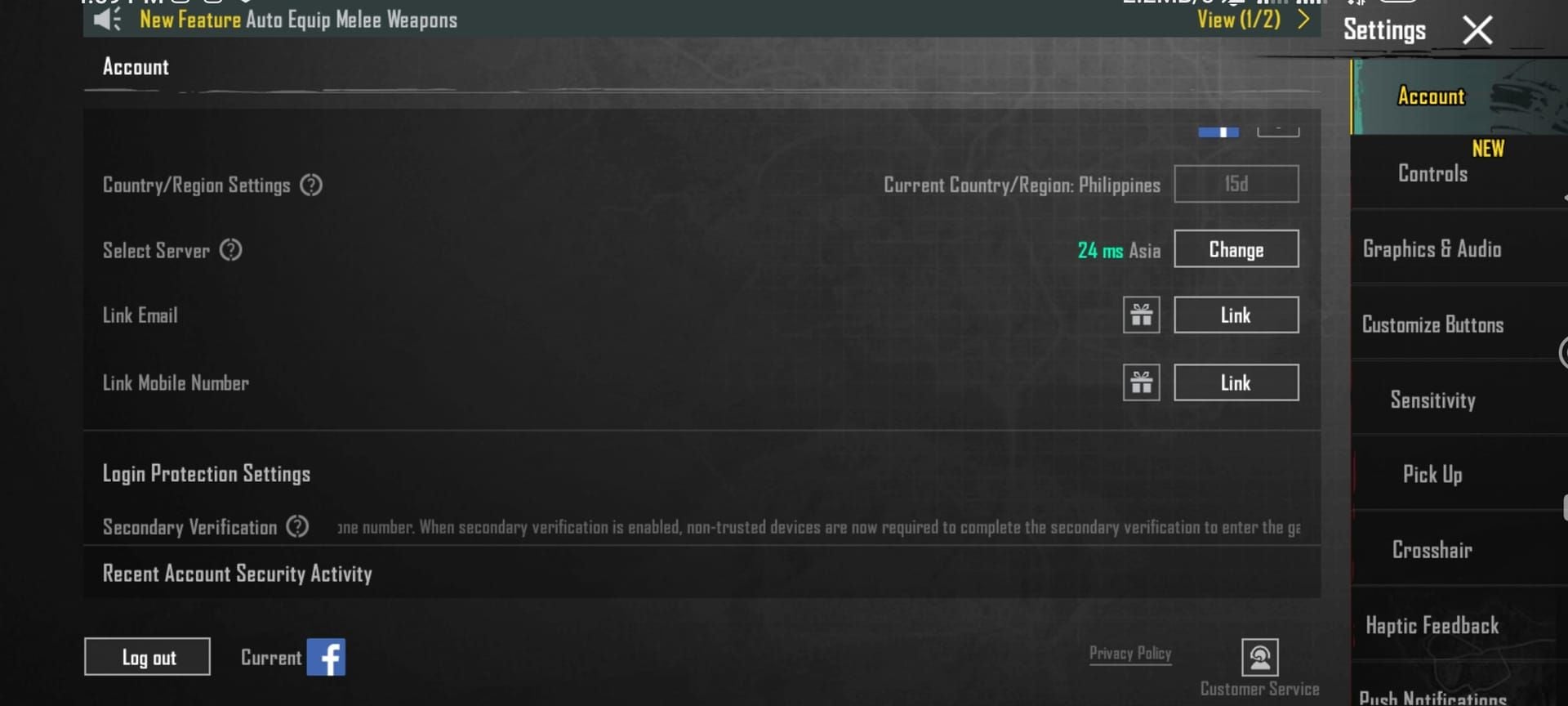
Enable 2FA: Settings > Account > Link phone > Enable Secondary Verification. Demonstrates account control and reduces fraud risk.
Unlink unused accounts, update outdated phone numbers, add backup email.
Step 2: Complete Payment Authentication
Android: Grant Google Play billing permissions for PUBG Mobile UC store. Check Billing & Subscriptions—details must match account region.
Create passkey or enable fingerprint/face scan/screen lock (mandatory for UC purchases).
iOS: Configure Apple Wallet through Settings > Wallet & Apple Pay with biometric authentication. Billing address must exactly match Apple ID region.
Step 3: Wait for Cooling Period (24-72 Hours)
Standard: 24-48 hours for minor flags, 72 hours after multiple failed attempts.
Don't attempt purchases during this period—each failure resets timer and escalates restriction.
Step 4: Test Small Transaction
After cooling period, test with smallest UC package. Minimizes risk and demonstrates cautious behavior.
If successful, wait 5 minutes before desired purchase.
Success Rate & Timeline
60-70% success rate for device security/authentication issues. Resolution: 2-5 days including cooling period.
HWID bans (Errors 0, 1, 5) require support contact with device info/logs—extends to 1-2 weeks.
Solution 2: Payment Method Optimization
Addresses technical compatibility issues.
Remove & Re-add Payment Methods
Remove payment method completely from PUBG Mobile and device payment system (Google Play/Apple Pay). Updating isn't enough—system caches old data.
Restart device to clear cached payment data. Add fresh, ensuring every detail matches account region: billing address, phone format, postal code.
Switch Payment Types
Credit card failing? Try digital wallets (Google Pay/Apple Pay). Adds intermediary verification layer that sometimes bypasses restrictions.
UniPin Voucher method: Purchase UniPin voucher from authorized retailers, redeem through PUBG Mobile voucher system. Completely bypasses direct payment processing.
Device-Specific Solutions
Android: Unroot device. Rooted Android auto-fails security checks.
iOS: Restore via iTunes to remove jailbreak—only way to pass iOS security verification.
Both platforms: Uninstall screen recorders, performance boosters, app cleaners before purchases.
Clear Cache & App Data
From login screen, clear game cache (removes corrupted payment session data).
Close background apps, disable security/battery-saving apps temporarily during purchase.
Update PUBG Mobile to latest version—outdated versions have incompatible payment modules.
Contact Bank
If payment works elsewhere but fails for PUBG Mobile, contact bank. Some institutions auto-block gaming/international transactions.
Request bank whitelist PUBG Mobile transactions or temporarily disable international blocks.
Solution 3: Trusted Third-Party Platforms (Recommended)
Highest success rate—bypasses PUBG Mobile's direct payment system entirely.
Why BitTopup Bypasses Errors
BitTopup operates as authorized UC distributor. Transaction occurs between you and BitTopup—not PUBG Mobile's payment system.
PUBG Mobile's fraud detection never analyzes your payment method, device, or regional settings. System only sees legitimate UC delivery from authorized distributor.
Reliable purchases: buy pubg mobile uc instant delivery completes in 2-5 minutes regardless of account status.
BitTopup Purchase Guide
- Locate Player ID (10-digit number starting with 5 in profile)

- Visit BitTopup PUBG Mobile UC section, select package
- Enter Player ID exactly as shown (double-check accuracy)
- Choose payment method (credit cards, digital wallets, regional systems)
- Complete transaction through secure gateway
- UC delivers within 2-5 minutes—check in-game balance
Security Advantages
- PCI DSS compliant payment processing (bank-level encryption)
- Payment details never transmit to PUBG Mobile servers
- Established reputation, high user ratings
- Auto-refund if delivery fails
- 24/7 customer service support
Instant Delivery Benefits
- Automated 24/7 processing
- UC arrives within minutes of payment
- Competitive pricing matches/beats in-game prices
- Frequent promotional discounts
- Bulk purchase better per-UC rates
- No 72-hour holds, cooling periods, or verification delays
- Multiple purchases without triggering fraud detection
Advanced Troubleshooting
Specific Error Codes
Error B102: Payment method failed fraud verification. Switch payment methods or use voucher system.
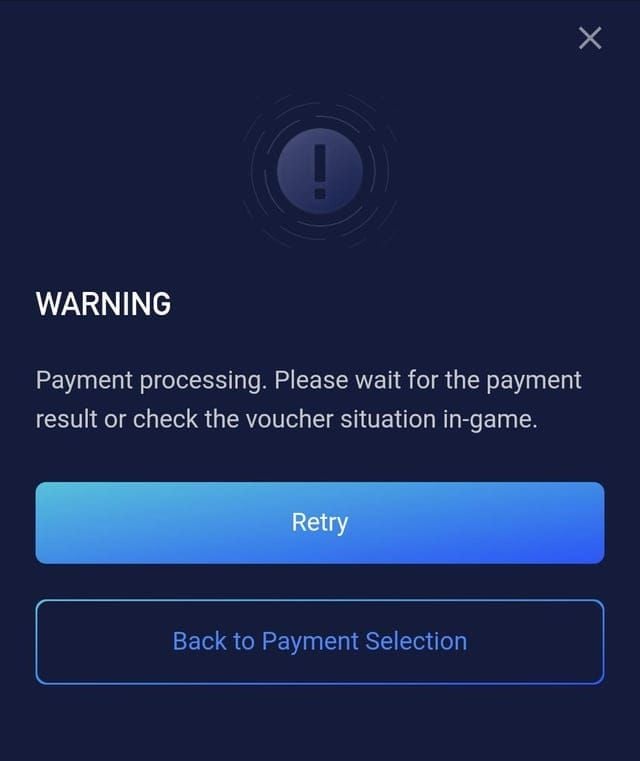
Error 1138: VPN detected. Remove VPN app completely (not just disconnect). Restart device, wait 24 hours.
Errors 0, 1, 5: HWID bans. Submit support ticket via Live Chat (green button bottom right). Provide device info, logs, security setup proof.
Regional Workarounds
Link account to Midasbuy (official UC platform): Click Feedback > Customer Service or email help@midasbuy.com.
Midasbuy may offer regional payment options unavailable in-game.
Account Recovery After Failed Attempts
Exceeded attempt limit with 72-hour hold? Contact support immediately—don't wait.
Email service@pubgmobile.com with:
- Player ID
- Issue description
- Error screenshots
- Device info
- Recent purchase history
- Account setting changes
Response: 24-48 hours with specific guidance.
Payment restriction appeals: PUBGMOBILE_CS@tencentgames.com
Formal claims: grievanceofficer@proximabeta.com
When to Contact Support
Contact when:
- All standard solutions failed
- Unfamiliar error codes appear
- Restrictions persist beyond 72 hours
Use Live Chat (green button, bottom right) for faster response.
Prepare: Player ID, exact errors, failure screenshots, device model/OS, account region, payment type.
Preventing Future Errors
Safe Purchase Practices
- Maintain consistent patterns (same device, same payment method)
- Wait 5 minutes between retry attempts
- Avoid purchases immediately after credential changes, new device links, or travel
- Wait 24-48 hours after account changes
Security Measures
- Enable 2FA (Settings > Account > Link phone > Enable Secondary Verification)
- Keep account info current (email, phone, payment methods)
- Regularly update PUBG Mobile
Consistent Payment Patterns
- Establish regular purchase pattern vs. sporadic large purchases
- Build up to large purchases with smaller transactions over days
- Use one verified payment method consistently
Purchase Limits
PUBG Mobile has undisclosed spending limits varying by account age, region, purchase history. Exceeding triggers auto-review and blocks.
New accounts (<30 days): Start small, gradually increase amounts.
Regional regulations may impose per-transaction or monthly limits.
Common Misconceptions
Myth: High Risk Is Permanent
False. Standard flags clear in 24-72 hours once issue addressed. Even HWID bans can be appealed.
Key: Address root cause, don't retry same failed transaction.
Myth: Only Hackers Get Errors
False. Legitimate players get errors from technical misconfigs, regional mismatches, oversensitive detection.
Legitimate causes: traveling while playing, privacy VPNs, rooted/jailbroken devices for development, payment methods from different regions.
Myth: All Third-Party Platforms Are Unsafe
False. Authorized platforms like BitTopup operate with proper licensing and security. Same standards as direct purchases, better reliability.
Distinction: Authorization status and reputation matter.
Truth: How Payment Systems Work
PUBG Mobile prioritizes security over convenience. Multi-factor fraud analysis means legitimate transactions sometimes fail when matching fraud patterns.
System can't distinguish privacy VPN from fraud VPN, development root from cheat root. Applies blanket rules based on risk indicators = false positives.
Direct Purchase vs BitTopup Comparison
Success Rate
Direct in-game: 70-80% with proper config, matching regions, no flags. Drops to 20-30% with VPN, regional mismatch, or modified devices.
BitTopup: 98%+ regardless of account status, device config, or region. Only failures: incorrect Player ID or BitTopup payment issues (resolve quickly).
Processing Time
Direct: Instant when successful, 24-72 hours troubleshooting when failed. Multiple solution attempts = several days total.
BitTopup: 2-5 minutes delivery, consistent reliability. Automated 24/7 system, no waiting periods.
Cost Analysis
Direct: Standard PUBG Mobile pricing. Occasional in-game promotions (infrequent, time-limited).
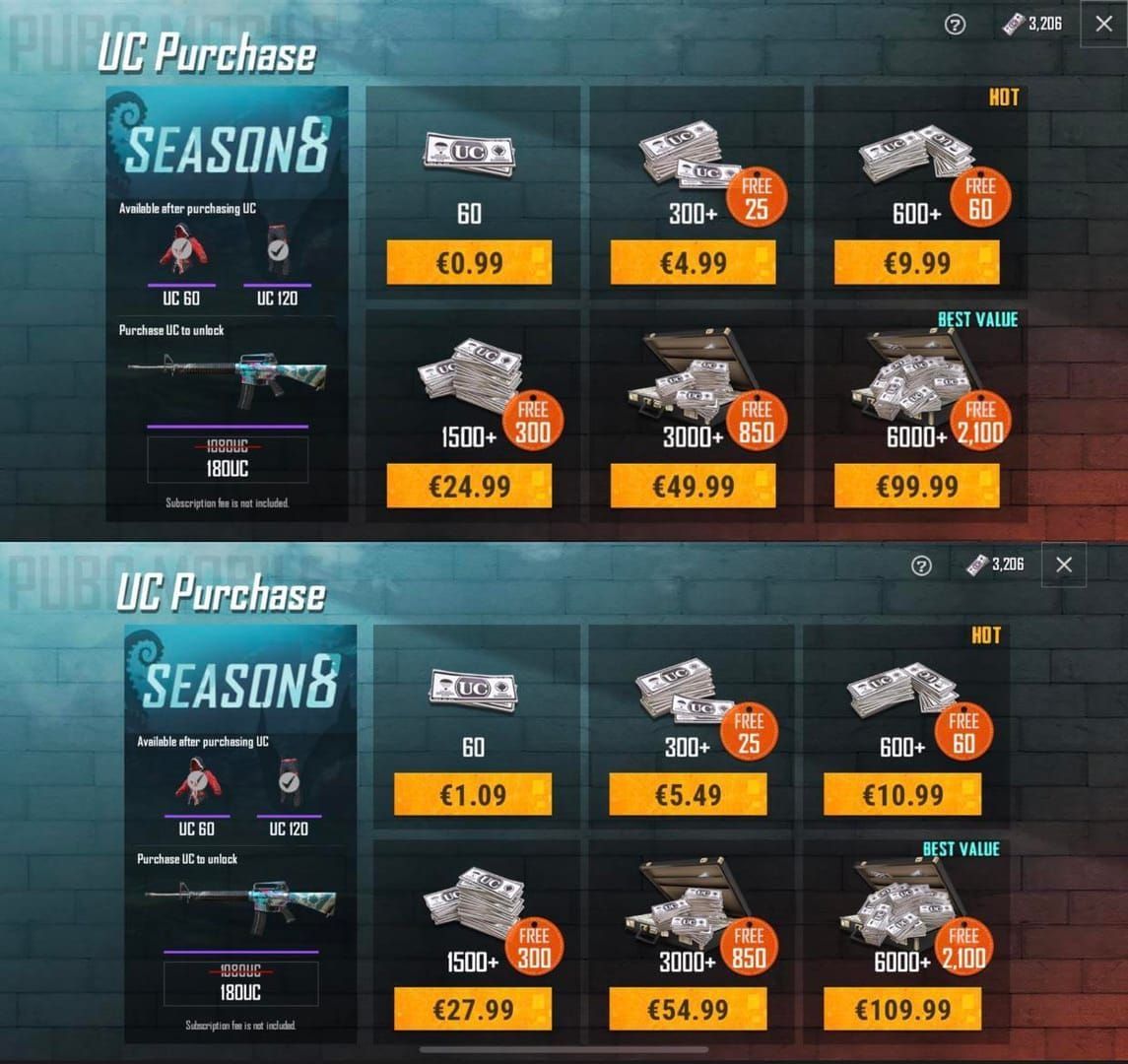
BitTopup: Matches in-game rates with frequent 5-15% promotional discounts. Bulk options = additional per-UC savings. Better overall value when factoring troubleshooting time cost.
Security Comparison
Both safe when used properly.
Direct: Connects to official servers (inherent authenticity), exposes payment info to PUBG Mobile's processor.
BitTopup: Authorized distributor (official UC delivery), payment info goes to PCI DSS compliant processor (fewer entities handling financial data).
Neither risks bans. Key difference: BitTopup eliminates payment failure scenarios.
FAQ
Why does PUBG Mobile say my account is high risk?
Fraud detection identifies suspicious patterns: rooted/jailbroken devices, VPN usage, regional mismatches (account vs. payment method), rapid purchase attempts, or unusual login locations. Status is temporary—clears once you address security concern through proper device config, account verification, and cooling periods.
How long does high risk status last?
Standard flags: 24-48 hours after resolving issue. Multiple failed attempts: 72 hours. HWID bans: 1-2 weeks via support tickets. Continue playing normally, avoid purchase attempts (each failure resets timer).
What causes payment failed error?
Missing authentication (no biometric setup on Google Play/Apple Pay), regional mismatches, VPN interference, outdated game version, background apps blocking permissions, or rooted/jailbroken devices. B102 = payment risk, 1138 = VPN, 0/1/5 = HWID bans.
Is it safe to use third-party platforms for UC?
Authorized platforms like BitTopup are completely safe—operate as official UC distributors with proper licensing, secure payment processing, official delivery channels. Risk exists only with unauthorized resellers using stolen payment methods or compromised accounts. Verify platform authorization and reputation.
How do I remove high risk warning?
Unroot Android or restore jailbroken iOS, remove VPN apps, enable 2FA, link official email/phone, update payment method region to match account, wait 24-72 hours without purchase attempts. For persistent cases: contact service@pubgmobile.com with Player ID and device info.
What payment methods work best?
Methods registered in same region as account work best. Google Play and Apple Pay with biometric authentication show highest success. UniPin vouchers bypass direct processing entirely. Credit cards require exact billing address match. For maximum reliability regardless of config: use authorized platforms like BitTopup handling payment separately from PUBG Mobile's system.
Stop struggling with payment errors! BitTopup provides instant UC delivery with 98%+ success rate, bypassing all security flags and regional restrictions. Complete purchase in 2 minutes with competitive pricing, secure transactions, 24/7 support. Visit BitTopup now—guaranteed delivery or automatic refund!






























































































































