What You Can Purchase With UC
- Seasonal Passes: Elite Royale Pass (660 UC), Elite Pass Plus (1800 UC)
- Premium Crates: Weapon skins, vehicle finishes, character outfits
- Direct Purchases: Guaranteed cosmetic items without randomization
- Lucky Spins: Event-exclusive items through limited-time draws
- Clan Perks: Name changes, emblems, clan-only items
Why Official Channels Matter
Official methods process payments through verified gateways with transaction records, dispute resolution, and customer support. Unauthorized sellers risk account flagging through irregular transaction patterns violating terms of service.
Official UC Top-Up Methods Overview
Two legitimate channels exist: in-game store (integrated directly into the app) and Midasbuy (official web platform handling transactions across 58 countries). Both maintain identical security standards with different payment flexibility.
In-game store connects to Google Play (Android) or Apple Pay (iOS). Midasbuy expands options to 100 payment methods including regional banking, digital wallets, and international credit cards.
Regional availability: UC top-ups exclude Japan, Korea, Taiwan, and Vietnam servers. Global server players (Player IDs starting with 5) can access both methods.
Method 1: In-Game UC Top-Up
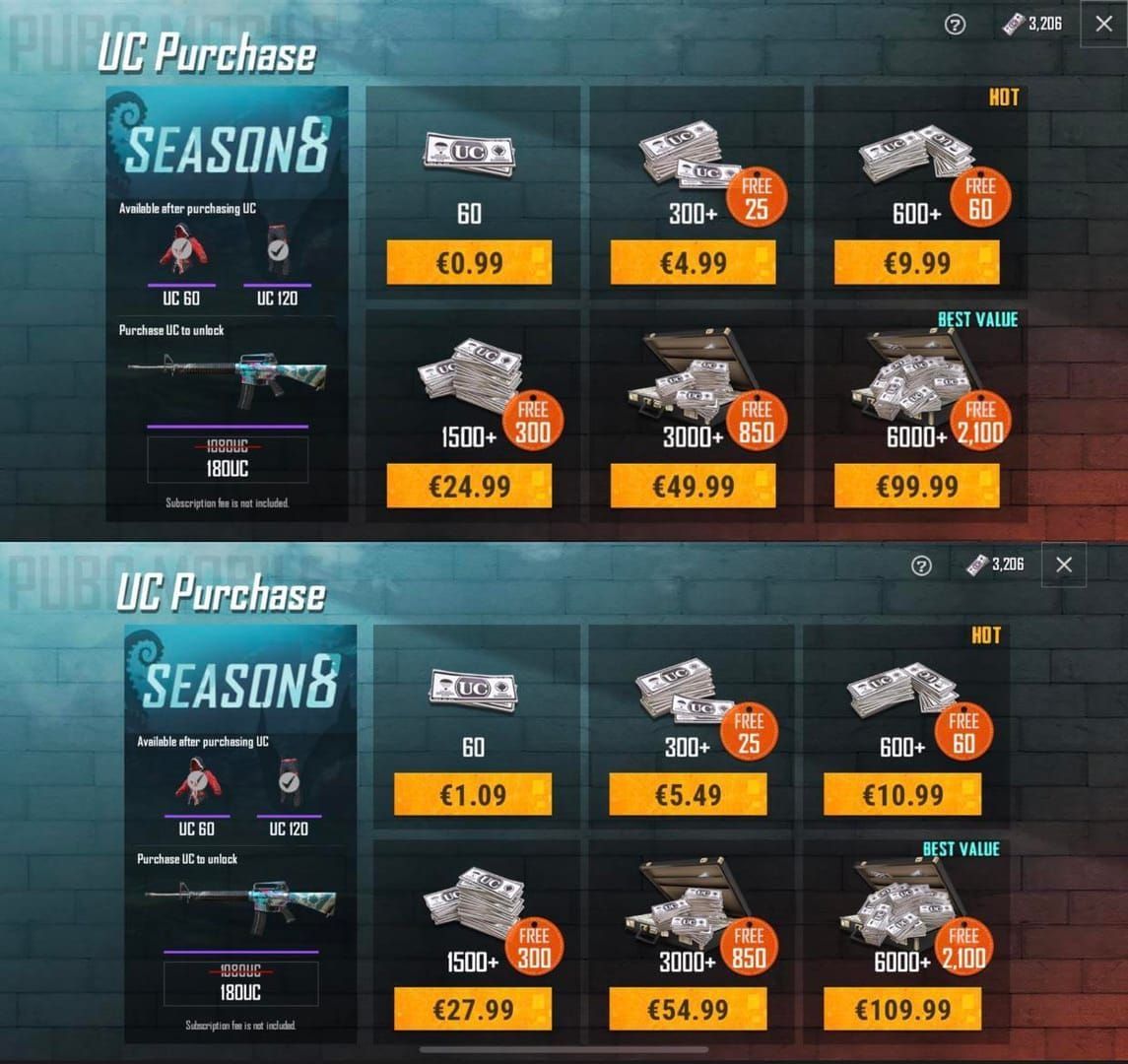
Most direct route requiring minimal navigation outside the game client.
Accessing the Store
- Launch PUBG MOBILE
- Tap UC icon (top-right corner)
- Select Store tab
- Choose UC category
UC Packages and Bonus Structures
- 60 UC: $0.99 (no bonus)
- 325 UC + 25 bonus: $4.99 (7.7% bonus)
- 660 UC + 60 bonus: $9.99 (9.1% bonus, covers Elite Royale Pass)
- 1800 UC + 300 bonus: $24.99 (16.7% bonus, covers Elite Pass Plus)
- 3000 UC + 850 bonus: $49.99 (28.3% bonus)
- 6000 UC + 2100 bonus: $99.99 (35% bonus, maximum value)
The $99.99 package delivers 35% additional UC—8100 total versus 6000 base.
Payment Process
- Tap selected UC package
- Review purchase summary (total UC + local currency cost)
- Confirm through Google Play or Apple Pay authentication
- Wait for confirmation screen (5-15 seconds)
- Check UC balance (top-right corner) to verify crediting
UC delivers within 30 seconds to 10 minutes. If delayed, check in-game mail.
Advantages
Eliminates external navigation, uses saved payment methods, provides immediate balance confirmation.
Method 2: Midasbuy Platform
Official web-based recharge platform offering expanded payment flexibility beyond app store limitations.
What is Midasbuy
Authorized payment processor for PUBG MOBILE handling transactions across 58 countries with 100 payment method integrations.
Purchase Process
- Navigate to Midasbuy website, log in (Facebook, Google, or email)
- Select PUBG MOBILE
- Enter Player ID (tap avatar in-game > Basic Info/Profile > copy 10-12 digit number starting with 5)
- Choose server region
- Select UC package
- Pick payment method
- Complete checkout
- Verify transaction via email confirmation
Double-check Player ID—incorrect IDs send UC to wrong accounts with limited recovery.
When to Choose Midasbuy
- Playing on emulators (desktop clients lack integrated payments)
- Preferred payment method unsupported by app stores
- Managing multiple accounts (easier Player ID switching)
- Need detailed transaction history
In-Game vs Midasbuy Comparison
Pricing
Identical across both platforms. 660 UC costs $9.99 USD everywhere. Bonus UC allocations match exactly.
Payment Methods
In-game:
- Android: Google Play methods (credit cards, Google Play balance, carrier billing)
- iOS: Apple Pay, cards linked to Apple ID, Apple Account balance
Midasbuy: Visa, MasterCard, PayPal, plus 97 regional methods including local banking and digital wallets.
Transaction Speed
In-game: typically 30 seconds. Midasbuy: 30 seconds to 10 minutes. Both credit to in-game mail if instant delivery fails.
Which Method to Choose
In-game if you:
- Play on mobile with configured app store payments
- Want minimal navigation outside game
- Need fastest transaction completion
Midasbuy if you:
- Play on emulators
- Require payment methods unsupported by app stores
- Manage multiple accounts
- Need detailed transaction history
Required Information for Safe Recharge
Locating Your Player ID

- Launch PUBG MOBILE, reach main lobby
- Tap avatar icon (top-left)
- Select Basic Info or Profile
- Locate Player ID above avatar image
- Copy complete numeric sequence (10-12 digits)
Player IDs remain constant and can't be changed.
Server Region Verification
Server region selection on Midasbuy must match your actual game server. Mismatched regions cause failed transactions or UC credited to wrong servers.
Why Accuracy Matters
Third-party UC top-ups require only Player ID without passwords. Single digit errors send UC to different accounts with virtually no recovery. Enable two-factor authentication for additional security.
UC Top-Up Safety Checklist
Verifying Official Channels
Legitimate platforms have:
- Direct integration (in-game) or official branding (Midasbuy)
- HTTPS encryption (padlock icons in browser)
- No password requests during UC purchases
PUBG MOBILE Prime UC recharges through BitTopup provide verified payment processing with competitive rates and fast delivery.
Red Flags of Fraudulent Sellers
- Free UC promises or prices significantly below official rates
- Requests for account passwords or login credentials
- No HTTPS or unfamiliar payment gateways
- No customer support or dispute resolution
- Reviews mentioning account bans or stolen credentials
Transaction Verification
- Screenshot transaction confirmations immediately
- Save email receipts
- Check UC balance before/after purchases
- Review transaction history monthly
- Report discrepancies within 24 hours
Common Scams
- Phishing websites: Fake Midasbuy clones stealing payment info
- Social media giveaways: Fake accounts requesting login credentials
- Account sharing services: Offers to top up for you resulting in theft
- Redeem code scams: Invalid codes from unofficial channels
Legitimate UC transactions never require password sharing.
Payment Methods and Regional Considerations
Accepted Payment Methods
Midasbuy's 100 methods include:
- Global cards: Visa, MasterCard, American Express
- Digital wallets: PayPal, regional e-wallets
- Bank transfers: Direct banking integrations
- Mobile payments: Carrier billing, mobile wallets
- Prepaid cards: Regional gift cards, vouchers
Currency Conversion
UC prices adjust to local currencies. Payment processors apply 2-4% conversion fees when payment currency differs from store currency.
Regional Restrictions
UC top-ups exclude Japan, Korea, Taiwan, Vietnam servers (separate publishing agreements). VPN usage to circumvent restrictions violates terms of service and risks account suspension.
Troubleshooting: When UC Doesn't Arrive
Normal Delivery Timeframes
30 seconds to 10 minutes. Check in-game mail if UC hasn't appeared within 10 minutes—delayed credits deposit automatically there.
Checking Transaction Status
In-game purchases:
- Open Google Play Store or Apple App Store
- Navigate to Purchase History
- Locate PUBG MOBILE UC transaction
- Verify payment completion and transaction ID
Midasbuy purchases:
- Log into Midasbuy account
- Access Transaction History
- Find purchase by date and Player ID
- Check order status (Processing, Completed, Failed)
Contacting Support
When UC delivery fails after confirmed payment:
- Gather transaction documentation (screenshots, receipts, transaction IDs)
- Note Player ID and server region
- Contact in-game support (Settings > Customer Service)
- Provide all transaction details
- Include payment confirmation screenshots
Support responds within 24-48 hours. Most issues resolve within 72 hours.
Prevention Tips
- Verify stable internet before purchasing
- Double-check Player ID accuracy
- Avoid purchasing during server maintenance
- Use payment methods with proven transaction history
- Complete one purchase at a time
UC Purchase Strategy: Maximizing Value
Understanding Pricing Tiers
35% bonus on 6000 UC package ($99.99) delivers maximum value—8100 total UC. Smaller packages suit specific targets: 660 UC ($9.99) covers Elite Royale Pass exactly; 1800 UC matches Elite Pass Plus.
Best Times to Purchase
PUBG MOBILE occasionally offers limited-time UC bonus promotions during seasonal events, anniversaries, and new version launches (typically 10-20% extra UC on top of standard bonuses). Monitor in-game announcements and official social media. First-time purchase bonuses provide one-time enhanced value.
Spending Priorities
Competitive players:
- Prioritize Elite Royale Pass (660 UC) for UC rewards funding future passes
- Avoid randomized crates
- Invest in guaranteed direct purchases
Collectors:
- Target higher tiers (3000-6000 UC) for sustained crate opening
- Calculate total UC needed before purchasing
- Wait for guaranteed draw mechanics
Casual players:
- Purchase only Elite Royale Pass each season
- Utilize pass UC rewards (200-960 UC) for next season
- Avoid impulse purchases
Common Misconceptions Debunked
Myth: Third-Party Sites Offer Better Prices
Reality: Legitimate platforms like BitTopup match official pricing with additional payment flexibility. Sites advertising UC significantly below official rates operate fraudulently—stolen payment info, account hacking, or non-delivery scams. The 35% bonus on official 6000 UC packages represents maximum legitimate discount.
Myth: VPN Usage Gets Cheaper Rates
Reality: Regional pricing variations rarely exceed 10%. VPN usage violates terms of service, risking permanent account bans and loss of all purchased UC and items. Payment processors flag mismatched IP locations, frequently declining transactions.
Myth: Sharing Account for Top-Up is Safe
Reality: Account sharing violates terms of service and creates severe security risks. Third parties with login credentials can change passwords and steal accounts. Legitimate UC top-ups require only Player ID—never passwords.
Truth About UC Giveaways
Official giveaways occur exclusively through verified social media and in-game events, never requiring passwords or payment info. Redeem codes work through redeem.pubg.com with Player ID entry only (case-sensitive, non-refundable, rewards delivered to in-game mail within 24-72 hours). Any free UC offer requesting account access represents a scam.
FAQ
What is UC in PUBG MOBILE and why do I need it?
UC (Unknown Cash) is premium currency for Elite Royale Pass (660 UC), Elite Pass Plus (1800 UC), exclusive skins, crates, and cosmetics unavailable through standard gameplay. Not required for core gameplay but unlocks seasonal content and customization.
Where can I find my Player ID?
Tap avatar icon (top-left lobby) > Basic Info/Profile > locate 10-12 digit numeric Player ID above avatar. Starts with 5 for global servers. Copy exactly for transactions.
How long does UC take to appear after purchase?
30 seconds to 10 minutes for both in-game and Midasbuy. Check in-game mail if delayed. Transactions over 10 minutes require support contact with documentation.
What payment methods are accepted?
In-game: Google Play methods (Android) or Apple Pay (iOS). Midasbuy: 100 methods across 58 countries including Visa, MasterCard, PayPal, regional banking, digital wallets, country-specific processors.
Are there regional restrictions?
UC top-ups exclude Japan, Korea, Taiwan, Vietnam servers (separate publishing agreements). Global server players (Player IDs starting with 5) can purchase through both methods. Select correct server region during Midasbuy checkout.
What if my UC doesn't arrive after payment?
Verify payment completion through app store purchase history or Midasbuy transaction records. Check in-game mail. If missing after 10 minutes with confirmed payment, contact in-game support (Settings > Customer Service) with transaction screenshots, Player ID, and payment confirmation. Resolution within 24-72 hours.
Ready to top up UC safely? Visit BitTopup for instant PUBG MOBILE UC recharge with secure payment processing, competitive rates, and 24/7 customer support!






























































































































