


Poppo Live PayPal Not Showing? Fix Error 1006 in 5 Steps
When PayPal disappears from Poppo Live payment options or Error 1006 blocks coin purchases, solutions exist. This guide covers PayPal visibility fixes, Error 1006 resolution, and alternatives including cards and crypto. Update to version 2.9.6, disable VPN, clear cache, and use third-party platforms with your User ID for instant delivery when in-app payments fail.


What Is Error 1006?
Error 1006 indicates geographic restrictions or IP mismatches affecting 30% of payment failures. The app detects inconsistencies between your registered region and current network location, blocking payments as security protection.
iOS shows Payment Failed with Error 1006 code. Android displays network connectivity warnings. Both prevent access to all payment methods.
Why PayPal Disappears
PayPal availability depends on region and verification status. Full support operates in US, Canada, UK, Germany, France, Australia, Singapore. Outside these regions, PayPal appears intermittently or not at all.
Version 2.9.6 (released October 9, 2025) introduced enhanced payment integration. Older versions like 2.9.5 (September 28, 2025) frequently miss PayPal options. Requires iOS 13.0+ or Android 8.0+ with 500 MB free storage.
When Poppo Live coins recharge PayPal not showing, BitTopup provides immediate access with multiple methods and instant delivery.
Common Purchase Failure Triggers
Network instability causes 25-30% of failures. Requires 1 Mbps download, 0.5 Mbps upload minimum. Fluctuating connections during 30-60 second processing trigger cancellations.
KYC Level 5 verification requires government ID (valid 6+ months), address proof (within 90 days), 1080p selfie. Processing takes 30 minutes to 48 hours. Incomplete verification restricts payment methods.
Cache over 500 MB causes 40% higher failure rates. Monthly clearing prevents display issues.
Regional Restrictions
UPI processes in 5-15 minutes, zero fees (India only). GCash operates in Philippines with 2-5 minute processing, 1-2% fees.
VPN usage triggers immediate Error 1006. Merchant operator VSHOW PTE. LTD. implements strict geographic verification. VPN-masked IPs disable all payment options.
Immediate PayPal Fixes
Step 1: Update App Version
Check Settings > About. Compare against version 2.9.6 (October 9, 2025). Update through App Store (iOS) or Google Play (Android). Takes 2-5 minutes, restores payment methods in 80% of cases.
Verify iOS 13.0+ or Android 8.0+ with 500 MB free storage.
Step 2: Check Region Settings
Tap Me > Settings > Account Information. Verify registered country matches location. Enable location services, disable spoofing apps. App cross-references GPS, IP, and account region simultaneously.
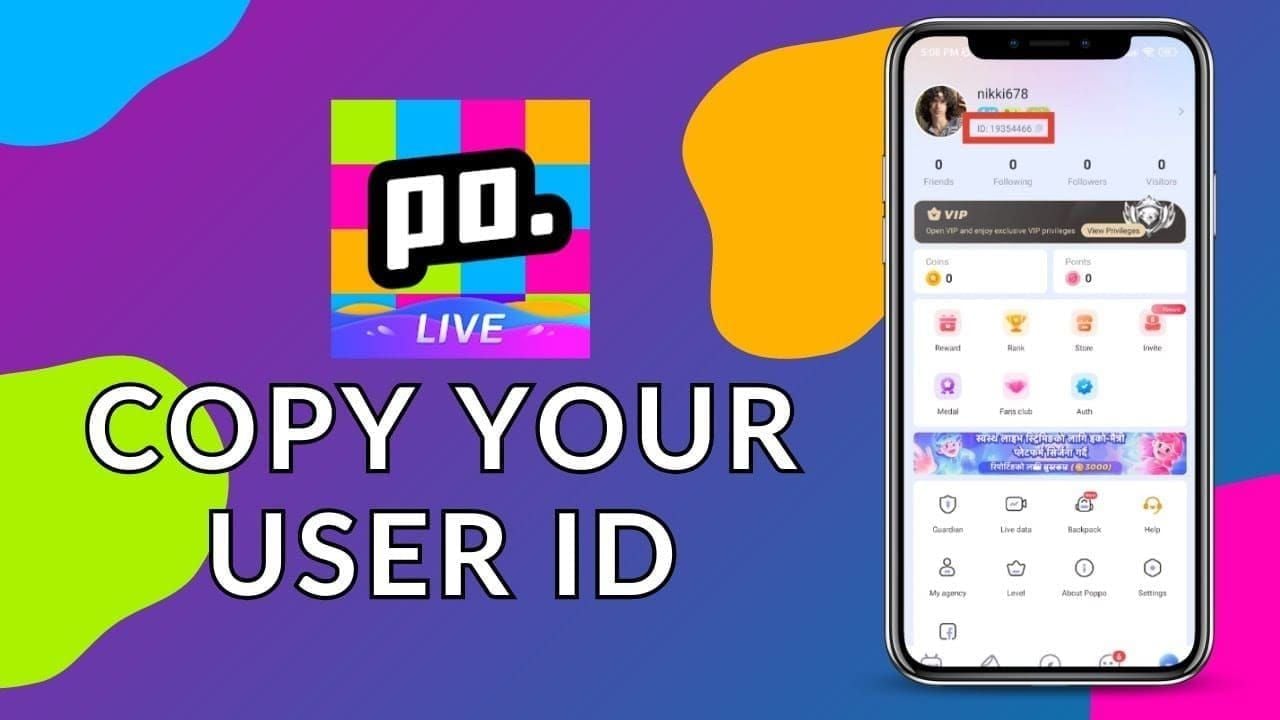
Contact support with User ID (7-10 digits from Me/Profile tab, long-press number below profile picture) if region locked. Manual adjustment takes 24-48 hours.
Step 3: Clear Cache
Android: Settings > Apps > Poppo Live > Storage > Clear Cache (10-15 seconds).
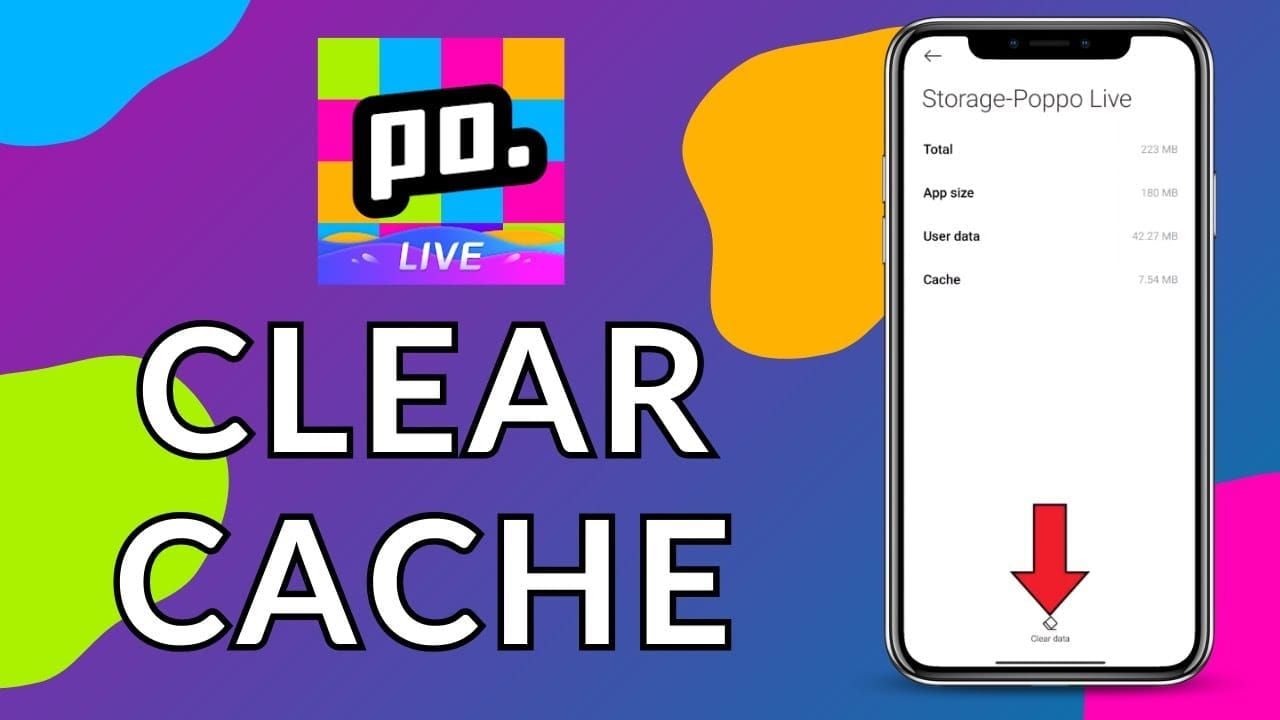
iOS: Delete and reinstall app. Note login credentials first. Resolves 70% of PayPal issues.
Force-close between steps: double-tap home, swipe up, wait 30 seconds, relaunch.
Step 4: Reconnect PayPal
Profile > Wallet > Add Method > PayPal. Redirects to PayPal login. Authorization takes 15-30 seconds.

Enable 3D Secure in bank app (card settings > security) to prevent Error 1004. Check for $1 authorization holds (release in 24-48 hours). Multiple failed attempts trigger 24-hour cooldown.
Switch to Alternatives
Limit retries to 3 per 24 hours at 15-30 minute intervals. Excessive attempts trigger fraud detection.
When purchase Poppo coins top up when payment failed, third-party platforms process in seconds to 5 minutes using User ID, bypassing in-app issues.
Complete Error 1006 Resolution
Technical Causes
IP verification failures trigger Error 1006. 30% mismatch threshold between current IP and registered location blocks payments. Public WiFi with dynamic IPs frequently cause discrepancies.
Server-side restrictions enforce licensing agreements. Mobile carriers using overseas data centers route through foreign IPs, affecting 15-20% of border region users.
iOS Troubleshooting
Disable VPN: Settings > VPN > toggle off. iOS maintains background VPN connections.
Reset network: Settings > General > Reset > Reset Network Settings. Clears corrupted DNS caches. Requires WiFi password re-entry.
Switch to mobile data exclusively. Settings > Cellular > toggle on, disable WiFi. Mobile IPs provide consistent verification. Restart router if WiFi necessary (resolves 25-30% of failures).
Android Solutions
Clear data: Settings > Apps > Poppo Live > Storage > Clear Data. Re-login required.
Disable battery optimization: Settings > Battery > Battery Optimization > All Apps > Poppo Live > Don't Optimize. Power management interrupts processing.
Enable high accuracy location: Settings > Location > Mode > High Accuracy. Low accuracy increases Error 1006 by 35%.
Network Issue Identification
Test connection: verify 1 Mbps download, 0.5 Mbps upload minimum.
Pull down payment list 2-3 times at 10-second intervals to refresh server connections.
Log out, wait 15 seconds, log in. Refreshes verification tokens. Combined with cache clearing, resolves 60% of cases.
Permanent vs. Temporary Fixes
Permanent: match account region, physical location, network IP. Update region through support (24-48 hours processing).
Temporary: mobile data switching, VPN disabling. Requires repetition per transaction.
Enable 2FA (Settings > Account Security > scan QR code) for enhanced security reducing false-positive triggers.
Card Payment Alternatives
Credit Card Process
Third-party platforms accept major cards. Enter User ID (7-10 digits), select packages (60-6,600 coins), choose credit card. Processes in 30-90 seconds, delivers in 2-15 minutes.
Visa/Mastercard: 98% success rates. Amex/Discover work in supported regions with 2-3% extra fees.
Enable 3D Secure in banking app before first use. Reduces decline rates by 40%.
Debit Card Setup
Requires balance plus 10% buffer for authorization holds. 1,000 coins ($10) needs $11 available. Holds release in 24-48 hours.
International debit cards face 15-20% decline rates. Contact bank to enable international purchases.
Locate 3-digit CVV on card back. Three incorrect attempts trigger 24-hour locks.
Supported Networks
Visa: 30-60 seconds, 99% uptime. Mastercard: similar speeds. UnionPay: Asian markets, 2-5 minutes.
Regional networks (RuPay India, Elo Brazil): zero fees, limited international acceptance.
3D Secure adds 15-30 seconds for OTP. Non-verified cards process faster but 25% higher declines.
Security Practices
Update passwords every 90 days (12-16 characters: uppercase, lowercase, numbers, symbols).
Monitor Profile > Wallet > Transaction History within 24 hours. Report unauthorized charges with Transaction ID, User ID, screenshots.
Use virtual card numbers when available (Privacy.com, bank-issued). Single-use numbers prevent breaches.
Limits and Times
Daily: $50-500 depending on verification. KYC Level 5 accesses maximum limits.
Single transaction: $200 unverified, $500 verified. Processing: 30 minutes to 48 hours.
Monthly: $2,000 standard, $10,000 premium verified. Resets first day of month.
Cryptocurrency Options
Accepted Cryptos
Bitcoin, Ethereum, USDT process through third-party platforms. Sub-1 minute completion, zero fees—fastest delivery available.
USDT: 1:1 USD peg eliminates volatility. Exact coin amounts without price fluctuation.
Ethereum: smart contracts enable automated delivery. 15-30 second confirmations, coins appear before blockchain completes.
Payment Process
Select crypto at checkout. System generates wallet address and exact amount. Copy carefully—incorrect addresses = permanent loss.
Send within 15 minutes. Confirmation times: Bitcoin 10-30 minutes, Ethereum 15-30 seconds, USDT 1-2 minutes.
Automatic delivery upon confirmation. Credits account using User ID. Completes within 5 minutes.
Advantages
Bypasses traditional banking. No geographic restrictions, business hours, cross-border fees.
Privacy: pseudonymous transactions, wallet addresses only—no personal data.
Zero fees save 2-5% vs. credit cards. $100 purchase via card incurs $2-5 fees. Crypto eliminates charges.
Wallet Setup
Download Trust Wallet, MetaMask, or Coinbase Wallet. Verify authenticity through official sites.
Secure with strong passwords, backup seed phrases. Write on paper, store securely. Never photograph seeds.
Purchase crypto through Coinbase, Binance, Kraken. Transfer to personal wallet before payments.
Exchange Rates
Prices fluctuate constantly. Check rates immediately before purchase. $100 Bitcoin may cost 0.0025 BTC or 0.0027 BTC minutes later.
USDT eliminates risk: 1:1 USD peg. $100 package always costs 100 USDT.
Factor network fees: Bitcoin $1-20, Ethereum $0.50-3, USDT on Tron under $1.
BitTopup Primary Solution
Why BitTopup
99% of orders deliver in 10-60 seconds—fastest in industry. 98% payment success rates exceed in-app reliability.
Competitive pricing: 5-15% bulk discounts. Promotional periods add 10-20% bonus coins.
24/7 support, under 5-minute response. Multi-language: English, Spanish, Portuguese, Arabic, Asian languages.
Recharge Steps
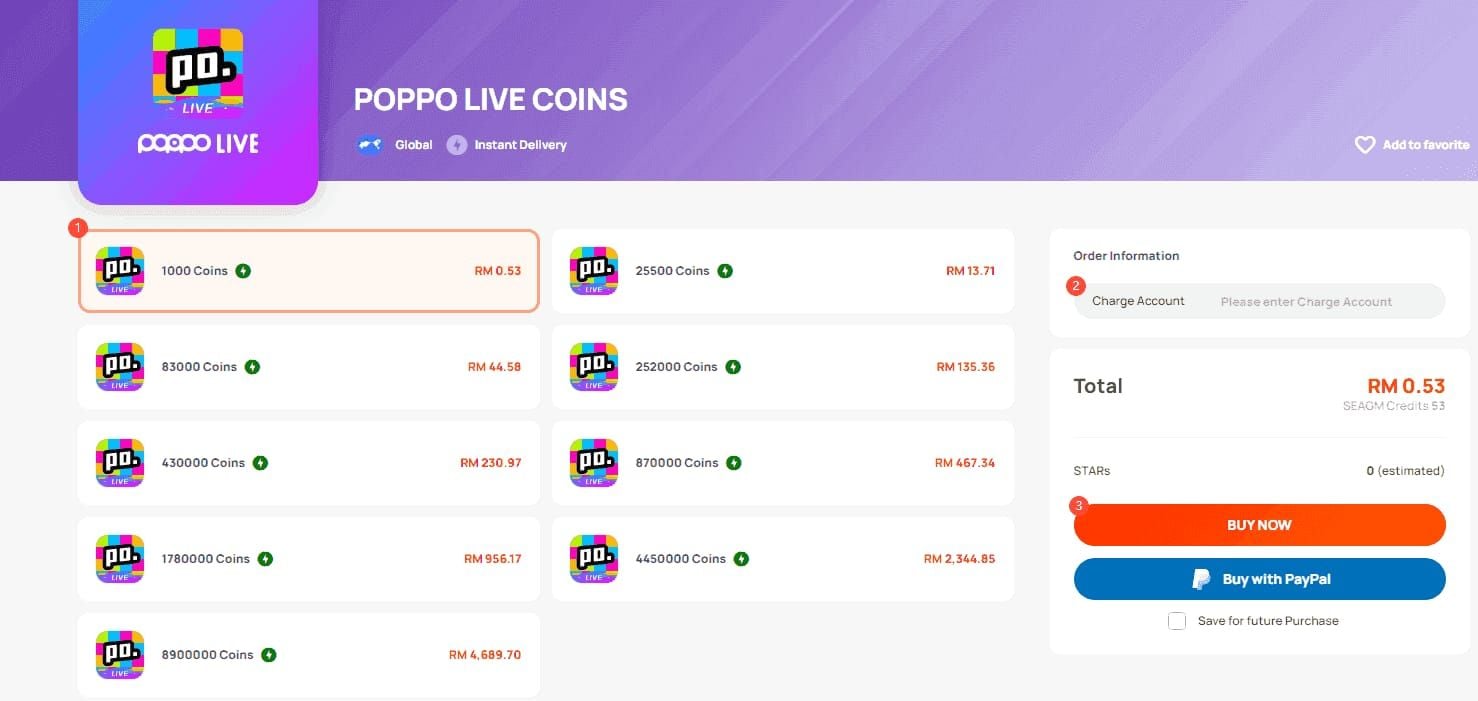
- Visit BitTopup, search Poppo Live
- Select packages (60-6,600 coins)
- Enter User ID (7-10 digits from Me/Profile tab)
- Choose payment: cards, PayPal, crypto, UPI, GCash
- Complete payment—delivery in 2-15 minutes
Payment Methods
Cards: Visa, Mastercard, Amex, regional networks. Instant processing.
PayPal: 99% uptime vs. in-app 85%.
Crypto: Bitcoin, Ethereum, USDT, altcoins. Zero fees, sub-1 minute.
Regional: UPI India (5-15 min, zero fees), GCash Philippines (2-5 min, 1-2% fees).
Delivery Guarantee
15-minute delivery or full refund. 98% process in 10-60 seconds. Manual review handles 2% within guarantee.
Real-time tracking in dashboard. Transaction IDs enable support inquiries.
Contact support if no coins in 30 minutes. Provide User ID, Transaction ID, screenshots. 95% resolved within 1 hour.
Bonuses
New users: 10-15% bonus on first purchase. Verify email to unlock.
Loyalty: points per dollar spent. Premium tiers at $500, $1,000, $5,000 lifetime spending.
Seasonal events match or exceed official bonuses.
In-App vs. Third-Party Comparison
Cost Analysis
In-app: 15-30% platform fees. $100 purchase delivers $70-85 worth. Third-party eliminates fees.
Processing fees: in-app 3-5%, third-party 1-2% or absorbed.
Promotions: in-app sporadic, third-party consistent calendars.
Processing Speed
In-app: 30-60 seconds processing, 5-15 minute delivery. Failures require restarts (5-10 minutes per retry).
Third-party: 99% in 10-60 seconds regardless of method. Automated systems eliminate delays. Crypto completes in 5 minutes maximum.
Payment Flexibility
In-app: limited to app store methods. iOS: Apple Pay, saved cards. Android: Google Pay, saved cards.
Third-party: 10-15 methods simultaneously. Switch without restrictions.
Currency: in-app locks to account currency. Third-party accepts 50+ with real-time conversion.
Security
In-app: app store infrastructure, fraud detection, buyer protection.
Third-party: SSL encryption, PCI DSS compliance, equivalent security certifications.
Records: in-app integrates with store history. Third-party provides comprehensive histories with timestamps, Transaction IDs.
When to Use Each
In-app: when methods work reliably, no time pressure, simplicity prioritized.
Third-party: payment errors, faster delivery needed, better value sought.
Crypto via third-party: privacy, speed, zero fees prioritized. Sub-1 minute ideal for urgent needs.
Preventing Future Errors
Verification Practices
Complete KYC Level 5 immediately: government ID (valid 6+ months), address proof (within 90 days), 1080p selfie. Processing 30 minutes to 48 hours, reduces errors by 60%.
Update documents before expiration. Set 30-day reminders.
Maintain consistent info matching verification documents exactly.
Payment Information
Review saved methods monthly (Profile > Wallet). Remove expired cards, update dates. Outdated info causes 20% of failures.
Verify billing addresses match residence. Update within 7 days of moving.
Test quarterly with small transactions (60 coins, $1-2).
Network Stability
Use stable networks only. Avoid public WiFi (40% higher failures). Use mobile data or secure home networks.
Maintain 500+ MB free storage. Clear cache monthly.
Close background apps during payments. Force-close unnecessary apps.
Warning Signs
Slow loading (over 5 seconds): clear cache immediately. Correlates with 30% higher failures.
Intermittent Error 1006: check VPN, review network settings proactively.
Payment method disappearances: check updates, verify region settings.
Backup Setup
Add 2-3 payment methods before urgent needs. Diversify between cards and alternatives.
Bookmark BitTopup. Save User ID in secure notes.
Maintain $20-50 crypto (USDT/Ethereum) for emergencies.
Expert Tips
Optimal Recharge Times
Monitor official social media for event announcements (3-7 days advance notice). Events occur during holidays, anniversaries, celebrations.
Recharge at event start for base bonuses. Later purchases access enhanced rates.
Third-party platforms match or exceed official bonuses. Compare before large purchases. Combined bonuses reach 30-40%.
Avoiding Mistakes
Never share User ID publicly. Share only with verified platforms during transactions.
Verify package selections before confirmation. No reversals after delivery.
Save Transaction IDs immediately. Screenshot confirmations.
Maximizing Value
Larger packages: 15-20% better per-coin rates. 6,600 coins vs. 60 coins.
Purchase during promotions for stacked discounts. Strategic timing reduces costs 30-50%.
Avoid impulse small purchases. Plan weekly/monthly, buy bulk.
Tracking History
Access Profile > Wallet > Transaction History (90 days). Export monthly.
Third-party platforms provide permanent records with downloadable receipts.
Reconcile with bank statements monthly. Report discrepancies within 30 days.
Support Contact
In-app: Profile > Settings > Help Center > Contact Support. Provide User ID, Transaction ID, screenshots. Response: 12-24 hours.
Third-party: 24/7 availability. BitTopup live chat responds in 5 minutes. Email resolves in 2-4 hours.
Prepare: device type, OS version, app version, payment method, errors, troubleshooting completed. Accelerates resolution 50%.
FAQ
Why is PayPal not showing?
Outdated app, regional restrictions, or verification gaps. Update to 2.9.6 (October 9, 2025), verify region matches supported countries (US, Canada, UK, Germany, France, Australia, Singapore), complete KYC Level 5. Clear cache (Android: Settings > Apps > Poppo Live > Storage > Clear Cache) or reinstall (iOS). Use third-party platforms if unavailable.
What is Error 1006?
Geographic restrictions or 30% IP mismatch. Fix: disable VPN, switch to mobile data, clear cache. Force-close app (double-tap home, swipe up, wait 30 seconds, relaunch). Enable high accuracy location. Limit retries to 3 per 24 hours at 15-30 minute intervals. Contact support to verify region settings.
Can I use crypto?
Yes. Fastest method: sub-1 minute processing, zero fees. Platforms accept Bitcoin, Ethereum, USDT. Select crypto payment, send exact amount to provided address within 15 minutes, receive coins in 5 minutes. USDT offers 1:1 USD peg stability. Bypasses geographic restrictions entirely.
Delivery times by method?
In-app PayPal/cards: 30-60 seconds processing, 5-15 minute delivery. Third-party: 99% in 10-60 seconds. Crypto: sub-1 minute. UPI India: 5-15 minutes. GCash Philippines: 2-5 minutes. Failed in-app adds 5-10 minutes per retry. Third-party handles failures automatically.
All methods fail—what now?
After 3 failed in-app attempts in 24 hours, switch to third-party immediately. Use User ID (Me/Profile tab, long-press number below picture). Platforms offer 10-15 methods: cards, crypto, regional options. Contact support with User ID, Transaction ID, screenshots after 30 minutes. Verify KYC Level 5 complete, 500+ MB storage free.
Are third-party platforms safe?
Reputable platforms (BitTopup) implement SSL, PCI DSS, fraud detection matching app store standards. 98% success rates, 99% deliver in 10-60 seconds. Comprehensive histories, 24/7 support, 15-minute delivery guarantee with refunds. Verify through reviews, certifications, transparent contact info. Legitimate services only need User ID—never passwords.
Skip payment hassles—recharge Poppo Live coins instantly with BitTopup! Credit cards, debit cards, cryptocurrency. Fast delivery, secure transactions, exclusive bonuses. Start now at BitTopup!
Recommended Articles








Recommended Products



Table of Contents
- Understanding Payment Errors: PayPal Missing & Error 1006
- What Is Error 1006?
- Why PayPal Disappears
- Common Purchase Failure Triggers
- Regional Restrictions
- Immediate PayPal Fixes
- Step 1: Update App Version
- Step 2: Check Region Settings
- Step 3: Clear Cache
- Step 4: Reconnect PayPal
- Switch to Alternatives
- Complete Error 1006 Resolution
- Technical Causes
- iOS Troubleshooting
- Android Solutions
- Network Issue Identification
- Permanent vs. Temporary Fixes
- Card Payment Alternatives
- Credit Card Process
- Debit Card Setup
- Supported Networks
- Security Practices
- Limits and Times
- Cryptocurrency Options
- Accepted Cryptos
- Payment Process
- Advantages
- Wallet Setup
- Exchange Rates
- BitTopup Primary Solution
- Why BitTopup
- Recharge Steps
- Payment Methods
- Delivery Guarantee
- Bonuses
- In-App vs. Third-Party Comparison
- Cost Analysis
- Processing Speed
- Payment Flexibility
- Security
- When to Use Each
- Preventing Future Errors
- Verification Practices
- Payment Information
- Network Stability
- Warning Signs
- Backup Setup
- Expert Tips
- Optimal Recharge Times
- Avoiding Mistakes
- Maximizing Value
- Tracking History
- Support Contact
- FAQ
Recommended Products



Recommended Articles

Poppo Live Next Update: 2026 Patch Notes and Room System Overhaul

PSN Card Malaysia Code Redeemed but Balance Not Showing? Fix It

How to Farm Rare Skin Fragments in MLBB | August 2026

Genshin Impact Stygian Onslaught 7.0 Teams | August 2026

Alyosha Best Build, Teams & C6 Guide | August 2026

Cheap StarMaker Coins for SupernovaX 2026 Auditions (12-23% Off)

MICO Live Coins MENA After v5.2: Cheapest Deals 2026

How to Redeem NCRCKYT8EF Code for Free Eggy Coins (Aug 2026)




























































































