Why Google Play Is Preferred for Android Users
Android users benefit from seamless integration between Google accounts and Likee's in-app purchase system. Payment authorization uses existing Google credentials, maintaining transaction history in a familiar interface.
Google Play Balance accepts gift cards from retail locations, promotional credits from Google rewards, and traditional payment methods like credit cards or PayPal. This flexibility helps users without international payment cards.
Security features include two-factor authentication, biometric verification, and fraud detection systems. These protections explain why first-time purchases often face 24-48 hour verification holds.
Supported Countries and Regional Restrictions
Google Play Balance works in 140+ countries where Google Play Store operates. Currency conversion applies when your Google account region differs from Likee's pricing region, adding 2-5% conversion fees.
Regional restrictions affect payment method availability rather than Google Play Balance itself. Users in countries with limited banking infrastructure find Google Play gift cards valuable for digital purchases without traditional financial accounts.
Complete Wallet Setup: Adding Google Play Balance for Likee Purchases
Prerequisites: Account Verification and App Version Requirements
Verify your device meets minimum requirements: iOS 12.0+ or Android 6.0+, with 1GB free storage. Outdated app versions cause 30-40% of payment authorization failures.
Your internet connection needs stable 1-2 Mbps minimum throughout the transaction. Disable VPN services during purchase and for 10-15 minutes afterward—VPNs interfere with Google's payment verification and trigger security holds.
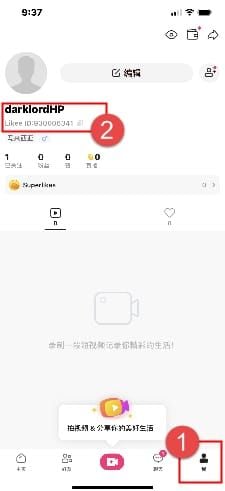
Confirm your Likee ID—the 10-digit numeric identifier below your profile name. To locate it: log into Likee, tap the profile icon (top-left), select View or Edit Profile. ID mismatches cause 60-70% of transaction failures.
Step-by-Step: Linking Your Google Play Account to Likee
Navigate to Google Play Store and access your account profile (circular icon, top-right). Select Payments & subscriptions → Payment methods to review active options.
Add Google Play Balance by selecting Add credit or debit card or Redeem gift card depending on your funding source. Gift card redemption requires the 16-digit code, with funds appearing within 2-3 minutes.
Verify the payment method displays Active status. Inactive or expired methods cause immediate transaction failures.
Adding Funds to Google Play Balance
Physical gift cards from retail locations come in $10-$100 denominations. Scratch off the protective coating, enter the redemption code in Google Play Store redemption interface.
Digital gift cards via email provide instant funding. Major retailers sell these codes, arriving within minutes and never expiring once redeemed.
Promotional credits from Google Opinion Rewards, Play Points, or special offers add automatically. Check your balance: open Google Play Store → profile icon → Payments & subscriptions → Google Play Balance.
Exact Steps to Top Up Likee Diamonds Using Google Play Balance
Navigating to Likee Diamond Purchase Screen
Launch Likee and verify you're logged into the correct account by checking your 10-digit ID. Tap your profile icon (top-left) to access your dashboard.
Locate the Diamond icon (sparkling gem symbol) in the top-right corner of your profile screen. Tapping opens the Diamond purchase interface showing available packages with prices in your local currency.
Pull down on the Diamond balance screen to refresh and display current package offerings, including limited-time promotions or bonus packages.
Selecting Your Diamond Package and Confirming Pricing
Diamond packages range from 60 Diamonds to 6,600+ Diamonds, with larger purchases offering better per-Diamond value. Review displayed pricing—amounts include applicable taxes or platform fees.
Compare package values by calculating cost per 100 Diamonds. Premium packages typically offer 15-25% better value than smaller bundles.
Tap your desired package to highlight it. A confirmation popup displays total charge, selected payment method, and final Diamond quantity. Verify details before proceeding.
Choosing Google Play Balance as Payment Method
The payment method selection screen appears after confirming your package. If Google Play Balance isn't default, tap Payment methods to reveal all options linked to your Google account.
Select Google Play Balance from the list—your current balance displays beneath the option name. Ensure your balance exceeds the total purchase amount; insufficient funds trigger immediate failures.
For persistent payment issues, BitTopup provides reliable alternatives with solutions for Likee top up pending status fix and guaranteed delivery timelines.
Authorizing the Transaction and Verification Process
Google's payment authorization screen requests confirmation via your device's security method—fingerprint, face recognition, or PIN. This biometric verification prevents unauthorized purchases.
After successful authorization, Google Play processes payment and sends confirmation email to your Gmail within 2-3 minutes. This email contains your Google Play order ID (format: GPA.####-####-####-#####), serving as proof of purchase.
Transaction status changes from Pending to Complete in Google Play payment history: Google Play Store → Profile → Payments & subscriptions → Budget & history. Filter by Likee to isolate Diamond purchases.
Confirming Diamond Delivery to Your Account
Standard delivery: 5-30 minutes for most transactions, though first-time purchases may require the full 24-48 hour verification window. Monitor your Likee Diamond balance: Profile → Wallet → Diamond Balance, pull down to refresh.
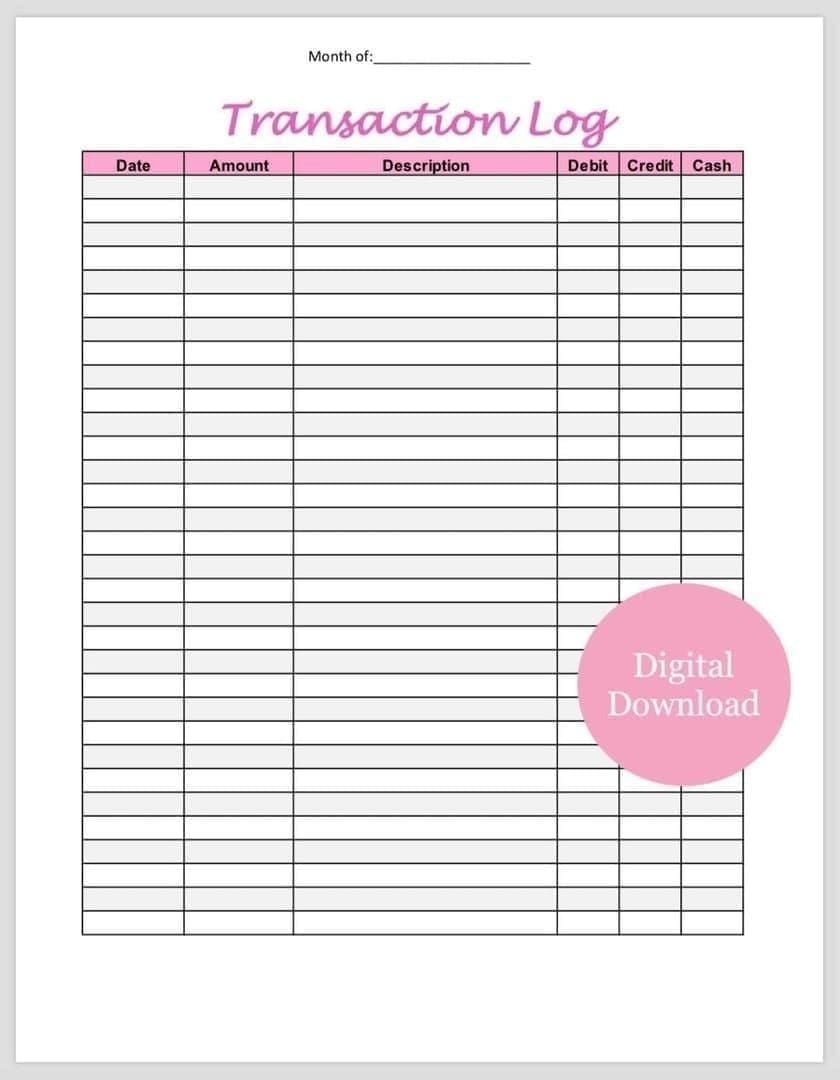
Check transaction log: Profile → Wallet → Transaction Log. Completed purchases show green checkmarks, pending transactions show clock icons, failed attempts show red X marks.
If Diamonds don't appear within expected timeframe, verify transaction completed in Google Play before troubleshooting. 80% of deliveries complete within 24 hours when prerequisites are met.
Decoding 'Pending' Status: What It Means and Why It Happens
Normal Processing Time vs Abnormal Delays
Pending status means Google Play received your payment authorization but hasn't transferred funds to Likee's merchant account. This typically lasts 5-30 minutes, with clock icon appearing in Likee transaction log.
First-time purchasers routinely experience 24-48 hour verification holds as Google's fraud detection analyzes new payment patterns. This protects both users and merchants from unauthorized transactions.
Abnormal delays exceeding 48 hours suggest technical issues requiring intervention. 90% of pending transactions resolve within 48 hours—delays beyond this warrant active troubleshooting.
Common Causes of Pending Transactions
Insufficient Google Play Balance ranks as the leading cause, occurring when promotional credits expire between package selection and payment authorization. Verify your balance exceeds total purchase amount including taxes.
Verification holds affect accounts flagged for unusual activity—large purchases from new locations, rapid successive transactions, or first-time Diamond purchases exceeding $50.
Technical glitches during wallet sync cycles cause temporary pending states lasting 15-30 minutes. Google Play and Likee's payment systems synchronize at regular intervals; transactions initiated during sync windows queue until the next cycle completes.
How to Check Your Transaction Status in Google Play
Open Google Play Store → profile icon → Payments & subscriptions → Budget & history. This displays all transactions chronologically with status indicators: Pending,Complete, or Cancelled.
Filter by selecting Likee from the app filter dropdown, isolating Diamond purchases. Each entry displays purchase date, amount charged, and current processing status.
Tap individual transactions for detailed information: Google Play order ID, exact timestamp, payment method used, and any error messages. Screenshot this for support requests if needed.
When to Take Action vs When to Wait
Wait 5-10 minutes after purchase before troubleshooting—this covers normal processing delays. Refresh your Diamond balance by pulling down Profile → Diamond screen rather than repeatedly checking.
Take immediate action if transaction status shows Failed or Cancelled in Google Play. These states require reinitiating purchase rather than waiting. Failed transactions refund within 3-5 business days.
Contact support after 48 hours of pending status. Gather: 10-digit Likee ID, Google Play transaction ID, purchase amount, date/time of transaction, screenshots of Google Play payment confirmation and Likee transaction log. Support response times average 24-48 hours for standard inquiries, 72 hours during peak periods, 5-7 business days for complex cases.
Instant Fixes for Pending Likee Diamond Transactions (Tested Solutions)
Fix #1: Wait and Refresh Your Diamond Balance
Wait 5-10 minutes after purchase, then manually refresh your Diamond balance. Navigate to Likee profile, tap Diamond icon, pull down to trigger balance refresh.
This forces Likee's servers to query latest transaction data from Google Play's payment gateway, resolving display delays from temporary synchronization lags. Avoid repeatedly refreshing—excessive queries trigger rate limiting.
During off-peak hours (2-6 AM), this resolves ~40% of pending issues within 10 minutes. Peak hour transactions (6-10 PM) may require the full 30-minute standard processing window.
Fix #2: Force Close and Restart Both Apps
Force close Likee completely. Android: swipe up from bottom → access recent apps → swipe Likee upward. iOS: swipe up → flick Likee app preview away.
Wait 30-60 seconds before reopening Likee, allowing background processes to terminate and cached data to clear. This ensures clean restart rather than resuming suspended session with stale transaction data.
Force close Google Play Store using same method, then restart your device by powering off for 30 seconds. Wait 1-2 minutes after boot before reopening Likee—system services need time to initialize.
Fix #3: Clear Cache and Data for Payment Services
Android: Settings → Apps → Likee → Storage → Clear Cache to remove temporary files without deleting login credentials. This resolves corrupted cache interfering with payment processing.
For persistent issues, select Clear Data after clearing cache—note this logs you out and resets app preferences. Verify your 10-digit Likee ID before logging out.
iOS: Use Offload App in Settings → General → iPhone Storage → Likee. This removes the app while preserving documents/data, then reinstalling provides fresh app instance with cleared cache but maintained login status.
Fix #4: Verify Internet Connection Stability
Test connection speed using built-in tools or speed test apps, confirming you maintain minimum 1-2 Mbps required for stable payment processing. Unstable connections cause transaction timeouts leaving payments in pending states.
Switch between WiFi and mobile data to determine if network-specific issues affect payment processing. Some WiFi networks employ restrictive firewalls blocking payment gateway communications.
Disable VPN services completely and wait 10-15 minutes before checking transaction status. VPN usage during purchases accounts for 15-20% of verification holds.
Fix #5: Update Apps and Verify Account Settings
Check for Likee app updates in Google Play Store by searching Likee and tapping Update if available. Outdated versions lack compatibility with current payment gateway protocols.
Update Google Play Services—the background component handling payment processing—through Settings → Apps → Google Play Services. This often resolves pending issues from deprecated payment APIs.
Log out of Likee: Settings → Account → Log Out, wait 30-60 seconds, log back in. This refreshes account data with Likee's servers and often triggers pending Diamond deliveries to complete.
Fix #6: Optimize Device Settings for Payment Processing
Enable Likee in battery optimization settings to prevent system from suspending payment-related background processes. Android: Settings → Battery → Optimization → find Likee → Don't optimize.
iOS: Verify Likee has tracking permissions: Settings → Privacy → Tracking. Disabled tracking prevents transaction status updates from reaching your device.
Restart device after making optimization changes, powering off for 30 seconds before rebooting. This ensures system-level changes take effect and background services restart with updated permissions.
Fix #7: Verify Google Play Payment Method Status
Access Google Play Store → Profile → Payments & subscriptions → Payment methods. Confirm Google Play Balance shows Active rather than Expired or Requires verification. Inactive methods cause transactions to hang indefinitely.
Check for payment holds on your Google account by reviewing recent security alerts in Gmail. Google sometimes places temporary holds requiring identity verification before processing pending transactions.
Ensure Google Play Balance contains sufficient funds to cover full transaction amount including taxes. Partial payments aren't supported—transactions require complete funding from single payment source.
Advanced Troubleshooting for Failed or Stuck Payments
Handling Payment Authorization Failed Errors
Payment authorization failures typically stem from security verification requirements. Review Gmail for messages from Google requesting identity confirmation, often requiring you to verify recent login locations or confirm unusual purchase patterns.
Re-authenticate your Google account payment method by removing and re-adding Google Play Balance in payment methods section. This refreshes stale authentication tokens that expire after extended periods without payment activity.
Verify your Google account hasn't been flagged for suspicious activity by checking Google's Security Checkup tool. Accounts with unresolved security warnings face payment restrictions until verification completes.
Resolving Region Mismatch Issues
Region mismatches occur when your Google account country setting differs from current physical location or Likee's detected region. Access Google Play Store → Profile → Settings → General → Account preferences to verify your country matches payment method's registered location.
Currency conversion complications arise when purchasing Diamonds priced in different currencies from your Google Play Balance currency. Google applies real-time exchange rates plus 2-5% conversion fees, which may cause insufficient balance errors if rates fluctuate.
VPN usage exacerbates region detection issues—payment gateways compare your IP location against Google account region. Disable VPNs completely and wait 10-15 minutes for actual IP to register before retrying.
What to Do When Diamonds Don't Appear After Payment
Verify payment completion in Google Play transaction history before assuming delivery failure. Transactions showing Complete status with corresponding charges indicate successful payment processing, shifting troubleshooting focus to Likee's delivery system.
Check Likee's transaction log: Profile → Wallet → Transaction Log for entries matching Google Play order timestamp. Green checkmarks confirm successful delivery, clock icons indicate ongoing processing that should resolve within 5-30 minutes.
Screenshot both Google Play payment confirmation and Likee transaction log showing pending or missing transaction. These visual records prove payment completion and provide essential documentation for support requests or refund claims.
Contacting Support: Information You'll Need
Gather your 10-digit Likee ID from profile screen before contacting support—representatives require this to locate your account. Incorrect or incomplete IDs delay resolution by 24-48 hours.
Collect your Google Play transaction ID from payment confirmation email or transaction history—format GPA.####-####-####-#####. This uniquely identifies your purchase in Google's payment database.
Document exact purchase amount, date, and time to help support teams filter transaction logs efficiently. Include screenshots showing current Diamond balance, transaction log entries, and Google Play payment confirmation.
Note specific error messages or symptoms—Diamonds not received,Payment pending over 48 hours, or Authorization failed each trigger different troubleshooting protocols.
Pro Tips for Smooth Google Play Diamond Purchases on Likee
Best Times to Top Up for Faster Processing
Schedule purchases during off-peak hours (2-6 AM) for optimal processing speeds averaging 5-10 minutes. Transaction volumes drop 70-80% compared to peak hours, enabling faster processing.
Avoid peak hours (6-10 PM) when processing times extend 50-100% beyond standard windows. Evening hours coincide with maximum live stream activity, overwhelming payment gateways.
Weekday mornings (9-11 AM) offer balanced conditions with moderate server load and full support staff availability. This timing provides faster-than-peak processing while ensuring immediate support access if issues arise.
Maintaining Sufficient Balance to Avoid Payment Holds
Keep Google Play Balance 10-15% above intended purchase amount to account for currency conversion fluctuations and unexpected tax calculations. Insufficient balance errors cause immediate transaction failures.
Monitor promotional credit expiration dates in Google Play Balance—expired credits reduce available funds without notification. Set calendar reminders 7 days before expiration.
Reload during promotional periods when retailers offer bonus credits—common during holidays when $50 gift cards include $5-10 bonus credits. These promotions reduce per-Diamond costs by 10-20%.
Enabling Purchase Notifications for Transaction Tracking
Activate Google Play purchase notifications: Google Play Store → Profile → Settings → Notifications → Purchases. These real-time alerts confirm transaction authorization within seconds.
Enable Likee's in-app notifications for Diamond balance changes: Settings → Notifications → Wallet Activity. This dual notification system ensures alerts from both payment processor and recipient app.
Configure email notifications in Gmail to prioritize messages from Google Play and Likee, preventing transaction confirmations from landing in spam. Create filters that label these messages for easy reference.
Understanding Likee's Diamond Delivery System
Likee's delivery infrastructure operates on batch processing cycles every 15-30 minutes, explaining why Diamonds don't appear instantly even after Google Play confirms payment. Your transaction queues until the next processing cycle executes.
Server-side validation checks verify payment authenticity, account status, and fraud indicators before releasing Diamonds. First-time purchasers face additional validation layers requiring 24-48 hours, while established accounts process through expedited queues.
Transaction logs update in real-time as Diamonds move through stages: Payment Received → Verification Complete → Diamonds Delivered. Monitor these status changes in Profile → Wallet → Transaction Log.
Common Misconceptions About Google Play Payments on Likee
Myth: Pending Always Means Failed Transaction
Pending represents an intermediate processing state, not failure—90% of pending transactions resolve successfully within 48 hours. Clock icon in Likee's transaction log indicates active processing, not rejection.
Failed transactions display red X marks and generate immediate error messages. Google Play refunds failed transactions automatically within 3-5 business days, while pending transactions remain charged until processing completes.
First-time purchase verification holds routinely extend pending periods to 24-48 hours as security measures. Patience proves more effective than repeated troubleshooting that may trigger additional security flags.
Myth: Google Play Charges Extra Fees for Likee Purchases
Google Play doesn't add visible fees to user-facing prices—displayed Diamond package price represents your total charge. Google's 15-30% commission comes from Likee's revenue share, not additional user charges.
Currency conversion fees of 2-5% apply only when your Google Play Balance currency differs from package pricing currency, clearly disclosed during payment authorization. Same-currency transactions avoid conversion charges.
Taxes and regional fees vary by jurisdiction and appear as separate line items during checkout, not hidden charges. Review final authorization screen for complete breakdown before confirming.
Myth: You Can't Get Refunds for Digital Currency
Google Play's refund policy allows refund requests within 48 hours of purchase for digital content including Likee Diamonds, with extended windows up to 30 days for non-delivery cases. Access refund requests: Google Play Store → Profile → Payments & subscriptions → Budget & history.
Refund approval depends on usage status—unused Diamonds qualify more readily than partially spent balances. Document non-delivery with screenshots showing transaction completion in Google Play but absence in Likee's transaction log.
Processing times for approved refunds average 3-5 business days for Google Play Balance returns, with funds reappearing in your balance. Credit card refunds take 5-10 business days depending on card issuer.
Security Best Practices for Google Play Balance Transactions
Protecting Your Google Account from Unauthorized Purchases
Enable two-factor authentication: myaccount.google.com → Security → 2-Step Verification. This requires both password and secondary verification (SMS code, authenticator app, or security key) for account access.
Set up purchase authentication requiring password or biometric verification for every Google Play transaction: Google Play Store → Profile → Settings → Authentication → Require authentication for purchases.
Review connected devices regularly in Google account security settings, removing unfamiliar devices. Sign out all other sessions if you suspect unauthorized access.
Recognizing Legitimate Likee Payment Screens vs Phishing
Authentic Likee payment screens display official app interface with consistent branding, proper spelling, and secure connection indicators. Verify URL bar (web version) shows likee.video or official domains without misspellings.
Phishing attempts redirect to external websites requesting Google account credentials or payment information directly. Legitimate Google Play purchases never request password entry within Likee app—authentication occurs through Google's native payment interface.
Suspicious payment requests asking for credit card details, banking information, or unusual personal data indicate phishing. Google Play Balance transactions only require existing Google account authentication.
Monitoring Your Google Play Transaction History Regularly
Review Google Play transaction history weekly: Profile → Payments & subscriptions → Budget & history. Regular monitoring enables quick detection of unauthorized purchases, maximizing refund eligibility within Google's 48-hour primary refund window.
Set up Google account activity alerts to receive notifications of new sign-ins, password changes, and payment method modifications. These real-time alerts provide immediate awareness of potential account compromise.
Export transaction history monthly for offline record-keeping, creating permanent archive independent of Google's online systems. This backup proves invaluable for tax documentation, budget tracking, and dispute resolution.
Alternative Solution: Why BitTopup Offers Superior Reliability
Instant Delivery Guarantee Without Pending Issues
BitTopup's specialized infrastructure eliminates 24-48 hour first-time verification holds common with Google Play Balance, delivering Diamonds within 2 minutes for 95% of transactions. This speed advantage stems from direct merchant relationships and optimized payment routing.
Dedicated payment gateways handle exclusively gaming transactions, avoiding congestion affecting general-purpose platforms like Google Play during peak hours. This specialization enables consistent processing speeds regardless of time-of-day or seasonal demand.
Automated delivery systems trigger Diamond transfers immediately upon payment confirmation, bypassing 15-30 minute batch processing cycles that delay Google Play transactions. Real-time API integration with Likee's servers ensures instant account crediting.
Competitive Pricing and Exclusive Diamond Bonuses
Bulk purchasing agreements with game publishers enable BitTopup to offer Diamond packages at 5-15% below standard Google Play pricing. These savings compound significantly for regular purchasers.
Exclusive bonus packages provide additional Diamonds beyond standard quantities—for example, purchasing a 660 Diamond package might deliver 726 Diamonds (10% bonus) through promotional offers. These bonuses reduce per-Diamond costs without requiring coupon codes.
Transparent pricing displays total costs including all fees upfront, eliminating surprise charges from currency conversion or regional taxes. What you see during package selection matches your final charge.
24/7 Customer Support for Payment Problems
Live chat support operates continuously with average response times under 3 minutes, compared to Google Play's email-based support averaging 24-48 hours for initial responses. This immediate assistance resolves urgent issues.
Multilingual support teams communicate in 15+ languages, eliminating language barriers that complicate troubleshooting through Google's automated support systems. Native-language assistance accelerates problem resolution.
Dedicated account managers for high-volume purchasers provide personalized service including priority processing, custom payment arrangements, and proactive issue resolution.
Multi-Payment Options Beyond Google Play Limitations
BitTopup accepts 50+ payment methods including credit cards, PayPal, cryptocurrency, bank transfers, and regional payment systems unavailable through Google Play. This flexibility accommodates users in markets with limited Google Play support.
Cross-platform compatibility serves both Android and iOS users through web-based interfaces, eliminating device restrictions inherent to Google Play Balance. Single accounts work across all devices without platform-specific payment method limitations.
Flexible denomination options allow custom Diamond quantities beyond Google Play's fixed packages, enabling precise purchases matching exact needs without overspending.
Frequently Asked Questions
How long does Google Play Balance take to process Likee Diamond purchases?
Standard processing completes in 5-30 minutes for established accounts, while first-time purchases require 24-48 hours for verification. 80% of transactions deliver within 24 hours, with off-peak purchases (2-6 AM) averaging 5-10 minutes.
Why is my Likee Diamond purchase stuck on pending with Google Play?
Pending typically indicates verification holds for first-time purchases, insufficient Google Play Balance, or transactions initiated during wallet sync cycles lasting 15-30 minutes. Wait 5-10 minutes and refresh your Diamond balance—90% of pending transactions resolve within 48 hours.
Can I use Google Play gift cards to buy Likee Diamonds?
Yes, redeem Google Play gift cards to add funds to your Google Play Balance, then use that balance for Likee Diamond purchases. Gift card redemption completes within 2-3 minutes, and funds never expire once added.
What does pending status mean for Likee Diamond transactions?
Pending indicates Google Play authorized your payment but hasn't completed transfer to Likee's merchant account. This appears as clock icon in Likee's transaction log and typically resolves within 5-30 minutes, though first-time purchases may require up to 48 hours.
How do I add Google Play Balance to my account for Likee?
Open Google Play Store → profile icon → Payments & subscriptions → Payment methods. Choose Add credit or debit card or Redeem gift card depending on funding source. Gift card codes appear in your balance within 2-3 minutes of redemption.
What happens if my Google Play payment fails on Likee?
Failed transactions display red X marks in Likee's transaction log and generate immediate error messages. Google Play automatically refunds failed payments within 3-5 business days. Verify your Google Play Balance contains sufficient funds and payment method shows Active status before retrying.
Skip pending status headaches—Top up Likee Diamonds instantly through BitTopup with guaranteed delivery in under 2 minutes, 24/7 support, and exclusive bonus packages. Start your hassle-free top-up now!























































































































