What Are BIGO Beans and How Cashouts Work
Broadcasters earn Beans from viewer gifts during streams. Example: Love Carriage gift = 122,850 Beans ($585). BIGO Diamonds convert at 1,000 Diamonds = 500 Beans ($2.38).
Cashout via BIGO Live app Wallet section. Requires verified payment methods and separate withdrawal password. Each withdrawal needs individual processing—no bulk requests.
Major Policy Changes from 2025 to 2026
48-hour hold period: Newly earned Beans now excluded from immediate withdrawal—adds 2 days to processing.
Standardized weekly caps: 1,050,000 Beans across all regions, replacing previous tiered systems.
Who Is Eligible to Withdraw BIGO Beans
- 18+ age verification via government ID or SMS (24-48 hour processing)
- Account holder name must match BIGO profile exactly—spacing, middle initials, character order all matter
- Payment method details must align with verified personal information
Complete Cashout Timeline
Under $1,000 (210,000 Beans): 7-10 calendar days
- 48 hours: Hold period
- 3-5 working days: Payment processing
Over $1,000: 25-30 working days after hold period
Seven-day cycle resets 168 hours after previous request submission, not after funds arrive.
The 48-Hour Hold Period: What You Need to Know
48-hour hold applies to newly earned Beans only. Beans earned Monday 3PM become available Wednesday 3PM. This creates a rolling eligibility window requiring timestamp tracking.
Why BIGO Implements the 48-Hour Security Hold
Detects fraudulent gifts, identifies manipulation schemes, provides buffer for payment reversals. Platform monitors Bean sources, flagging suspicious patterns like rapid exchanges between new accounts or unusually large single-source donations.
Also allows proper transaction categorization for tax documentation, particularly for creators approaching $20,000 annual threshold triggering US 1099 requirements.
What Happens During the Hold Period
Held Beans appear in total balance but display separately with countdown timer. System auto-recalculates available amounts as Beans age past 48 hours.
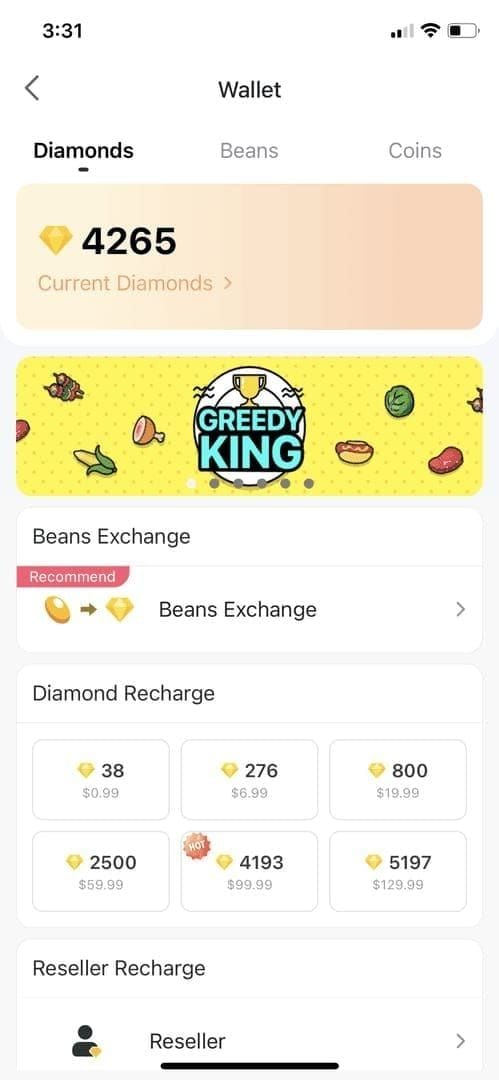
Automated security checks verify gift sender legitimacy, payment method validity, transaction pattern analysis. 95% clear automatically; flagged transactions get manual review.
Can You Cancel or Modify Requests During the Hold
No. Once submitted, requests lock and cannot be cancelled or modified. System immediately reserves Bean amount, removing it from available balance.
To change payment methods or correct errors, wait for current request to complete or fail. Failed requests return Beans within 24 hours.
How to Prepare Before Submitting Your Request
- Verify payment method details match BIGO profile name exactly
- Confirm account name unchanged for 30+ days (recent changes trigger additional verification)
- Calculate available balance by subtracting past 48 hours' earnings from total
- Add 500-Bean buffer below weekly cap for system calculation differences
Minimum Payout Thresholds and Regional Differences
Universal minimum: 6,700 Beans ($31.90). Local payment methods sometimes impose higher thresholds:
- Payoneer: $200 minimum (42,000 Beans)
- M-Pesa (Kenya): KES 1,000 minimum
Standard Minimum Withdrawal Amounts by Currency
Bank transfers in USD/EUR/GBP honor 6,700 Bean minimum. However, fees significantly reduce net receipts:
- $31.90 withdrawal faces $3 base fee + 2% FX fee = ~$28.26 net (11.4% effective fee)
Digital wallets often better for minimum withdrawals:
- Payoneer: Flat $3 fee (more favorable at higher amounts)
- M-Pesa: KES 30-50 fees (smaller percentage of typical withdrawals)
Regional Variations: US, Europe, Asia-Pacific
US: $20,000 annual threshold triggers 1099 tax form issuance
EU: 20% VAT withheld before processing. 6,700 Bean withdrawal yields ~$25.52 after VAT
India: 18% GST automatically deducted from all withdrawals
Asia-Pacific (outside India): Generally no automatic deductions but may require separate tax reporting
Account Type Impact on Minimum Thresholds
Individual broadcasters and agency-affiliated creators face identical 6,700 Bean minimum. Agency partners managing multiple broadcasters must process individual withdrawals per creator—no aggregation.
Verified accounts see no threshold advantages over newer accounts. System treats all verified users equally.
How to Check Your Current Cashout Eligibility
- Tap Profile icon (bottom right)
- Select Wallet
- Tap Beans tab
- Select Exchange Rewards
Interface shows:
- Available balance (excluding held Beans)
- Next withdrawal eligibility date
- Remaining weekly cap allowance
- Countdown timer for held Beans
- Progress bar for weekly cycle position
Weekly and Monthly Withdrawal Caps Explained
1,050,000 Bean weekly cap ($5,000) resets exactly seven days after previous request submission. Cap applies to withdrawal amounts, not total earnings—excess Beans remain for future cycles.
Standard Weekly Withdrawal Limits for Broadcasters
Every broadcaster: 1,050,000 Beans once per seven-day period. Rolling window enforcement: withdraw Tuesday 3PM, next available following Tuesday 3PM.
Single-withdrawal-per-week rule prevents splitting cap across multiple transactions. Cannot withdraw 500,000 Monday + 550,000 Friday—only one request per cycle regardless of amount.
Monthly Cap Structures and Reset Schedules
No explicit monthly cap. Weekly limitation creates effective monthly maximum of ~4,200,000 Beans ($20,000) for consistent high earners.
Calendar months don't affect eligibility—purely rolling seven-day cycles. Withdraw on 28th, next request available on 5th of following month.
Agency Partner vs. Individual Creator Limits
Agency partners face identical per-account limits: 1,050,000 Beans weekly. Must process separate withdrawals per broadcaster. Cannot consolidate earnings across multiple accounts.
Strategies for Planning Large Withdrawals
- Establish regular withdrawal schedule (same day/time weekly) for predictability
- Withdraw full 1,050,000 Beans when available—partial withdrawals don't accelerate seven-day reset
- Maximizes effective monthly earning potential
Step-by-Step BIGO Beans Withdrawal Process
Accessing the Cashout Section in Your Dashboard

- Tap Profile icon (bottom right)
- Select Wallet
- Navigate to Beans tab
- Tap Exchange Rewards
Verify available balance, next eligibility date, pending requests before proceeding.
Entering Withdrawal Amount and Payment Details
Enter amount between 6,700-1,050,000 Beans. System auto-calculates USD equivalent at 210 Beans = $1 and displays net amount after fees.
Select verified payment method from dropdown. If preferred method missing, must add and verify first (24-48 hours)—cannot complete during active withdrawal.
Submitting Required Verification Documents
First-time withdrawals require government-issued ID: passport, national ID card, or driver's license showing full legal name, DOB, photo. Must be current (not expired) and clearly legible.
Name on documents must match BIGO profile exactly. Name mismatches cause 40% of rejections. If profile differs from legal name, update profile and wait 30 days before withdrawal.
BitTopup provides BIGO withdrawal failed verification support for documentation issues.
Tracking Your Request Status and Notifications
After submission: Pending status during 48-hour hold. App sends push notifications at key milestones: hold completion, processing initiation, payment dispatch.
Access detailed status: Wallet > Beans > Transaction History
- Pending: 48-hour hold
- Processing: Payment preparation
- Completed: Funds transferred
- Failed: Shows specific rejection reasons
Why Withdrawals Fail Verification: Top 15 Reasons
These fifteen issues account for ~90% of verification failures.
Identity Document Issues and Common Mistakes
- Expired identification: Requires current ID with future expiration date. Renew if expiring within 30 days
- Poor photo quality: Need 1200x900+ pixels minimum, adequate lighting, no glare
- Partial document visibility: Submit full-page photos showing all four corners
- Mismatched document names: System requires exact character-for-character matches including middle names, suffixes, spacing
Payment Method Mismatches and Account Name Errors
- Bank account name discrepancies: Bank account name must match BIGO profile and verification documents exactly
- Outdated payment information: Verify linked method remains active before each request
- Incorrect account numbers/routing codes: Double-check against official bank statements
- Payoneer account verification gaps: Ensure Payoneer shows Verified status before linking to BIGO
Insufficient Account History or Activity Flags
- New account restrictions: Profiles <30 days old or <10 hours broadcast time face enhanced verification
- Suspicious earning patterns: Sudden large gifts from new accounts, reciprocal gifting, earning spikes inconsistent with viewer metrics
- Inactive account withdrawals: Accounts dormant 60+ days before withdrawal face additional verification
Tax Documentation Problems and Regional Compliance
- Missing tax forms: US broadcasters approaching/exceeding $20,000 annual need W-9 submission
- Incomplete GST/VAT registration: India/EU creators must provide tax registration numbers
Security Flags and Suspicious Activity Triggers
- Multiple failed login attempts: Recent password changes within 72 hours trigger security holds
- IP address inconsistencies: VPN use or international travel access triggers manual verification
Verification Requirements and Document Checklist
Mandatory Identity Verification Documents
Acceptable options:
- Passports: Full page with photo, name, DOB, passport number, expiration
- National ID cards: Both front and back sides
- Driver's licenses: Both sides with clear photo and text
Must be current with expiration 30+ days in future. Full legal name must match BIGO profile exactly.
Payment Method Verification Process
Bank account needs recent statement (within 90 days) showing:
- Account holder name matching BIGO profile
- Full account number and routing/SWIFT codes
- Bank name and branch
- Statement date confirming recent activity
Digital wallet needs app screenshots displaying:
- Account holder name
- Wallet account number/ID
- Verified or Confirmed status
- Recent transaction history
Tax Forms and Compliance Documentation
US (W-9):
- Legal name and business name
- Tax classification
- SSN or EIN
- Signature and date
India (GST):
- Registered business name
- GSTIN
- Registration date and validity
- Registered address matching profile
EU: VAT registration numbers and certificates (requirements vary by member state)
Photo Quality Standards and Submission Tips
- Well-lit environment, natural light preferred
- Camera directly above document at 90-degree angle
- Highest resolution setting (1200x900+ pixels minimum)
- No digital zoom—move camera closer
- All four corners visible with small margins
- JPEG or PNG format, 500KB-5MB file size
Troubleshooting Failed Cashout Requests
Failed withdrawals return Beans within 24 hours. Check Transaction History for specific error codes:
- VER-001: Identity document expired/invalid
- VER-002: Name mismatch between profile and documents
- PAY-001: Payment method verification failed
- PAY-002: Account number/routing code incorrect
- LIM-001: Weekly withdrawal cap exceeded
- LIM-002: Insufficient available balance (held Beans)
- SEC-001: Security review required
Fixing Common Document Rejection Issues
VER-001: Obtain current ID before resubmission. No temporary documents accepted.
VER-002: Update profile name to match legal documents exactly. Navigate to Profile > Edit Profile > Name. Wait 30 days after updating before withdrawal attempt.
Poor quality: Re-photograph following quality standards above.
Resolving Payment Method Verification Errors
PAY-001: Verify linked account name matches BIGO profile exactly. For joint accounts, ensure your name is primary holder.
PAY-002: Obtain official bank documentation showing correct account number and routing codes. Copy-paste from official documents rather than manual typing.
Payoneer failures: Log into Payoneer, confirm Verified status. Complete pending Payoneer verification before relinking to BIGO.
When and How to Contact Support for Appeals
Contact BIGO support when:
- Failure reasons seem incorrect
- Corrected issues but rejections continue
- Security holds (SEC-001) persist beyond 5 business days
- Need clarification on requirements
Access: Profile > Settings > Help & Support > Contact Us
- Category: Payment Issues
- Subcategory: Withdrawal Problems
- Include transaction ID, detailed description, screenshots
Response time: 24-48 hours for payment inquiries.
Payment Methods and Processing Times
Available Payment Options by Region
Bank transfers: Global availability. US domestic: 3-5 business days. International wire: 7-10 business days. Supports 6,700-1,050,000 Bean range.
Payoneer: International option. $200 minimum (42,000 Beans). Processes in 2-3 business days after hold period.
M-Pesa: Kenya only. Funds arrive within 24 hours after processing. KES 1,000 minimum (~8,000-9,000 Beans).
Regional digital wallets: GCash (Philippines), PayTM (India), GrabPay (Southeast Asia). 2-4 business days processing.
Processing Time Expectations for Each Method
Under $1,000 (210,000 Beans):
- Days 0-2: 48-hour hold
- Days 3-5: Payment processing
- Days 6-7: Funds arrival
- Total: 7-10 calendar days
Over $1,000:
- Days 0-2: 48-hour hold
- Days 3-30: Enhanced security review
- Days 31-32: Funds arrival
- Total: 30-35 calendar days
$1,000 threshold (210,000 Beans) is critical dividing line. Consider splitting large amounts into multiple weekly requests below threshold for faster processing.
Fees and Currency Conversion Considerations
Bank transfer: $3 base + 2% FX fee
- 1,050,000 Beans ($5,000): ~$103 total fees = $4,897 net (2.06% effective rate)
Payoneer: Flat $3 per withdrawal regardless of amount
- 1,050,000 Beans: Only $3 fee (Payoneer charges separate fees for bank transfers from Payoneer account)
M-Pesa: KES 30-50 (~$0.20-$0.35)
- 100,000-200,000 Beans ($476-$952): <0.1% transaction value
Currency conversion: Exchange rates lock at request submission, not transfer time. Fluctuations during processing don't affect final amount.
How to Update or Change Your Payment Method
Add new: Wallet > Payment Methods > Add New Method. Enter details. System sends test deposit ($0.01-$0.50) within 24-48 hours.
Confirm exact deposit amount in BIGO app to complete verification. New method appears immediately after confirmation.
Remove: Select method in Payment Methods list, tap Remove. Must maintain at least one verified method on file.
Advanced Tips for Faster, Smoother Cashouts
Pre-Verification Strategies to Avoid Delays
- Complete identity verification immediately upon account creation, before earning first Bean
- Maintain consistent profile information across all platforms—use full legal name exactly as on government ID
- Link and verify multiple payment methods before needing them (at least one bank + one digital wallet)
Optimal Timing for Withdrawal Requests
- Submit early week (Monday-Tuesday) to avoid weekend delays
- Requests Thursday-Friday may not process until following Monday (+2-3 days)
- Time requests to align with streaming schedule—submit Monday if broadcasting weekends
- Establish fixed weekly schedule (same day/time) to maximize earning potential
Maintaining Account Security to Prevent Flags
- Enable two-factor authentication: Profile > Settings > Security > Two-Factor Authentication
- Avoid VPNs or proxy servers when accessing account, especially during withdrawal requests
- Maintain consistent login patterns from same devices and locations
- Sudden access pattern changes trigger fraud concerns and additional verification
Maximizing Your Bean Earnings with BitTopup Services
- Focus on high-value gifts: Love Carriage = 122,850 Beans ($585), 11.7% of weekly cap from one interaction
- Build consistent streaming schedules—predictable schedules see 40-60% higher Bean earnings per hour
- Engage viewers personally: acknowledge gifts immediately, use donor names, create recognition for top supporters
Frequently Asked Questions
What is the 48-hour hold period for BIGO Beans cashout?
Newly earned Beans within past 48 hours are excluded from withdrawal balance. Security measure allows BIGO to verify gift legitimacy and detect fraud. Rolling basis: Beans earned Monday 3PM available Wednesday 3PM.
What is the minimum payout amount for BIGO Beans in 2026?
6,700 Beans = $31.90 USD at 210 Beans = $1 rate. Payment method exceptions: Payoneer $200 minimum (42,000 Beans), M-Pesa KES 1,000. Bank transfers honor standard 6,700 Bean minimum.
Why does my BIGO withdrawal keep failing verification?
Name mismatches cause 40% of failures. Ensure BIGO profile name matches government ID and payment account exactly—including middle names, suffixes, spacing. Other causes: expired ID, poor photo quality, incorrect bank numbers, incomplete payment verification. Check error code in Transaction History.
How long does BIGO Beans cashout take to process?
Under $1,000 (210,000 Beans): 7-10 calendar days (48-hour hold + 3-5 working days processing). Over $1,000: 30-35 calendar days (enhanced security review). M-Pesa fastest at 24 hours after hold; international wires take full 5-7 business days.
Can I withdraw BIGO Beans multiple times per week?
No. One withdrawal per seven-day period regardless of amount. Cycle resets 168 hours after previous request submission. Cannot split 1,050,000 Bean weekly cap across multiple transactions.
What documents do I need for BIGO cashout verification?
Government-issued photo ID (passport, national ID, driver's license) with full legal name, DOB, current expiration. Payment verification: bank statements with account holder name and numbers, or digital wallet screenshots showing verified status. US: W-9 for $20,000+ annual earnings. India: GST registration. EU: VAT registration numbers.
Ready to maximize BIGO earnings? BitTopup offers secure, instant BIGO Beans top-up with verified payment methods and 24/7 support. Visit BitTopup for exclusive creator benefits!























































































































