Understanding MICO's 2026 Refund Policy
Published January 2, 2026, MICO's policy treats virtual currency and digital services as final transactions. Once you buy coins, send gifts, or activate subscriptions, reversals are impossible. This protects content creators and prevents abuse.
Regional pricing: Global rate is $1 = 110 coins; MENA region gets $1 = 143 coins. Refund rules stay consistent worldwide.
Chargeback consequences: Payment disputes = permanent ban (account + ID + device) in 24-48 hours. Appeals take 30+ days with <15% success. MICO loses transaction amount plus 2.9-3.5% processing fees per chargeback.
For transparent transactions with better documentation, BitTopup offers competitive pricing and comprehensive records.
What's Non-Refundable: Complete Breakdown
MICO Coins
All coin purchases are final. Delivery times:
- Credit/debit cards: 95% in 5 min, 100% in 30 min
- PayPal/digital wallets: instant to 15 min
- Cryptocurrency: 20-30 min
- Bank transfers: 1-4 hours
Promotional coins expire in 30-90 days. Once in your wallet, coins are non-refundable whether spent or not.
Virtual Gifts & Locked Messages
Zero refunds on donations, tips, or gifts sent to streamers. Transactions complete instantly—streamers receive their share immediately. Locked message purchases are final once content is accessed.
VIP Subscriptions
Non-refundable except for major defects or legal requirements. Canceling mid-cycle grants access through the paid period with no prorated refund. Cancel via profile settings or device store 24+ hours before renewal.
Cancel Auto-Renew: Step-by-Step
iOS (iPhone/iPad)
- Settings > [Your Name] > Subscriptions
- Select MICO Live
- Tap Cancel Subscription
- Confirm
Complete 24+ hours before renewal. Access continues through paid period.
Android

- Google Play Store > Menu/Profile
- Payments & subscriptions > Subscriptions
- Select MICO Live > Cancel subscription
- Confirm
Timing Critical
Cancel 48-72 hours before renewal for safety. Same-day cancellations often result in one more charge. Check renewal dates: Profile > Wallet > History.
Required Proof for Refund Requests
Submit all four items within 48 hours:
- MICO User ID - Profile settings
- Transaction ID - Payment provider confirmation
- Payment screenshot - Shows charge, date, amount, merchant
- Wallet history screenshot - MICO app delivery status
Finding transaction IDs:
- Credit/debit: Bank app transaction details
- PayPal: Account history
- App stores: Email receipts
- Crypto: Blockchain transaction hash
Contact: Settings > Help & Support > Payment Issues
Message template:
- Subject: Missing Coins - Transaction ID [number]
- Body: Purchased [amount] coins on [date] at [time]. Payment processed, coins not received.
- Attach all four proof items
- Request: Investigate and deliver coins or process refund
Response times: Automated (immediate), first human reply (2-8 hours), resolution (24-72 hours standard, 5-14 days complex). Peak periods add 50-100% delay.
When Refunds Are Possible
Technical Errors
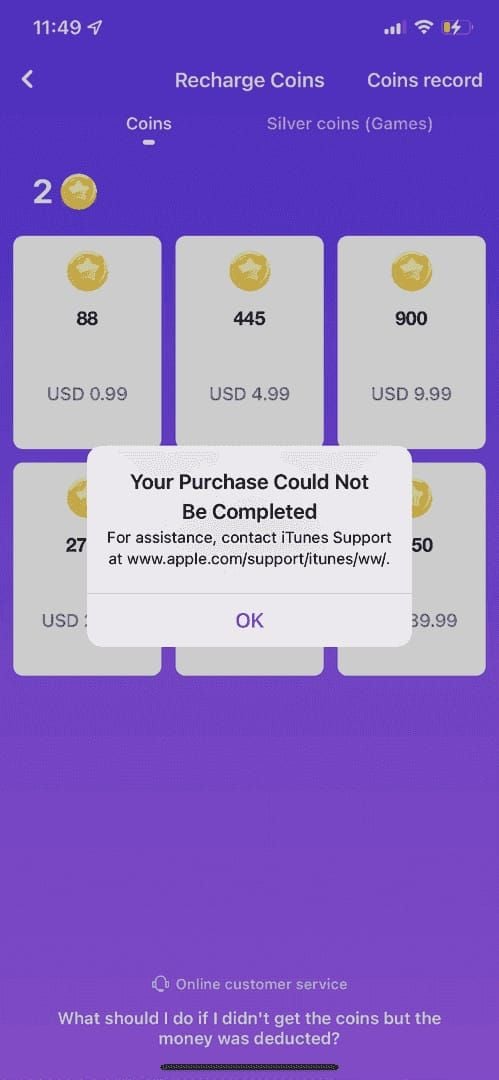
Payment charged but coins never arrived. Try first: Log out completely, close app, log back in (resolves 60% of cases). If coins don't appear in 15 min, submit ticket with full documentation.
Unauthorized Purchases
Account compromised, purchases made without permission. Enable two-factor authentication (Account Security) to strengthen claims. Investigation: 7-14 days. Account may suspend 3-30 days. Provide police reports if available.
Duplicate Charges
Charged twice, received coins once. Screenshot both charges + single coin deposit. Resolution: 24-72 hours.
Post-Cancellation Charges
Canceled 24+ hours before renewal but still charged. Proof needed: Cancellation date screenshot + charge date screenshot. Refund processes in 7-14 business days.
Common Rejection Reasons
Insufficient documentation: Missing any of the four required items restarts investigation timeline. Prepare everything before contacting support.
Late submission: 48-hour window exists because transaction volumes make delayed investigations difficult. Verify delivery within 30 min (cards) or method-appropriate timeframe.
Coins already used: Spending even one coin makes entire purchase non-refundable. Wallet history tracks all expenditures—contradicting claims triggers fraud flags.
ToS violations: Active suspensions (3-30 days) pause refund investigations. Violation-related purchases get automatic denials.
Refund Processing Timeline
Initial response: 2-8 hours (standard), 8-12 hours (peak periods)
Approval duration:
- Standard cases: 24-72 hours
- Complex cases: 5-14 days
Refund posting:
- Credit/debit cards: 5-7 business days
- PayPal: 3-5 days
- Bank transfers: 7-14 days
- Crypto: New coin delivery (blockchain irreversible)
Delayed refunds: Check payment provider's pending transactions first. If not there, reply to original ticket (don't create new ones).
Expert Tips
Best submission time: Weekday mornings, Asian time zones. But don't delay time-sensitive issues—48-hour rule takes priority.
Escalation: Reply in existing ticket: I respectfully disagree because [reason]. Please escalate to supervisor. Adds 5-10 days but offers second review.
Proactive documentation: Screenshot payment confirmation immediately. Check wallet within delivery window. File screenshots for future reference. For subscriptions, screenshot confirmation + cancellation steps.
Professional communication: Use this structure:
- Issue: [one sentence]
- What happened: [2-3 facts]
- What I need: [specific request]
- Attached: [documentation list]
Avoid threats about chargebacks/reviews—reduces support flexibility.
BitTopup: Safer Payment Alternative
Better payment control: Comprehensive transaction records from BitTopup + payment processor. Multi-layered documentation aids dispute resolution.
Accessible history: Retrieve transaction details weeks/months later. BitTopup customer service assists with delivery issues as intermediary.
Transparent pricing: All costs shown upfront (fees, conversion). Frequent promotions beat official rates. Regular users save 5-10% annually.
Streamlined process: Select MICO Live > Choose package > Pay > Provide User ID. Faster delivery (minutes). Multiple payment methods for flexibility.
Purchase MICO coins through BitTopup for competitive rates and superior documentation.
Subscription Management Best Practices
Set reminders: 7 days (evaluation) + 2 days (cancellation window) before renewal. Create recurring calendar events with User ID + tier in notes.
Right tier selection: Start with lowest tier meeting essential needs. Upgrade anytime; downgrading doesn't refund differences.
Weekly monitoring: Profile > Wallet > History. Spot unauthorized purchases, track spending, verify deliveries. Use promotional coins first (expire 30-90 days).
Prevent accidents: Enable purchase confirmation in device settings. Maintain subscription spreadsheet with renewal dates + cancellation deadlines. Review monthly.
FAQ
Can I refund MICO coins after purchase?
No, except for technical errors (payment processed, coins never delivered), unauthorized purchases, or duplicate charges. Once in wallet, coins are non-refundable.
How do I cancel auto-renew on iPhone?
Settings > [Your Name] > Subscriptions > MICO Live > Cancel Subscription. Do this 24+ hours before renewal. Access continues through paid period.
What proof does MICO need?
Four items: MICO User ID, Transaction ID, payment screenshot, wallet history screenshot. Submit within 48 hours.
How long does refund processing take?
Investigation: 24-72 hours (standard) or 5-14 days (complex). Refund posting: 7-14 business days (3-5 for PayPal, 5-7 for cards).
Can I refund gifts sent to streamers?
No. Donations, tips, and virtual gifts are completely non-refundable. Streamers receive their share instantly.
What if MICO rejects my request?
Request escalation in existing ticket with additional evidence (adds 5-10 days). If escalation fails, consult payment provider about disputes—but chargebacks trigger permanent bans.
Skip refund hassles! Purchase MICO Coins through BitTopup for transparent pricing, instant delivery, and reliable records. Better rates + complete control. Visit BitTopup now for worry-free top-ups!