What Constitutes an Account Hack vs. Unauthorized Access
Hacks involve technical exploitation where attackers gain access without your knowledge. These leave digital footprints in login history—unfamiliar IP addresses, device types, or locations. Unauthorized access occurs when someone uses credentials you previously shared, even if you later revoked permission.
The distinction affects recovery timeline and success rate. Hacked accounts with clear external intrusion evidence receive priority investigation. Unauthorized access cases require additional verification to confirm you didn't willingly share access.
How Hackers Target Diamond Balances
Attackers monitor high-value users who frequently send expensive virtual gifts, identifying targets with substantial purchasing power. Once inside, hackers immediately spend diamonds on gifts to alternate accounts or sell access to third parties.
Depletion speed varies by account limits. Unverified accounts face monthly restrictions of 5,000-10,000 diamonds; verified accounts can transact 20,000-50,000 monthly. Hackers exploit these limits by spreading theft across multiple sessions to avoid triggering fraud detection.
Common Entry Points
Weak password combinations cause 60-70% of top-up failures and security breaches. Passwords containing birthdays, usernames, or common phrases fall within minutes to automated cracking tools. Phishing attacks trick users into entering credentials on fake login pages.
Session hijacking intercepts active login sessions through compromised WiFi or malware-infected devices, bypassing password protection by stealing authenticated session tokens.
The Real Impact on Paid Diamond Investments
Lost diamonds represent direct financial loss, with recovery costs ranging from 120 USD (standard recovery) to 300 USD (deleted accounts). Beyond monetary impact, hacked accounts face 24-48 hour transaction holds even after recovery, disrupting live stream participation or time-sensitive gifts.
Users who experience hacks without proper documentation face permanent diamond loss—Likee cannot process refunds without verified ownership proof. This makes maintaining organized purchase records through platforms like BitTopup essential.
Immediate Actions: First 24 Hours After Discovering a Hack
The first 24 hours determine recovery success rate. Immediate action prevents further unauthorized spending and preserves critical evidence. Delayed reporting reduces recovery chances significantly.
Document everything before making changes. Screenshot current diamond balance, recent transaction history, and suspicious activity notifications. These timestamped records provide baseline evidence.
Emergency Account Lockdown Procedures
Force close Likee immediately to terminate active sessions. Android: swipe up, locate Likee in recent apps, swipe off-screen. iOS: swipe up (or double-click home button), flick Likee upward.
Disable internet connectivity temporarily—turn off WiFi and mobile data for 2-3 minutes while preparing to change password from a different, secure device.
Check account status: Profile > Settings > Account Status. This displays security warnings, unusual login attempts, or restriction notices. If you see active sessions from unfamiliar devices, proceed immediately to password reset.
Changing Passwords and Security Credentials Safely
Password resets take 24-48 hours to process fully—initiate this first. Use a different device than the potentially compromised one. Navigate to login screen, select Forgot Password.
Create a completely new password unrelated to previous credentials. Avoid reusing passwords from other platforms or incorporating personal information. Effective passwords combine 12+ characters with uppercase, lowercase, numbers, and symbols in non-sequential patterns.
After reset confirmation, immediately update recovery email and phone number if you suspect the hacker modified these. Submit verification documents proactively rather than waiting for support requests.
Checking Diamond Balance and Transaction History
Access transaction log: Profile > Wallet > Transaction Log. This shows every diamond purchase, gift sent, and balance change with timestamps and transaction IDs. Look for unfamiliar entries, particularly large transfers during times you weren't using the app.
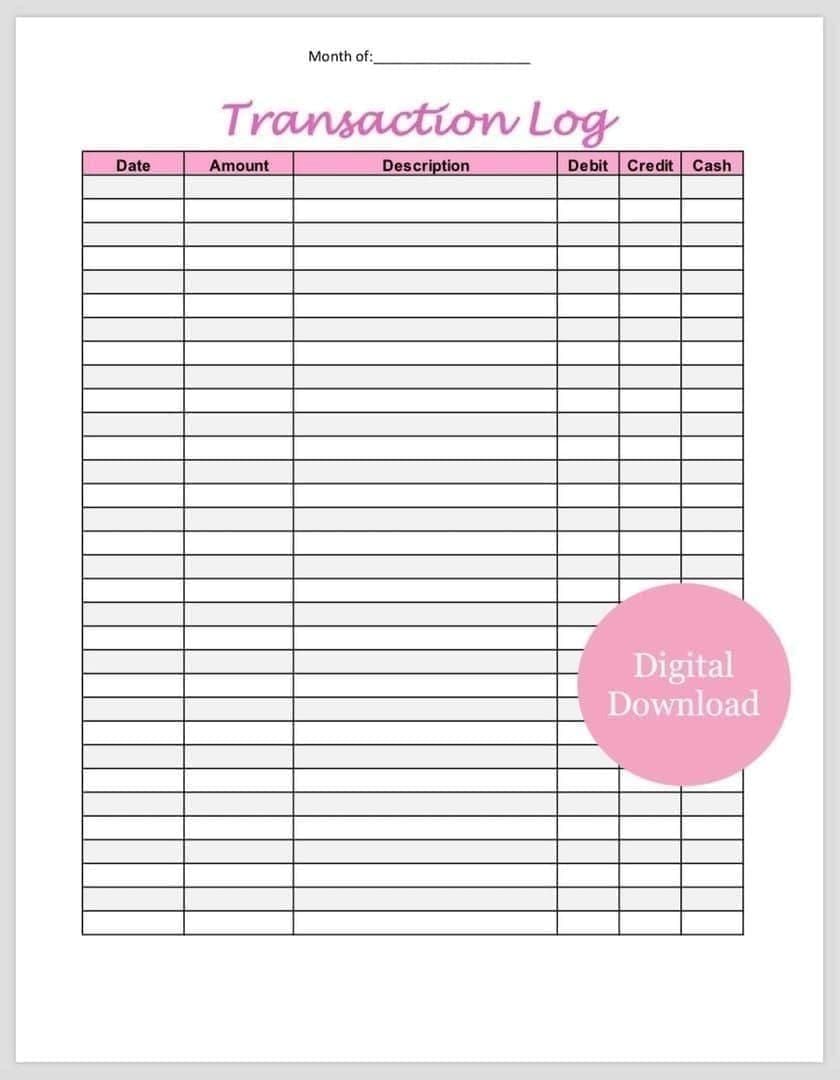
Transaction statuses: green checkmarks (completed), clock icons (pending), red X marks (failed). Focus on completed transactions you didn't authorize—these represent actual diamond loss requiring recovery claims.
Refresh wallet display by pulling down on diamond icon. Wallet sync cycles every 15-30 minutes. Discrepancies between displayed balance and transaction history totals indicate ongoing sync issues or unauthorized spending.
Documenting Evidence: Screenshots and Timestamps
Capture screenshots of every relevant screen before making changes. Essential documentation: current diamond balance, complete transaction history (all pages), login history showing unfamiliar devices/locations, security notifications.
Include device timestamps in screenshots—ensure phone's date/time display is visible. This temporal context helps investigators establish hack timeline and differentiate your legitimate activity from unauthorized transactions.
Export transaction history if available. Note exact time you discovered the hack, last time you personally accessed your account, and any suspicious emails/messages received before the breach.
Disconnecting Linked Payment Methods
Remove all saved payment methods immediately: Settings > Payment Methods, delete stored cards and digital wallet connections. This prevents hackers from making additional purchases using your saved payment info.
Contact your bank to report unauthorized access. Request temporary blocks on Likee-related transactions. Many financial institutions offer fraud protection that can reverse unauthorized charges if reported within 60-90 days.
Review email for purchase confirmations from Likee or payment processors. These receipts contain transaction IDs and timestamps supporting your recovery claim. Forward to a secure folder for submission to support.
How to Prove Likee Account Ownership After a Hack
Ownership verification determines whether Likee can process your diamond recovery claim. The platform requires multiple forms of proof to prevent fraudulent recovery attempts. Incomplete documentation is the primary reason recovery claims fail.
Your Likee User ID serves as the foundation for all verification. This exactly 10-digit numerical code contains no letters, spaces, hyphens, or symbols. Find your UID: launch Likee, tap profile icon (top-left), select View or Edit Profile below profile picture. Or tap bottom-right avatar, then tap profile picture at top—popup displays 10-digit ID under nickname.
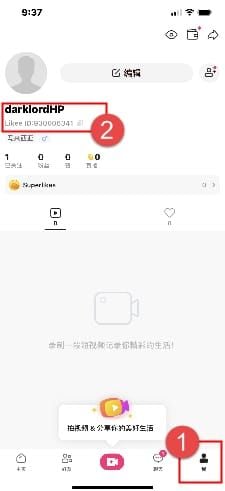
Verification reviews take minutes to 24 hours depending on submission completeness and support workload. Providing all required documents initially significantly reduces processing time.
Essential Documentation Checklist
Accepted verification: government-issued ID cards, valid passports, permanent resident cards. Likee rejects driver's licenses, expired IDs, and edited images. Your ID must clearly show full name, photo, date of birth, and document number without obstruction or blur.
Submit selfie holding ID/passport alongside handwritten note displaying current date in '+DATE' format (example: '+2026-03-15'). This live verification proves you currently possess the ID. Ensure face, ID details, and date note are all clearly visible in one well-lit photo.
Include proof of payment for diamond purchases. Bank statements showing Likee charges, credit card records, or digital wallet receipts all work. Documents must display your name, transaction amount, date, and clear indication payment went to Likee or authorized diamond retailer.
Provide complete transaction history exported from Likee app. This internal record shows purchase patterns, spending habits, and account activity timeline only the legitimate owner would possess.
Using BitTopup Purchase Records as Primary Proof
Platforms like BitTopup provide detailed transaction records serving as powerful ownership evidence. These include exact User ID, purchase amounts, transaction timestamps, and confirmation numbers Likee's support can cross-reference.
BitTopup's automated receipt system generates immediate confirmation emails containing all necessary verification details: specific diamond packages purchased, payment method used, delivery confirmation timestamp. Established platforms maintain permanent transaction archives accessible months after purchase.
When submitting BitTopup records, include complete email confirmation showing transaction ID, 10-digit Likee User ID, diamond quantity purchased, and purchase date. Multiple receipts spanning different dates demonstrate consistent ownership patterns fraudulent claimants cannot replicate.
Email Verification and Registration Details
Your original registration email serves as primary ownership proof, especially if it predates the hack by months/years. Likee logs the email used during account creation—matching this to your current email access demonstrates long-term account control. Forward account creation confirmation to support.
If you've changed email since registration, provide documentation of this change. Email forwarding records, previous correspondence with support from old address, or account settings change confirmations establish connection between current email and original registration.
Phone Number and Identity Verification Methods
Phone verification requires access to mobile number linked to your Likee account. Likee sends verification codes to this number during recovery. If hacker changed your number, prove ownership of original number through carrier records or porting documentation.
Submit mobile carrier bill showing phone number registered under your name. This external verification from telecommunications provider carries significant weight—nearly impossible for hackers to forge legitimate carrier documentation.
Device History and Login Location Logs
Login history reveals patterns distinguishing legitimate owners from unauthorized users. Access: Settings > Security > Login History. Look for typical devices, locations, and login times, then identify entries not matching actual usage.
Device fingerprints include hardware identifiers, OS versions, and app configurations unique to your phone/tablet. Likee logs these with each login, creating a profile of legitimate devices. Demonstrating continued access from recognized devices proves ongoing ownership despite hack.
Geographic consistency supports ownership claims. If your account typically logs in from home city and workplace, then suddenly shows access from different country/region, this pattern clearly indicates unauthorized access.
Protecting Your Diamond Balance: Advanced Security Measures
Prevention dramatically outperforms recovery. Advanced security creates multiple barriers hackers must overcome, significantly reducing successful breach attempts. Implementing these protocols takes 15-30 minutes initially but provides ongoing protection worth thousands in potential diamond loss.
Security features work in layers—each additional measure exponentially increases protection. Two-factor authentication alone blocks ~80% of automated hacking attempts; combining 2FA with biometric authentication and device management reduces vulnerability by over 95%.
Enabling Two-Factor Authentication (2FA) Step-by-Step
Navigate to Settings > Security > Two-Factor Authentication. Select preferred 2FA method: SMS codes to phone, authentication app codes (Google Authenticator/Authy), or email verification codes.
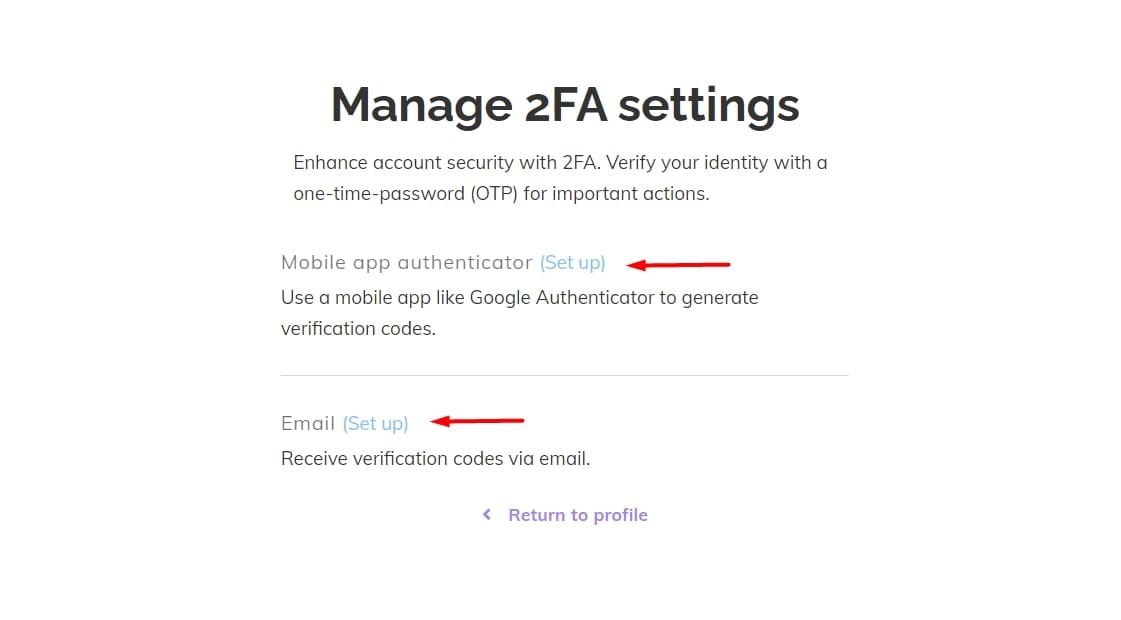
SMS-based 2FA provides most accessible option. Enter mobile number, verify by entering code Likee sends via text. This number becomes secondary authentication factor required for all future logins from unrecognized devices.
Authentication app-based 2FA offers superior security vs. SMS. Download compatible authenticator app, scan QR code Likee displays during setup. App generates time-based codes refreshing every 30 seconds—nearly impossible to intercept or replicate.
After enabling 2FA, Likee provides backup codes for emergency access if you lose phone/authentication device. Store codes securely in password manager or physical safe—never in email or cloud storage. Each backup code works only once.
Test 2FA setup by logging out completely and attempting to log back in. You should receive prompt for authentication code after entering password.
Setting Up Biometric Authentication on Mobile Devices
Enable fingerprint or face recognition: Settings > Security > Biometric Authentication. App integrates with device's built-in biometric sensors, requiring fingerprint/face scan before accessing account or authorizing diamond purchases.
Biometric authentication prevents unauthorized access even if someone knows your password. Physical presence becomes mandatory, eliminating remote hacking attempts relying solely on stolen credentials.
Configure biometric requirements for sensitive actions beyond login. Set fingerprint/face verification for diamond purchases over certain amounts, gift sending, or account settings changes.
Creating Unbreakable Password Strategies
Effective passwords combine length, complexity, and uniqueness. Aim for 16+ characters incorporating uppercase, lowercase, numbers, and symbols in non-predictable patterns. Avoid dictionary words, personal information, or sequential characters.
Use password manager applications to generate and store complex passwords you don't need to memorize. These tools create random character strings while encrypting your password database behind single master password. Popular options: Bitwarden, 1Password, KeePassXC.
Implement unique passwords for every platform. Password reuse creates cascading vulnerabilities—if hackers breach one service and obtain your password, they'll attempt it on other platforms including Likee.
Change Likee password quarterly or immediately after any security incident on related services. Set calendar reminders for password updates.
Managing Trusted Devices and Active Sessions
Review active sessions regularly: Settings > Security > Active Sessions or Device Management. This displays all devices currently logged into your account, including device type, location, and last activity timestamp. Immediately terminate unrecognized sessions by selecting Log Out or Remove Device.
Designate trusted devices for streamlined access while maintaining security. Likee remembers devices you've verified through 2FA, reducing authentication prompts on personal phone/tablet while still requiring full verification on new devices.
Enable login notifications alerting you via email/push notification whenever account is accessed from new device/location. These real-time alerts allow immediate response to unauthorized access attempts.
Revoke access for old/unused devices periodically. If you've upgraded phones, sold tablets, or stopped using certain computers, remove these from trusted list.
Regular Security Audits: Monthly Checklist
Conduct comprehensive security reviews on first day of each month. Check transaction history for unfamiliar purchases, review login history for suspicious patterns, verify contact information remains current and under your control, confirm all security features remain enabled.
Update recovery information including backup email addresses and phone numbers. Life changes like new phone numbers or email provider switches should be reflected immediately.
Review connected third-party applications with access to your Likee account. Revoke permissions for apps you no longer use or don't recognize.
Test backup and recovery procedures by attempting to log in using backup codes or alternative authentication methods. Verify you can still access recovery email and phone number.
The Diamond Recovery Process: What to Expect
Diamond recovery follows structured investigation balancing user protection with fraud prevention. Understanding this timeline and requirements helps set realistic expectations and improves claim success rate. Process typically resolves 80% of legitimate cases within 24 hours when proper documentation is submitted initially.
Likee's support prioritizes cases based on severity, documentation completeness, and account value. High-value accounts with comprehensive ownership proof receive faster investigation vs. new accounts with minimal purchase history.
Contacting Likee Support: Best Practices and Response Times
Access support: Profile > Help & Support, or search KChat within app. KChat provides direct messaging with support representatives who escalate to security and fraud investigation teams. Avoid general email support for urgent diamond recovery—these channels experience longer response times.
Structure initial support message with clear, organized information. Start with concise summary: My account was hacked on [date], and [amount] diamonds were stolen. I have ownership documentation ready to submit. Then provide 10-digit User ID, approximate date/time you discovered hack, and estimated diamond loss amount.
Attach all verification documents to first message rather than waiting for support requests. Include ID selfie with date note, payment receipts, transaction history screenshots, and other ownership proof. This proactive approach reduces back-and-forth communication and accelerates investigation timelines.
Response times vary by support workload and time zones. Peak hours (6-10 PM) see 45-60 minute initial responses or 50-100% longer processing vs. off-peak. Submitting claims during off-peak hours (2-6 AM) often results in 1-2 second to 5-10 minute initial responses, though full investigation still requires 24-48 hours.
Submitting a Formal Diamond Dispute Claim
Formal dispute claims require specific information beyond general support requests. Prepare detailed incident report including exact date/time you last accessed account legitimately, when you discovered unauthorized access, what specific unauthorized transactions occurred, and what immediate actions you took.
List every unauthorized transaction individually with transaction IDs, timestamps, diamond amounts, and recipient information if visible. This granular detail helps investigators trace diamond movement and potentially recover gifts not yet converted or withdrawn.
Explain unusual circumstances surrounding hack. Did you receive suspicious messages before breach? Click any links or download files? Use public WiFi? This context helps support identify attack vector and potentially prevent similar breaches.
Request specific outcomes in claim. State clearly whether you're seeking diamond restoration, account recovery, security enhancement recommendations, or all above. Explicit requests ensure support understands your priorities.
Investigation Timeline and Communication Expectations
Initial case acknowledgment typically occurs within 1-24 hours, confirming support received claim and assigned investigation ticket number. Save this ticket number for all future correspondence.
Preliminary investigation takes 24-48 hours for most cases. During this period, security team verifies ownership documentation, cross-references transaction logs with reported unauthorized activity, and determines whether diamond recovery is technically possible based on how stolen diamonds were spent.
You'll receive status updates at key milestones: documentation verification complete, unauthorized transactions confirmed, recovery feasibility determined, final resolution. If investigators need additional information, they'll contact you with specific requests. Respond within 24 hours to avoid case delays or automatic closure.
Complex cases involving deleted accounts, multiple hackers, or international transaction chains may extend investigations to 3+ working days.
Success Rates: When Diamond Recovery is Possible
Diamond recovery succeeds most often when unauthorized transactions are caught within 24-48 hours and diamonds remain in identifiable accounts. Gifts sent to hacker's alternate accounts can sometimes be reversed if those accounts are frozen before diamond withdrawal/conversion. Diamonds spent on live stream gifts to third-party broadcasters are generally unrecoverable.
Cases with complete ownership documentation see ~80% success rates for partial/full diamond restoration. Incomplete documentation drops success rates below 30%—Likee cannot verify legitimate ownership and risks rewarding fraudulent claims.
Account sharing significantly complicates recovery claims. If you previously shared password with friends/family, Likee may classify unauthorized spending as dispute between known parties rather than security breach.
Repeated hack claims from same account trigger additional scrutiny. Demonstrating improved security measures (2FA enabled, password changed) strengthens subsequent claims.
Understanding Likee's Refund and Compensation Policies
Likee doesn't automatically refund diamonds lost to hacks. Recovery depends entirely on investigation outcome and whether diamonds can be technically retrieved from current location. Platform distinguishes between diamond restoration (returning original diamonds) and compensation (providing equivalent diamonds from Likee's reserves).
Restoration occurs when unauthorized transactions can be reversed—typically within 24-48 hours when diamonds haven't been further distributed. Compensation is rarer, generally reserved for cases where Likee's security systems failed to prevent obvious fraud despite proper user security practices.
Account recovery fees (120 USD standard recovery, 300 USD deleted accounts) are separate from diamond restoration. These fees cover investigation and technical restoration process, not diamond value itself. You'll pay these regardless of whether diamond recovery succeeds.
Likee's terms limit liability for user account security. Platform provides security tools (2FA, login notifications) but places responsibility on users to implement protections. Claims based on weak passwords, disabled security features, or password sharing face reduced recovery prospects.
Common Mistakes That Prevent Diamond Recovery
Recovery failures often stem from preventable errors rather than investigation limitations. Understanding these mistakes helps avoid pitfalls dooming otherwise legitimate claims. Many users unknowingly sabotage recovery chances through actions taken immediately after discovering hack.
Most damaging mistakes occur in first hours after breach discovery. Panicked responses like deleting app, creating new account, or repeatedly changing passwords can erase critical evidence investigators need.
Misconception: All Hacked Diamonds Are Automatically Refunded
Many users assume Likee automatically refunds diamonds lost to unauthorized access, similar to credit card fraud protection. This expectation leads to inadequate documentation and delayed reporting.
Reality requires active participation. You must prove ownership, document unauthorized transactions, demonstrate proper security practices, and often pay investigation fees before recovery begins. Passive reporting without supporting evidence results in claim denial.
Burden of proof rests entirely on account holder. Likee's default position assumes all account activity is authorized unless you can definitively prove otherwise.
Why Delayed Reporting Reduces Recovery Chances
Every hour of delay allows hackers to further distribute stolen diamonds, making recovery progressively more difficult. Diamonds spent on live stream gifts within first few hours often cannot be recovered, as broadcasters receive and potentially withdraw earnings before investigations begin.
Transaction trails grow cold as time passes. Investigating transactions from weeks/months ago requires deeper database queries and more extensive verification, extending investigation timelines and reducing success probability.
Delayed reporting raises suspicion about claim legitimacy. If you waited days/weeks to report hack, investigators question why you didn't notice unauthorized access sooner.
The 24-hour window represents optimal reporting timeframe. Cases reported within this period see highest recovery rates, fastest investigation times, and most favorable support responses.
Incomplete Documentation and Its Consequences
Submitting partial documentation forces multiple rounds of communication, extending investigation timelines from 24 hours to potentially weeks. Each documentation request adds 24-48 hours to process.
Missing critical documents like payment receipts or ID verification often results in automatic claim denial. Support cannot proceed without confirmed ownership.
Poor quality documentation creates similar problems. Blurry ID photos, cropped screenshots missing critical information, or payment receipts not clearly showing Likee-related transactions all require resubmission.
Inconsistent information across documents raises red flags. If ID shows one name but payment receipts show another, or stated User ID doesn't match transaction records, investigators suspect fraudulent claims.
The Risk of Using Unofficial Recovery Services
Third-party services claiming to recover hacked Likee accounts typically operate as scams. These request account credentials, payment for recovery expertise, or both—then either steal your account or simply take your money.
Legitimate account recovery occurs exclusively through Likee's official support channels. No external service has special access to Likee's systems or ability to bypass verification requirements.
Sharing account credentials with recovery services violates Likee's terms and may result in permanent account suspension. Even if you've been hacked, providing password to third parties demonstrates continued security negligence disqualifying you from official recovery assistance.
These services often request payment in cryptocurrency or other non-refundable methods. Cost of scam services (often 200-500 USD) exceeds Likee's official recovery fees while providing zero legitimate assistance.
Account Sharing: How It Complicates Ownership Proof
Previous password sharing with friends, family, or romantic partners creates ambiguity about whether unauthorized access constitutes hack or dispute between known parties. Investigation teams examine account history for evidence of multiple users, weakening your claim recent activity was unauthorized.
Shared accounts show inconsistent login patterns, multiple device types, varied geographic locations, and diverse usage behaviors making it difficult to distinguish legitimate activity from unauthorized access.
If you've shared account previously, disclose this upfront in recovery claim. Explain when sharing occurred, with whom, and why that person no longer has authorized access. Transparency demonstrates honesty and helps investigators understand context.
Safe Diamond Top-Up Practices to Prevent Future Loss
Prevention strategies protect diamond investments more effectively than recovery processes. Implementing secure top-up practices creates documented purchase history serving dual purposes: reducing fraud risk during transactions and providing comprehensive ownership proof if recovery becomes necessary.
Established platforms with verified transaction systems offer superior security vs. informal sellers or peer-to-peer transfers. These maintain permanent records, provide customer support, and implement fraud detection protecting both payment information and diamond delivery.
Why BitTopup Offers Superior Transaction Security
BitTopup provides verified transaction records with every purchase, creating automatic documentation system for ownership proof. Each top-up generates detailed receipt containing User ID, diamond quantity, purchase timestamp, and transaction confirmation number—all critical elements for recovery claims.
Platform's customer service maintains interaction logs further verifying identity and account ownership. If you've contacted support regarding delivery questions or account issues, these communications create additional evidence layer showing consistent account control over time.
Competitive pricing reduces temptation to use suspicious discount sellers who may compromise your account during top-up process. While unofficial sellers might offer slightly lower prices, security risks and lack of transaction documentation make them false economies potentially costing far more in lost diamonds.
Fast delivery times (5-30 minutes for repeat customers) mean diamonds arrive quickly without extended vulnerability windows. First-time purchases require 24-48 hour verification, but this security measure protects against fraudulent top-ups to stolen accounts.
Maintaining Organized Purchase Receipt Archives
Create dedicated folder in email for all Likee-related purchase confirmations. Set up automatic filters routing receipts from BitTopup and other diamond sellers directly to this folder.
Download and save PDF copies of receipts to cloud storage with automatic backup. Services like Google Drive, Dropbox, or iCloud provide redundant storage surviving device loss or email account compromise. Organize receipts chronologically with clear file names like Likee_BitTopup_2026-03-15_5000diamonds.pdf.
Maintain spreadsheet tracking all diamond purchases with columns for date, platform, amount, cost, and transaction ID. This master log provides quick reference during recovery claims and helps identify unauthorized purchases.
Print physical copies of high-value purchase receipts and store securely. While digital records are convenient, physical backups protect against scenarios where you lose access to all electronic devices simultaneously.
Verifying Payment Confirmations Before Leaving the App
Always wait for in-app confirmation diamonds have been credited before closing transaction screen. Confirmation typically appears within 5-30 minutes for repeat purchases, though first-time top-ups may require 24-48 hours.
Check diamond balance immediately after stated delivery timeframe. Navigate to profile and verify new balance matches previous balance plus purchased amount. Discrepancies should be reported to seller's customer service within 1 hour of expected delivery time.
Screenshot delivery confirmation screen showing transaction ID, diamond amount, and timestamp. This immediate documentation proves successful delivery and protects against future disputes.
Enable purchase notifications in Likee's settings to receive automatic alerts when diamonds are added to account. These provide real-time confirmation of successful top-ups and immediate alerts if unauthorized purchases occur.
Recognizing Fraudulent Top-Up Offers and Scams
Legitimate diamond sellers never request account password. Any service asking for login credentials is attempting to steal your account, not provide legitimate top-up services. Reputable platforms only require public User ID to deliver diamonds.
Unrealistic discounts exceeding 30-40% off official prices typically indicate scams or stolen payment methods. While platforms like BitTopup offer competitive pricing through bulk purchasing and efficient operations, extreme discounts suggest seller is using fraudulent payment sources that will eventually be reversed, taking your diamonds with them.
Pressure tactics demanding immediate purchase decisions or limited-time offers expiring in minutes are classic scam indicators. Legitimate sellers maintain consistent pricing and don't use artificial urgency.
Requests for payment through untraceable methods like cryptocurrency, gift cards, or peer-to-peer transfers without buyer protection indicate scams. Established platforms accept credit cards, PayPal, and other payment methods with fraud protection and dispute resolution.
Setting Up Purchase Notifications and Alerts
Enable email notifications for all account activity including logins, password changes, diamond purchases, and gift sending. Navigate to Settings > Notifications > Email Notifications and activate all security-related alerts.
Configure push notifications on mobile device for transaction confirmations. These real-time alerts notify you within seconds of diamond additions or spending, allowing immediate response if unauthorized activity occurs.
Set up banking alerts for charges to payment methods. Most banks and credit card companies offer transaction notifications via text/app alerts. Configure these to notify you of any Likee-related charges.
Review notification settings quarterly to ensure they remain properly configured. App updates sometimes reset notification preferences to default settings, potentially disabling critical security alerts.
Building Long-Term Diamond Security: Prevention Strategies
Sustainable security requires ongoing maintenance rather than one-time setup. Long-term protection strategies create habits and systems continuously defending diamond investments against evolving threats.
Most secure accounts combine technical protections with behavioral practices. While 2FA and strong passwords provide technical barriers, security-conscious habits like recognizing phishing attempts and maintaining updated software address human vulnerabilities technology alone cannot solve.
Monthly Security Maintenance Routine
Dedicate 15-20 minutes on first day of each month to comprehensive security review. Check transaction history for unfamiliar purchases, review login history for suspicious patterns, verify contact information remains current, confirm all security features remain enabled.
Update password quarterly using password manager to generate new complex credential. Even if current password hasn't been compromised, regular rotation limits potential damage from undetected breaches.
Review connected devices and active sessions, removing any you don't recognize or no longer use. Devices you've sold, given away, or stopped using should be immediately removed from trusted device list.
Test backup and recovery procedures by attempting to log in using alternative authentication methods. Verify you can still access recovery email and phone number, locate backup codes, and successfully complete account recovery process.
Recognizing Phishing Attempts and Suspicious Messages
Phishing messages impersonating Likee support often contain urgent language about account problems, security issues, or diamond promotions requiring immediate action. Legitimate Likee communications rarely demand urgent responses and never request password or verification codes.
Examine sender email addresses carefully. Phishing emails often use addresses resembling official Likee domains but contain subtle misspellings or extra characters. Hover over links before clicking to reveal true destination URLs.
Suspicious messages frequently contain grammatical errors, awkward phrasing, or translation mistakes professional communications wouldn't include.
Never click links in unexpected messages claiming to be from Likee. Instead, manually navigate to app or official website and check for claimed issue through legitimate channels.
Educating Yourself on Latest Hacking Techniques
Follow security-focused technology news sources to stay informed about emerging threats affecting social media and gaming platforms. Understanding current attack methods helps you recognize and avoid new scam tactics before they become widespread.
Participate in Likee's official community forums or social media channels where platform announces security updates and warns users about active threats.
Learn to identify social engineering tactics where attackers manipulate you into revealing information or taking actions compromising security. Common techniques: impersonating friends requesting account access, fake customer service representatives asking for verification codes, or romantic interests requesting financial assistance through diamond gifts.
Creating a Personal Security Protocol Document
Document your security setup including which 2FA method you use, where backup codes are stored, password manager details, and recovery email and phone number. Store this document securely (not in cloud storage or email) where you can access it during account recovery emergencies.
Create response checklist for suspected security breaches listing specific steps in order: force close app, disable internet, change password from secure device, check transaction history, document evidence, contact support. Having predetermined steps prevents panic-driven mistakes during actual emergencies.
Record typical usage patterns including usual login times, devices, locations, and spending habits. This baseline helps quickly identify anomalous activity indicating unauthorized access.
Designate trusted contact who can assist with account recovery if you're unable to access devices or accounts. Provide this person with User ID and basic account information (but never password) so they can contact support on your behalf in extreme emergencies.
Frequently Asked Questions About Likee Diamond Recovery After Hacks
Can I get my Likee diamonds back after my account is hacked?
Diamond recovery is possible in 80% of cases when you report within 24 hours and provide complete ownership documentation including ID verification, payment receipts, and transaction history. Diamonds spent on live stream gifts or withdrawn by hackers are generally unrecoverable, but gifts sent to identifiable accounts can sometimes be reversed if caught quickly. Success depends on documentation quality, reporting speed, and how stolen diamonds were used.
How do I prove I own a Likee account after being hacked?
Submit selfie holding government-issued ID/passport alongside handwritten note with current date, plus payment receipts from diamond purchases showing your name and transaction details. Include complete transaction history exported from app, and provide 10-digit User ID along with access to registered email address and phone number. Platforms like BitTopup provide detailed purchase records serving as powerful ownership evidence during recovery investigations.
What documents do I need to recover lost Likee diamonds?
Essential documents: valid government ID (passport, ID card, or permanent resident card—not driver's licenses), current selfie holding ID with dated note, payment proof from banks or diamond sellers showing Likee-related charges, and complete Likee transaction history. Additional supporting documents: email confirmations from diamond purchases, login history showing typical devices and locations, and previous correspondence with Likee support demonstrating account ownership over time.
How long does Likee take to investigate a hacked account?
Standard investigations resolve within 24 hours for cases with complete documentation, though complex situations may extend to 3 working days. Initial case acknowledgment occurs within 1-24 hours of submission, preliminary investigation takes 24-48 hours, and final resolution depends on diamond recovery feasibility. Account recovery fees (120 USD standard, 300 USD deleted accounts) are separate from investigation timelines and must be paid before recovery begins.
Will Likee refund diamonds spent by hackers?
Likee doesn't automatically refund hacked diamonds but may restore them if unauthorized transactions can be reversed within 24-48 hours before diamonds are further distributed or withdrawn. Platform distinguishes between restoration (returning original diamonds) and compensation (providing equivalent diamonds), with restoration being more common for quickly reported breaches. Recovery depends entirely on investigation outcomes and technical feasibility, not automatic refund policies.
How can I prevent my Likee account from being hacked again?
Enable two-factor authentication (Settings > Security > Two-Factor Authentication), create unique 16+ character password using password manager, set up biometric authentication for app access and diamond purchases, and enable login notifications for all account activity. Review active sessions monthly and remove unrecognized devices, maintain organized purchase receipt archives for ownership proof, and use established platforms like BitTopup that provide verified transaction records and dedicated customer support for secure diamond top-ups.
Secure your Likee diamond investments with BitTopup—the trusted platform providing verified purchase records, instant transaction confirmations, and dedicated customer support to help you prove ownership and protect your balance. Top up safely today and get automatic receipt archiving for complete peace of mind against account security threats.
























































































































