Transaction Processing Stages
A typical recharge involves four stages: payment initiation, gateway processing, anti-fraud verification, and coin crediting. Normal crediting occurs within 30 seconds for established accounts.
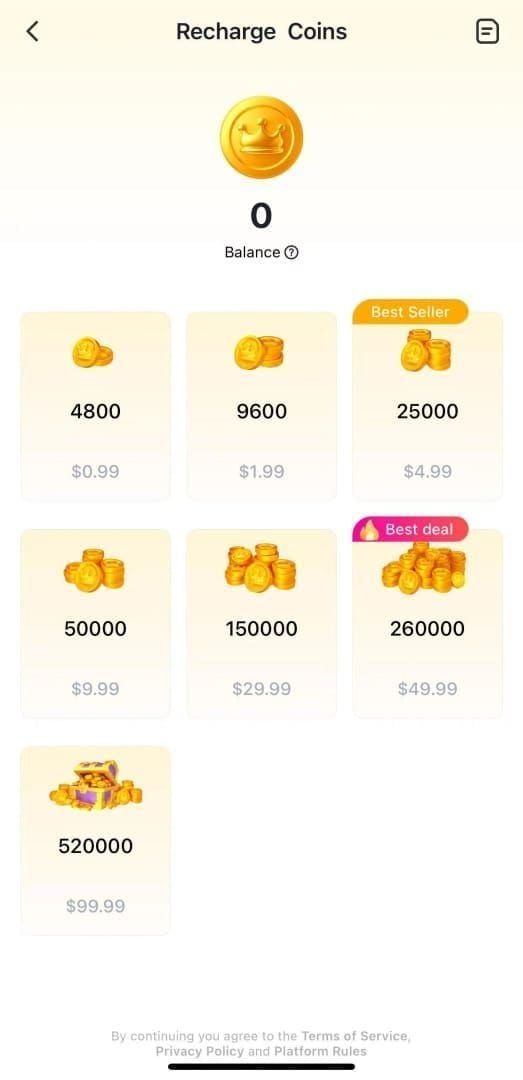
The payment gateway processes your transaction first, deducting funds and generating a Transaction ID. SUGO's anti-fraud algorithms then scan for suspicious patterns: multiple recharges within 15 minutes, VPN usage, or new accounts under 7 days old making purchases exceeding $20 USD.
After verification, the crediting system updates your balance. Standard processing completes in 1-5 minutes; extended holds last 15 minutes to 24 hours.
Common Causes
Payment gateway delays (60% of cases): Third-party processors experience high traffic, server issues, or cross-border verification requirements. Your bank confirms the charge, but confirmation signal to SUGO arrives late.
System errors (25% of cases): Error E001 (VPN Detected) or Error E003 (Network Timeout). VPN usage triggers automatic holds due to location mismatches.
Network instability (15% of cases): Unstable connections interrupt data transmission during crediting. Toggling airplane mode for 10 seconds resolves 80% of network issues.
2026 Payment System Updates
SUGO implemented version 2.41.0.0 in November 2025, introducing enhanced anti-fraud measures that increased false-positive holds. The system now cross-references device fingerprints, IP addresses, and payment histories more aggressively.
New accounts face stricter scrutiny. Accounts under 7 days old attempting purchases of $20+ USD enter extended verification queues with 24-72 hour processing. This reduced fraudulent transactions 40% but increased legitimate user complaints.
The system limits new accounts to 6250 coin packages maximum for the first 30 days.
Immediate Actions: First 30 Minutes
Check Balance and Recharge History
Open SUGO and tap ME icon. Your coin balance displays at top. Compare to pre-purchase balance.
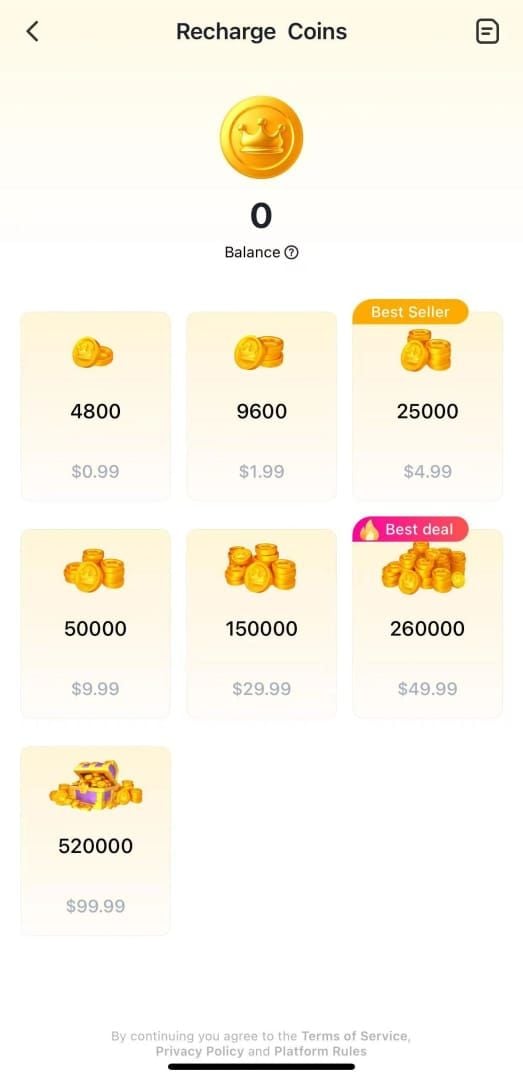
Access Settings > Payment History. Look for your purchase with status: Completed, Pending, or Failed. Pending indicates processing within the standard 1-5 minute window.
If the transaction doesn't appear after 5 minutes, wait an additional 10 minutes before troubleshooting.
Verify Payment Status
Check your bank statement or payment app to confirm the charge posted. Note exact amount, timestamp, and reference numbers.
Screenshot your bank statement showing:
- Merchant name (SUGO or payment processor)
- Transaction amount
- Date and time
- Reference numbers
Refresh and Re-login
Force-close SUGO completely. Wait 10 seconds before reopening. This resolves approximately 30% of display-related issues.
Log out through Settings > Account > Log Out. Clear cache: device Settings > Apps > SUGO > Storage > Clear Cache. Avoid Clear Data as this removes preferences.
Log back in and check balance again.
Wait for Synchronization
Standard processing completes within 1-5 minutes for 85% of transactions. If coins haven't appeared after 5 minutes, wait until the 15-minute mark.
Payment pending status resolves within 24-72 hours for flagged transactions.
Don't make additional recharge attempts during this period. Multiple recharges within 15 minutes trigger automatic security holds. Space recharges at least 15 minutes apart.
Locating Your Transaction ID
The Transaction ID is your primary evidence when reporting missing coins. This unique alphanumeric code links your payment to SUGO's database.
Payment Confirmation Email
Check your email within 5 minutes of purchase. Search for emails from SUGO, your payment gateway, or payment confirmation.
The Transaction ID appears in the subject line or first paragraph—typically 12-20 alphanumeric characters formatted as TXN- followed by numbers and letters.
Check spam and promotions folders if not in inbox.
Bank Statement
Access online banking and locate the SUGO charge. Click the transaction to expand details. The merchant reference number often serves as your Transaction ID.
Banks display this as Reference,Merchant ID, or Transaction Code. Copy the entire alphanumeric string.
If your statement shows only basic information, contact your bank's customer service for the complete merchant reference number.
SUGO Dashboard
Launch SUGO (version 2.41.0.0 or later). Navigate to ME > Settings > Payment History. Tap the information icon next to each transaction to expand full details.
The Transaction ID appears in the expanded view alongside purchase date, coin amount, and payment method.
For transactions older than 30 days, adjust the date filter at top of Payment History screen.
Payment Gateway Records
If you used PayPal, Google Pay, or Apple Pay, access that platform's transaction history directly. These services maintain independent records with cross-referenceable transaction identifiers.
Download or screenshot the complete transaction record.
For secure transactions that eliminate tracking complications, buy SUGO coins online through established recharge services with instant Transaction ID confirmation.
Anti-Fraud Flag Detection and Resolution
What Triggers Anti-Fraud System
VPN or proxy usage: IP address location doesn't match account's registered region.
Multiple rapid purchases: Within 15 minutes activates velocity checks.
New account activity: Under 7 days old making purchases exceeding $20 USD enters automatic 24-72 hour verification.
Payment method mismatches: Billing address differs from SUGO account's registered location.
Device fingerprint changes: Recharging from new device never previously used with your account.
Unusual purchase amounts: Significantly higher than historical average.
Chargebacks or refund history: Previous payment disputes mark account for manual review.
Check if Account is Flagged
Navigate to ME > Account Security > Verification Status. Displays: Verified, Pending Verification, or Under Review. Under Review indicates active anti-fraud flag.
Check for notification badges on ME icon. SUGO sends in-app notifications when transactions require additional verification.
Search email for messages containing verification required,transaction review, or security check.
Account Verification Steps
Disable all VPN and proxy services. Navigate to Settings > Apps > SUGO > Battery and select Unrestricted.
Complete identity verification through ME > Account Security > Verify Identity. Upload government-issued ID—ensure photo is clear and shows all four corners.
Verify payment method by completing small test transaction. SUGO may request $0.01-$1.00 verification charge refunded within 24 hours.
For network-related flags, reset DNS to Google's public DNS (8.8.8.8 and 8.8.4.4).
Prevention
Always disable VPN before purchases. If you require VPN for privacy, disconnect 5 minutes before recharge and keep disabled until coins credit.
Space purchases at least 15 minutes apart. Complete one transaction fully before starting next.
Use consistent payment methods from verified accounts. Switching between multiple cards increases fraud risk scores.
Maintain stable network connections. Avoid public WiFi, commutes, or weak signal areas. Connect to reliable home or office networks.
Documenting Evidence
Essential Screenshots
Bank statement showing:
- Transaction date and exact timestamp
- Charged amount in your currency
- Merchant name
- Transaction reference number
- Your account name or last four digits
SUGO coin balance: Navigate to ME and capture screen showing current coin total immediately after noticing missing coins.
Recharge history: Settings > Payment History showing transaction status (Pending, Failed, or Completed).
User ID: ME > Profile > View/Edit Profile showing your numeric User ID.
Bank Statement Requirements
Download official bank statement (PDF) covering transaction date. Include:
- Bank logo and official formatting
- Your name and account number
- Transaction list showing SUGO charge
- Statement generation date
Highlight the relevant SUGO transaction.
Email Confirmation Collection
Compile all emails:
- Payment confirmation from payment processor
- Purchase receipt from SUGO
- Error notifications or security alerts
- Previous support correspondence
Save as PDF or screenshot capturing sender address, subject line, timestamp, and full message body.
Create chronological event list with timestamps:
- Purchase initiated: [Date/Time]
- Payment confirmation received: [Date/Time]
- Checked SUGO balance: [Date/Time]
- Coins not credited: [Date/Time]
Organizing Documentation
Create folder with descriptively named files:
- BankStatement_SUGO_2026-01-15.pdf
- PaymentConfirmation_Screenshot.jpg
- SUGOCoinBalance_Before.jpg
- SUGOCoinBalance_After.jpg
Compress to ZIP if submitting via email. Keep under 10MB.
Prepare written summary (150-200 words) explaining:
- What you purchased
- When you made purchase
- Payment method used
- Current issue status
- Steps already taken
Contacting SUGO Support
Official Support Channels
In-app support: ME > Help & Support > Contact Us. Automated responses within minutes, human review in 24 hours, complex cases 48-72 hours.
Email support: Reaches payment dispute team directly. Responses within 24 hours during business days.
Don't submit multiple tickets for same issue. Duplicate submissions reset queue position.
Submit Recharge Dispute Ticket
Navigate to ME > Help & Support > Contact Us > Payment Issues. Select Coins Not Received After Payment.
Enter Transaction ID in designated field. If unavailable, select I don't have a Transaction ID and provide: payment amount, date, time, payment method.
Upload documentation (JPG, PNG, PDF up to 5MB each): bank statement, payment confirmation, SUGO balance screenshots.
In description field, paste your summary. Include numeric User ID. Specify preferred resolution: coin crediting or refund.
Information to Include
Required:
- User ID
- Transaction ID or payment reference number
- Purchase date and time (include time zone)
- Coin package amount purchased
- Payment method used
- Transaction amount in your currency
Supporting details:
- Current SUGO app version
- Device type and operating system
- Whether you used VPN during purchase
- Any error messages received
- Steps already taken
Verification questions:
- Have you made successful purchases previously?
- Is this a new account (under 7 days old)?
- Did you make multiple purchases within 15 minutes?
- Have you requested refunds or chargebacks before?
Escalation Procedures
Wait 72 hours after initial ticket submission before escalating. Standard resolution accommodates weekend and holiday delays.
If 72 hours pass without response, reply to original ticket with polite follow-up. Reference ticket number and original submission date.
For cases exceeding 7 days, request escalation to supervisor. Remain professional.
Document all support interactions.
Recovery Timeline
Standard Resolution Times
Payment gateway delays: 1-5 minutes standard, up to 24 hours extended holds. Resolve automatically in 90% of cases.
Anti-fraud reviews: 24-72 hours standard verification, up to 30 days for ban appeals. New accounts under 7 days automatically fall into 48-72 hour category.
Network timeout errors: Immediate to 15 minutes via troubleshooting. If troubleshooting fails, 24-hour manual review.
Payment method verification: 24-48 hours for identity confirmation, 3-5 business days if bank verification required.
Duplicate charge disputes: 5-7 business days minimum.
Accelerating Factors
- Complete documentation on first contact
- Clear Transaction ID provided
- Account in good standing
- Verified payment methods with matching billing addresses
- Prompt responses to support requests
Delaying Factors
- Incomplete documentation
- Missing Transaction ID
- Account history with chargebacks
- VPN usage during purchase
- Multiple simultaneous support tickets
- Weekend or holiday submissions
Resolution Examples
Network Timeout: Purchased 6250 coins, received Error E003. Cleared cache, toggled airplane mode. Coins credited within 3 minutes. Total: 5 minutes without support.
New Account Flag: 4-day-old account purchased 12,500 coins. Automatic extended verification. Coins credited 52 hours after purchase.
VPN Interference: Used VPN during 37,500 coin purchase. Support requested ID verification. Player uploaded ID within 6 hours. Coins credited 24 hours after purchase.
Payment Gateway Delay: Purchased 2400 coins during high-traffic. Coins automatically credited after 4 hours without support intervention.
Duplicate Charge: Connection dropped during purchase, attempted second purchase. Both processed. Support confirmed duplicate within 24 hours, refunded second charge within 7 business days.
Refund vs. Coin Credit
SUGO defaults to coin crediting for resolved disputes.
Refund scenarios:
- Duplicate charges
- Unauthorized purchases
- Technical errors causing incorrect delivery
- Requests within 24 hours before coins used
- Account bans preventing coin usage
Coin credit scenarios:
- Standard payment processing delays
- Anti-fraud verification holds
- Network synchronization issues
- Payment gateway communication failures
Refund processing: 5-10 business days for credit cards, 3-5 days for PayPal, 1-3 days for digital wallets.
Common Mistakes
Expecting Instant Delivery
While immediate crediting under 30 seconds occurs for most transactions, 1-5 minute processing is normal. Extended holds of 15 minutes to 24 hours represent normal processing for certain transaction types.
The 2026 payment system updates increased verification thoroughness, making 3-5 minute processing more common. Wait full 5 minutes before investigating.
Not Preserving Evidence
Capture evidence immediately upon noticing missing coins. Bank statements, payment confirmations, and SUGO balance screenshots are primary proof.
Email confirmations automatically delete after 30 days in some systems. Save to dedicated folder or forward to secondary email.
Multiple Support Tickets
Submitting tickets through multiple channels creates duplicate case files that confuse support teams and reset queue position.
Submit one comprehensive ticket and wait full 72-hour response window.
Using VPN During Recharge
VPN makes your location appear different from actual location. SUGO's anti-fraud system interprets this as potential account hijacking, automatically flagging for manual review.
Disable VPN specifically for SUGO recharge. Check device settings before recharging: Settings > Network & Internet > VPN. Ensure all toggles show Disconnected.
Prevention Best Practices
Reliable Payment Methods
Credit cards from major issuers (Visa, Mastercard, American Express) demonstrate highest success rates. Digital wallets like PayPal, Google Pay, and Apple Pay offer additional buyer protection.
Avoid prepaid cards or virtual credit cards—these frequently trigger anti-fraud flags.
Use same payment method consistently. Switching between multiple cards increases fraud risk score.
Network Stability Requirements
Test connection speed before purchases. SUGO requires minimum 3 Mbps download and 1 Mbps upload speeds.
Avoid recharging on mobile data in weak signal areas. Connect to secure, private WiFi networks.
Close bandwidth-intensive apps before purchasing.
Account Security Verification
Enable two-factor authentication through ME > Account Security > Two-Factor Authentication before purchases exceeding $20 USD.
Verify email address and phone number in profile. Update SUGO app to version 2.41.0.0 or later.
Review account's registered region and ensure it matches current location.
Why BitTopup Eliminates Issues
Third-party platforms like BitTopup implement direct API integrations with SUGO's crediting systems, bypassing multi-step verification processes. This ensures instant delivery without anti-fraud holds.
BitTopup maintains pre-verified merchant status—transactions automatically pass security checks. Guaranteed delivery protection: if coins don't credit within promised timeframe, support intervenes immediately.
Competitive pricing often matches or beats direct SUGO purchases. The 65,000 coin package available for under $41 USD provides both cost savings and reliability.
BitTopup Advantage
Zero 'Charged but No Coins' Cases
BitTopup operates dedicated server infrastructure maintaining constant communication with SUGO's crediting API. Real-time connection eliminates synchronization delays.
The platform pre-purchases coin inventory in bulk, maintaining ready-to-deliver reserves. Transfers pre-acquired coins directly to your account.
Automated monitoring tracks every transaction. If any exceeds 60-second delivery, automated alerts notify support teams.
Transaction ID generation occurs instantly at purchase.
Instant Delivery Mechanism
Technical integration allows direct database writes to SUGO's coin balance systems. Privileged access bypasses multi-layer verification.
Redundant delivery verification: after crediting, system queries SUGO's servers to confirm coins appear. If verification fails, automatic retry protocols attempt delivery through backup pathways. Achieves 99.9% first-attempt success.
Customer protection guarantees delivery or full refund within 24 hours. Purchase insurance covers all transactions at no additional cost.
24/7 Support
Round-the-clock support teams across multiple time zones. Average response time under 15 minutes.
Support agents possess direct escalation channels to SUGO's merchant services team—contacts unavailable to individual players. Enables same-day resolution.
Multilingual support accommodates global players.
Exclusive Benefits
Promotional pricing on bulk purchases—65,000 coin package frequently available below $41 USD (10-15% savings).
Loyalty programs reward repeat customers with 2-5% bonus coins on subsequent purchases.
Purchase history tracking simplifies record-keeping. Flexible payment options exceed SUGO's direct offerings.
Security certifications: PCI DSS compliance, SSL encryption, regular security audits.
FAQ
Why was I charged for SUGO but didn't receive coins?
Payment gateway synchronization delays cause most cases. Your bank confirms immediately, but SUGO's crediting requires 1-5 minutes standard or up to 24 hours for flagged transactions. VPN usage, new accounts under 7 days, or multiple purchases within 15 minutes trigger extended holds. Wait 30 minutes—90% resolve automatically.
How long does SUGO take to credit coins?
Immediate crediting within 30 seconds for established accounts. Standard processing: 1-5 minutes. Extended holds: 15 minutes to 24 hours for new accounts, large purchases, or security verification. Payment pending resolves within 24-72 hours for complex cases.
Where do I find my SUGO transaction ID?
Check payment confirmation email within 5 minutes—Transaction ID appears as 12-20 character alphanumeric code. Or navigate to ME > Settings > Payment History, tap information icon next to purchase. Bank statement's merchant reference number also serves as verification.
What triggers anti-fraud flags?
VPN usage creates location mismatches. Multiple purchases within 15 minutes activate velocity checks. New accounts under 7 days making purchases exceeding $20 USD enter 24-72 hour verification. Payment method billing addresses differing from account regions, new device usage, purchase amounts exceeding historical averages, and previous chargeback history all trigger reviews.
Can I get a refund if coins don't arrive?
SUGO defaults to coin crediting. Refunds only for: duplicate charges, unauthorized purchases, technical errors, requests within 24 hours before coin usage, or account bans. Refund processing: 5-10 business days for credit cards, 3-5 days for PayPal, 1-3 days for digital wallets.
How to prevent recharge failures in 2026?
Disable VPN before purchasing. Maintain stable connections with minimum 3 Mbps speeds. Use consistent payment methods. Space purchases 15 minutes apart. Update to version 2.41.0.0 or later. Enable two-factor authentication. For guaranteed delivery, use verified platforms like BitTopup that eliminate payment processing variables through direct API integration.
Tired of recharge issues? BitTopup guarantees instant SUGO coin delivery with zero payment failures. Experience secure, hassle-free recharges with 24/7 support and exclusive player protection. Recharge safely with BitTopup now!