How SUGO Processes Payments
Three distinct phases:
- Payment method processes charge and generates confirmation
- Gateway transmits confirmation to SUGO servers with your User ID
- SUGO matches payment to account and credits coins
Payment gateway delays cause 60% of crediting issues, system errors 25%, network instability 15%. Each phase introduces delay points, especially during peak hours.
Normal Delivery Timeframes
Standard processing completes within 1-5 minutes for 85% of transactions. Established accounts with verified payment methods receive coins within 30 seconds.
Extended holds (15 minutes to 24 hours) occur when:
- Multiple recharges within 15 minutes
- New accounts (under 7 days) purchasing over $20 USD
- Anti-fraud measures activate
The November 2025 version 2.41.0.0 update limits new accounts to 6250 coin packages during first 30 days.
UID's Critical Role
Your User ID is the delivery address for purchased coins. Without the correct numeric string, coins can't reach your account. Entering wrong UID sends coins to whoever owns that ID—irreversible.
UID verification is the most important step before purchase. Unlike usernames, your User ID is permanent and server-specific.
Step 1: Verify Your SUGO UID Before Escalating
Confirm correct User ID entry before contacting support. This 30-second check prevents 40% of false escalations.
Locate Your Correct UID

- Log into SUGO
- Tap ME icon (bottom-right)
- Tap View/Edit Profile
- Scroll down to view User ID
Your coin balance displays at top of ME screen. This numeric User ID appears below profile info and stays consistent.
Common UID Entry Mistakes
Most frequent errors:
- Copying usernames instead of User IDs (usernames have letters/special characters, UIDs are numbers only)
- Adding spaces, hyphens, or formatting to numeric string
- Using UIDs from secondary or friend accounts
Screenshot your User ID immediately before purchases to ensure accuracy.
Double-Check UID Against Receipt
Compare your User ID digit-by-digit against the UID entered during purchase. Payment receipts display destination User ID alongside transaction details. If numbers don't match exactly, coins went to a different account.
Buy SUGO coins online through BitTopup for clear UID confirmation screens before finalizing purchases.
Step 2: Confirm Payment Status and Transaction Completion
Your bank may show completed charge while SUGO still processes crediting.
Check Bank/Payment Method
Access transaction history to confirm charge posted successfully. Look for exact amount matching your coin package. Pending charges differ from completed transactions—pending means gateway hasn't finalized processing.
Confirmation times:
- Credit cards: 1-3 minutes
- Digital wallets: instant
- PayPal: shows Completed once funds transfer
Failed or declined payments mean no coins arrive—SUGO never received authorization.
Payment Confirmation vs Coin Delivery
Payment confirmation = financial institution approved charge. Coin delivery = SUGO credited your balance. These are separate events with different timelines.
Transaction IDs (TXN- + 12-20 alphanumeric characters) track purchases through SUGO's system and are essential for support escalation.
Access Top-Up Transaction History
- Tap ME icon
- Select Settings
- Choose Payment History
Status indicators: Pending, Completed, Failed. Pending typically lasts 1-5 minutes before transitioning to Completed. Use date filter for transactions older than 30 days.
Identify Transaction Status
Failed transactions: Display error codes
- Error E001: VPN detection blocking purchase
- Error E003: Network timeout during processing
Pending transactions: Remain in processing, typically resolve within 24-72 hours
Completed transactions:Success status but missing coins indicates delivery issues requiring escalation
Step 3: Wait Appropriately Based on Delivery Timeframes
Different account types and purchase patterns trigger varying wait periods.
Standard Delivery Windows
Baseline: 1-5 minutes from payment confirmation to coin crediting. If coins don't appear within 5 minutes, wait additional 10 minutes. This 15-minute window accommodates temporary server delays.
Force-close SUGO app, wait 10 seconds, reopen to refresh connection and display delayed coins.
Account Age and Purchase Amount Impact
New accounts face mandatory 48-72 hour processing for anti-fraud reviews, regardless of payment method or package size. Established accounts bypass these holds.
Verification charges ($0.01-$1.00) may appear on new accounts, refunding automatically within 24 hours after identity confirmation.
When Delays Are Normal vs Problems
Wait 72 hours before escalating if:
- You're a new account holder
- You made multiple purchases within 15 minutes
Space recharges at least 15 minutes apart to avoid fraud detection.
Escalate immediately if:
- Transaction shows Completed for over 24 hours
- No coins credited
- You're an established account holder
Step 4: Perform In-Game Verification Checks
Technical issues sometimes prevent balance updates despite successful crediting. These steps resolve 80% of display problems.
Refresh SUGO Coin Balance
Toggle airplane mode for 10 seconds, then disable. This network reset resolves 80% of network-related display issues. After reconnecting, check coin balance at top of ME screen.
Clear SUGO app cache: Settings > Apps > SUGO > Storage > Clear Cache. Cache corruption prevents balance updates. This doesn't delete account data or login info.
Check Transaction Records Within SUGO
In-app Payment History provides most accurate record. Compare against bank statement to identify discrepancies. If purchase appears in bank records but not SUGO's Payment History, transaction failed to reach SUGO servers.
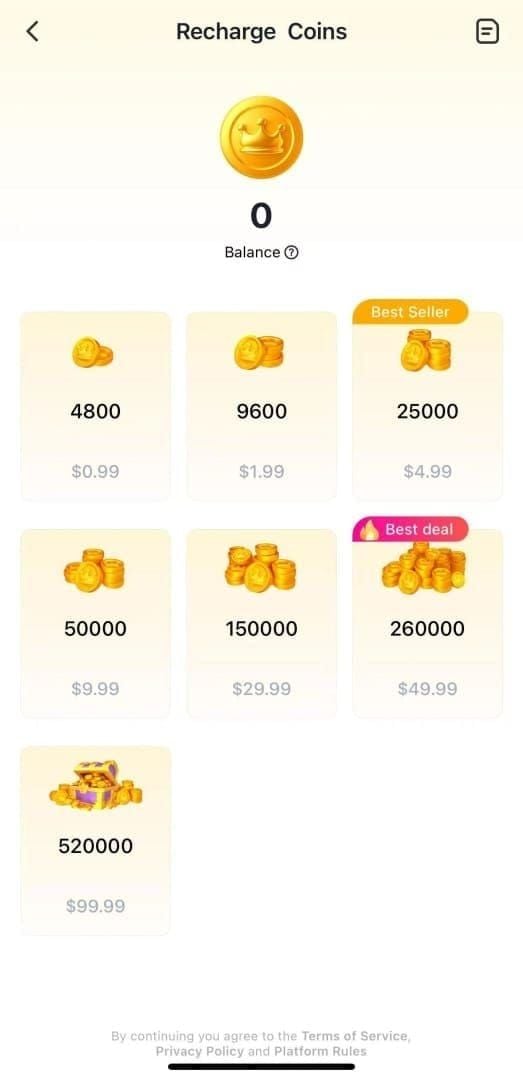
Coin packages available: 1200, 2400, 6250, 12500, 37500, 65000, 130000 Coins. Custom amounts indicate third-party seller involvement.
Verify Account Binding and Login Status
Confirm you're logged into correct account by checking User ID against purchase receipt. Players with multiple accounts sometimes log into secondary profiles.
Enable two-factor authentication through ME > Account Security to prevent unauthorized access affecting coin delivery.
When to Escalate: Recognizing Legitimate Delivery Issues
Clear Signs Coins Are Genuinely Missing
Escalate when ALL exist simultaneously:
- Payment shows completed in bank records
- 72 hours passed since purchase
- Transaction appears in Payment History as Completed
- Verified correct User ID
- Coin balance hasn't increased
If transaction doesn't appear in SUGO's Payment History despite bank confirmation, payment gateway failed to transmit purchase data. Requires immediate escalation with both payment provider and SUGO support.
The 72-Hour Rule
Wait 72 hours before contacting support for new accounts or purchases flagged for verification. Anti-fraud reviews require this full window. Premature escalation creates duplicate tickets that slow resolution.
For established accounts with verified payment methods, escalate after 24 hours if coins remain missing.
Red Flags: System Errors vs User Errors
System errors:
- Multiple users reporting identical issues simultaneously
- Error codes during purchase
- Transaction IDs failing to generate
User errors:
- Incorrect UID entry
- Insufficient payment method funds
- VPN interference blocking transactions
Check community forums for widespread delivery issues before escalating.
How to Escalate Missing SUGO Coins to Support
Essential Documentation
Collect before contacting support:
- Screenshot of User ID from ME > View/Edit Profile
- Payment receipt (amount, date, confirmation number)
- Screenshot of Payment History showing transaction status
- Transaction ID (TXN- prefix + 12-20 characters)
- Screenshot of current coin balance
- Timeline documenting purchase and when you noticed issue
Upload JPG, PNG, or PDF format, max 5MB file size.
Contact SUGO Support
Submit through: ME > Help & Support > Contact Us > Payment Issues > Coins Not Received After Payment. This routes to payment specialist team.
Support responds within 24 hours on business days. Provide all documentation in initial message. Include User ID, Transaction ID, purchase amount, purchase date/time, and payment method.
Expected Response Times
Standard tickets receive initial responses within 24 hours. Complex cases involving payment gateway investigations may require 5-7 business days.
Refund timelines:
- Credit cards: 5-7 business days
- PayPal: 3-5 days
- Digital wallets: 1-3 days
Don't submit multiple tickets for same issue—creates separate case numbers that fragment information and delay resolution.
Avoiding Duplicate Charges: Critical Prevention Steps
Why Multiple Attempts Create Duplicate Charges
Each Purchase or Buy Now click initiates new transaction. If first purchase processes slowly, clicking again doesn't accelerate delivery—it creates second charge. Payment systems process these as separate, legitimate transactions.
The 15-minute spacing rule prevents this scenario.
Safely Check Status Without Resubmitting
Use Payment History to monitor transaction status. Refresh by pulling down to reload server data. Transaction status updates automatically as processing progresses.
Check coin balance through ME screen rather than attempting test purchases.
When NOT to Click 'Buy Again'
Never retry while previous transaction shows Pending status. Pending indicates active processing that will complete given time. Clicking Buy Again guarantees duplicate charges.
If first purchase failed with error code, resolve underlying issue before retrying:
- Error E001: Disable VPN services
- Error E003: Improve network stability
If You Made Duplicate Purchases
Contact support immediately with both Transaction IDs and request refund for unintended purchase. Specify which transaction to refund and which to process.
Duplicate charge refund timelines:
- Credit cards: 5-10 business days
- PayPal: 3-5 days
- Digital wallets: 1-3 days
Refund processes to original payment method automatically once approved.
Expert Tips: Preventing Future SUGO Top-Up Issues
Pre-Purchase UID Verification Checklist
Complete before every purchase:
- Screenshot User ID from ME > View/Edit Profile
- Compare screenshot against UID entry field character-by-character
- Verify you're logged into intended account
- Confirm current coin balance to detect pending credits
- Check Payment History for recent transactions to avoid 15-minute spacing violations
This 60-second routine prevents majority of delivery failures.
Screenshot Everything
Capture at critical moments:
- Before purchase (showing UID)
- During purchase (showing confirmation screen)
- After purchase (showing payment receipt)
Enable timestamp display on screenshots to document exactly when each action occurred.
Optimal Top-Up Times
Purchase during off-peak hours when server load is minimal. Early morning hours typically experience faster processing than evening peak times.
Avoid purchasing immediately after major SUGO updates or events that drive massive concurrent activity.
Network Optimization
Disable VPN and proxy services before purchases—these trigger Error E001 and automatic blocks. Set SUGO's battery usage to Unrestricted in Settings > Apps > SUGO to prevent background process termination.
Ensure minimum 3 Mbps download and 1 Mbps upload speeds. Network instability causes Error E003 timeouts. Reset DNS to 8.8.8.8 and 8.8.4.4 for improved stability.
Update to SUGO version 2.41.0.0 or later for latest payment processing improvements.
Account Security Measures
Complete identity verification through ME > Account Security by uploading valid ID documents. Verified accounts bypass many anti-fraud holds. Enable two-factor authentication to prevent unauthorized access triggering security reviews.
Note: Taiwan accounts currently lack top-up support due to regional restrictions.
FAQ: SUGO Coin Delivery Issues
How long does SUGO coin delivery take after top-up?
Standard delivery completes within 1-5 minutes for 85% of transactions. Established accounts receive coins within 30 seconds, while new accounts may experience 24-72 hour delays for anti-fraud verification. Extended holds of 15 minutes to 24 hours occur when multiple purchases happen within 15 minutes or new accounts exceed $20 USD.
Where do I find my SUGO UID for top-up?
Log into SUGO, tap ME icon (bottom-right), select View/Edit Profile, scroll down to view User ID. This numeric string without spaces appears below profile info and remains permanent. Always verify this UID matches what you enter during purchase.
What should I do if SUGO coins don't arrive after payment?
Wait 15 minutes and refresh app by toggling airplane mode for 10 seconds. Check Payment History through ME > Settings > Payment History to confirm transaction status. If 72 hours pass with Completed status but no coins, escalate through ME > Help & Support > Contact Us > Payment Issues with screenshots of UID, payment receipt, and transaction history.
Can I get a refund for SUGO coins not credited?
Yes, if coins never arrive after proper escalation and investigation. Refund timelines: 5-10 business days for credit cards, 3-5 days for PayPal, 1-3 days for digital wallets. Submit refund requests only after waiting 72 hours and confirming with support that delivery failed permanently.
Why are my SUGO coins delayed after top-up?
New accounts under 7 days face automatic 24-72 hour verification holds for purchases exceeding $20 USD. Multiple purchases within 15 minutes trigger fraud detection delays. Payment gateway issues cause 60% of delays, system errors 25%, network instability 15%. Most delays resolve automatically within standard processing windows.
How can I avoid duplicate charges when recharging SUGO?
Space purchases at least 15 minutes apart and never click Buy Again while previous transactions show Pending status. Monitor transaction status through Payment History rather than attempting new purchases. If you accidentally create duplicate charges, contact support immediately with both Transaction IDs to request refund of unintended purchase.
Avoid top-up headaches entirely! Purchase SUGO Coins through BitTopup for guaranteed fast delivery, transparent UID verification, and 24/7 support. Get your coins credited instantly—start your secure top-up now at BitTopup!