How No-Login Recharge Works
No-login systems let you purchase SUGO coins by entering your numeric User ID on external platforms without logging in. This convenience increases risk—manual ID entry creates typo opportunities that send coins to wrong accounts permanently.
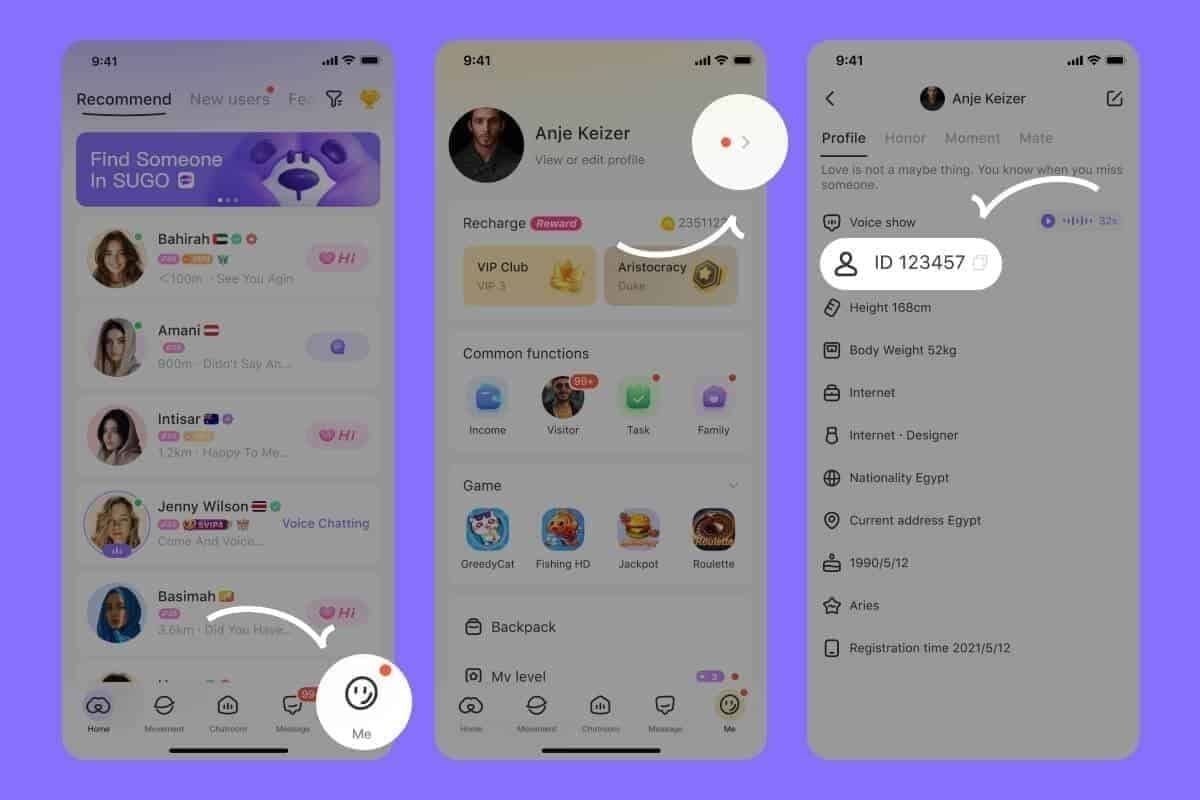
To find your User ID:
- Tap ME icon (bottom-right)
- Select View/Edit Profile
- Scroll to numeric identifier
This ID must be entered exactly on payment platforms, with no verification step before purchase completion.
Common Delivery Failure Causes
Incorrect User ID entry represents the most frequent cause—players confuse display names with numeric identifiers. Payment platforms process transactions to whatever ID you enter, with no reversal mechanism.
New account holds: Accounts under 7 days old exceeding $20 USD face automatic 24-72 hour security holds (implemented version 2.41.0.0, November 24, 2025). This fraud prevention reduced fraudulent transactions by 40% but delays legitimate purchases.
Velocity checks: Multiple recharges within 15 minutes trigger temporary suspension pending manual review. Space recharges at least 15 minutes apart.
Expected Delivery Times
- Established accounts: 30 seconds
- New accounts: 1-5 minutes standard
- First-time purchasers: Check Settings > Payment History during initial window
Network issues during synchronization extend delivery times. Toggle airplane mode for 10 seconds to resolve 80% of network-related delays by forcing fresh server connections.
Immediate Verification Checks
Before filing disputes, complete systematic verification to determine if coins were delivered or processing remains incomplete.
Step 1: Verify Account ID Accuracy
Log into SUGO, tap ME icon, select View/Edit Profile, and locate your numeric User ID. Compare this exact number against the ID entered during top-up.
Even single-digit discrepancies send coins to completely different accounts with no recovery option.
Step 2: Check Transaction History
Navigate to Settings > Apps > SUGO > Storage > Clear Cache to resolve 95% of connection issues preventing transaction history display. Force-close SUGO, wait 10 seconds, then reopen.
Access Settings > Payment History to view completed transactions. Adjust date filter for purchases older than 30 days.
Step 3: Confirm Payment Completion
Review payment confirmation email or platform transaction history to verify payment actually processed. Some players mistake authorization holds for completed transactions.
Transaction IDs follow format: TXN- + 12-20 alphanumeric characters. This proves payment completion and serves as essential dispute documentation.
Step 4: Wait for Server Synchronization
New accounts: Wait 72 hours before escalating disputes due to security holds. Premature filing complicates resolution.
Set Settings > Apps > SUGO > Battery to Unrestricted mode to prevent background process termination that interrupts synchronization.
Correctly Identify Your SUGO Account
Accurate account identification prevents 90% of delivery failures. Distinguish between display names, email addresses, and the numeric User ID—the sole valid recharge identifier.
Locating Your User ID
- Tap ME icon (bottom-right)
- Select View/Edit Profile
- Scroll to numeric User ID field (8-12 digits)
Screenshot this exact number before navigating to payment platforms. Visual reference eliminates transcription errors.

Screenshot Best Practices
Capture screenshots showing complete User ID with SUGO interface visible. Include date/time in device status bar.
Upload JPG, PNG, or PDF formats up to 5MB when submitting support tickets.
Common Entry Mistakes
Display name vs User ID: Players confuse customizable usernames with permanent numeric identifiers. Display names cannot process recharges.
Pro tip: Copy-paste User IDs directly from SUGO app to eliminate manual entry errors. Some platforms disable paste functionality—verify character-by-character when manual typing is necessary.
Complete Dispute Process
When verification confirms coins should have arrived but remain absent, systematic dispute filing through both payment platform and SUGO support maximizes resolution speed.
Required Documentation
- Transaction ID: TXN- + 12-20 alphanumeric characters from confirmation emails
- User ID screenshot: From ME > View/Edit Profile
- Current coin balance: Screenshot from ME icon balance display
- Payment receipt: Amount charged, payment method, completion timestamp
Filing Through Payment Platform
Contact support within 72 hours for optimal response priority. Describe issue as Coins Not Received After Payment rather than requesting refunds initially.
Include all documentation in initial ticket to prevent delays. Support responses typically arrive within 24 hours on business days.
Contacting SUGO Support
Navigate to ME > Help & Support > Contact Us > Payment Issues > Coins Not Received After Payment. This routes your ticket to specialized payment support.
Provide identical documentation submitted to payment platform. Request manual account crediting if payment platform confirms successful processing.
What to Include for Fast Resolution
State exact date/time of purchase, coin package amount (1200, 2400, 6250, 12500, 37500, 65000, or 130000), and payment method. Specify if this was your first purchase or if you have successful transaction history.
Mention error messages encountered:
- Error E001: VPN Detected
- Error E003: Network Timeout
For secure transactions without complications, BitTopup's verified delivery system eliminates delivery issues.
Troubleshooting Technical Issues
Technical configuration problems frequently prevent successful delivery even when payments process correctly.
Resolving VPN and Network Conflicts
Disable all VPN and proxy services before recharging—Error E001 (VPN Detected) blocks transactions for security. SUGO flags VPN usage as high-risk.
Reset device DNS settings to 8.8.8.8 (primary) and 8.8.4.4 (secondary) to resolve Error E003 (Network Timeout).
Ensuring Adequate Network Speed
SUGO requires minimum 3 Mbps download and 1 Mbps upload speeds. Test connection before purchases, particularly on mobile data.
Remain connected to stable networks and avoid switching between Wi-Fi and mobile data immediately after completing purchases.
Updating SUGO Version
Update to version 2.41.0.0 or later for improved payment processing and reduced error rates. Older versions lack compatibility with current payment gateway protocols.
Check app store for updates before making purchases.
New Account Restrictions
SUGO implements aggressive fraud prevention for new accounts, creating legitimate delivery delays players often mistake for failed transactions.
First 30 Days Limitations
New accounts face restrictions limiting initial purchases to 6250 coin packages during first 30 days. Larger packages trigger automatic rejection or extended security holds.
This protects against stolen payment method abuse. Established accounts face no package size restrictions.
Identity Verification
Complete verification through ME > Account Security by uploading government-issued ID. Includes $0.01-$1.00 authorization charge (automatically refunded within 24 hours).
Verified accounts bypass most security holds and receive coins within 30 seconds even on first purchases.
Two-Factor Authentication
Activate through ME > Account Security to demonstrate security awareness. Payment systems prioritize delivery to accounts with enhanced security features.
Also protects against unauthorized purchases if credentials become compromised.
Refund Eligibility and Timelines
When delivery proves impossible due to platform errors, refunds become appropriate resolution.
When Refunds Are Granted
Payment platforms issue refunds when they cannot prove successful delivery to specified account. If you entered incorrect User ID and coins were delivered to that wrong account, refunds are typically denied.
Technical failures on platform's side (double-charging, processing errors) qualify for immediate refunds.
Processing Times by Payment Method
- Credit card: 5-10 business days
- PayPal: 3-5 days
- Digital wallet: 1-3 days
Alternative: Coin Redelivery
Platforms may offer coin redelivery to correct account as alternative to refunds. Typically completes within 24-48 hours of approval.
Works only when original recipient account hasn't spent coins. Once consumed, refunds represent only resolution path.
Prevention Strategies
Implementing systematic verification eliminates 95% of delivery issues before they occur.
Pre-Purchase Checklist
- Screenshot User ID from ME > View/Edit Profile before each purchase
- Reference screenshot when entering account information
- Verify coin package amount matches intended purchase
- Check for similar package options with different prices
Maintaining Transaction Records
- Save payment confirmation emails in dedicated folder
- Screenshot successful payment completion screens showing Transaction IDs
- Document coin balance before/after each purchase
Optimal Purchase Timing
- Avoid recharging during announced server maintenance
- Check SUGO's official announcements before purchases
- Space multiple purchases at least 15 minutes apart
- Single large purchases create fewer security complications than multiple small transactions
Why BitTopup Provides Safer Recharges
Third-party platforms vary dramatically in reliability and security. BitTopup distinguishes itself through verified account matching, instant delivery guarantees, and comprehensive dispute support.
Verified Account ID System
BitTopup implements account verification before processing payments, confirming entered User IDs correspond to active SUGO accounts. Pre-purchase validation prevents the most common delivery failure cause.
Platform displays account details after ID entry, allowing confirmation before payment authorization.
Instant Delivery Guarantee
BitTopup's infrastructure maintains direct connections to SUGO's payment systems, enabling 30-second delivery for all transactions regardless of account age.
Comprehensive customer protection guarantees coin delivery or full refunds within 24 hours. BitTopup proactively monitors all transactions and initiates resolution for delays exceeding 5 minutes.
Transparent Transaction Tracking
Real-time tracking displays payment status, processing stage, and estimated delivery time. Players access complete transaction histories with detailed status updates.
Dashboard includes direct links to customer support for each transaction.
24/7 Customer Support
Round-the-clock support through live chat, email, and ticket systems. Support representatives specialize in SUGO payment issues.
Average response times under 15 minutes for urgent delivery issues ensure quick access to purchased coins.
Risks of No-Login Recharge Methods
No-login convenience creates security vulnerabilities and error opportunities that login-based methods eliminate.
Account Security Vulnerabilities
No-login systems require only User ID to send coins, meaning anyone obtaining this number can make purchases to your account. Disputing unauthorized purchases becomes difficult when platforms show successful delivery.
Higher Error Rates
Manual User ID entry creates transcription error opportunities that don't exist with login-based systems. Even careful players make typos on mobile devices with small keyboards.
Payment platforms process transactions exactly as entered with no verification. This creates permanent coin loss where refunds are denied because platform successfully delivered to specified (incorrect) account.
Limited Dispute Support
SUGO's official support provides limited assistance for third-party recharge issues, as they cannot verify transaction details from external platforms. Players must coordinate between platforms and SUGO support, creating extended resolution timelines.
FAQ
How long should I wait before filing a dispute?
Wait 72 hours for new accounts under 7 days old due to security holds. Established accounts should wait 1-5 minutes, then file disputes if coins don't arrive within 24 hours. Check Payment History and verify User ID accuracy first.
What if I recharged the wrong account?
Coins sent to incorrect accounts cannot be transferred or refunded once delivered. Contact SUGO support through ME > Help & Support immediately, but recovery is unlikely. Prevention through screenshot verification is essential.
Can I get a refund if coins never arrive?
Refunds are granted when platforms cannot prove successful delivery due to technical failures. Credit card refunds take 5-10 business days, PayPal 3-5 days, digital wallet 1-3 days. Refunds are denied if you entered incorrect User ID and coins were delivered to that wrong account.
How do I verify my account ID before recharging?
Tap ME icon, select View/Edit Profile, scroll to numeric User ID. Screenshot this exact number and reference it when entering account information. Never use display name or email address.
Why does payment show successful but coins are missing?
Payment success indicates your payment processed, but doesn't confirm coin delivery. Check Settings > Payment History after clearing app cache. New accounts under 7 days exceeding $20 face 24-72 hour security holds. Verify correct User ID entry.
What's the safest way to buy SUGO coins?
Use verified platforms like BitTopup that implement account verification before processing. Enable two-factor authentication through ME > Account Security and complete identity verification. Screenshot User ID before purchases, space recharges 15 minutes apart, and maintain stable network connections with minimum 3 Mbps download speed.
Tired of recharge headaches? Get your SUGO coins instantly with BitTopup's secure, verified delivery system. Zero delivery failures, 24/7 support, and instant account crediting. Top up safely now at BitTopup!