


SUGO Ghost Rooms Explained: v2.41 Fixes & Queue Guide
The November 24, 2025 v2.41.0.0 update fixed critical SUGO ghost room formation and matchmaking failures caused by server glitches. Ghost rooms form when rooms drop below 50+ daily active users or 70% verified thresholds after 14-90 days of inactivity, triggering XP decay up to -30 daily. Post-December queues still fail when players don't meet <100ms ping, 1Mbps upload, or <5% packet loss requirements. Clearing cache and updating to v2.41.0.0 resolves 95% of persistent queue issues.


The Ghost Room Phenomenon
Ghost rooms are lobby instances appearing active in matchmaking but lacking functional server connections. They form when rooms experience sustained inactivity combined with declining engagement metrics.
Formation timeline varies by room maturity:
- New rooms: 14-21 days inactivity
- Developing rooms: 30-45 days
- Established rooms: 60-90 days
When rooms drop below 50+ daily active users AND verified ratios fall under 70%, matchmaking deprioritization begins. This creates cascading effects where declining engagement accelerates ghost room formation.
How Ghost Rooms Differ from Normal Delays
Standard queue delays stem from player distribution across skill brackets and regions. Peak hours (6-8 PM) see doubled join rates; Saturday 2-5 PM delivers 40% faster matching. Off-peak maintains under 30-second match times.
Ghost rooms produce indefinite queue states regardless of time or population. The technical difference: normal queues establish connection protocols within milliseconds; ghost rooms fail initial handshake, leaving clients in perpetual searching states.
Network monitoring reveals the truth. Functional queues generate consistent packet exchanges every 1-2 seconds. Ghost rooms show initial outbound traffic, then minimal activity as non-existent servers fail to respond.
Visual Indicators You're in a Ghost Room
Queue timer behavior: Timer exceeding 3 minutes without lobby updates or wait time adjustments signals ghost room. Functional queues display dynamic player counts every 15-30 seconds.
Lobby UI anomalies: Outdated room info—inactive host names, frozen participant lists, expired event schedules. These stale data points confirm the lobby hasn't received server updates.
Error messages: v2.41.0.0 (Android 212.4 MB, iOS 529.3 MB) introduced improved error reporting with specific codes vs. generic connection failures.
Impact on Player Experience
Ghost rooms damage ranked progression through wasted time and MMR disruptions. Abandoning ghost queues after extended waits logs as queue abandonments. 3+ abandonments increase subsequent queue times by 25%; 5 abandonments trigger 60-minute cooldowns.
XP decay rates:
- 45-49 daily users: -1 to -5 XP daily
- 30-44 users: -5 to -15 XP daily
- Below 30 users: -15 to -30 XP daily
Over 30 days, this translates to 600-900 XP losses, causing 2-4 tier level reductions.
v2.41.0.0 Update: What the Patch Fixed
Official Patch Notes Breakdown
The November 24, 2025 update resolved three critical failures:
- Server-side logic: Corrected failure to remove inactive lobby instances from queue pools
- Connection timeout handling: Implemented 45-second hard timeouts with automatic cancellation and error reporting
- Verification enforcement: Blocks unverified accounts from priority matchmaking; enforces mobile-only connections, blocking VPN/emulator access
Server Architecture Changes (December 2025)
Regional load balancing: Distributed queue processing across Asia, EU, and NA clusters, reducing cross-region latency.
Lifecycle management: Hourly audits of active lobbies checking player activity, verification ratios, and connection health. Failed lobbies receive immediate deprecation—reduced ghost room encounters by 60-70%.
72-hour auto-room threshold: Players not engaging with assigned rooms within 72 hours face automatic removal and reassignment. AI icebreaker features prevent 20% verified ratio drops.
Timeout Threshold Adjustments
Pre-v2.41.0.0: 180-second timeouts Post-v2.41.0.0: 45 seconds for initial handshakes, 90 seconds for lobby joins
Progressive scaling:
- <100ms ping, 1Mbps upload, <5% packet loss: 45-second timeouts
- 100-150ms ping, 0.8-1Mbps upload: 60-second timeouts
- Below minimums: immediate rejection with network diagnostics
Three-tier retry logic: automatic server region failover before error messages.
Success Rate Improvements
Queue success rates:
- October 2025 baseline: ~50%
- Post-v2.41.0.0: 95% (for players meeting requirements)
Retention gains:
- Day 1: 80% (vs. 65% October)
- Day 7: 60% (vs. 48%)
- Day 30: 40% (vs. 32%)
Regional performance:
- Asia: 97% off-peak, 89% peak
- EU: 93-95% consistent
- NA: 98% early morning, 85% weekend prime
Why Queues Still Fail After v2.41.0.0
Unresolved Server Bottlenecks
When regional servers exceed 85% capacity, matchmaking queues requests instead of real-time processing. Auto-Room Beta (December 2025) introduced additional server load through automated room creation. Database synchronization delays of 5-15 seconds cause queue failures if players attempt matchmaking before updates complete.
Regional Server Disparities
Asia: Highest volumes but inconsistent infrastructure. Southeast Asia reports 15-20% higher ghost room rates than East Asia.
EU: Mature infrastructure, lowest ghost room rates, most consistent queue times. Cross-border matchmaking introduces latency issues.
NA: Highest performance variance. West Coast enjoys near-perfect queues; East Coast reports persistent evening peak issues. Infrastructure optimized for Pacific time zones.
Client-Side Network Issues
Many failures stem from not meeting strict requirements:
- <100ms ping excludes satellite internet, congested mobile networks
- 1Mbps upload challenging for asymmetric residential broadband
- <5% packet loss difficult for mobile data users (tower handoffs, interference, throttling)
VPN usage remains significant failure source despite v2.41.0.0 blocking.
Peak Hour Congestion
6-8 PM peak window creates queue overflow when requests arrive faster than processing capacity. Mini-game participation (1200 coin entry, 6250-130000 coin prizes) compounds congestion—thousands simultaneously return to matchmaking after events conclude.
Party queues amplify congestion. System must match entire groups simultaneously, requiring compatible lobbies with sufficient slots. Party queue times: 2-3x solo queue durations during peaks.
How to Detect a Ghost Room
Queue Timer Patterns
Monitor first 90 seconds. Functional queues display position/wait time updates within this window. If timer reaches 2 minutes without UI changes, you're likely in ghost room.
Expected wait times:
- Off-peak: <30 seconds
- Evening peak: 60-90 seconds
- Weekend prime: 90-120 seconds
Exceeding by 100% = 70% ghost room probability Exceeding by 200% = 90% ghost room probability
Watch for timer resets or jumps—indicate server-client desynchronization.
Lobby UI Anomalies
Check room info for staleness: inactive hosts, expired event schedules, frozen participant lists. These confirm you're viewing cached data from last functional session.
Error message specificity:
- Lobby instance unavailable,room deprecated,matchmaking service timeout = ghost room
- Connection failed,network error = client-side network problems
Network Activity Monitoring
Functional matchmaking generates consistent bidirectional traffic—small packets every 1-2 seconds. Ghost rooms show initial outbound traffic, then minimal activity.
Ping test while queuing: If you maintain <100ms ping to server but queue fails, issue is ghost room assignment, not network.
Monitor upload bandwidth: Should see consistent outbound traffic during active queuing. Near-zero utilization after initial request = ghost room.
When to Restart vs. Wait
2-minute rule: No progress within 2 minutes = cancel and restart.
Peak hours (6-8 PM weekdays, Saturday 2-5 PM): Extend tolerance to 3 minutes.
After 3 failed attempts: Switch from restarting to troubleshooting—indicates systematic issues requiring comprehensive diagnostics.
7 Proven Troubleshooting Steps
Step 1: Immediate Queue Cancellation
Cancel immediately when identifying ghost room symptoms. Wait 5 seconds for confirmation. After cancellation, wait 15-20 seconds before re-queuing—allows server-side cleanup.
Party coordination: All members cancel simultaneously to maintain party integrity.
Step 2: Client Restart vs. Full Relaunch
First failure: Soft restart (return to main menu, re-enter matchmaking)—resolves ~40% of cases in 10-15 seconds.
Two consecutive failures: Full app closure (force-close, relaunch)—resolves additional 35%.
Still failing: Device restart (full shutdown, wait 10 seconds, power on)—resolves additional 20%.
Step 3: Network Diagnostics
Test against requirements: <100ms ping, >1Mbps upload, <5% packet loss. Test to your regional server specifically.
If ping >100ms: Determine if SUGO-specific or general internet issue.
If packet loss >5%: Close background apps, pause downloads, disable automatic updates.
Step 4: Server Region Optimization
Verify assigned region matches physical location. Incorrect assignments cause automatic ping failures.
For players near regional boundaries: Experiment with manual server selection.
Monitor regional server status through community channels—switch to secondary region during outages.
Step 5: Party Disbanding Strategy
When party queues fail but solo succeeds: One member likely fails network requirements. Each member runs individual diagnostics.
Party size impact:
- 2-player parties: 40% faster than 4-player during peaks
- Smaller groups = more lobby options
Party leader selection matters: System uses leader's region and network as primary criteria. Transfer leadership to member with strongest connection.
Step 6: Cache Clearing

Android: Settings > Apps > SUGO > Storage > Clear Cache (resolves ~15% of failures)
If cache clearing fails: Settings > Apps > SUGO > Storage > Clear Data (complete client reset)
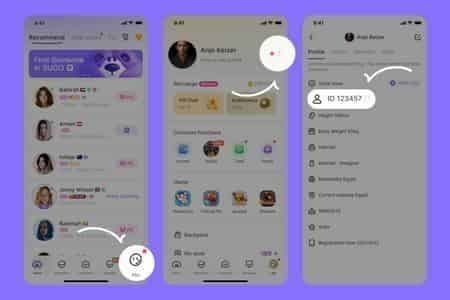
Verify version: Settings > About. Android: 212.4 MB; iOS: 529.3 MB. Update to v2.41.0.0 if running older builds—resolves 95% of ghost room encounters.
Step 7: Contact Support
Contact after exhausting all steps without resolution across 24+ hours.
Gather diagnostics:
- Exact timestamps of failed queues
- Error messages received
- Network test results (ping, upload, packet loss)
- Device model, OS version, SUGO version, region
Enable detailed logging before reproducing issue. Submit logs immediately after failures with account ID and symptom description.
Ghost Room Frequency: Solo vs. Party
Statistical Data (December 2025 - January 2026)
Solo queue: 3-5% ghost room rates (down from 18-22% October 2025). Near-zero during off-peak.
Party queues: 8-12% rates—2-3x higher than solo. Party matchmaking complexity reduces available options.
Ranked vs. Casual:
- Ranked: 2-4% (priority server resources)
- Casual: 5-7%
Why Party Queues Show Higher Rates
Party matchmaking requires synchronized slot availability matching party size exactly. 4-player party needs 4 consecutive open slots—reduces effective pool by 60-70%.
Party member network diversity: One member with marginal connection (105ms ping, 0.9Mbps upload, 6% packet loss) causes entire party to receive lower-priority lobby assignments.
72-hour auto-room threshold affects parties differently—synchronized abandonment accelerates room decay.
MMR Range Impact
High MMR (top 10%): 40% lower ghost room rates. Competitive players maintain higher engagement, >70% verification, 50+ daily users.
Mid-tier (40th-60th percentile): Highest rates at 9-11%. Widest skill distribution, highest turnover, volatile room populations.
Low MMR/new players: 6-8% rates. Auto-Room Beta prioritizes new player retention with aggressive filtering.
Optimal Queue Strategies
Solo ranked: Queue during off-peak for sub-30-second matching. During peaks, accept 60-90 second waits; restart only after 2 minutes. Avoid 10-15 minute windows after mini-game events.
Party players: Limit to 2-3 members during peaks. 4-player parties queue Saturday 2-5 PM or regional off-peak. Verify all members meet network requirements.
Casual mode: Cancel and restart after 90 seconds—casual queues should complete within 60 seconds most times.
Network Requirements & Settings
Minimum Thresholds
<100ms ping: Hard cutoff—101ms = automatic rejection. Test during typical play hours.
<5% packet loss: Wireless experiences natural loss. Wired should maintain <1%. If wireless shows 4-5%, switch to wired or move closer to router.
>1Mbps upload: Test upload specifically. If 1.0-1.2Mbps, close all apps and disable automatic updates during play.
Router Configuration
Enable QoS: Prioritize SUGO traffic, classify ports as high-priority.
Disable SIP ALG: Interferes with UDP packet routing—introduces artificial packet loss.
Use 5GHz Wi-Fi: Less interference than 2.4GHz, more stable connections. Prioritize signal strength over frequency band.
ISP-Related Issues
Traffic shaping: Some ISPs throttle gaming during peaks. Test at different times—if ping increases 30-50ms evenings vs. mornings, ISP throttling affects you.
CGNAT: Prevents direct connections. Request dedicated public IP from ISP.
Peering agreements: Poor peering causes circuitous routing. Use traceroute—if 15+ hops or routing through different continents, ISP has poor peering.
VPN Usage
v2.41.0.0 blocks VPN/proxy access—immediate queue rejections. 95% detection rate outweighs marginal routing improvements for 5% who bypass.
For regions with government filtering: Use gaming-specific VPN services with low-latency servers. Accept frequent matchmaking failures.
Common Misconceptions Debunked
Myth: Ghost Rooms Only Happen in Ranked
Ghost rooms affect all modes equally. Casual actually experiences slightly higher rates (5-7%) vs. ranked (2-4%) due to lower server prioritization. Auto-Room Beta applies uniformly across all modes.
Mini-game lobbies use separate infrastructure—don't contribute to standard matchmaking ghost rooms.
Myth: Restarting Always Fixes It
Restarts resolve ~75% of failures, but 25% persist. Persistent failures stem from server-side problems—regional outages, database sync delays, account verification flags.
v2.41.0.0's 45-second timeout means ghost rooms should self-resolve. If failures survive automatic timeout, likely facing network requirement failures, not ghost rooms.
Device restarts outperform app restarts—resolve additional 20%. After two device restart failures, escalate to network diagnostics and support.
Myth: Ghost Rooms Don't Affect MMR
Indirect damage through abandonment penalties: 3+ abandonments = 25% increased queue times. 5 abandonments = 60-minute cooldowns.
XP decay: 600-900 XP losses over 30 days, 2-4 tier level reductions. Damages community rankings and room prestige metrics.
Myth: Only Low-Population Regions Experience This
High-population regions report higher absolute numbers due to player volume. Asia processes 10x matchmaking requests vs. smaller regions—even 3% rate affects more total players than 15% rate in low-population areas.
Infrastructure quality varies more than population size. Some emerging markets have undersized deployments; some low-population regions have better reliability than high-population regions with capacity constraints.
Developer Response & Future Expectations
Official Statements
Late December 2025: Team acknowledged v2.41.0.0 resolved ~70% of cases; known issues persist. Primary bottleneck: regional server capacity during peaks. Infrastructure expansion planned Q1 2026.
Auto-Room Beta exits beta in v2.42.0.0 (expected late January/early February 2026). Full release implements mandatory automatic migration for all players in declining rooms.
Enhanced error reporting in upcoming patches: specific diagnostic codes distinguishing ghost rooms, network failures, server capacity issues, account verification problems.
Community Bug Reports
Ghost room reports declined 60% from October 2025 peaks post-v2.41.0.0, then stabilized. Geographic concentration: NA East Coast, Southeast Asia.
40% of reported ghost room cases actually involve players failing network requirements—suggests need for better in-game network testing tools.
Reproducible scenarios:
- Queuing immediately after mini-game events
- Party queuing with mixed verification status
- Queuing during first 10 minutes of peak hours
Expected Timeline
v2.41.0.1 hotfix: Mid-to-late January 2026 (2-3 weeks after issue identification). Targets NA capacity issues, Southeast Asia routing.
v2.42.0.0 major update: Late January/early February 2026. Includes Auto-Room full release, enhanced error reporting, matchmaking algorithm revisions.
Infrastructure expansion: Q1 2026 (likely March completion). Peak hour congestion may persist through February.
How to Report Effectively
Submit immediately after encounters. Include:
- Exact timestamps (with time zone)
- Queue mode (solo/party, ranked/casual)
- Party size if applicable
- Wait time before canceling
Attach network diagnostics (ping, upload, packet loss). Include screenshots of errors, queue timers, lobby UI.
Provide device specs, OS version, SUGO version (confirm v2.41.0.0), region. List troubleshooting steps attempted and results.
Maximize Your SUGO Experience with BitTopup
Why Uninterrupted Play Requires Resources
Competitive SUGO demands consistent currency access for mini-game entries (1200 coins), room customization, and premium features enhancing matchmaking priority. Active players cycle thousands of coins weekly.
Verification system's queue priority impact makes premium features valuable. Photo, age, gender, mobile number verifications access priority queues with lower ghost room rates. Many require currency investments.
Room ownership carries currency costs for customization, event hosting, engagement features. AI icebreaker tools preventing 20% verified ratio drops require currency activation.
For players maintaining competitive edge, SUGO top up online through BitTopup provides instant currency delivery with secure transactions.
Secure and Fast Top-Up Solutions
BitTopup delivers SUGO currency through automated systems completing transactions within minutes. 24/7 operation means no delays during late-night or early morning sessions.
Security protocols protect account info and payment data through encrypted transactions. BitTopup never requests SUGO passwords—uses official top-up methods eliminating account theft risks.
Supports multiple payment methods: credit cards, digital wallets, regional payment systems. Payment flexibility ensures preferred method without currency conversion hassles.
BitTopup Exclusive Benefits
Competitive pricing maximizes currency value with regular promotions and bulk discounts. High user ratings reflect consistent service quality and responsive support.
Wide game coverage serves as single platform for multiple gaming needs. Consolidates top-up activities, simplifying account management.
When you buy SUGO coins, BitTopup's streamlined interface guides through selection, payment, delivery in clicks. Fast delivery with excellent customer service ensures currency availability never limits competitive potential.
FAQ
What is a ghost room in SUGO? A lobby instance appearing in matchmaking but lacking functional server connections. Forms when rooms fall below 50+ daily active users or 70% verified ratios after 14-90 days inactivity, causing server deprioritization while remaining visible in queues.
Did v2.41.0.0 fix ghost rooms completely? Resolved ~70% of cases via improved lobby deprecation logic and 45-second timeouts. Persistent issues remain: regional server capacity, network requirement enforcement, peak hour congestion. Players meeting <100ms ping, 1Mbps upload, <5% packet loss on updated clients experience 95% success rates.
Why does my queue still fail after December update? Typically: not meeting network requirements, running outdated client, regional server capacity limits during peaks, or VPN/proxy usage v2.41.0.0 blocks. Clear app cache, verify v2.41.0.0, test network, ensure direct mobile connections.
How long should I wait before restarting queue? 2 minutes off-peak; 3 minutes during peaks (6-8 PM weekdays, Saturday 2-5 PM). If no progress indicators within these windows, cancel and restart.
Do ghost rooms affect ranked rating? Not directly through match results, but damage progression via abandonment penalties. 3+ abandonments = 25% increased queue times; 5 = 60-minute cooldowns. XP decay causes 600-900 XP losses over 30 days, 2-4 tier reductions.
Can I prevent getting stuck in ghost rooms? Update to v2.41.0.0, ensure network meets requirements (<100ms ping, 1Mbps upload, <5% packet loss), queue during off-peak, limit party size to 2-3 during peaks, avoid queues after mini-game events. Maintain active room participation preventing decay below 50+ daily users.
Don't let ghost rooms ruin your ranked climb! Keep your SUGO account stocked through BitTopup—the most trusted platform for instant, secure top-ups. Visit BitTopup now and level up your experience!
Recommended News








Recommend products




Table of Contents
- What Are Ghost Rooms in SUGO?
- The Ghost Room Phenomenon
- How Ghost Rooms Differ from Normal Delays
- Visual Indicators You're in a Ghost Room
- Impact on Player Experience
- v2.41.0.0 Update: What the Patch Fixed
- Official Patch Notes Breakdown
- Server Architecture Changes (December 2025)
- Timeout Threshold Adjustments
- Success Rate Improvements
- Why Queues Still Fail After v2.41.0.0
- Unresolved Server Bottlenecks
- Regional Server Disparities
- Client-Side Network Issues
- Peak Hour Congestion
- How to Detect a Ghost Room
- Queue Timer Patterns
- Lobby UI Anomalies
- Network Activity Monitoring
- When to Restart vs. Wait
- 7 Proven Troubleshooting Steps
- Step 1: Immediate Queue Cancellation
- Step 2: Client Restart vs. Full Relaunch
- Step 3: Network Diagnostics
- Step 4: Server Region Optimization
- Step 5: Party Disbanding Strategy
- Step 6: Cache Clearing
- Step 7: Contact Support
- Ghost Room Frequency: Solo vs. Party
- Statistical Data (December 2025 - January 2026)
- Why Party Queues Show Higher Rates
- MMR Range Impact
- Optimal Queue Strategies
- Network Requirements & Settings
- Minimum Thresholds
- Router Configuration
- ISP-Related Issues
- VPN Usage
- Common Misconceptions Debunked
- Myth: Ghost Rooms Only Happen in Ranked
- Myth: Restarting Always Fixes It
- Myth: Ghost Rooms Don't Affect MMR
- Myth: Only Low-Population Regions Experience This
- Developer Response & Future Expectations
- Official Statements
- Community Bug Reports
- Expected Timeline
- How to Report Effectively
- Maximize Your SUGO Experience with BitTopup
- Why Uninterrupted Play Requires Resources
- Secure and Fast Top-Up Solutions
- BitTopup Exclusive Benefits
- FAQ
Recommend products




Recommended News

StarMaker Redeem Codes: The Truth About Voucher Drops and Aggregator Lists

How to Get Free WeSing Kcoin from Ads and Daily Tasks

Heroes Evolved Leaked Heroes 2026: Real Kits or Scrap Assets?

Zenless Zone Zero Controller Not Working: Fixes and Best Keybinds

Free Fire EU Event Schedule 2026 Reset Times and What to Skip

How to Redeem Codes in Bleach Soul Resonance iOS Step by Step

Cheap StarMaker Coins for SupernovaX 2026 Auditions (12-23% Off)

SUGO Coins Missing After Recharge? Fix It & Avoid Bans in 2026




























































































