Visual Guide to Authentic Badges

Legitimate Super Admin badges contain specific design elements scammers can't duplicate:
- Persistent icon adjacent to username in all interface contexts
- Platform-specific colors and symbols matching official branding
- Perfect clarity at all zoom levels and device resolutions
- Interactive verification layer—tap profile to see assignment date and authority scope
Fake badges show color variations, pixelation, or positioning inconsistencies. Scammers using edited profile pictures can't replicate the interactive verification layer.
Legitimate Admin Privileges and Limitations
Real Super Admins can:
- Remove disruptive users from platform-wide access
- Adjust room capacity limits
- Resolve technical disputes
Real Super Admins cannot:
- Access user passwords or payment information
- See login credentials or bound mobile numbers (beyond last 4 digits)
- Transfer coins between accounts
- Issue refunds through voice chat
- Promise special privileges for personal information
These limitations are hardcoded into the platform's permission structure.
How Fake Admin Scams Work
Between September-November, a 23-year-old college student named Prashant lost Rs 3.48 lakh to a fake profile operation. The scammer used the profile name Nafrat, requesting coin purchases at Rs 100 for 300 coins.
The victim purchased Rs 30,000 initially, then transferred Rs 3.18 lakh to another scammer-controlled account. SHO Raman Pratap Singh, Sub-inspector Hanshul Gupta, and DCP Manoj Meena arrested Mayank Bisht from Ghaziabad.
Common Scammer Tactics
Fake admins exploit voice room real-time dynamics:
- Join popular rooms with 50+ participants
- Target users unfamiliar with platform mechanics
- Create urgency claiming account violations or security breaches
- Leverage sunk costs (users who purchased 90,000 coins)
- Reference technical requirements (100ms ping, 1Mbps upload speed, 5% packet loss threshold) for false legitimacy
Typical Opening Scripts
Security verification: This is SUGO security verification. Your account shows unusual activity. Verify within 24 hours to prevent suspension.
Fake prizes: Congratulations! You've been selected for our Super Admin trial program. Send verification payment to activate your badge.
Account recovery: We detected unauthorized login attempts. Confirm your mobile number and recent purchase amounts to secure your account.
Why Voice Rooms Are Targeted
Voice rooms create psychological vulnerability through:
- Real-time social pressure demanding immediate responses
- False security from verification requirements (photo upload, age verification, mobile number binding, permanent gender selection)
- Community bonds scammers weaponize by participating authentically for weeks before executing scams
Case Study: Anatomy of the Scam
The Prashant case (published March 16, 2025) reveals the complete lifecycle:
- Fraudster created Nafrat profile with convincing admin-like decorations
- Spent weeks establishing presence in popular voice rooms
- Identified vulnerable targets and spending patterns
- Framed Rs 30,000 as security deposit for verification issues
- Escalated to Rs 3.18 lakh claiming first payment triggered additional security flags
- Mixed real information (correct Rs 100 for 300 coins rate) with false claims
Red Flags: Identifying Fake Admins Instantly
Real Super Admins operate through official support channels, not random voice room encounters. They never initiate private conversations requesting personal information or payments.
Visual Indicators of Fraudulent Badges

- Badge appears as profile picture overlay, not system-generated icon
- Quality degradation when viewed at full resolution (pixelation, compression artifacts)
- Positioning shifts across different app sections (participant lists, chat headers, profile pages)
- Screenshots of real admin profiles used as profile pictures
Behavioral Warning Signs
Legitimate admins:
- Use formal, templated language
- Reference specific policy numbers
- Provide exact timestamps for violations
- Offer clear appeal processes
Scammers:
- Use vague threats: Your account has problems
- Express urgency about payments
- Request information they claim to need for verification
- Become hostile when questioned
Requests Real Admins Never Make
- Password, SMS verification codes, or payment credentials
- Purchase coins and transfer to specific accounts for verification or security deposits
- Special deals, exclusive badges, or privileged access for payments
- Use external payment services, third-party verification sites, or messaging apps
Username and Profile Inconsistencies
Scammers create usernames like SUGO_Admin_Official,SuperAdmin_Support, or SUGO_Verification_Team. Real admins use company-assigned identifiers appearing in official announcements.
Check:
- Profile creation date (recent accounts claiming admin status are suspicious)
- Bio sections (grammatical errors, unofficial contact info, promises of special services)
- Cross-reference against published admin lists
Step-by-Step: Verifying Admin Authenticity
For secure transactions never requiring credential sharing, BitTopup provides top up sugo app with instant delivery and verified payment security.
Method 1: Check Badge Details
- Tap username to open full profile
- Long-press badge icon—legitimate badges display tooltip showing badge type, assignment date, authority scope
- Check account information for verified indicators (official email domains, employee designation markers)
- Examine activity history for consistent, long-term platform engagement
Method 2: Cross-Reference Official Admin List
- Navigate to SUGO's help/support section
- Search username against published moderator roster
- Check official social media for admin announcements
- Use verify this user function if available
Method 3: Test Knowledge of Admin Protocols
Ask specific questions:
- What's the standard response time for support tickets?
- Which Community Guidelines section covers voice room conduct?
Real admins answer precisely with policy references. Scammers provide vague responses or deflect.
Request demonstration of admin-specific capabilities. Real moderators show how to access official support, point to published policies, explain formal reporting processes.
When to Contact Official Support
If verification yields suspicious results:
- Exit conversation immediately
- Submit official support ticket with username, screenshots, conversation logs
- Use only in-app support or contact methods on official website
- Avoid email addresses, messaging IDs, or phone numbers from suspected scammer
- Enable two-factor authentication while waiting for response (24-48 hours)
Real vs Fake Admin: Side-by-Side Comparison
Communication Style
Authentic: Professional, emotionally neutral, scripted responses, proper grammar, official terminology, specific policy references
Fake: Overly friendly or aggressive, artificial urgency (immediate action required), spelling errors, vague instructions, changing requirements mid-conversation
Permission Scope
Legitimate capabilities:
- Remove users from voice rooms
- Adjust room settings
- Issue temporary communication restrictions
Fake claims:
- Access passwords
- View payment information
- Transfer coins
- Manually adjust balances
- Request external app actions
Response Patterns
Authentic: Direct answers, ticket numbers, estimated timeframes, clear next steps, encourage verification through official channels
Fake: Avoid direct answers, deflect with urgency, become hostile when questioned, pressure immediate trust, claim verification is too slow
What to Do When You Encounter a Suspected Fake Admin
Immediate Safety Steps
- Stop all communication immediately
- Exit voice room
- Change password through official app settings
- Enable two-factor authentication
- Review recent account activity for unauthorized changes
- Screenshot suspicious entries
Use In-App Reporting System
- Access Report User from suspected fake admin's profile
- Select Impersonation,Scam/Fraud, or Fake Admin category
- Provide detailed information: timestamps, specific claims, payment requests
- Include exact username
- Attach screenshots: profile, badge, conversation logs
Document Evidence
Capture:
- Complete profile (username, badge, bio, account creation date)
- Full conversation history with timestamps
- Voice room name and participant list
- External communications (emails, messaging app screenshots, payment requests)
Protect Your Account
- Review shared personal information
- Monitor for suspicious SMS/calls if mobile number disclosed
- Contact financial institution if payment details mentioned
- Check linked mobile number and email haven't been changed
- Enable all available privacy settings
Common Misconceptions About SUGO Admins
Myth: Admins Randomly Join Voice Rooms for Checks
Reality: Moderation relies on automated systems and user reports. Admins investigate specific reported issues, not random inspections. When they join rooms, they announce presence and purpose clearly.
Myth: Super Admins Can See Your Password
Reality: SUGO stores passwords using one-way encryption (hashing). Even database administrators can't view actual passwords. Password resets occur exclusively through automated email/SMS verification.
Myth: Admin-Like Usernames Mean Official Status
Reality: Anyone can choose usernames with Admin,Official,Support. Real admins use company-assigned identifiers appearing in official documentation and publicly listed admin rosters.
Truth: How Real Admins Operate
Real Super Admins:
- Work through backend moderation tools
- Interact through official support ticket systems with case numbers
- Use official announcement channels (platform-wide notifications, verified news sections)
- Follow strict protocols: verifiable identification, specific policy references, official appeal channels
- Never send unsolicited private messages or join random voice rooms
Voice Room Safety Best Practices
Privacy Settings to Enable
iOS: Settings > Privacy & Security > Location Services > SUGO > Never
Android: Settings > Apps > SUGO > Permissions > Location > Don't allow
In-app:
- Toggle OFF Show me in nearby suggestions
- Disable Location-based room matching
- Restrict profile visibility (bio, activity status, friend lists)
Information Never to Share
- Password, SMS verification codes, email credentials
- Exact account balance, recent purchase amounts, payment method details
- Bound mobile number, recovery email, security question answers
Security Checklist
Before joining:
- Verify privacy settings configured correctly
- Confirm location services disabled
- Check profile visibility restricted
During participation:
- Maintain skepticism toward private information requests
- Remember legitimate features are publicly documented
After sessions:
- Review account activity for unauthorized changes
- Check password, linked contacts, payment methods unaltered
Educate Friends
- Share information with SUGO contacts, especially new users
- Discuss Prashant's Rs 3.48 lakh loss through Nafrat profile
- Establish verification protocol: verify through official channels before complying, alert friends to similar contact attempts
Account Recovery After a Scam
Secure Your Account Immediately
- Change password through official app
- Use strong, unique password not used elsewhere
- Enable two-factor authentication
- Check mobile number receiving authentication codes is yours
- Review and revoke third-party app permissions
Report Compromised Accounts
- Submit official support ticket: Account Compromised or Security Issue
- Provide complete details: when scam occurred, information shared, unauthorized transactions, fake admin's username
- Include transaction IDs, amounts, timestamps for coin transfers/payments
- File police report if loss is significant (Prashant's case resulted in Mayank Bisht's arrest through investigation by SHO Raman Pratap Singh, Sub-inspector Hanshul Gupta, DCP Manoj Meena)
Prevent Future Attempts
- Analyze how scam succeeded to identify vulnerabilities
- Implement personal rule: never make account decisions during voice room conversations
- Exit and verify through official channels if someone claims immediate action needed
- Limit participation to verified rooms with established moderation
Safe Top-Up with BitTopup
Use only verified platforms for coin purchases. BitTopup offers secure SUGO coin top-up with instant delivery, competitive pricing, transaction protection.
Legitimate recharge process:
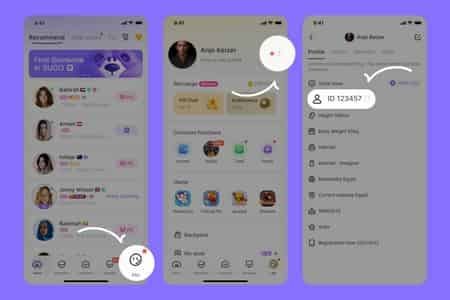
- Locate user ID in SUGO profile settings
- Select desired coin package on secure platform
- Enter user ID accurately
- Complete payment through verified gateways
- Coins deliver instantly without password sharing
Avoid peer-to-peer transfers from strangers, discounted offers through voice rooms, any method requiring login credentials.
Official SUGO Support Channels
Legitimate Ways to Reach Support
- Access through in-app help center: Settings/Profile > Help,Support, or Contact Us
- Ticket system provides case numbers for tracking
- Response times: 24-48 hours for standard issues, faster for security emergencies
- Never use contact info from voice room users
How Official Announcements Are Made
- Published through verified in-app notification systems
- Appear as platform-wide messages in inbox/news feed
- Include maintenance schedules, policy updates, new features, security alerts
- Never request individual user action (payments, credential verification, personal information)
- Admin team changes appear in official news sections with proper formatting, company branding, verifiable dates
Verified Communication Channels
Maintain personal record of:
- In-app support ticket system
- Verified email domains (matching official website domain)
- Official social media accounts published on platform website
SUGO's verification requirements (photo upload, age verification, mobile number binding, permanent gender selection) mean platform already has essential information. Legitimate support never needs re-verification through voice rooms or external links.
If uncertain about communication authenticity, access platform through usual method and check for corresponding messages in official inbox/announcements.
FAQ
What does a real SUGO Super Admin badge look like?
Authentic badges appear as distinct interface elements separate from profile pictures, featuring platform-specific colors and symbols with perfect clarity. Tapping reveals assignment details, authority scope, verification status. Real badges can't be replicated through profile customization or uploaded images.
Can SUGO admins ask for my password in voice rooms?
No. Legitimate admins never request passwords, SMS codes, or login credentials through any channel. Platform security architecture prevents admins from needing this information. Password resets occur exclusively through automated systems. Any such request indicates a scammer.
How do I report a fake admin?
Tap suspicious user's username > Report User > select Impersonation or Scam/Fraud > provide timestamps, specific claims, payment requests > attach screenshots of profile, badge, conversation logs.
What privileges do Super Admins have?
Real Super Admins can remove disruptive users, adjust room capacity, issue temporary communication restrictions through backend tools. They cannot access passwords, view complete payment info, transfer coins, manually adjust balances. All actions occur through official systems, never requiring user cooperation or payments.
Will SUGO admins ever request account information?
Real admins never request passwords, bound mobile numbers, payment history, or verification codes through voice rooms or private messages. They access necessary information through secure backend systems. Legitimate support occurs through official ticket systems where you voluntarily provide relevant details, never through unsolicited voice room contacts.
How can I verify someone is an official moderator?
Tap profile to check authentic system-generated badges. Cross-reference username against official admin lists in app's help section. Test knowledge with specific policy questions—real admins answer precisely with references. When uncertain, contact official support through in-app ticket system to verify moderator status before sharing information.
Protect your SUGO account from scams by topping up securely through BitTopup – the trusted platform for safe, instant SUGO currency purchases. Avoid risky third-party offers and keep your account secure!