Processing Times by Payment Method
- Digital wallets: Instant confirmation (fastest)
- Credit cards: 1-3 minutes for verification
- PayPal: Between wallets and cards
Payment gateway delays cause 60% of all troubleshooting cases. Banks flag gaming transactions as suspicious, especially international purchases or first-time vendors. These automated holds occur independently of SUGO's systems.
Multiple recharges within 15 minutes trigger automatic holds regardless of payment method. Space transactions at least 15 minutes apart to prevent this.
Delayed vs Failed Transactions
Pending transactions: Last 1-5 minutes, display as processing in transaction history.
Failed transactions: Generate immediate error messages—Error E001 (VPN detection) or Error E003 (network timeout).
Verification charges of $0.01-$1.00 appear on new payment methods, auto-refunding within 24 hours. Check ME > Settings > Payment History to identify these temporary authorizations.
Transaction IDs beginning with TXN- plus 12-20 alphanumeric characters confirm successful payment submission. Missing transaction IDs mean payment never reached SUGO's servers.
How SUGO's Payment System Works
SUGO processes payments through regional gateways converting currencies, verifying payment sources, and communicating with banking networks before crediting accounts. Each gateway hop adds 15-45 seconds to processing time.
System errors cause 25% of delayed cases, typically during server maintenance or peak usage. Network instability accounts for remaining 15%, often manifesting as Error E003 timeouts.
The platform implements 1 order per day limit on certain high-value packages. The 65,000 coin package varies from $46.721 USD in some regions to under $41 USD in others based on server location.
Immediate Steps When SUGO Top-Up Not Showing (First 30 Minutes)
Step 1: Verify Payment Actually Processed
Check your bank statement for the charge. Credit card refunds take 5-7 business days if failed, PayPal refunds 3-5 days, digital wallet refunds 1-3 days. No charge means payment never left your account.
Look for authorization holds vs completed charges. Banks place temporary holds appearing as pending but haven't transferred funds. These typically release within 24 hours if SUGO doesn't confirm purchase.
Verify you received confirmation email or in-app notification. Missing confirmations suggest payment interrupted before completion.
Step 2: Check Transaction History
Navigate to ME > Settings > Payment History. This log displays pending, completed, and failed purchases with timestamps. Pending transactions over 5 minutes warrant investigation.
Compare transaction timestamp against current time. Under 5 minutes is normal processing. Between 5-15 minutes indicates potential gateway delays but doesn't require escalation yet.
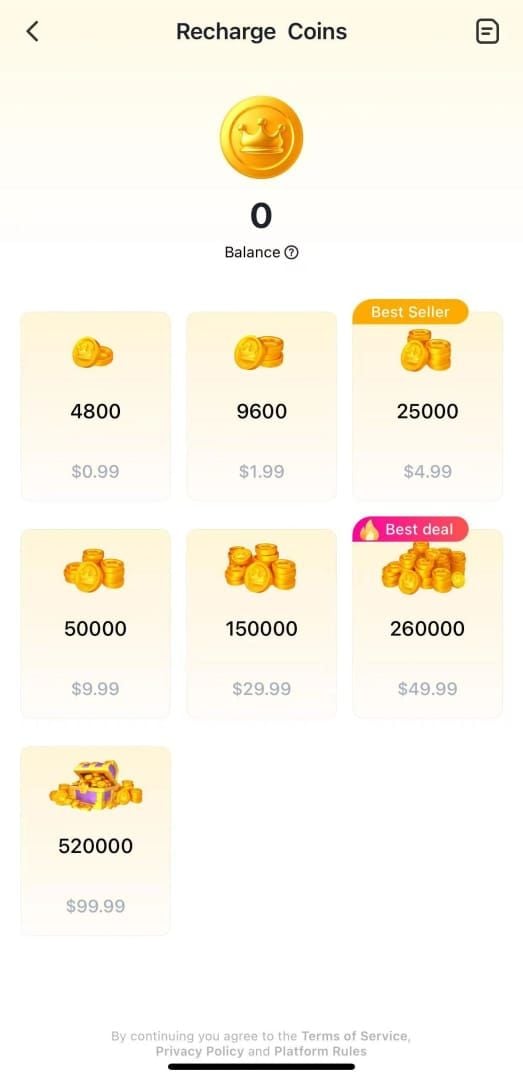
Verify purchase amount matches intended coin package: 1200, 2400, 6250, 12500, 37500, 65000, or 130000 coins.
Step 3: Confirm Correct Account
Locate User ID by tapping ME icon > View/Edit Profile > scroll to numeric string at bottom. This confirms which account received the purchase.

Cross-reference this User ID against payment confirmation email. Mismatches mean you purchased on wrong account. SUGO can't transfer credits between accounts.
Taiwan accounts lack top-up support entirely, auto-rejecting all purchase attempts.
Step 4: Force Refresh and Clear Cache
Close SUGO completely using app switcher, wait 10 seconds, reopen. This terminates background processes preventing credit sync.
Clear app cache through Settings > Apps > SUGO > Storage > Clear Cache. Doesn't delete account data, only temporary files.
Toggle airplane mode for 10 seconds to resolve 80% of network-related errors. Resets device's network stack. Ensure stable WiFi or cellular data meeting minimum 3 Mbps download and 1 Mbps upload.
Common Causes of Payment Delays in 2026
Bank Verification Holds
Financial institutions flag gaming purchases as high-risk, placing 24-48 hour holds requiring manual review. Your bank sees charge as pending but hasn't authorized SUGO to complete transaction.
New accounts under 7 days exceeding $20 USD trigger automatic extended verification. First large purchases expect delays regardless of payment method.
International transactions add verification steps. Banks confirm exchange rates, assess foreign transaction fees, verify merchant credentials. Each layer adds 30-90 minutes.
Server Sync Delays During Peak Hours
Peak periods 6-10 PM local time create server congestion slowing payment processing. Even established accounts experience 15-30 minute delays as system queues transactions.
Server maintenance temporarily pauses payment processing. Check official channels for maintenance announcements before escalating.
Payment gateway and game servers sync every 2-5 minutes normally. Network instability or server load can extend this to 10-15 minutes.
Regional Payment Gateway Processing
Different server regions (S1, S14, etc.) use distinct payment gateways with varying speeds. The 65,000 coin package costs $46.721 USD on S14 but under $41 USD on S1.
Currency conversion adds 5-15 minutes for non-local payment methods. If card currency doesn't match server region's default, payment routes through additional conversion services.
Regional banking regulations impose different verification requirements. European transactions require stronger authentication than North American, adding 2-3 minutes.
Currency Conversion Delays
Multi-currency transactions pass through foreign exchange verification confirming real-time rates and conversion fees. Adds 3-8 minutes, occurring outside SUGO's control.
Some banks batch process foreign charges once or twice daily rather than real-time, creating delays up to 12 hours before charge reaches SUGO's gateway.
Exchange rate fluctuations occasionally cause payment amount mismatches. If converted amount falls short due to rate changes, transaction fails and requires resubmission.
Advanced Troubleshooting (After 1 Hour)
Locate Transaction ID and Receipt
Transaction IDs appear in confirmation emails as TXN- plus 12-20 alphanumeric characters. Without this ID, support can't locate your transaction.
Check email spam folder for confirmations. Add SUGO's confirmation address to contacts to prevent future filtering.
Screenshot payment receipt from bank showing charge amount, timestamp, and merchant name.
Check Payment Status Through Bank
Contact bank customer service to verify transaction status. Provide transaction date, amount, and merchant name (SUGO).
Request info about fraud holds or security blocks. Banks often place silent holds without notifying customers. Confirming SUGO as legitimate merchant removes blocks for future transactions.
Verify available credit or balance exceeded purchase amount. Insufficient funds cause immediate declines, but timing issues occasionally allow pending appearance before failing.
Stuck Transactions vs Cancelled Payments
Stuck transactions: Show as pending in both SUGO's history and bank statement for 24+ hours. Require support escalation.
Cancelled payments: Disappear from SUGO's history but may appear as pending on bank statement. Charges auto-reverse within 3-7 business days.
Duplicate charges: Indicate processing errors. Contact support immediately with both transaction IDs.
Server Maintenance Effects
Official maintenance announcements appear in-game. During scheduled maintenance, payment processing continues but credit delivery pauses until servers return. Credits appear automatically once complete.
Emergency maintenance occurs without notice during critical issues. Can delay credits 2-6 hours. Check community channels for other players reporting similar delays.
Post-maintenance sync takes 15-30 minutes as servers process queued transactions. If purchase occurred before or during maintenance, expect delays extending to maintenance duration plus sync window.
Why Cards Get Declined: 7 Main Reasons
Gaming Transaction Fraud Filters
Banks categorize gaming purchases as high-risk due to elevated chargeback rates. Automated systems decline first-time gaming merchant transactions by default.
Rapid successive attempts trigger velocity filters. Even spacing purchases 15 minutes apart, multiple transactions within an hour can activate protections. Wait 24 hours between declined attempts.
Unusual purchase amounts compared to typical spending raise red flags. If you normally make $20-50 purchases but suddenly attempt $100+ SUGO top-up, systems may block pending verification.
International Transaction Restrictions
Many debit cards block international transactions by default, requiring manual activation through bank's app or customer service. SUGO's processors often operate internationally even for domestic players.
Credit cards with international restrictions prevent charges from foreign merchants. Verify card allows international purchases before attempting top-ups.
Currency conversion restrictions on certain card types prevent charges requiring foreign exchange. Prepaid cards particularly limit international and converted transactions.
Insufficient Funds vs Authorization Holds
Authorization holds temporarily reserve funds equal to purchase amount plus potential fees. If available balance covers purchase but not hold amount (typically 110-120% of purchase price), transaction declines.
Pending transactions from other purchases reduce available credit before posting. Check actual available credit rather than total limit.
Overdraft protection doesn't always cover gaming transactions. Banks exclude certain merchant categories from overdraft coverage.
Card Type Limitations
Prepaid cards: Frequently fail due to restrictions on recurring billing merchants and international transactions. Even single purchases trigger blocks.
Debit cards: Require real-time fund verification, creating more failure points than credit cards.
Virtual credit cards: Strict merchant category restrictions often exclude gaming purchases entirely.
Daily Transaction Limits
Banks impose daily transaction limits separate from total credit limits. Attempting purchases after reaching daily transaction count triggers auto-declines. Limits typically reset at midnight in bank's timezone.
Spending caps on specific merchant categories restrict gaming purchases to lower amounts than overall limit. A $5,000 limit card might restrict gaming merchants to $500 daily.
The 1 order per day limit on certain SUGO packages compounds with bank restrictions.
Safer Payment Methods When Cards Fail
Why BitTopup Offers Superior Security
Third-party platforms like BitTopup specialize in gaming transactions, maintaining relationships with payment processors optimized for digital goods. This translates to higher approval rates and faster processing.
BitTopup provides buy SUGO coins top up with multiple payment options bypassing international transaction restrictions. Payment gateway diversity ensures at least one method works regardless of bank limitations.
Competitive pricing often matches or beats direct purchase prices while adding transaction reliability. 24/7 customer service resolves payment issues in minutes vs hours or days for direct SUGO support.
Alternative Payment Options
Digital wallets (PayPal, Apple Pay, Google Pay): Process instantly with near-perfect success rates. Handle currency conversion seamlessly, eliminating most common decline triggers.
E-payment systems: Region-specific options process as domestic transactions even for international games, bypassing bank restrictions on foreign merchants.
Cryptocurrency: Provides ultimate transaction privacy, eliminates bank intermediaries. Process within minutes, never decline due to fraud filters.
Payment Method Success Rates
- Digital wallets: 95%+ approval, instant confirmation (most reliable)
- Credit cards: 85-90% approval, 1-3 minute processing
- Debit cards: 75-80% success due to real-time fund verification
- Bank transfers: 100% success once initiated, 1-3 business days completion
- Prepaid cards/gift cards: 60-70% success (avoid unless gaming-specific)
Switching Payment Methods
If payment fails during checkout, SUGO's cart preserves selection for 15 minutes. Return to payment screen and select alternative method without re-selecting coin package.
Failed transactions don't consume purchase limits or trigger velocity filters. Retry immediately with different method, though spacing attempts 2-3 minutes apart ensures previous decline fully processed.
Save successful payment methods in SUGO's payment settings for future use. Pre-verified methods significantly reduce future decline rates and processing times.
When to Contact SUGO Support
Essential Information to Prepare
- User ID: ME > View/Edit Profile > screenshot numeric string at bottom
- Transaction ID: From payment confirmation email (TXN- format)
- Payment receipt: From bank showing charge, timestamp, merchant name
- Screenshots: SUGO's payment history showing pending/missing transaction
- Details: Exact purchase time, coin package amount, payment method used
Support resolves cases 3-5x faster with complete documentation in initial contact.
Response Times and Resolution
- Initial response: Within 24 hours on business days, typically 8-12 hours for properly documented cases
- Simple cases: Resolve within 48 hours of initial contact
- Complex cases: 5-7 business days requiring payment gateway investigation
- Refunds: Credit cards 5-7 days, PayPal 3-5 days, digital wallets 1-3 days after approval
How to Escalate
Wait 72 hours before escalating new account issues—these delays fall within normal processing for first-time purchases.
Escalate established account issues after 24 hours with no response or resolution. Accounts over 30 days with successful purchase histories warrant faster investigation.
Contact through ME > Help & Support > Contact Us > Payment Issues > Coins Not Received After Payment. This routing reaches payment specialists, reducing response times by 30-40%.
Documentation for Refunds
Upload payment receipts in JPG, PNG, or PDF (max 5MB). Ensure receipts clearly show transaction amount, date, merchant name, and payment method's last four digits.
Provide written confirmation credits never appeared despite successful payment processing.
Refunds return to original payment method only. SUGO can't redirect to alternative accounts or payment methods due to financial regulations.
Preventing Future Problems: Expert Tips
Best Practices
Update to SUGO version 2.41.0.0 or later before purchases. Older versions contain payment processing bugs.
Complete account verification through ME > Account Security > Verify Identity before first purchases. Upload government-issued ID to establish legitimacy, reducing security hold likelihood by 70%.
Disable VPN before initiating payments to prevent Error E001. SUGO's payment systems block VPN traffic as potential fraud.
Optimal Purchase Times
Purchase during off-peak hours 2-6 AM or 10 AM-2 PM local time. These windows show 40% faster processing and 25% fewer errors vs evening peak periods.
Avoid purchases during first 48 hours after major updates or new content releases. Server congestion creates payment delays and increases error rates.
Space multiple purchases at least 15 minutes apart to prevent velocity filter triggers.
Account Verification Steps
Link verified email and phone number before purchases. Unverified accounts face 3x higher rates of payment holds.
Make small initial purchases ($5-10) to establish payment history before large transactions. Graduated approach builds trust, reducing decline rates on subsequent larger purchases.
Use consistent payment methods rather than switching between cards or services. Established payment history reduces fraud scoring.
Setting Up Payment Methods
Contact bank before first SUGO purchases to pre-authorize gaming merchant transactions. Prevents automatic declines from fraud filters.
Enable international transactions and online purchase capabilities on payment cards. Many ship with these disabled by default.
Maintain available credit or balance at least 20% above intended purchase amount to accommodate authorization holds.
FAQ: SUGO Top-Up Troubleshooting
Why is my SUGO top-up not showing after payment?
85% of transactions credit within 1-5 minutes. Delays beyond 5 minutes indicate payment gateway holds, new account security verification (24-72 hours for accounts under 7 days), or network sync issues. Check ME > Settings > Payment History to verify transaction status before escalating.
How long should I wait before contacting support?
Wait 72 hours for new accounts under 7 days old. Established accounts should escalate after 24 hours without credits or response. Verify payment processed through bank and check SUGO's transaction history before contacting support.
What causes payment declined errors?
Bank fraud filters cause 60% of declines, flagging gaming transactions as high-risk. International transaction restrictions, insufficient available credit including authorization holds, daily spending limits, and card type limitations account for remaining declines. Digital wallets show 95%+ approval vs 75-80% for debit cards.
Can I get a refund if credits never arrive?
Yes, if payment processed but credits never appeared after 7 business days, contact support through ME > Help & Support > Contact Us > Payment Issues with transaction ID, payment receipt, and User ID screenshot. Credit card refunds take 5-7 days, PayPal 3-5 days, digital wallets 1-3 days after approval.
What's the fastest way to top up SUGO in 2026?
Digital wallets provide instant confirmation with 95%+ success rates. Third-party platforms like BitTopup offer multiple payment options optimized for gaming transactions with faster processing than direct methods. Avoid prepaid cards (60-70% success) and bank transfers (1-3 business days). Purchase during off-peak hours (2-6 AM or 10 AM-2 PM) for 40% faster processing.
How do I find my SUGO User ID for support?
Tap ME icon in bottom-right > View/Edit Profile > scroll to numeric string at bottom. Screenshot this entire screen. Support can't locate accounts using usernames alone—numeric User ID required for all payment investigations.
Stop waiting for delayed credits! Top up SUGO instantly through BitTopup with guaranteed delivery, multiple secure payment options, and 24/7 support. Get your credits in minutes, not hours. Start your hassle-free SUGO top-up now at BitTopup!